How Many Users Can the MikroTik RB4011iGS+RM Support?
If you are buying a router for an office, apartment building, school or paid hotspot, you probably want a straightforward answer: how many users can the MikroTik RB4011iGS+RM support?
There is no single number that reliably describes every installation. Capacity depends on what people are doing, how many are active simultaneously, your internet connection and the configuration running on the router.
MikroTik publishes hardware specifications and performance tests for this model, but its product page does not provide a universal recommended user count. Its test results also show that performance changes with packet size and configuration.
Before choosing the MikroTik RB4011iGS+RM router, assess the workload you expect it to manage. This guide explains how to do that without relying on unsupported claims about maximum users.
What Determines How Many Users the MikroTik RB4011 Can Handle?
Several parts of the network influence the experience users receive.
| Factor | Why it matters |
|---|---|
| Simultaneously active devices | Connected devices may be idle or generating substantial traffic |
| Application usage | Messaging, video meetings and large downloads create different demands |
| Internet download and upload speeds | Either direction can become a bottleneck |
| Router configuration | Traffic processing requirements vary with the enabled features |
| Wireless infrastructure | Access-point coverage and congestion affect wireless users |
| Network links | Busy uplinks can restrict traffic between network sections |
| Service expectations | Occasional browsing and consistent business application performance require different planning |
A useful assessment considers these factors together. Buying a capable router cannot compensate for every limitation elsewhere in the network.
Connected Users and Active Users Are Different
An office may have many devices connected throughout the day, but only some may be transferring substantial amounts of data at any given moment.
Compare two situations:
- Employees mainly use email, messaging and occasional web browsing.
- Employees join video meetings while synchronising cloud files and downloading large documents.
Even with the same number of people, the second situation creates a different workload.
Also distinguish people from devices. One employee may connect a laptop and a phone, while printers, cameras and other equipment add their own connections.
When planning your installation, record:
- The number of people who use the network.
- The approximate number of connected devices.
- How many devices are busy during peak periods.
- Which applications are essential.
- Expected growth over the next year.
This information is more useful than a headcount alone.
How Does Internet Bandwidth Affect User Capacity?
Your internet subscription places a limit on how much external traffic the network can carry.
For an illustrative calculation, suppose you have a 100 Mbps download connection and want to budget 4 Mbps per simultaneously active user:
100 Mbps ÷ 4 Mbps = 25 active users
That is a simple bandwidth calculation, not a tested RB4011 capacity rating. It assumes the full connection is available and ignores overhead, changing application demand and other traffic.
A practical design should leave spare capacity and assess upload requirements separately.
For example, a connection with sufficient download speed may still struggle when several people upload files or join video meetings simultaneously. Ask your provider about both directions rather than judging the service by its advertised download figure alone.
Does the Router’s Hardware Tell You Its Maximum User Count?
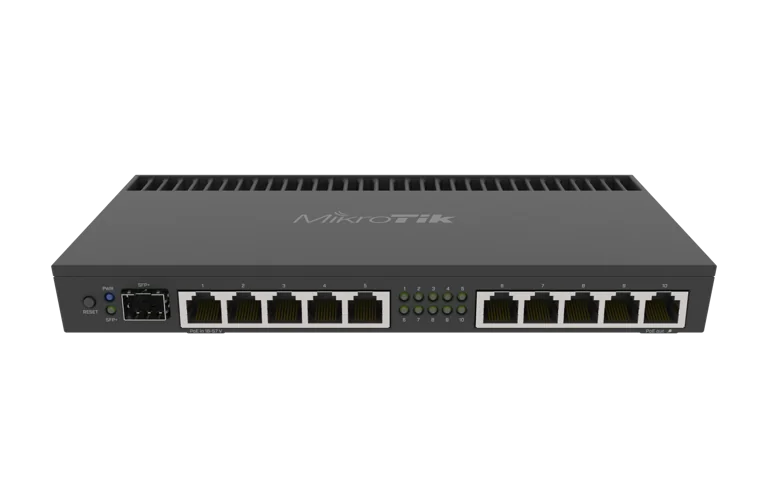
The RB4011iGS+RM has a quad-core processor, 1GB of RAM, ten Gigabit Ethernet ports and one 10G SFP+ interface. These specifications describe its hardware resources and connections; they do not translate directly into a guaranteed number of users.
Avoid choosing a router using claims such as “supports 500 users” unless the supplier explains the conditions behind the figure.
Ask:
- Were those devices merely connected or actively using the network?
- What applications were running?
- What was the total traffic rate?
- Which security, bandwidth-management and authentication features were enabled?
- What level of delay or packet loss was considered acceptable?
An answer based on a defined workload is much more useful than an isolated number.
Can Wi-Fi Become the Bottleneck?
Yes. The RB4011iGS+RM is a wired model, so wireless clients require separate access points.
This creates two related planning questions:
- Can the router process the required traffic?
- Can the wireless network deliver that traffic reliably where people need it?
A busy access point or poor signal can cause complaints even when the internet connection and router have capacity available.
For an office, guesthouse or apartment installation, review the building layout, access-point placement and cable routes. Pay attention to rooms where many people gather, such as meeting spaces or shared lounges.
Adding more access points should follow a coverage and capacity plan. Placement and channel planning matter alongside the number of units.
What Should a Business Office Measure?
If you are replacing an existing router, use the current network to understand demand before buying.
Measure during normal busy periods, rather than relying only on a speed test taken when the office is quiet.
Useful observations include:
- Peak download and upload usage.
- The number of active devices.
- Applications associated with slowdowns.
- Whether problems affect wired users, wireless users or both.
- Whether delays occur throughout the premises or in specific rooms.
These observations help identify the actual constraint.
If only one meeting room experiences poor service, investigate its local connection and wireless coverage. If everyone experiences slow uploads during cloud backups, examine upload capacity and scheduling.
How Should You Plan a Paid Hotspot?
For a paid hotspot, subscriber count and simultaneous demand are different measures.
A business with many registered customers may have a much smaller group online at once. Conversely, an evening rush can create substantial demand within a short period.
Plan around:
- Expected simultaneous customers.
- The speeds offered in each package.
- Typical customer activities.
- Access-point coverage and density.
- Available internet bandwidth.
- Authentication and payment requirements.
For example, 40 customers each using 5 Mbps at the same time would request 200 Mbps. This arithmetic describes potential traffic demand; it does not establish that a particular installation will deliver it.
If you are evaluating Hotspot Billing System or Tajira, ask the provider to review your proposed topology and confirm the requirements for your intended configuration. Request a demonstration of customer login, payment and package enforcement before launching.
How Can You Check Whether the Router Is Approaching Its Limits?
Ask your technician to monitor the network under representative load.
Review router resource use, traffic levels, errors and user experience together. A single reading is rarely enough to identify the cause of a slowdown.
The investigation should distinguish between:
- An internet connection reaching its available capacity.
- A congested wireless access point.
- A busy or faulty network link.
- Router processing constraints.
- Problems with an external application or service.
Change one relevant factor at a time where practical, then repeat the test. This helps avoid replacing hardware when the underlying problem is elsewhere.
Keep records of the busiest periods. They provide a useful baseline for deciding when an upgrade is justified.
What Should You Ask Before Buying in Kenya?
Prepare a short description of your installation before requesting a recommendation.
Include your internet speeds, premises layout, current device count, busiest applications and any special requirements such as guest access or customer billing.
You can review the MikroTik RB4011iGS+RM product page for product details and purchasing information.
Other references include the Tawa RB4011iGS+RM listing, the Reisen SEO RB4011iGS+RM listing, and Orbitlink Solutions’ MikroTik routers and gateways category.
Confirm current availability, price, warranty and configuration services directly. Ask suppliers to explain their recommendation against your requirements rather than offering only a maximum-user estimate.
Frequently Asked Questions
Can the MikroTik RB4011iGS+RM support 100 users?
A count of 100 users alone is insufficient to confirm suitability. You need to define simultaneous activity, bandwidth demand, configuration and wireless infrastructure, then validate the proposed installation.
Does adding a switch increase router processing capacity?
No. A switch can provide additional connections and help organise local traffic, but it does not add processing resources to the router.
Will faster internet solve every slowdown?
No. Faster internet helps when the internet connection is the limiting factor. Wireless congestion, poor cabling or other network constraints require their own investigation.
Can I expand the network later?
Plan expansion before installation. Allow for additional connections, access-point locations and higher traffic demand, then monitor usage as the network grows.
Choose Capacity Based on Your Actual Workload
The best way to assess the RB4011 is to define what your users need during the busiest part of the day.
Start with simultaneous activity, download and upload demand, wireless coverage and configuration requirements. Then test the completed installation against those expectations.
Explore the MikroTik RB4011iGS+RM for your planned deployment, or visit MikroTik Kenya to review equipment for the wider network.
