MikroTik VRRP Configuration: How to Prevent Network Downtime Using Redundant Routers
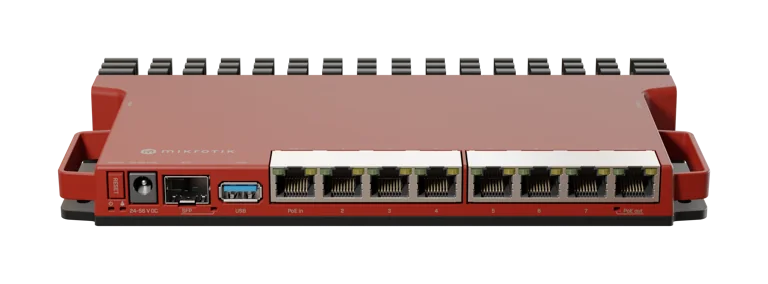
MikroTik VRRP configuration provides businesses, internet service providers, financial institutions and enterprise network administrators in Kenya with a practical solution for reducing network downtime through automatic router redundancy.
Many organizations depend on a single router to manage internet connectivity, network security, subscriber authentication and communication between different departments. When that router fails, the entire network may become inaccessible, even when the internet service provider is operating normally.
For businesses relying on cloud accounting systems, online payments, surveillance cameras, inventory management and digital communication, unexpected router failure can result in significant operational disruptions.
Virtual Router Redundancy Protocol, commonly known as VRRP, allows multiple compatible routers to operate together as a virtual gateway. If the primary router becomes unavailable, a backup router can automatically assume responsibility for the virtual gateway.
At MikroTik Kenya, we help businesses and networking professionals identify suitable routing equipment for reliable, scalable and highly available network infrastructure.
This comprehensive guide explains how MikroTik VRRP works, suitable equipment for redundant networks, RouterOS v7 configuration, connection tracking synchronization, internet failover and best practices for minimizing network downtime.
What Is MikroTik VRRP?
VRRP stands for Virtual Router Redundancy Protocol. It is a networking protocol that allows multiple physical routers to share a virtual IP address that acts as the default gateway for connected devices.
Instead of configuring computers, servers and other network devices to use the physical IP address of a single router, administrators configure them to use a shared virtual gateway address.
One router actively handles gateway traffic, while another remains available to take over if the active router becomes unavailable.
MikroTik RouterOS supports VRRP for both IPv4 and IPv6 networking environments. Administrators can therefore use VRRP when designing redundant residential, commercial and enterprise networks.
Important VRRP Terminology
| Term | Meaning |
|---|---|
| Virtual router | Logical gateway represented by participating routers |
| Master router | Router currently responsible for the virtual gateway |
| Backup router | Router available to assume gateway responsibility |
| Virtual IP address | Shared gateway address used by network clients |
| VRID | Virtual Router Identifier |
| Priority | Value influencing which router becomes master |
| Advertisement interval | Frequency of VRRP announcements |
| Preemption | Allows a higher-priority router to regain the master role |
| Failover | Transfer of gateway responsibility to another router |
| Connection tracking synchronization | Sharing supported connection state between routers |
Understanding these concepts is essential before implementing MikroTik VRRP configuration.
How Does MikroTik VRRP Work?
Consider a business operating two MikroTik RB5009 routers connected to the same local network.
The primary router uses 192.168.10.2, while the backup router uses 192.168.10.3.
Both participate in a VRRP group using the shared virtual gateway address 192.168.10.1.
Under normal operating conditions, Router A handles gateway traffic.
If Router A stops sending VRRP advertisements, Router B can assume the master role after the applicable detection period.
Connected devices continue using the same virtual gateway address without requiring manual changes to their network settings.
When Router A becomes available again, it may regain the master role if preemption is enabled and it has the appropriate priority.
VRRP reduces disruptions caused by gateway failure, but it does not independently guarantee uninterrupted internet connectivity. Upstream routing, power supplies, switches, firewall configurations and application state must also be considered.
Why MikroTik VRRP Is Important for Businesses in Kenya
1. Reducing Network Downtime
A single router failure can interrupt business operations across an entire property.
By deploying redundant MikroTik routers, organizations can reduce the time required to restore gateway connectivity following a hardware or software failure.
2. Supporting Business Continuity
Businesses using cloud-based applications require dependable connectivity to access accounting systems, customer records, inventory software and communication platforms.
MikroTik VRRP configuration can help maintain access to these systems when one gateway becomes unavailable.
3. Protecting Internet Service Provider Operations
For an ISP, a failed core or distribution router may affect numerous paying subscribers.
A professionally designed redundant network can reduce service interruptions, support customer retention and improve operational resilience.
However, subscriber authentication and billing services also require independent redundancy planning.
4. Simplifying Scheduled Maintenance
Network administrators can deliberately transfer gateway responsibility to a backup router before performing maintenance on the primary router.
This can reduce the impact of firmware upgrades, configuration changes and hardware replacement.
5. Supporting Critical Infrastructure
Hospitals, hotels, financial institutions, warehouses and other organizations may require networking infrastructure capable of tolerating equipment failures.
VRRP can form part of a broader high-availability strategy designed to support essential operations.
MikroTik VRRP vs Dual-WAN Internet Failover
VRRP and dual-WAN failover are complementary technologies, but they solve different problems.
| Feature | VRRP | Dual-WAN failover |
|---|---|---|
| Primary purpose | Protects against gateway router failure | Protects against internet connection failure |
| Number of routers | Usually two or more | Can operate on one router |
| Number of internet connections | Design dependent | Two or more |
| Shared virtual gateway | Yes | Not required |
| Router hardware redundancy | Yes | No, when using one router |
| ISP redundancy | Requires additional configuration | Yes |
| Connection preservation | Depends on architecture | Depends on architecture |
| Recommended use | High-availability networks | Internet service continuity |
For example, a business using two internet connections on one RB5009 remains vulnerable to failure of the RB5009 itself.
Similarly, a business using two VRRP routers connected to one internet provider remains vulnerable to failure of that provider.
Organizations requiring greater reliability should consider combining router redundancy with independent upstream internet connections.
Read our guide on how to set up backup internet with a MikroTik router in Kenya for additional information about internet service redundancy.
Best MikroTik Routers for VRRP Configuration in Kenya
Choosing appropriate routing equipment is essential when designing a high-availability network. Both routers should have sufficient processing capacity to handle the entire network workload if one becomes unavailable.
1. MikroTik RB5009UG+S+IN
The MikroTik RB5009UG+S+IN is suitable for growing businesses, residential internet distribution networks and commercial facilities requiring advanced routing capabilities.
| Specification | Details |
|---|---|
| Processor architecture | ARM64 |
| Processor | Quad-core, 1.4 GHz |
| RAM | 1 GB |
| Gigabit Ethernet ports | 7 |
| 2.5 Gigabit Ethernet ports | 1 |
| 10G SFP+ interface | 1 |
| USB interface | USB 3.0 |
| Operating system | RouterOS v7 |
| RouterOS license | Level 5 |
| VRRP support | Yes |
A pair of RB5009 routers can provide a flexible platform for implementing redundant internet gateways in suitably sized networks.
Customers can explore purchasing options through Orbitlink Solutions, Tawa Kenya, Jupitaz Kenya and Reisen SEO.
Additional specifications are available on the official MikroTik RB5009 product page.
RB5009UG+S+IN
2. MikroTik RB4011iGS+RM
The MikroTik RB4011iGS+RM provides ten Gigabit Ethernet interfaces, a 10G SFP+ interface and 1 GB of RAM.
Its rackmount design makes it suitable for structured commercial networking installations.
Organizations already operating RB4011 routers can evaluate introducing an additional compatible router to establish gateway redundancy without completely replacing their infrastructure.
3. MikroTik CCR2004-1G-12S+2XS
The MikroTik CCR2004-1G-12S+2XS Cloud Core Router provides extensive optical connectivity for larger business networks and internet service providers.
Its twelve 10G SFP+ interfaces, two 25G SFP28 interfaces and 4 GB of RAM make it particularly attractive for high-capacity fiber aggregation networks.
A redundant pair of CCR2004 routers can be evaluated for networks requiring advanced routing and substantial optical connectivity.
CCR2004-1G-12S+2XS+1
4. MikroTik CCR2116-12G-4S+
The MikroTik CCR2116-12G-4S+ is an enterprise-oriented router featuring a 16-core processor, 16 GB of RAM and four 10G SFP+ interfaces.
It is worth considering for larger ISPs, data centers and organizations operating demanding network infrastructure.
For technical specifications, visit the official MikroTik CCR2116 product page.
CCR2116-12G-4S+
MikroTik Router Comparison for High-Availability Networks
| Router | RAM | Ethernet interfaces | Optical interfaces | Recommended application |
|---|---|---|---|---|
| RB4011iGS+RM | 1 GB | 10 | 1 × SFP+ | Commercial offices |
| RB5009UG+S+IN | 1 GB | 8 | 1 × SFP+ | Growing businesses and ISPs |
| CCR2004-1G-12S+2XS | 4 GB | 1 | 12 × SFP+, 2 × SFP28 | Fiber aggregation |
| CCR2116-12G-4S+ | 16 GB | 13 | 4 × SFP+ | Enterprise and ISP core networks |
For production redundancy, using two routers of the same model is generally preferable because it simplifies capacity planning, configuration management and troubleshooting.
Equipment Required for MikroTik VRRP Configuration
A professionally designed redundant network requires more than two routers.
| Equipment | Purpose |
|---|---|
| Primary MikroTik router | Handles normal gateway traffic |
| Secondary MikroTik router | Provides backup gateway functionality |
| Managed network switches | Connects routers and network clients |
| Primary internet connection | Provides upstream connectivity |
| Secondary internet connection | Provides ISP redundancy |
| UPS systems | Protects against electricity interruptions |
| Ethernet cables | Connects copper network interfaces |
| Fiber modules and cables | Supports optical network infrastructure |
| Network cabinet | Protects networking equipment |
| Monitoring system | Detects failures and performance problems |
For more demanding installations, consider redundant distribution switches, independent power sources and physically diverse internet connections.
Installing two routers while connecting both to a single unprotected switch leaves an important single point of failure.
How to Configure MikroTik VRRP in RouterOS v7
The following MikroTik VRRP configuration demonstrates a basic active-passive gateway redundancy deployment using two MikroTik routers.
The example assumes that both routers already have functional upstream internet connectivity, appropriate firewall protection and a shared LAN segment.
Example Network Configuration
| Network parameter | Router A | Router B |
|---|---|---|
| Router identity | Primary-Router | Backup-Router |
| Physical LAN address | 192.168.10.2/24 | 192.168.10.3/24 |
| Virtual gateway | 192.168.10.1/32 | 192.168.10.1/32 |
| LAN interface | bridge-lan | bridge-lan |
| VRRP interface | vrrp-lan | vrrp-lan |
| VRID | 10 | 10 |
| Priority | 150 | 100 |
| Advertisement interval | 1 second | 1 second |
| VRRP version | 3 | 3 |
| Normal operating role | Master | Backup |
Important: These are illustrative network settings. Review your existing IP addresses, DHCP configuration, routing tables and firewall rules before applying any commands.
Create configuration backups and use a controlled maintenance window when modifying production networks.
Step 1: Verify RouterOS Compatibility
Connect to each router using WinBox or WebFig.
Check the installed RouterOS version:
/system resource printFor new deployments, use compatible, supported RouterOS releases on both routers.
Keeping both devices on the same tested RouterOS version helps reduce compatibility problems.
Step 2: Assign Physical LAN IP Addresses
On Router A, configure its physical LAN address:
/ip address
add address=192.168.10.2/24 \
    interface=bridge-lan \
    comment="Primary router LAN"
On Router B:
/ip address
add address=192.168.10.3/24 \
    interface=bridge-lan \
    comment="Backup router LAN"
The bridge-lan interface must already exist and be correctly connected to the shared LAN segment.
Each physical router requires its own unique management address.
Do not assign the virtual gateway address directly to both physical LAN interfaces.
Step 3: Allow VRRP Communication Through the Firewall
VRRP uses IP protocol number 112 rather than an ordinary TCP or UDP service port.
Both routers must be able to exchange VRRP advertisements across the shared LAN.
On Router A:
/ip firewall filter
add chain=input action=accept \
    protocol=112 \
    in-interface=bridge-lan \
    src-address=192.168.10.3 \
    comment="Allow VRRP from backup router"
On Router B:
/ip firewall filter
add chain=input action=accept \
    protocol=112 \
    in-interface=bridge-lan \
    src-address=192.168.10.2 \
    comment="Allow VRRP from primary router"
Place these rules before any applicable input-chain drop rules.
Restrict VRRP communication to trusted network interfaces rather than accepting it indiscriminately from external networks.
Step 4: Create the VRRP Interface on Router A
Configure the primary router with a higher VRRP priority.
/interface vrrp
add name=vrrp-lan \
    interface=bridge-lan \
    vrid=10 \
    priority=150 \
    interval=1s \
    version=3 \
    v3-protocol=ipv4 \
    preemption-mode=yes
The higher priority makes Router A the preferred master when both routers are available.
Step 5: Create the VRRP Interface on Router B
Configure the backup router using the same VRID and compatible VRRP settings.
/interface vrrp
add name=vrrp-lan \
    interface=bridge-lan \
    vrid=10 \
    priority=100 \
    interval=1s \
    version=3 \
    v3-protocol=ipv4 \
    preemption-mode=yes
Router B uses a lower priority so that it normally remains in the backup role.
Both routers must use compatible VRRP versions, advertisement intervals and virtual gateway settings.
Step 6: Assign the Virtual IP Address
On Router A:
/ip address
add address=192.168.10.1/32 \
    interface=vrrp-lan \
    comment="Virtual default gateway"
On Router B:
/ip address
add address=192.168.10.1/32 \
    interface=vrrp-lan \
    comment="Virtual default gateway"
The same virtual IP address is configured on both VRRP interfaces.
Network clients will use 192.168.10.1 as their default gateway.
The physical router addresses remain available for authorized administration and troubleshooting.
This configuration follows the basic principles illustrated in MikroTik’s official VRRP configuration examples.
RouterOS Manual
Step 7: Configure the DHCP Default Gateway
If the network uses DHCP to assign IP addresses to client devices, configure the DHCP service to advertise the virtual gateway.
For an existing DHCP network entry:
/ip dhcp-server network
set [find where address=192.168.10.0/24] \
    gateway=192.168.10.1
Client computers and other network devices should receive the following settings:
| Network setting | Example value |
|---|---|
| Client IP address | 192.168.10.100 |
| Subnet mask | 255.255.255.0 |
| Default gateway | 192.168.10.1 |
| DNS server | Authorized network DNS resolver |
DHCP redundancy must be designed separately.
VRRP does not automatically synchronize DHCP leases, subscriber records or address pool allocations between routers.
An independent DHCP server or appropriately coordinated active-passive DHCP architecture may be required.
Avoid running two uncoordinated DHCP servers with overlapping address pools.
Step 8: Verify VRRP Operating Status
On both routers, execute:
/interface vrrp print detailUnder normal conditions, the expected status is:
| Router | Expected VRRP status |
|---|---|
| Router A | Master |
| Router B | Backup |
If both routers report the master state, investigate whether VRRP advertisements are reaching the other router.
Possible causes include incorrect VLAN configuration, firewall restrictions, incompatible VRRP settings and interrupted Layer 2 connectivity.
Step 9: Verify Internet Routing and NAT
Both routers must have functioning upstream routes and appropriate security policies.
If Router B becomes master without a working internet connection, local gateway redundancy may function correctly while internet access remains unavailable.
For networks requiring IPv4 masquerading, an illustrative NAT rule is:
/ip firewall nat
add chain=srcnat \
    out-interface-list=WAN \
    action=masquerade \
    comment="Internet source NAT"
This example assumes that the appropriate upstream interfaces already belong to the WAN interface list.
Do not duplicate existing NAT rules unnecessarily.
Changing from one router or public IP address to another may interrupt existing internet sessions. More advanced state synchronization and upstream addressing arrangements are required to improve session continuity.
Step 10: Test Automatic Router Failover
From a connected computer, continuously ping the virtual gateway.
On Windows:
ping 192.168.10.1 -tOn Linux:
ping 192.168.10.1During an approved maintenance window, disable the VRRP interface on Router A:
/interface vrrp
disable [find where name="vrrp-lan"]
Router B should assume the master role.
Check its status:
/interface vrrp printVerify that connected devices can still access authorized network resources and the internet.
Restore Router A:
/interface vrrp
enable [find where name="vrrp-lan"]
With preemption enabled, Router A should eventually resume the master role.
Also perform a separate controlled power-loss test. Administratively disabling VRRP and unexpectedly losing router power can produce different failover timings.
Interactive MikroTik VRRP Failover Demonstration
The following simulation illustrates how a redundant gateway responds to primary router failure.
Gateway available through Router A
The preferred router is handling gateway traffic.
Reset simulationSimplified demonstration assuming preemption is enabled and all other network infrastructure remains operational. Actual failover takes time.
How Fast Is MikroTik VRRP Failover?
VRRP failover time depends on the advertisement interval, backup router priority and surrounding network conditions.
With a one-second advertisement interval and backup priority of 100, the standard master-down timer is approximately 3.61 seconds following an unexpected loss of advertisements.
Shorter intervals can reduce detection time, but they may also increase sensitivity to temporary network interruptions.
| Advertisement interval | Approximate failure detection time* |
|---|---|
| 100 milliseconds | 0.36 seconds |
| 500 milliseconds | 1.80 seconds |
| 1 second | 3.61 seconds |
| 2 seconds | 7.22 seconds |
Calculated using a backup priority of 100. These are protocol timer estimates, not guaranteed application recovery times. Subsecond intervals should be tested carefully.
VRRP Failover Time Calculator
100
Estimated master-down timer
3.609 seconds
3.000 s
0.609 s
Uses the VRRPv3 master-down interval formula. Actual service recovery also depends on switching, routing, NAT and application behavior.
Businesses should evaluate actual failover performance through controlled testing rather than relying exclusively on theoretical protocol timers.
How to Enable MikroTik VRRP Connection Tracking Synchronization
One limitation of basic router redundancy is that the backup router may not contain information about network connections established through the primary router.
When the primary router fails, active connections may consequently be interrupted.
RouterOS v7 supports VRRP connection tracking synchronization to help address this problem.
On both routers, ensure that connection tracking is enabled:
/ip firewall connection tracking
set enabled=yes
Then enable synchronization on the VRRP interface:
/interface vrrp
set [find where name="vrrp-lan"] \
    sync-connection-tracking=yes
The routers must be able to exchange synchronization traffic. The documented default synchronization port is UDP 8275.
Firewall policies should permit the required communication between authorized redundancy peers.
Connection tracking synchronization can improve stateful failover, but it does not guarantee that every active application session will survive.
For example, changing the public source IP address used by an active internet connection may still interrupt the session.
MikroTik provides additional information in its official VRRP documentation.
RouterOS Manual
How to Combine MikroTik VRRP With Starlink and Fiber Internet
Organizations seeking greater internet availability can combine router redundancy with independent upstream connections.
For example, a company in Nairobi may use fiber optic internet as its primary connection and Starlink satellite internet as its backup connection.
Customers can explore satellite internet equipment and installation options through Starlink Kenya and Spacelink Kenya.
This architecture can help protect against several different failure scenarios.
| Failure scenario | Expected response with correct configuration |
|---|---|
| Primary MikroTik router fails | Backup router assumes gateway responsibility |
| Fiber connection fails | Traffic switches to the secondary internet connection |
| Starlink connection fails | Fiber connectivity remains available |
| Primary router undergoes maintenance | Backup router handles gateway traffic |
| Both internet connections fail | Local networking may remain available |
| Both routers fail | Gateway connectivity becomes unavailable |
VRRP does not automatically detect every upstream internet failure.
Administrators should configure appropriate internet reachability checks and routing failover policies. Where necessary, gateway ownership should also respond to the availability of usable upstream routes.
Understanding MikroTik VRRP Group Authority
Advanced MikroTik networks may contain several VRRP interfaces operating across different VLANs or network segments.
If different VRRP interfaces independently select different master routers, network traffic may follow inconsistent paths.
This can cause problems in environments using stateful firewalls and NAT.
RouterOS provides a group-authority feature that allows related VRRP interfaces to coordinate their operating states.
For example:
| VRRP interface | Network | Role |
|---|---|---|
| vrrp-lan | Business LAN | Group authority |
| vrrp-staff | Employee VLAN | Group member |
| vrrp-guest | Guest VLAN | Group member |
| vrrp-cctv | Surveillance VLAN | Group member |
Coordinating these interfaces helps ensure that related gateway responsibilities move together during a failover event.
This feature is particularly useful when designing advanced redundancy architectures involving multiple routed networks.
Can MikroTik VRRP Provide Load Balancing?
A standard VRRP group normally uses one active master gateway, with the other participating routers operating as backups.
However, administrators can configure multiple virtual gateways with different preferred master routers to distribute workloads.
Example Active-Active Gateway Distribution
| Virtual gateway | Router A priority | Router B priority | Preferred router |
|---|---|---|---|
| 192.168.10.1 | 150 | 100 | Router A |
| 192.168.10.254 | 100 | 150 | Router B |
One group of clients can use the first virtual gateway, while another group uses the second.
If one router fails, the remaining router can assume responsibility for both virtual gateways.
This is not equivalent to automatically balancing every network connection across both routers.
Active-active deployments require careful routing, NAT, capacity planning and connection tracking synchronization. For most small and medium-sized businesses, a simpler active-passive architecture is preferable initially.
MikroTik VRRP Configuration for IPv6 Networks
MikroTik also supports VRRP for IPv6 gateway redundancy.
Organizations implementing dual-stack infrastructure can establish separate redundancy arrangements for IPv4 and IPv6.
An IPv6 VRRP deployment must account for link-local gateway addresses, Neighbor Discovery, Router Advertisements, firewall policies and upstream IPv6 routing.
Simply enabling IPv4 VRRP does not automatically provide IPv6 gateway redundancy.
ISPs should incorporate both protocols into their high-availability testing procedures when offering dual-stack connectivity.
Using MikroTik VRRP in Different Industries Across Kenya
Internet Service Providers
ISPs can deploy redundant MikroTik routers to reduce disruptions affecting distribution infrastructure and subscriber internet access.
PPPoE authentication, RADIUS servers, billing services and subscriber databases require additional continuity planning.
Operators can explore Tajira Kenya for relevant subscriber management and networking solutions.
Banks and Financial Institutions
Financial institutions depend on reliable networking infrastructure for transaction processing, internal applications and communication between branches.
VRRP can provide an additional layer of gateway redundancy within a professionally engineered network.
Hospitals and Healthcare Facilities
Healthcare organizations can use redundant networking equipment to improve availability for administrative systems, authorized medical applications and communication infrastructure.
Critical healthcare systems require comprehensive continuity planning beyond router redundancy alone.
Hotels and Hospitality Businesses
Hotels can use MikroTik VRRP configuration to reduce gateway-related interruptions affecting guest Wi-Fi, booking platforms, payment systems and internal communications.
Warehouses and Logistics Companies
Redundant routers can help maintain connectivity for inventory management, dispatch operations, surveillance systems and cloud-based logistics applications.
Apartment Wi-Fi Businesses
Residential internet operators can deploy redundant gateways to reduce disruptions caused by router hardware failures.
However, hotspot and PPPoE session continuity must be tested independently because VRRP does not automatically synchronize all subscriber authentication state.
Commercial Farms and Rural Businesses
Agricultural businesses can combine redundant MikroTik routers, satellite internet, cellular backup connections and appropriate power infrastructure to improve network resilience.
How Much Does MikroTik VRRP Installation Cost in Kenya?
The cost of establishing a redundant MikroTik network depends on equipment selection, internet service arrangements, installation complexity and required network availability.
Illustrative High-Availability Network Budget
| Equipment or service | Quantity | Estimated total |
|---|---|---|
| MikroTik RB5009 routers | 2 | KSh 70,000 |
| Managed network switches | 2 | KSh 50,000 |
| UPS backup systems | 2 | KSh 30,000 |
| Network cabinet | 1 | KSh 15,000 |
| Ethernet cables and accessories | Various | KSh 12,000 |
| VRRP configuration | 1 project | KSh 20,000 |
| Dual-WAN configuration | 1 project | KSh 15,000 |
| Failover testing | 1 project | KSh 10,000 |
| Documentation and training | 1 project | KSh 8,000 |
| Estimated total | KSh 230,000 |
KSh 0KSh 20KKSh 40KKSh 60KKSh 80KRoutersSwitchesBackup powerVRRP configurationNetwork cabinetDual-WAN configurat…CablingTestingDocumentation
These figures are hypothetical planning estimates rather than verified supplier quotations.
Internet subscriptions, satellite internet equipment, applicable taxes, fiber infrastructure and recurring technical support are excluded.
Businesses already operating compatible networking equipment may require a considerably smaller investment.
How Much Can Network Downtime Cost a Business?
When evaluating redundant networking equipment, businesses should consider the potential financial impact of service interruptions.
For example, a business losing approximately KSh 5,000 in contribution or productivity during every hour of network downtime may experience considerable annual disruption costs.
| Monthly downtime | Estimated monthly impact | Estimated annual impact |
|---|---|---|
| 1 hour | KSh 5,000 | KSh 60,000 |
| 2 hours | KSh 10,000 | KSh 120,000 |
| 4 hours | KSh 20,000 | KSh 240,000 |
| 8 hours | KSh 40,000 | KSh 480,000 |
| 12 hours | KSh 60,000 | KSh 720,000 |
Interactive Network Downtime Cost Calculator
75%
KSh 480,000
KSh 360,000
Hypothetical business planning model. Actual avoided losses depend on the causes of downtime and the effectiveness of the complete redundancy architecture.
A high-availability investment should be justified according to measurable operational requirements rather than assuming that every network interruption can be prevented through VRRP.
Common MikroTik VRRP Problems and Solutions
| Problem | Possible cause | Recommended solution |
|---|---|---|
| Both routers become master | VRRP advertisements blocked | Check firewall and shared LAN connectivity |
| Backup router never becomes master | Incorrect configuration | Verify VRID, priority and interface settings |
| Virtual IP address unreachable | Incorrect virtual address assignment | Inspect VRRP interface addressing |
| Internet unavailable after failover | Missing upstream route | Verify backup internet routing |
| Existing connections disconnect | Missing state synchronization or changed public IP | Review connection tracking and NAT |
| Router frequently changes roles | Unstable network or aggressive timers | Adjust advertisement intervals and investigate link stability |
| Preferred router does not regain control | Preemption disabled | Review preemption settings |
| DHCP clients receive conflicting addresses | Uncoordinated DHCP servers | Implement DHCP redundancy separately |
| IPv6 fails after switchover | Missing IPv6 redundancy | Configure and test IPv6 VRRP |
| Multiple VLANs use different masters unexpectedly | Independent VRRP state changes | Review group-authority configuration |
| Both routers fail during power outage | Shared power dependency | Introduce appropriate independent backup power |
| Backup router becomes overloaded | Insufficient processing capacity | Size both routers for the complete workload |
Best Practices for MikroTik VRRP Configuration
A reliable MikroTik high-availability network requires appropriate planning, configuration and ongoing maintenance.
Recommended practices include:
-
Use matching router models where practical.
-
Ensure each router can independently support the full network workload.
-
Maintain consistent, tested RouterOS versions.
-
Configure unique physical management IP addresses.
-
Use the virtual gateway address for client default routes.
-
Maintain equivalent firewall and routing policies.
-
Restrict VRRP and synchronization traffic to trusted networks.
-
Test both graceful and unexpected router failures.
-
Introduce redundant internet connections where necessary.
-
Provide independent backup power.
-
Avoid unnecessary single points of failure.
-
Monitor router availability and interface utilization.
-
Maintain secure configuration backups.
-
Document all redundancy settings.
-
Test upgrades before introducing them into production networks.
A redundancy solution that has never been tested should not be assumed to operate correctly during an actual equipment failure.
Recommended MikroTik High-Availability Testing Schedule
| Testing activity | Suggested frequency |
|---|---|
| Router availability monitoring | Continuous |
| VRRP operating status review | Daily or automated |
| Internet failover testing | Monthly or quarterly |
| Connection tracking verification | After configuration changes |
| Configuration backup | After significant changes |
| Controlled router shutdown test | Quarterly |
| UPS battery testing | Quarterly |
| Firmware compatibility assessment | Before upgrades |
| Complete redundancy review | Annually |
Testing should take place during approved maintenance windows, particularly in networks supporting critical business services.
Where to Buy MikroTik Routers for VRRP in Kenya
At MikroTik Kenya, we help businesses, internet service providers and networking professionals identify appropriate equipment for reliable and scalable network infrastructure.
Whether you are establishing a redundant network for a small office, a commercial building, a large ISP or an enterprise data center, selecting suitable routing equipment is essential.
The MikroTik RB5009 is a strong option for many growing business networks, while the RB4011 provides multiple Gigabit Ethernet interfaces for commercial installations.
Larger organizations can evaluate Cloud Core Routers such as the CCR2004 and CCR2116 for demanding routing and aggregation requirements.
Before purchasing equipment, determine your current network workload, required availability, number of internet connections, firewall complexity and anticipated future growth.
Read our guide on how to order MikroTik routers in Kenya for additional purchasing information.
For equipment quotations and networking enquiries, contact MikroTik Kenya.
Frequently Asked Questions
1. What is MikroTik VRRP used for?
MikroTik VRRP is used to provide redundant default gateways. It allows a backup router to assume gateway responsibility automatically when the active router becomes unavailable.
2. Can the MikroTik RB5009 support VRRP?
Yes. The MikroTik RB5009UG+S+IN supports VRRP through RouterOS and can be used in appropriately designed redundant network architectures.
3. Do I need two identical MikroTik routers for VRRP?
No. Compatible MikroTik routers of different models can participate in VRRP. However, matching hardware is generally preferable for consistent performance and simpler network administration.
4. Does MikroTik VRRP prevent all internet downtime?
No. VRRP primarily protects against default gateway failure. Internet provider outages, power interruptions, switch failures and application problems require additional redundancy measures.
5. Can VRRP work with Starlink internet in Kenya?
Yes. MikroTik routers operating in a VRRP architecture can use appropriately configured Starlink connectivity as part of their upstream internet infrastructure.
6. Can MikroTik VRRP preserve active internet connections?
RouterOS v7 connection tracking synchronization can improve session continuity. However, preserving active connections also depends on public IP addressing, NAT, routing and application behavior.
7. Can I configure VRRP for multiple VLANs?
Yes. MikroTik supports multiple VRRP interfaces, allowing administrators to implement gateway redundancy across different VLANs and network segments. Group authority can help coordinate related interface states.
8. Does MikroTik VRRP require an additional license?
Standard VRRP functionality is included in compatible RouterOS installations. A separate recurring VRRP subscription is not required.
Conclusion
MikroTik VRRP configuration provides businesses and internet service providers in Kenya with a practical approach to reducing network downtime caused by router failure.
By deploying redundant MikroTik routers, establishing a shared virtual gateway and implementing appropriate failover policies, organizations can improve network availability and reduce dependence on individual networking devices.
Combining VRRP with independent internet connections, reliable backup power, connection tracking synchronization and redundant distribution infrastructure can provide additional operational resilience.
Whether you are operating a small commercial office, an apartment internet business, a financial institution or a large internet service provider, professionally designed network redundancy can support business continuity.
Successful implementation requires appropriate hardware selection, secure configuration, comprehensive monitoring and regular failover testing.
Visit MikroTik Kenya today to explore genuine MikroTik routers, Cloud Core Routers, managed switches and professional networking equipment for your next high-availability network deployment.
