Can the MikroTik RB4011iGS+RM Use Two Internet Connections for Backup?
An internet outage can interrupt customer payments, cloud applications, online meetings and everyday communication. For businesses that depend on connectivity, a second internet connection can help reduce disruption.
The MikroTik RB4011iGS+RM can be configured to use a primary internet connection and a secondary connection for backup. RouterOS supports routing arrangements that prefer one connection and switch to another when the configured reachability checks fail. MikroTik documents this approach in its WAN backup guide.
However, connecting two internet cables does not automatically create a dependable backup system. The router needs appropriate configuration, both services need to be operational, and the completed setup needs testing.
If you are planning backup internet for your business, the MikroTik RB4011iGS+RM is worth assessing against your connection speeds, applications and installation requirements.
What Does Dual WAN Mean?
WAN stands for Wide Area Network. In this context, it refers to the connection between your local network and an internet provider.
A dual WAN installation connects your router to two internet services.
For example, a business might use:
- Fibre as its primary connection.
- A separate mobile broadband router as its backup.
Another business might choose two fixed internet services, provided their availability and installation arrangements suit the premises.
The objective is to give the network another route to the internet when the preferred service becomes unavailable.
How Does Dual WAN Failover Work on the MikroTik RB4011?
A typical failover configuration gives the primary connection a preferred route and keeps a secondary route available.
Health checks help determine whether the preferred path remains usable. MikroTik’s documented example checks external destinations through their respective connections and uses route priorities to select the primary service. It also describes using additional monitoring targets to improve detection reliability.
This matters because a connected Ethernet cable does not necessarily mean the provider can reach the internet.
The provider’s equipment may remain powered and connected while an upstream fault interrupts service. Your installer should explain which failures the chosen monitoring method can detect.
The desired behaviour should be agreed before configuration:
- Use the primary service during normal operation.
- Detect a qualifying failure.
- Direct traffic through the available backup.
- Return to the preferred connection according to the recovery policy.
The timing depends on the configuration and the type of fault.
What Equipment Do You Need?
The exact equipment depends on how each provider delivers its service.
| Component | Purpose | What to confirm |
|---|---|---|
| RB4011iGS+RM router | Manages the internet connections and local network | Suitability for the intended workload |
| Primary internet service | Carries normal daily traffic | Handover method and configuration details |
| Secondary internet service | Provides an alternative path | Capacity, coverage and service availability |
| Provider modem, ONT or gateway | Terminates the provider’s connection where required | Ethernet handoff and operating mode |
| Network cables | Connect equipment | Suitable cables and clearly labelled ports |
| Access points or switches | Connect local devices | Capacity and compatibility with the design |
| Backup power | Keeps essential equipment operating | Combined load and required runtime |
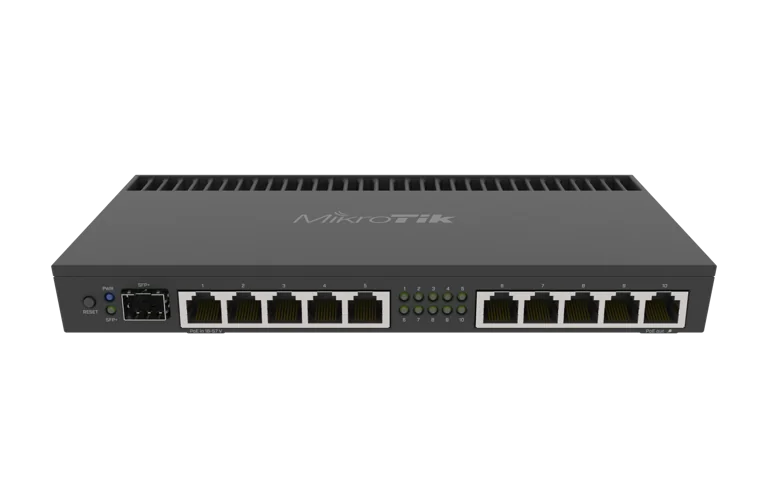
The RB4011iGS+RM provides ten Gigabit Ethernet ports and one 10G SFP+ interface. It is a wired router; mobile broadband requires separate suitable equipment rather than inserting a SIM card into this model.
Ask your installer to document which ports serve each internet connection and which serve the local network.
Should Your Backup Use a Different Provider?
Consider how independent the two services really are.
Two subscriptions may still share infrastructure, a cable route or the same building entry point. A single fault could therefore affect both.
Before ordering, ask providers about the physical delivery arrangements where that information is available. A different connection technology may reduce some shared risks, but it introduces its own requirements.
For example, mobile backup depends on signal quality and network conditions at the premises. Test the service where the equipment will be installed and during the hours when you expect to use it.
The most useful backup is one that remains available during the kinds of failures your primary service is likely to experience.
Will Internet Calls and Meetings Continue Without Interruption?
Do not assume failover will preserve every active session.
Changing internet connections commonly changes the public-facing address and network path. Existing calls, VPN connections, downloads or application sessions may need to reconnect.
A practical goal is to restore usable connectivity within an agreed period. That is different from guaranteeing that every application continues without a pause.
Test the services your business actually uses, including:
- Video meetings and internet calling.
- Cloud accounting and stock systems.
- Payment applications.
- Remote access tools.
- Customer-facing services.
Record whether each application reconnects automatically or requires user action.
Does Dual WAN Double Your Internet Speed?
A primary-and-backup configuration does not add the two subscriptions together for normal use. Its purpose is availability.
Using both services actively involves a different traffic-distribution design. Even then, you should not assume that one download or one video call can combine both connections’ speeds.
When requesting a quotation, state whether your priority is backup connectivity, distributing traffic across services, or both. These requirements affect configuration and testing.
How Fast Should the Backup Connection Be?
Size the backup around the work that must continue during an outage.
A business may decide that payments, email and essential cloud applications take priority, while large downloads and nonessential streaming can wait.
Prepare a short list of critical activities and their simultaneous demand. Assess upload capacity as well as download speed.
Also check commercial restrictions such as data allowances or usage-based charges. A backup service that is adequate for occasional emergencies may become expensive or restrictive during a prolonged outage.
Agree how staff will be notified when the network switches to backup so that they can adjust usage where necessary.
Why Does Backup Power Matter?
Dual WAN cannot keep users connected if the necessary equipment loses power.
Assess the complete connection path:
- The MikroTik router.
- Both providers’ powered equipment.
- Essential switches.
- Wireless access points.
- Any other equipment required for business connectivity.
Ask for a power-backup calculation based on the combined load and your target runtime.
Test the installation during a controlled power interruption. This can reveal overlooked equipment that remains dependent on mains power.
Can You Use Dual WAN for a Paid Hotspot?
A paid hotspot needs careful testing because connectivity, customer authentication and payment processes must work together.
If you are considering Hotspot Billing System or Tajira, ask the provider to review the proposed failover design before installation.
Confirm:
- Whether customers can log in through either connection.
- Whether payment confirmation works after a switch.
- How active customer sessions behave.
- Whether remote management remains available.
- Which routing arrangements the provider supports.
Do not assume an office dual WAN configuration can be copied unchanged into a customer billing network.
What Should Your Installer Test?
A useful handover should demonstrate more than unplugging one cable.
| Test | What it establishes |
|---|---|
| Disconnect the primary link | Response to a physical connection failure |
| Simulate upstream loss while the local link stays connected | Whether monitoring detects loss beyond the provider’s local equipment |
| Restore the primary service | Recovery behaviour and stability |
| Make the backup unavailable | Visibility of backup faults |
| Run essential applications during a switch | Actual business impact |
| Test under representative traffic | Whether backup capacity is sufficient |
| Test with backup power | Whether the required equipment stays operational |
Ask for the results, a configuration backup and a simple diagram. Keep provider support details and equipment labels accessible to the person responsible for the network.
Where Can You Buy the MikroTik RB4011iGS+RM in Kenya?
Check the MikroTik RB4011iGS+RM product listing and request a quotation that separates hardware from dual WAN configuration and testing.
Other purchasing references include the Tawa RB4011iGS+RM listing, the Reisen SEO RB4011iGS+RM listing, and Orbitlink Solutions’ MikroTik routers and gateways category.
Confirm current pricing, availability, warranty and installation scope directly with each supplier.
Frequently Asked Questions
Is dual WAN ready as soon as I connect two providers?
No. Routing, monitoring and the relevant network policies must be configured for the intended behaviour.
Can I use mobile internet as the backup?
Yes, through suitable external mobile broadband equipment with a compatible network handoff. Test coverage, capacity and service terms before relying on it.
Is failover instant?
Detection and recovery take time. Ask the installer to measure the switching behaviour and demonstrate its effect on your essential applications.
Will a second internet service protect against router failure?
No. Both connections still depend on the same router in this design. Router hardware redundancy is a separate requirement.
Plan Backup Internet Around Your Business Priorities
A dependable backup connection starts with clear expectations: which services must continue, how much interruption is acceptable and what capacity is needed during an outage.
Explore the MikroTik RB4011iGS+RM for your proposed installation, or visit MikroTik Kenya to review equipment for your wider network.
