How Much Should You Budget to Buy and Set Up a MikroTik RB4011iGS+RM in Kenya?
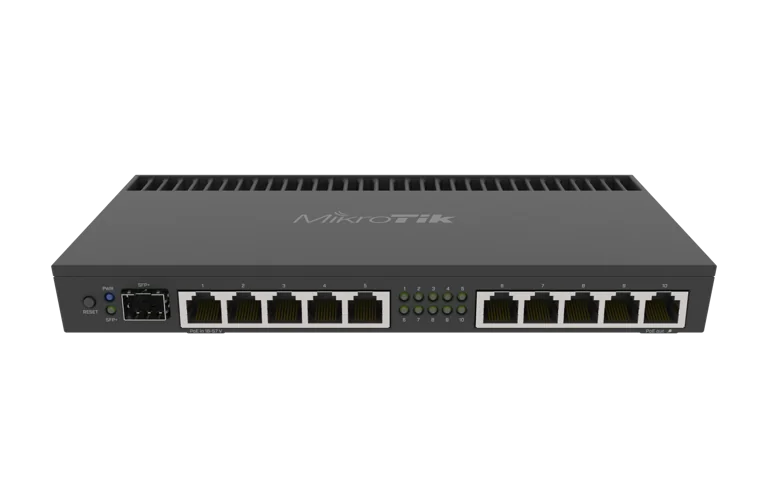
When comparing the MikroTik RB4011iGS+RM price in Kenya, the router’s purchase price is the starting point. Your complete budget depends on what you need the network to do, which equipment you already own, and how much installation and configuration work is required.
An office replacing an existing router may need only the hardware and a configuration service. A new business installing internet across several rooms may also need wireless access points, cabling, switching and backup power.
Start by checking the MikroTik RB4011iGS+RM product page for the listed price and confirming availability. Then use this guide to identify the other costs that belong in your quotation.
What Does the Router Purchase Include?
The RB4011iGS+RM is a wired router with ten Gigabit Ethernet ports, one 10G SFP+ interface, a quad-core processor and 1GB of RAM. MikroTik lists a 24V power adapter, rack ears and a mounting kit among the included parts. RouterOS comes preinstalled and licensed, so a separate operating-system purchase is unnecessary.
Before paying, ask the supplier to confirm the contents of the particular unit being sold, especially if it is used, refurbished or supplied in an opened box.
Your quotation should state:
- The exact model: RB4011iGS+RM.
- Whether the unit is new or previously used.
- Which accessories are included.
- Whether the price includes VAT.
- Delivery or collection arrangements.
- Warranty terms and the procedure for reporting a fault.
- Whether configuration is included or charged separately.
These details make it easier to compare offers fairly.
What Makes Up the Total Setup Cost?
A useful budget separates equipment, installation and recurring services.
| Cost item | When to include it | What to confirm |
|---|---|---|
| Router | Every installation | Exact model, condition and supplied accessories |
| Configuration | When you need technical setup | Written scope and completion tests |
| Wi-Fi access points | When wireless coverage is needed | Coverage, mounting, cabling and power requirements |
| Network switch | When your connection plan requires more ports | Port count, uplink capacity and PoE requirements |
| Cabling | New or unsuitable cable runs | Materials, installation, labelling and testing |
| Optical modules or compatible cables | When using the SFP+ connection | Compatibility at both ends |
| Backup power | When operation during power cuts matters | Required runtime and equipment supported |
| Delivery and site work | Where applicable | Transport, access and additional labour charges |
| Ongoing services | According to the project | Internet, support and any billing-platform fees |
Ask for quantities and unit prices wherever possible. A single figure labelled “network installation” makes it difficult to understand what you are buying or adjust the scope.
How Much Configuration Work Do You Need?
Configuration costs depend on the agreed requirements.
For a straightforward office, the work might cover connecting the internet service, assigning local addresses, setting administrator credentials and verifying that staff can access the services they need.
A more involved project may require separate staff and guest networks, a second internet connection, remote access or integration with other systems.
Explain your requirements before requesting a quotation. Useful questions include:
- How many internet connections will the router manage?
- Which devices and departments need access?
- Should guests be separated from business equipment?
- Are there applications that must remain accessible remotely?
- Who will maintain the network after installation?
Ask the installer to include a configuration backup, a simple network diagram and a secure handover of administrator access. These deliverables can reduce the work needed when another technician takes over.
Will You Need to Buy Wi-Fi Access Points?
The RB4011iGS+RM does not have built-in Wi-Fi. Wireless access requires separate access points.
The additional cost depends on the premises. A compact office and a building with several floors have different coverage requirements.
Before buying access points, assess:
- Where people will use wireless devices.
- Walls and other obstacles between rooms.
- Where Ethernet cables can be installed.
- Busy areas such as meeting rooms or reception.
- Existing wireless equipment that might be reusable.
Include mounting and power arrangements in the quotation. The access point’s shelf price may exclude the labour and accessories required to install it properly.
Avoid choosing quantities solely from the number of employees. Layout and simultaneous usage also matter.
Do You Need a Separate Switch?
Count the connections required by your planned installation before adding a switch to the shopping list.
Include the internet handover, desktop computers, access points, printers, servers and other wired equipment. Allow some room for expected expansion.
A separate switch may be useful when many connections are concentrated in a different room or floor. It can also be appropriate when several devices require compatible PoE power.
However, a small installation may already have enough suitable connections available. Ask the installer to explain the purpose of each proposed device so that you can avoid unnecessary purchases.
Should You Budget for SFP+ Accessories?
Using the router’s SFP+ interface can require a compatible module and cable. These should be selected for the equipment at the other end of the connection.
Ask the installer to specify:
- The two devices being connected.
- The required link speed.
- The connection distance.
- The proposed module or cable model.
- How compatibility will be checked.
An installation using Ethernet from the internet provider’s equipment may not need an optical accessory at all.
Purchase these components to meet a defined connection requirement. Having an available interface is not, by itself, a reason to spend money on additional hardware.
How Should You Budget for Backup Power?
Backup power should support the equipment required to keep the connection usable.
If the router remains powered but the internet provider’s ONT or your wireless access points switch off, users may still lose access.
List the essential equipment and decide how long you want it to operate during an outage. Ask for a backup-power recommendation based on that combined load.
Also clarify:
- Whether the proposed runtime is estimated or measured.
- Which devices are included in the calculation.
- The battery replacement arrangements.
- Whether installation accessories are included.
This produces a more useful budget than buying a UPS without checking the network’s requirements.
What Changes If You Are Building a Paid Hotspot?
A paid hotspot introduces costs and responsibilities beyond buying the router.
You may need customer access points, an onboarding page, payment integration, package configuration and ongoing assistance.
If you are evaluating Hotspot Billing System or Tajira, request a current proposal and confirm support for your intended RB4011 configuration.
Ask each provider to clarify:
- Initial setup charges.
- Recurring subscription fees.
- Any transaction or collection charges.
- Supported payment arrangements.
- Router connectivity requirements.
- Who handles faults affecting customer login or payment.
Include a demonstration or acceptance test in the project scope. A customer should be able to follow the intended purchase and login process successfully before the installation is considered complete.
How Can You Compare Supplier Quotations Fairly?
Begin with the RB4011iGS+RM listing at MikroTik Kenya and request a quotation that matches your requirements.
Other purchasing references include the Tawa RB4011iGS+RM listing, the Reisen SEO RB4011iGS+RM listing, and Orbitlink Solutions’ MikroTik routers and gateways category.
Confirm current prices, availability and terms directly with each supplier.
Compare equivalent packages. A hardware-only quotation and an installed package answer different needs. The lower initial figure may exclude services you still need to purchase.
Pay particular attention to the distinction between a hardware warranty and configuration support. Ask who handles each type of issue and whether site visits carry an additional charge.
What Should Be Tested Before You Sign Off?
Agree on completion checks before installation starts.
For a typical office, these could include internet access from the required work areas, access to shared printers, and confirmation that guest users cannot reach designated business resources.
Where the project includes backup connectivity or customer billing, test those functions too.
Request the final equipment list, configuration backup and support contact details. Record any remaining work rather than assuming it is included in a future visit.
Frequently Asked Questions
What is the current MikroTik RB4011iGS+RM price in Kenya?
Check the current product listing and request confirmation of the total payable amount, including any applicable delivery and installation charges.
Is installation always necessary?
Professional installation may be useful if you need assistance with configuration or physical setup. Buyers with suitable networking experience may be able to complete the work themselves.
Can I reuse my existing network equipment?
Potentially. Have your existing access points, switches and cabling assessed before replacing them. Reuse depends on their condition, compatibility and ability to meet the project’s requirements.
Should I pay for ongoing support?
Consider who will troubleshoot faults and maintain the configuration. If your business lacks that expertise internally, request a clearly defined support option and compare its scope with occasional call-out charges.
Plan the Complete Installation Before Buying
The right budget covers the router, the work required to deploy it and any equipment needed to serve your premises.
Start with the MikroTik RB4011iGS+RM, prepare a short list of requirements and request an itemised quotation. You can also visit MikroTik Kenya to explore equipment for the rest of your network.
