MikroTik CCR1009 vs CCR2116: Which Router Is Better for ISPs in Kenya?
Selecting the right router is one of the most important decisions for an internet service provider (ISP). The router must handle customer connections, bandwidth management, routing protocols, firewall policies and increasing network traffic without becoming a bottleneck.
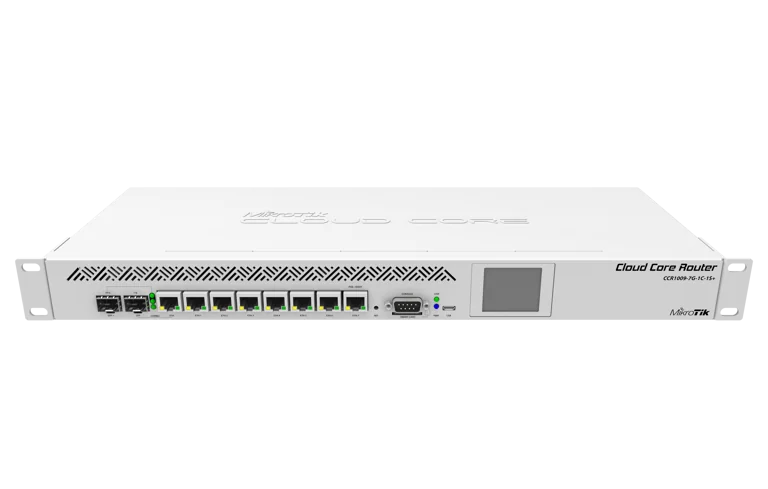
Two MikroTik Cloud Core Routers worth comparing are the MikroTik CCR1009-7G-1C-1S+PC and the MikroTik CCR2116-12G-4S+.
The CCR1009 is an older nine-core router that remains useful in certain existing installations. The CCR2116, meanwhile, is a newer-generation router with a 16-core ARM64 processor, 16 GB of RAM and four 10G SFP+ ports.
For Kenyan ISPs expanding fibre networks, managing PPPoE subscribers or upgrading their core infrastructure, understanding the differences between these routers can help avoid expensive hardware decisions.
This guide compares the MikroTik CCR1009 vs CCR2116 in terms of processor performance, memory, connectivity, routing capabilities, power requirements and suitability for ISP networks in Kenya.
For additional information about the older model, explore the MikroTik CCR1009-7G-1C-1S+PC Cloud Core Router in Kenya.
You can also review the MikroTik CCR2116-12G-4S+ Cloud Core Router product page.
MikroTik CCR1009 vs CCR2116: Specifications Comparison
The table below compares the exact hardware models discussed in this article.
| Specification | MikroTik CCR1009 | MikroTik CCR2116 |
|---|---|---|
| Model | CCR1009-7G-1C-1S+PC | CCR2116-12G-4S+ |
| CPU architecture | TILE | ARM64 |
| Processor | TLR4-00980 | AL73400 |
| CPU cores | 9 | 16 |
| CPU frequency | 1 GHz | 2 GHz |
| RAM | 2 GB | 16 GB |
| Storage | 128 MB NAND | 128 MB NAND |
| Gigabit Ethernet ports | 7 | 13 |
| Gigabit Ethernet/SFP combo | 1 | None |
| 10G SFP+ ports | 1 | 4 |
| Switch chip | No | Marvell 98DX3255 |
| RouterOS licence | Level 6 | Level 6 |
| Cooling | Passive | Four fans |
| Power inputs | DC jack and passive PoE-in | Dual AC power inputs |
| Maximum power consumption | 38 W | 83 W |
| Product status | Discontinued | Newer-generation model |
| Typical suitability | Existing smaller networks | Growing and high-capacity ISP networks |
The CCR2116 offers substantial advantages in processing resources, RAM and high-speed connectivity.
However, a router should always be selected according to actual traffic requirements rather than hardware specifications alone.
1. Processor Performance: Nine Cores vs Sixteen Cores
Processor performance directly affects many routing operations.
The CPU handles tasks such as firewall processing, routing decisions, PPPoE sessions and certain bandwidth-management functions.
MikroTik CCR1009 Processor
The CCR1009-7G-1C-1S+PC uses a nine-core TILE processor operating at 1 GHz.
This architecture was developed for professional routing applications and can support a variety of RouterOS networking features.
For an existing network with manageable traffic levels, the CCR1009 may continue operating reliably.
However, TILE is an older processor architecture, and the CCR1009 has been discontinued.
MikroTik CCR2116 Processor
The CCR2116 uses a 16-core ARM64 processor operating at 2 GHz.
This newer processor architecture provides considerably greater computing resources.
It is designed for demanding networking environments involving:
- High-volume internet traffic.
- Complex firewall configurations.
- Large routing tables.
- Multiple high-speed network connections.
- Advanced quality-of-service policies.
- Dynamic routing protocols.
- Heavy packet-processing workloads.
Which Router Has Better CPU Performance?
The CCR2116 is the stronger platform for demanding modern routing workloads.
It combines more processor cores with a newer architecture and higher nominal clock frequency.
Nevertheless, actual throughput depends on packet sizes, firewall rules, connection tracking, queues and hardware offloading.
Verdict: The CCR2116 is the better option for CPU-intensive ISP applications and significant network expansion.
2. RAM Comparison: 2 GB vs 16 GB
One of the largest differences between these routers is memory capacity.
The CCR1009 includes 2 GB of RAM, while the CCR2116 provides 16 GB.
This gives the CCR2116 eight times the RAM capacity.
Why RAM Matters for ISPs
Router memory supports activities such as:
- Connection tracking.
- Routing-table storage.
- Dynamic routing processes.
- Network-management services.
- Certain monitoring functions.
- Other RouterOS operations.
For smaller networks, 2 GB may be sufficient depending on the configuration.
However, larger networks running extensive routing tables and resource-intensive services may benefit from additional memory.
The CCR2116 provides considerably more room for demanding applications.
Verdict: The CCR2116 wins for memory capacity and is generally better positioned for larger routing workloads.
3. Ethernet and Fibre Connectivity
Network connectivity is especially important for fibre ISPs and organizations operating multiple distribution networks.
MikroTik CCR1009 Ports
The CCR1009-7G-1C-1S+PC includes:
- Seven Gigabit Ethernet ports.
- One Gigabit Ethernet/SFP combo interface.
- One 10G SFP+ interface.
The combo port provides flexibility between compatible copper Ethernet and SFP connections.
The CCR1009 also features independently connected Ethernet interfaces rather than a shared Ethernet switch chip.
MikroTik CCR2116 Ports
The CCR2116-12G-4S+ includes:
- Twelve Gigabit Ethernet ports connected through its switch chip.
- One additional Gigabit Ethernet port connected directly to the CPU for management.
- Four 10G SFP+ interfaces.
The four SFP+ ports are particularly useful for high-speed fibre infrastructure.
An ISP may use them for upstream connectivity, aggregation switches and other network interconnections.
Which Router Is Better for Fibre Networks?
The CCR2116 provides substantially greater high-speed connectivity.
Its four 10G SFP+ interfaces allow more flexible network designs than the CCR1009’s single 10G port.
However, the presence of four 10G interfaces does not guarantee 40 Gbps of routed application traffic under every configuration.
Actual performance depends on switching, routing, packet sizes and enabled features.
Verdict: CCR2116 is the better choice for expanding fibre aggregation and high-speed ISP infrastructure.
4. Which Router Is Better for PPPoE Servers?
PPPoE is commonly used by Kenyan ISPs to authenticate subscribers and manage internet access.
Both routers support PPPoE server functionality through RouterOS.
A typical PPPoE deployment may involve:
Upstream Internet → MikroTik Router → Distribution Network → Customer Routers
The MikroTik router authenticates subscriber sessions and applies the appropriate service policies.
CCR1009 for PPPoE
The CCR1009 can continue supporting PPPoE subscribers in existing networks where its performance remains adequate.
It may be appropriate for networks that do not require extensive additional capacity.
CCR2116 for PPPoE
The CCR2116 offers more CPU resources and RAM, making it a stronger candidate for demanding PPPoE environments.
It can be particularly attractive where the router must also perform firewall processing, bandwidth management and other routing functions.
How Many PPPoE Users Can Each Router Support?
There is no universal subscriber count for either model.
Capacity depends on:
- Concurrent subscriber sessions.
- Average and peak bandwidth consumption.
- Packet rates.
- Queue configuration.
- Firewall complexity.
- RADIUS integration.
- Other RouterOS services.
A network serving customers with light browsing requirements behaves differently from one carrying heavy streaming, gaming and business traffic.
Recommendation: Use measured traffic and resource utilization to determine the required router capacity.
5. Bandwidth Management and QoS
Bandwidth management is essential for ISPs offering different internet packages.
Both the CCR1009 and CCR2116 support RouterOS traffic-management features.
For example, an ISP may provide:
| Internet package | Download | Upload |
|---|---|---|
| Basic | 5 Mbps | 5 Mbps |
| Standard | 10 Mbps | 10 Mbps |
| Premium | 20 Mbps | 20 Mbps |
| Business | 50 Mbps | 50 Mbps |
| Enterprise | 100 Mbps | 100 Mbps |
These are illustrative package speeds.
CCR1009 Bandwidth Management
The CCR1009 supports simple queues, queue trees and other RouterOS traffic-management functions.
However, complex queue configurations can increase CPU utilization.
CCR2116 Bandwidth Management
The CCR2116 provides significantly greater processing resources for demanding QoS configurations.
This can be valuable when managing large numbers of subscribers and multiple traffic policies.
Administrators should still monitor CPU utilization and verify that FastTrack or hardware-offloading configurations do not bypass intended traffic controls.
Verdict: CCR2116 is better suited to demanding bandwidth-management workloads.
6. BGP and Dynamic Routing Performance
Dynamic routing becomes increasingly important as ISP networks expand.
Larger providers may use BGP to exchange routing information with upstream providers, internet exchanges or other networks.
Both routers support dynamic routing features available in their compatible RouterOS versions.
However, the CCR2116 offers considerably more memory and modern processing resources.
Why CCR2116 Is Better for Large Routing Tables
Large routing tables can consume significant memory.
Routing updates and policy processing also require CPU resources.
The CCR2116’s 16 GB RAM and modern ARM64 processor make it better suited for demanding BGP applications.
MikroTik specifically positions the CCR2116 for networks requiring substantial dynamic-routing and firewall-processing capacity.
Should Small ISPs Use BGP?
Not every ISP requires BGP.
A smaller network with one upstream provider may operate using static routing or other simpler configurations.
BGP becomes relevant when the network’s addressing, connectivity and routing requirements justify it.
Verdict: The CCR2116 is the stronger choice for advanced BGP and large-scale dynamic routing.
7. Firewall and Network Security
Security is essential for any ISP or enterprise network.
Both routers support RouterOS firewall features, including:
- Stateful packet filtering.
- Network Address Translation.
- Address lists.
- Connection tracking.
- Traffic filtering.
- Access-control policies.
- Supported VPN technologies.
The CCR2116 offers greater processing capacity for demanding firewall workloads.
However, poorly designed firewall rules can still reduce performance.
Recommended Security Practices
- Restrict management access.
- Use strong administrator credentials.
- Maintain supported RouterOS updates.
- Disable unnecessary services.
- Review firewall policies regularly.
- Monitor unusual traffic.
- Use secure remote-management methods.
- Maintain configuration backups.
For production ISP environments, firewall configuration should be tested before deployment.
8. Layer 3 Hardware Offloading
A major advantage of the CCR2116 is support for Layer 3 hardware offloading in compatible configurations.
Hardware offloading allows certain supported traffic-processing operations to be handled by the switch chip rather than relying entirely on the CPU.
This can improve forwarding efficiency for suitable network designs.
However, not every routing or firewall feature can be hardware-offloaded.
Administrators must understand which functions are supported and how offloading interacts with firewall rules, queues and other policies.
The CCR1009 does not offer the same switch-chip-based Layer 3 hardware-offloading architecture.
Verdict: CCR2116 offers greater flexibility for suitable high-performance network designs.
9. Power Consumption and Cooling
Power requirements are important for Kenyan businesses and ISPs operating networking equipment continuously.
CCR1009 Power and Cooling
The CCR1009-7G-1C-1S+PC uses passive cooling.
It has no mechanical cooling fans and supports a maximum power consumption of 38 W.
This can be useful for quiet installations and locations with limited power capacity.
CCR2116 Power and Cooling
The CCR2116 uses four cooling fans and has a specified maximum power consumption of 83 W.
It also includes dual AC power inputs, providing redundancy when connected to appropriately designed power sources.
Which Router Is Better for Power Efficiency?
The CCR1009 has a lower specified maximum power consumption.
However, the CCR2116 provides substantially more processing and connectivity capacity.
For larger ISPs, the additional power requirement may be justified by the increased hardware capabilities.
Backup Power Considerations
Network operators in Kenya should consider UPS systems, surge protection and appropriate backup power infrastructure.
A redundant router power supply does not eliminate the need for reliable external electricity.
10. CCR1009 vs CCR2116 for Starlink Networks
Both routers can connect to compatible Starlink equipment through Ethernet.
A typical configuration may look like:
Starlink Equipment → MikroTik Router → Distribution Switch → Connected Devices
The router can then manage:
- LAN routing.
- Firewall policies.
- Bandwidth allocation.
- VLAN segmentation.
- Network monitoring.
- Guest access.
- Supported VPN connections.
Is CCR2116 Necessary for Starlink?
For a single standard Starlink connection serving a modest business network, the CCR2116 may be unnecessarily powerful.
The CCR1009 may also be capable of handling such a connection if it is already installed and operating properly.
The CCR2116 becomes more relevant when the network includes substantial additional routing workloads, multiple high-speed upstream links or complex distribution infrastructure.
Neither router increases the speed provided by Starlink.
For information about Starlink equipment and connectivity options, visit Starlink Kenya.
Commercial redistribution of Starlink connectivity must comply with applicable service terms and regulatory requirements.
11. Is CCR2116 a Good Upgrade From CCR1009?
For growing ISPs, upgrading from CCR1009 to CCR2116 can provide substantial additional capacity.
However, a successful migration requires planning.
Reasons to Upgrade
Consider upgrading when:
- CPU utilization remains high during normal peak traffic.
- The network requires additional 10G fibre connections.
- Routing tables and policies are becoming more demanding.
- Bandwidth-management processing is creating bottlenecks.
- The subscriber base is expanding.
- Existing hardware is approaching the end of its practical service life.
- Required features are better supported by newer hardware.
- Network reliability requirements justify a newer platform.
Important Migration Differences
| Consideration | CCR1009 | CCR2116 |
|---|---|---|
| CPU architecture | TILE | ARM64 |
| RAM | 2 GB | 16 GB |
| SFP+ ports | 1 | 4 |
| Ethernet layout | Independent interfaces | Switch-chip architecture plus management port |
| Cooling | Passive | Active |
| Power | DC and passive PoE-in | Dual AC |
| Hardware offloading | Different architecture | Supported Layer 3 offloading |
| RouterOS deployment | Legacy hardware considerations | RouterOS v7 platform |
Recommended Upgrade Procedure
Before migration:
- Export the existing RouterOS configuration.
- Record all interface assignments.
- Document PPPoE and RADIUS settings.
- Review firewall and NAT policies.
- Record VLAN configurations.
- Verify routing protocols.
- Test the replacement router in a controlled environment.
- Schedule a maintenance window.
- Monitor the network after migration.
Do not restore a CCR1009 binary backup directly onto a CCR2116.
A reviewed text-based configuration export is generally more appropriate for migration between different hardware architectures.
12. Which Router Should Kenyan ISPs Choose?
The most appropriate router depends on the network’s current size and expected growth.
| Network requirement | Suggested approach |
|---|---|
| Existing stable CCR1009 network | Continue using it if capacity is sufficient |
| Small network with modest routing needs | Evaluate a smaller modern MikroTik router |
| Growing PPPoE subscriber network | Consider CCR2116 based on measured demand |
| Multiple 10G fibre connections | CCR2116 |
| Large BGP routing tables | CCR2116 |
| Complex QoS and firewall policies | CCR2116 |
| Low-power, silent existing installation | CCR1009 may remain suitable |
| High-capacity ISP core routing | Evaluate CCR2116 |
| Long-term infrastructure expansion | Prefer a suitably sized modern platform |
For many smaller businesses, the CCR2116 may provide more capacity than necessary.
For larger ISPs, its processing resources, RAM and 10G connectivity can make it a strong candidate.
13. Where to Find MikroTik CCR1009 and CCR2116 in Kenya
If you are evaluating either router, compare the hardware specifications and confirm availability with a networking-equipment supplier.
MikroTik CCR1009
Visit the MikroTik CCR1009-7G-1C-1S+PC product page in Kenya.
Additional product information can be found at:
Because the CCR1009 is discontinued, confirm its condition, software compatibility and warranty before purchasing.
MikroTik CCR2116
For technical specifications and purchasing enquiries, explore the MikroTik CCR2116-12G-4S+ Cloud Core Router product page in Kenya.
Before choosing either model, evaluate network throughput, interface requirements, subscriber load and long-term infrastructure plans.
Frequently Asked Questions
Is MikroTik CCR2116 better than CCR1009?
For demanding modern routing applications, the CCR2116 is significantly more capable. It has a newer 16-core ARM64 processor, 16 GB RAM and four 10G SFP+ interfaces.
How many CPU cores does CCR2116 have?
The CCR2116-12G-4S+ has 16 CPU cores operating at a nominal frequency of 2 GHz.
How much RAM does MikroTik CCR2116 have?
The CCR2116 includes 16 GB of RAM, compared with 2 GB in the CCR1009-7G-1C-1S+PC.
Does CCR2116 support 10G fibre connections?
Yes. The CCR2116 provides four 10G SFP+ interfaces.
Can CCR2116 work as a PPPoE server?
Yes. The CCR2116 supports PPPoE server functionality through RouterOS.
How many PPPoE subscribers can CCR2116 support?
There is no universal subscriber limit. Actual capacity depends on traffic levels, packet rates, authentication methods, firewall policies and bandwidth-management configuration.
Does CCR2116 support BGP?
Yes. RouterOS v7 supports BGP and other dynamic routing functions, and the CCR2116 is designed for demanding routing workloads.
Can CCR2116 replace CCR1009?
Yes, in many network designs. However, interface assignments, power requirements, RouterOS configuration and other hardware-specific settings must be reviewed before migration.
Is MikroTik CCR1009 discontinued?
Yes. MikroTik officially lists the CCR1009-7G-1C-1S+PC as discontinued.
Which router is better for a fibre ISP in Kenya?
For expanding fibre ISPs requiring multiple 10G connections, advanced routing and substantial processing capacity, the CCR2116 is generally the stronger option.
Conclusion: MikroTik CCR1009 vs CCR2116
The MikroTik CCR1009 vs CCR2116 comparison highlights the substantial differences between an older Cloud Core Router and a newer high-capacity routing platform.
The CCR1009-7G-1C-1S+PC offers nine CPU cores, 2 GB of RAM, Gigabit Ethernet connectivity and one 10G SFP+ interface. It may remain useful in existing networks where its performance and software compatibility meet operational requirements.
The CCR2116-12G-4S+ provides a modern 16-core ARM64 processor, 16 GB of RAM, four 10G SFP+ interfaces, advanced hardware capabilities and redundant AC power inputs.
For Kenyan ISPs expanding their subscriber base, upgrading fibre infrastructure or implementing demanding routing policies, the CCR2116 is generally the more suitable platform.
However, smaller networks should evaluate whether they genuinely need this level of processing and connectivity capacity.
To compare the models further, explore the MikroTik CCR1009 Cloud Core Router and the MikroTik CCR2116-12G-4S+ Cloud Core Router product pages at MikroTik Kenya.
