MikroTik Switches in Kenya: How to Choose the Right Model
Choosing a network switch starts with understanding what you need to connect. An office with computers and printers has different requirements from a CCTV installation, a hotel WiFi network or a server room handling large transfers.
When comparing MikroTik switches in Kenya, look beyond the number of ports. Connection speeds, power delivery, uplink capacity and management requirements all affect whether a model fits your installation.
This guide explains how to narrow your options and prepare a useful quotation request before purchasing from MikroTik Kenya.
Start With Your Connected Devices
Create an equipment list before comparing models.
Include desktop computers, printers, wireless access points, IP phones, cameras, servers and connections to other network equipment. Identify which devices need power over Ethernet and which have separate power supplies.
For each device, record:
- Its required connection speed.
- Whether it needs PoE.
- Its location and approximate cable distance.
- The applications or traffic it carries.
- Whether additional devices are likely to be installed nearby.
Count uplink connections as well as endpoint connections. A switch with enough ports for today’s equipment may leave no room for the link to another cabinet or a planned expansion.
Choose Between Gigabit, 2.5G and 10G Connections
Different parts of a network may need different speeds.
Gigabit connections can suit many everyday office endpoints. Multi-gigabit connections become relevant when compatible computers, access points or storage systems need more capacity. Higher-speed uplinks can carry the combined traffic from several devices.
| Network requirement | What to assess |
|---|---|
| Computers and printers | Endpoint port count and required speeds |
| Compatible multi-gigabit equipment | 2.5G or faster copper connections |
| Servers and shared storage | Transfer demand and interface compatibility |
| Links between switches | Combined traffic and uplink capacity |
| Fibre aggregation | Number of optical connections and link distances |
A faster switch cannot increase an internet subscription’s capacity. It can help remove a bottleneck within the local network.
Consider Multi-Gigabit Switching for Growing Offices
An office upgrading its computers or wireless infrastructure may benefit from reviewing the switch at the same time.
The MikroTik CRS310-8G+2S+IN provides eight 2.5 Gigabit Ethernet ports and two 10G SFP+ ports. This combination offers a possible upgrade path where compatible endpoints need more than Gigabit connectivity. CRS310-8G+2S+IN
Before choosing it, check whether your devices can use those speeds and whether the existing cabling performs reliably at the intended rate.
You can review the MikroTik CRS310-8G+2S+IN switch when assessing a compact multi-gigabit installation.
For another product reference, consult the CRS310 listing at Tawa.
Select PoE Switches by Compatibility and Power Budget
A PoE switch can supply electricity and data through the Ethernet cable to compatible equipment. This can simplify installations involving access points, cameras and phones.
However, the number of PoE ports does not establish whether a switch can power your complete equipment list.
Check:
- The PoE standard required by each endpoint.
- Maximum demand per device.
- The switch’s per-port output limit.
- Its total available PoE budget.
- The allowance needed for future additions.
The MikroTik CRS354-48P-4S+2Q+RM has 48 Gigabit Ethernet ports with PoE output, four 10G SFP+ ports and two 40G QSFP+ ports. Its supported output options include 802.3af/at and passive PoE. Compatibility still needs checking for each connected device. CRS354-48P-4S+2Q+RM
Review the MikroTik CRS354 48-port PoE switch if you are planning a substantial powered-device installation.
Match Fibre Switches to the Actual Link Requirements
A network connecting several cabinets, servers or distribution switches may need numerous high-speed interfaces.
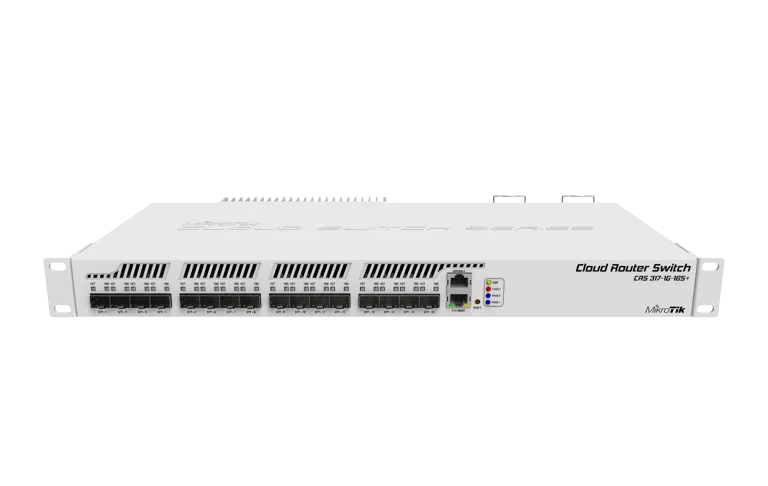
The MikroTik CRS326-24S+2Q+RM provides 24 10G SFP+ ports and two 40G QSFP+ ports. It is a different type of product from a switch primarily designed to connect ordinary RJ45 desktop cables. CRS326-24S+2Q+RM
Assess the accessories required for every planned connection. Optical modules, fibre patch leads or compatible direct-attach cables should be included in the project budget.
Check both ends of each link for speed, module and cable compatibility.
You can compare the MikroTik CRS326-24S+2Q+RM with your required connection plan before requesting a quotation.
Decide Which Management Features You Need
Managed switches are useful when the network needs more control over how devices connect.
For example, a business may want separate networks for staff, visitors and equipment management. It may also need monitoring, controlled uplinks or protection against unintended network loops.
List the required functions and verify support on the exact model and software you intend to use. MikroTik products do not all have identical capabilities.
Also establish who will configure and maintain the equipment. A switch with extensive features still needs an appropriate configuration and documented administrative access.
You can browse the MikroTik switch range at Jupitaz when comparing available product categories.
Plan Uplinks Around Combined Demand
The connection between a switch and the rest of the network can become a shared bottleneck.
Consider an office where several users access central storage simultaneously. Each workstation may have an adequate connection, while their shared uplink carries the combined traffic.
Review traffic during representative busy periods. Determine whether the demand involves internet access, internal transfers or both.
Do not assume that adding a second cable automatically increases capacity or provides a safe backup. Multiple links need a deliberate design and compatible configuration at both ends.
For broader comparisons, consult the MikroTik switches category at Orbitlink Solutions.
Include Power, Cooling and Installation Space
Before ordering, check where the switch will operate.
A compact office installation and a rack serving dozens of powered endpoints have different space, cooling and backup-power requirements.
Confirm:
- Rack or desktop mounting requirements.
- Cable access and labelling.
- Fan noise where the equipment is near employees.
- Power consumption under the intended load.
- Backup power for essential connected equipment.
For PoE installations, remember that the backup system may need to support the powered endpoints as well as the switch itself.
Understand What Affects MikroTik Switch Prices in Kenya
Switch prices vary with port count, interface speeds, PoE capability and hardware features. The complete installation cost also depends on accessories and configuration work.
Ask for an itemised quotation covering the switch, optical modules, cables, mounting equipment and installation services.
Confirm whether VAT, delivery and configuration are included. Check warranty and support terms directly with the supplier.
You can use the MikroTik switches listings at Network Switch Kenya as an additional comparison point. Compare exact model codes, because similar names can describe substantially different port arrangements.
Test the Installation Before Accepting It
Agree on what the completed network must do before installation begins.
Test connections from relevant work areas and confirm that required applications operate normally. For PoE equipment, verify that all intended devices remain stable when connected together.
Where network separation is configured, test both permitted and blocked access.
Request a handover containing the port map, management details, configuration backup and accessory list. These records make future expansion and troubleshooting easier.
Frequently Asked Questions About MikroTik Switches in Kenya
Which MikroTik switch is best for an office?
The appropriate model depends on device count, required speeds, PoE needs and expansion plans. Start with those requirements rather than choosing solely by price.
Do all MikroTik switches provide PoE output?
No. Check the exact model’s output capability, supported standards and power budget before buying.
Do I need 10G connections for every computer?
Not necessarily. A faster shared uplink may be useful even when individual endpoints use slower connections. Assess where traffic combines and where bottlenecks occur.
Are fibre modules included with every SFP+ switch?
Do not assume they are. Ask the supplier to list the modules or cables required for your specific links.
Where can I buy MikroTik switches in Kenya?
Start with MikroTik Kenya and review the models matching your requirements. Submit your device list, PoE needs, uplink speeds and installation details to obtain a quotation for the complete solution.
