Who is this product best for?
- Home and small office routing
- Business internet edge routing
- ISP customer or branch deployments

MikroTik router prices in Kenya
IN STOCKWorks with compatible MikroTik RouterOS networks and standard Ethernet networking equipment. Confirm port, power and mounting requirements before purchase.
Check the product label or manufacturer datasheet for exact input voltage, PoE support and power adapter requirements.
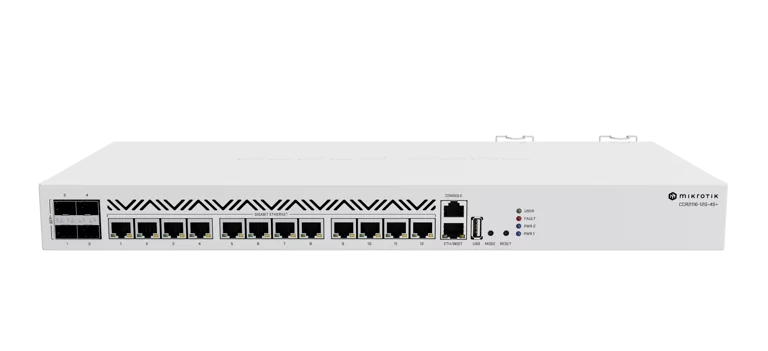
The MikroTik Router CCR2116-12G-4S+ is a high-performance, enterprise-grade Cloud Core Router designed for internet service providers (ISPs), telecommunications companies, data centres, large businesses and organisations that require powerful routing, high-speed fibre connectivity and advanced network management.
Powered by a 16-core Annapurna Labs AL73400 processor operating at 2GHz, the MikroTik CCR2116-12G-4S+ delivers the processing resources required for demanding RouterOS workloads such as dynamic routing, BGP, firewall filtering, bandwidth management, VPN connectivity, VLAN segmentation and high-volume network traffic.
The router features twelve Gigabit Ethernet ports for network connectivity, one additional Gigabit Ethernet management port and four 10Gbps SFP+ interfaces for high-speed fibre or compatible direct-attach connections.
With 16GB DDR4 RAM, RouterOS v7 Level 6, Layer 3 hardware offloading capabilities and an M.2 PCIe expansion slot, the CCR2116 provides a professional platform for complex network infrastructures.
Unlike entry-level MikroTik routers intended primarily for homes and small offices, the CCR2116 is designed for more demanding routing environments where traffic volume, processor performance, network reliability and future expansion are major considerations.
For Kenyan internet service providers expanding their fibre and wireless networks, the CCR2116 offers a combination of multi-core processing, 10 Gigabit uplinks and advanced RouterOS management capabilities.
Its four SFP+ interfaces can connect to compatible 10G fibre infrastructure, aggregation switches, upstream provider links and enterprise networking equipment.
The device also features dual redundant AC power supplies, allowing it to continue operating from the remaining supply if one fails, provided that the other supply and its power source remain operational.
Its standard rackmount enclosure makes it suitable for professional server rooms, network cabinets, data centres and ISP points of presence.
Whether you are upgrading an ISP core router, designing a high-capacity business network, deploying a BGP routing platform or creating a reliable internet gateway for a large organisation, the MikroTik CCR2116-12G-4S+ Cloud Core Router offers advanced features for demanding networking requirements.
For buyers comparing the model across Kenyan ICT suppliers, the MikroTik CCR2116-12G-4S+ product listing at Jupitaz provides an additional product reference.
To purchase through MikroTik Kenya, explore our MikroTik router collection or request a quotation for the exact CCR2116-12G-4S+ model.
The MikroTik CCR2116-12G-4S+ price in Kenya depends on the supplier, prevailing exchange rates, import costs, product availability and any additional networking equipment or configuration services required.
As an enterprise networking device, the CCR2116 is commonly purchased for business, institutional, telecommunications and internet service provider deployments.
Customers should request a current quotation from MikroTik Kenya to confirm the exact selling price, applicable taxes, stock availability, warranty terms and delivery arrangements.
The manufacturer's published suggested price is denominated in US dollars and should not be treated as a confirmed selling price in Kenyan shillings.
Several factors influence the total cost of purchasing and deploying the MikroTik CCR2116.
1. Router purchase price
The hardware cost depends on current local supplier pricing and product availability.
2. SFP+ modules and fibre accessories
The router has four SFP+ interfaces, but compatible optical transceivers or DAC cables may need to be purchased separately.
3. Network cabling
Professional installations may require Cat6 Ethernet cables, fibre patch cords, structured cabling accessories and suitable cable-management equipment.
4. Rackmount infrastructure
Network cabinets, UPS systems, power distribution units and ventilation equipment may be required for enterprise installations.
5. Network configuration
Complex deployments involving BGP, OSPF, VPNs, VLANs, redundant connections or subscriber management may require professional configuration services.
6. Support and maintenance
Organisations operating critical networks should consider ongoing system maintenance, software updates, backup procedures and network monitoring.
For additional Kenyan product information, buyers may review the MikroTik CCR2116-12G-4S+ router listing at Tawa Kenya.
The final price charged by MikroTik Kenya should always be confirmed directly before purchase.
Explore our MikroTik router buying guide for more information about selecting professional routing equipment in Kenya.
The MikroTik CCR2116-12G-4S+ uses the Annapurna Labs AL73400 processor, featuring sixteen processing cores operating at a nominal clock frequency of 2GHz.
This powerful ARM64 processor provides the computing resources required for advanced network routing and management.
The sixteen-core architecture is particularly useful for environments handling a mixture of demanding network services.
These may include:
Large-scale IPv4 and IPv6 routing
BGP routing and route-policy processing
OSPF and other supported dynamic routing protocols
Advanced firewall and connection tracking
Bandwidth management using queues
Multiple routing tables and policy routing
Compatible VPN services
Network address translation
High-volume enterprise traffic
Complex network monitoring and administration
MikroTik designed the CCR2116 to improve both aggregate processing capacity and per-core performance compared with several previous-generation CCR models.
According to MikroTik's manufacturer performance comparisons, the CCR2116 demonstrates significant improvements in selected BGP and packet-processing workloads compared with older Cloud Core Router platforms.
However, real-world throughput depends on the RouterOS configuration, enabled functions, packet sizes, hardware-offloading support and traffic distribution across processing cores.
The CCR2116 is therefore best evaluated against the specific workload it will perform.
The processor's sixteen cores provide substantial parallel processing resources for RouterOS.
In high-capacity networks, administrators may operate multiple services simultaneously, including routing, firewall filtering, traffic classification and network monitoring.
Multi-core processing helps the router handle these functions across available processor resources.
This is particularly relevant for internet service providers managing large routing environments or enterprises with multiple network segments.
However, not all networking operations scale equally across multiple CPU cores.
Some processing tasks depend heavily on single-core performance, while others benefit from parallel operation.
Network administrators should examine CPU usage per core, packet rates and application-specific benchmarks when planning high-capacity deployments.
The MikroTik CCR2116-12G-4S+ includes 16GB DDR4 RAM.
This provides significantly more memory than many entry-level and midrange MikroTik routers.
Memory is important for RouterOS processes such as:
Dynamic routing table storage
BGP route information
Connection tracking
Firewall operation
Network services
Routing protocols
Management processes
Supported advanced applications
For ISPs receiving substantial routing information from upstream providers, the available RAM can be particularly valuable.
The memory capacity also supports more complex network configurations and helps provide headroom for suitable future requirements.
However, RAM capacity alone does not guarantee a particular maximum number of BGP routes, customers or active connections.
Actual capacity depends on RouterOS version, routing policy complexity, traffic characteristics and other enabled services.
The CCR2116 provides twelve standard 10/100/1000Mbps Ethernet ports for connecting supported networking equipment.
These ports can be used to connect:
Network switches
Business LAN networks
ISP distribution equipment
Firewalls and servers
Subscriber aggregation equipment
Network monitoring systems
Access-point controllers
Separate network segments
Each port supports up to 1Gbps negotiated Ethernet link speed when connected to compatible devices.
RouterOS allows administrators to assign ports to different network roles according to their design.
For example, an ISP may connect several distribution switches to the CCR2116 while using its SFP+ interfaces for higher-speed uplinks.
The router also includes a separate Gigabit Ethernet management interface for administrative access.
This additional management port should not be confused with the twelve main Gigabit Ethernet interfaces.
For deployments requiring more access ports, combine the router with compatible MikroTik network switches.
One of the CCR2116's main strengths is its four SFP+ interfaces supporting compatible 10 Gigabit connections.
These interfaces are useful for high-bandwidth fibre networking and connections to compatible data-centre or enterprise equipment.
Typical applications include:
ISP upstream connections
High-speed network aggregation
Data-centre switching
Fibre backbone connections
Enterprise network distribution
Connections between network cabinets
High-speed server and storage infrastructure
Each SFP+ port supports a nominal 10Gbps interface speed when used with appropriate equipment.
The router can connect through suitable fibre optic modules or supported direct-attach cables.
The selected SFP+ module must match the intended connection type, fibre medium, wavelength and distance.
The presence of four 10Gbps ports does not guarantee 40Gbps of routed throughput under every configuration.
Actual performance depends on traffic patterns and enabled RouterOS functions.
Explore our MikroTik SFP and QSFP module collection for compatible optical networking accessories.
In addition to its twelve standard Gigabit Ethernet ports, the CCR2116 includes a dedicated Gigabit Ethernet management interface.
This allows administrators to design a separate network for router administration and maintenance.
For example, a telecommunications provider may connect the management interface to a dedicated management switch accessible only to authorised technical personnel.
This separation can reduce the exposure of management services to ordinary customer or production traffic.
However, a management interface is not automatically a secure management network.
Access restrictions, authentication, firewall policies and network segmentation still need to be configured correctly.
The MikroTik CCR2116 supports Layer 3 hardware offloading for compatible configurations.
Hardware offloading allows supported network processing to be performed by the switch chip rather than relying entirely on the router's CPU.
This can improve forwarding efficiency and reduce CPU utilisation for eligible traffic.
Potential benefits include:
More efficient supported packet forwarding
Reduced CPU load for eligible traffic
Better resource utilisation in supported network designs
Increased processing headroom for other routing services
Hardware offloading availability depends on RouterOS version, switch-chip capabilities and the specific features configured.
Not every routing, firewall, NAT or queue function can be offloaded.
Some configurations may require traffic to be processed through the CPU, so the network design should account for those limitations.
The CCR2116 uses the Marvell 98DX3255 switch chip.
This switching architecture is designed to work with the router's Ethernet and SFP+ interfaces.
MikroTik's hardware design distributes the main Ethernet ports through the switch chip and provides high-speed internal connectivity for appropriate traffic paths.
This is useful for networks carrying traffic across several ports and high-speed uplinks.
The actual forwarding path depends on the configuration and whether supported hardware offloading is active.
Administrators should distinguish switching performance from processor-based routing performance when assessing the device.
The CCR2116 runs MikroTik RouterOS v7 and includes a Level 6 licence.
RouterOS provides extensive configuration capabilities for enterprise and ISP networking.
These include:
IPv4 and IPv6 routing
BGP and OSPF
Policy-based routing
Routing filters
Firewall and NAT
VLAN management
DHCP services
PPPoE functionality
HotSpot services
Traffic queues
Compatible VPN technologies
Network monitoring
Automation and scripting
Administrative access controls
RouterOS Level 6 is included with the device.
For a business or ISP, this provides a flexible software platform for implementing sophisticated routing and network management policies.
Supported functionality depends on the installed RouterOS version and configuration.
Border Gateway Protocol (BGP) is an important routing protocol for internet service providers and large networks exchanging routes with upstream or peer networks.
The CCR2116 is designed for demanding dynamic-routing workloads.
Its combination of a sixteen-core CPU and 16GB RAM makes it attractive for environments requiring substantial routing resources.
Common applications include:
BGP peering with upstream providers
Managing multiple internet transit connections
Applying routing filters and policies
Processing IPv4 and IPv6 routing information
Supporting suitable redundant network designs
An ISP may use BGP to exchange reachability information with multiple providers.
However, BGP deployments require correct autonomous system configuration, routing policy design, filtering and ongoing monitoring.
The CCR2116's performance should be validated against the expected number of routes, updates, peers and associated traffic workloads.
The MikroTik CCR2116 includes two AC power supply units.
Each accepts 100–240V AC input, making the router suitable for compatible power installations.
Redundant power supplies are particularly important for critical networking equipment.
For example, an ISP may connect each power supply to an appropriate independent or protected power distribution source.
If one power supply fails, the second supply can maintain operation, provided it remains functional and has sufficient incoming power.
Dual power supplies do not eliminate all possible power failures.
For critical installations, organisations should also consider suitable UPS systems, generators, protected power distribution and environmental monitoring.
The CCR2116 includes one M.2 PCIe expansion slot.
MikroTik specifies a PCIe Gen 3.0 x4 connection and recommends compatible NVMe M.2 2280 M-key SSDs.
This allows administrators to install supported additional storage for suitable RouterOS applications.
Potential uses include network logging and supported storage-intensive applications, depending on the installed RouterOS packages and configuration.
The internal M.2 SSD is not listed as standard included storage and should be purchased separately when required.
Installation warning: Power off the router, disconnect its AC cables and allow the device to discharge before opening the chassis or installing an SSD.
The CCR2116 features a 1U rackmount enclosure measuring 443 × 199 × 44mm.
It is suitable for installation in standard compatible network racks and data-centre cabinets.
This design is useful for:
ISP points of presence
Data centres
Server rooms
Enterprise communications rooms
Network operations facilities
Telecommunications installations
The router includes rackmount accessories for suitable installation.
Adequate space, cable management and ventilation should be provided.
The MikroTik CCR2116 uses four cooling fans.
These provide active cooling for its processor, internal components and power system.
Active cooling is important in networking equipment designed for continuous operation under demanding workloads.
However, the fans generate operating noise and require appropriate airflow.
The router is therefore better suited to a network cabinet, server room or dedicated equipment area than a quiet desk environment.
RouterOS provides extensive firewall and traffic-control capabilities.
Administrators can configure policies for:
Restricting unauthorised traffic
Protecting router management interfaces
Controlling access between VLANs
Filtering traffic between network segments
Managing selected protocols and destinations
Implementing network address translation
Protecting internal management networks
For ISPs, firewall and routing policies can form an important part of protecting network infrastructure.
However, the CCR2116 is not automatically secure simply because it supports advanced features.
Security requires correctly configured firewall rules, strong authentication, suitable management restrictions, software updates and ongoing review.
The CCR2116 supports RouterOS bandwidth-management features, including queues and traffic classification.
These functions are useful for ISPs and enterprises managing competing traffic requirements.
For example, a provider may apply customer bandwidth policies while an enterprise prioritises latency-sensitive applications.
Possible applications include:
Subscriber speed profiles
Department-level bandwidth allocation
Traffic classification
Quality-of-service policies
Managing shared internet resources
Limiting selected traffic classes
Complex queue configurations consume processing resources.
The CCR2116 offers substantial CPU capacity, but administrators should still monitor utilisation and confirm that the selected traffic-management design meets performance requirements.
The router supports VPN functionality through compatible RouterOS protocols.
This allows organisations to establish encrypted connections between offices, remote sites and authorised network administrators.
For example, a company operating branches in Nairobi, Mombasa, Kisumu and Eldoret may use suitable site-to-site VPN configurations to connect internal networks.
VPN performance depends on the selected protocol, encryption settings, connection count and traffic patterns.
The CCR2116 can form part of a high-capacity VPN design, but the required encrypted throughput should be tested before deployment.
Specification note: MikroTik's product literature and documentation have differing maximum power-consumption figures across revisions. The current online product specification lists 83W with attachments, while a newer published specification sheet lists 72W. Verify the exact hardware revision when sizing power and cooling infrastructure.
The MikroTik CCR2116 is suitable for ISPs requiring a high-performance router for core or aggregation functions.
Its sixteen-core processor, 16GB RAM and four 10G SFP+ interfaces allow it to form part of networks handling substantial traffic.
A typical ISP deployment may connect upstream transit providers through compatible SFP+ links while connecting distribution equipment through additional Ethernet or fibre interfaces.
RouterOS can provide dynamic routing, traffic policies, firewall services and monitoring.
However, the appropriate router position depends on the network's total capacity, redundancy requirements and routing architecture.
For providers planning a network upgrade, explore our MikroTik CCR router selection guide.
Internet service providers using multiple upstream networks may require BGP to exchange routing information.
The CCR2116 provides substantial CPU and RAM resources for suitable BGP deployments.
An administrator can establish sessions with upstream providers and apply routing policies to control route acceptance and advertisement.
This can support redundant internet connectivity and flexible routing decisions.
The actual benefits depend on the ISP's addressing, autonomous system, peering relationships and policy configuration.
Data centres require equipment capable of connecting multiple network services while maintaining predictable forwarding and routing behaviour.
The CCR2116 can function as an edge or aggregation router within a suitably designed data-centre network.
Its SFP+ ports can connect to compatible 10G switches and other network equipment.
The Gigabit interfaces may provide connectivity to management systems or other Ethernet infrastructure.
For installations requiring many 10G interfaces, a dedicated high-density switch can extend connectivity.
Large organisations may use the MikroTik CCR2116 as a central routing platform.
For example, a company with several departments, branches and server networks can use RouterOS VLAN routing, firewall policies and VPN capabilities.
A network administrator can separate guest networks, employee devices, servers and surveillance systems using suitable VLANs and routing policies.
The CCR2116's performance capabilities make it relevant for environments with more demanding requirements than ordinary small-office routers.
The four SFP+ interfaces allow the CCR2116 to connect to compatible high-speed fibre infrastructure.
This can be useful for internet service providers aggregating traffic from fibre distribution switches or enterprise network backbones.
The router should be paired with appropriate SFP+ modules, optical cables and supported upstream equipment.
For larger fibre networks, a high-port-density aggregation switch may be required.
Browse our MikroTik switches in Kenya for compatible network expansion solutions.
The CCR2116 supports RouterOS HotSpot and PPPoE functionality.
These capabilities can be used as part of a managed internet access system.
For example, an ISP operating internet connections across apartments, commercial buildings or hospitality facilities may use compatible subscriber authentication and bandwidth management systems.
However, the router's high processor capacity does not automatically guarantee support for a particular number of active users.
Actual performance depends on packet rates, customer bandwidth policies, concurrent sessions, authentication methods and network architecture.
Large institutions often operate networks with numerous VLANs, switches, servers and internet users.
The CCR2116 can support a professionally designed network requiring advanced routing and firewall policies.
For example, a university may separate administration, student, research and guest networks.
Likewise, a hospital may require distinct networks for administrative systems, clinical devices and guest internet access.
Appropriate security controls and network segmentation remain necessary, particularly where sensitive systems are involved.
The CCR2116 can be configured with multiple internet connections through RouterOS.
For example, a business may use a fibre connection as its primary service and a compatible Starlink connection as an alternative uplink.
Routing policies, connection monitoring and appropriate failover rules can manage how traffic uses the available internet connections.
Organisations installing satellite connectivity can explore Starlink Kenya Installers for Starlink kits and installation-related information.
The CCR2116 does not increase Starlink's underlying internet speed. Its role is to provide advanced routing, failover, firewall and network-management capabilities.
For smaller installations using only a single Starlink connection, a less expensive MikroTik router may be more appropriate.
Large CCTV installations can generate substantial network traffic.
The CCR2116 can provide routing and segmentation for surveillance networks while suitable switches carry local camera traffic.
A typical deployment may include separate VLANs for IP cameras, recording servers, administration and external access.
Firewall policies can restrict access between surveillance networks and other business systems.
Because the CCR2116 does not provide PoE output, IP cameras requiring Ethernet power need compatible PoE switches or other appropriate power sources.
Telecommunications infrastructure often requires high reliability, remote administration, dynamic routing and structured network monitoring.
The CCR2116 can be used in appropriate network roles where RouterOS features meet the operator's technical requirements.
Its redundant AC power supplies, rackmount chassis and multiple 10G interfaces make it relevant for professional networking facilities.
Deployment should include appropriate monitoring, configuration backups and a documented recovery plan.
Powerful sixteen-core processor: Provides substantial processing resources for demanding routing workloads.
16GB RAM: Supports complex routing environments and suitable memory-intensive RouterOS services.
Four 10Gbps SFP+ interfaces: Enables connections to compatible high-speed fibre equipment.
Thirteen Gigabit Ethernet interfaces: Includes twelve production ports and one additional management interface.
RouterOS Level 6 licence: Provides advanced network management and routing features.
Layer 3 hardware offloading: Improves supported forwarding workloads when correctly configured.
Dual redundant AC power supplies: Adds resilience against failure of an individual supply.
M.2 PCIe expansion: Allows compatible NVMe storage to be installed.
BGP and dynamic routing support: Useful for ISP and enterprise networks.
1U rackmount design: Suitable for professional data-centre and network cabinet installations.
Network monitoring features: Includes CPU temperature, board temperature and voltage monitoring.
Flexible deployment options: Suitable for ISP, enterprise, aggregation and data-centre routing roles.
Higher purchase cost: More expensive than routers intended for smaller networks.
No built-in Wi-Fi: Requires separate access points for wireless connections.
No 25G or 100G interfaces: Organisations requiring faster uplinks need another router model.
Only four 10G ports: Additional high-speed connections require a suitable switch.
No PoE output: Cannot directly power PoE access points or cameras.
Requires technical expertise: Advanced BGP, VLAN, firewall and routing configurations should be performed by qualified administrators.
Active cooling noise: Four fans make it less suitable for quiet office desks.
Higher energy demand than entry-level routers: Requires an appropriate power and cooling environment.
Not every workload benefits from hardware offloading: Some configurations require CPU-based forwarding.
SFP+ accessories purchased separately: Compatible transceivers or DAC cables may add to installation costs.
The MikroTik CCR2116-12G-4S+ can be configured through Winbox, WebFig or RouterOS command-line tools.
Because the CCR2116 is intended for professional environments, its installation should begin with a defined network design.
The following procedure covers initial access, basic internet routing, security and optional advanced services.
Before installation, prepare:
MikroTik CCR2116-12G-4S+ router
Supplied AC power cables
Compatible rack or suitable installation surface
Ethernet cables
Computer with Winbox
Upstream internet connection
Compatible SFP+ modules if needed
Planned WAN and LAN addressing
Network gateway, VLAN and routing information
For ISP deployments, obtain the necessary upstream configuration details, including any required BGP parameters.
Attach the supplied rackmount brackets according to MikroTik's installation instructions.
Install the router securely in a compatible rack.
Ensure adequate ventilation and appropriate cable management.
Avoid placing the router where airflow is obstructed.
The device is intended for indoor installation.
Connect the router's AC power inputs using suitable power cables.
Where appropriate, connect each supply to a separate protected power source or power distribution path.
This helps maintain operation if an individual supply fails.
Verify that the router powers on and that the cooling fans operate normally.
Connect the configuration computer to the designated management or initial configuration interface.
MikroTik's quick guide identifies the ETH/BOOT or first Ethernet connection for initial access.
For the manufacturer's documented initial configuration method, manually configure the computer with:
192.168.88.2/24
Use the router's documented default management address:
192.168.88.1
These defaults may differ if the router has been previously configured.
Open Winbox and discover the router through its local network connection.
Use the IP address or a suitable MAC-based connection.
The factory administrator username is typically:
admin
The initial password may be blank or printed on the device label, depending on the unit.
Set a strong administrator password immediately.
Before making major changes, inspect the existing RouterOS configuration.
Export the settings and create a suitable configuration backup.
For a production replacement, confirm whether the existing network relies on special routing, VLAN, firewall or interface configurations.
Avoid resetting an operational router without a recovery plan.
Select the interface connected to the upstream internet service.
Depending on the provider, configure:
DHCP client
Static IP addressing
PPPoE client
VLAN-tagged upstream service
Dynamic routing where required
Use the appropriate RouterOS settings for the selected connection.
For a conventional static WAN, assign the provider's IP address and configure the required default gateway.
Do not use example IP addresses as production settings.
Create the required internal networks.
For example, an enterprise may use separate VLANs for:
Administrative users
Employees
Guest internet
Servers
CCTV systems
Network management
Assign appropriate subnets, gateway interfaces and DHCP services.
Where hardware-offloaded switching is intended, verify that the bridge and VLAN configuration supports the required switch-chip functions.
For a conventional private IPv4 LAN accessing the internet, configure source NAT where appropriate.
Open:
IP → Firewall → NAT
Set up a suitable source NAT policy for the upstream interface or interface list.
Important: Publicly routed ISP networks may not require ordinary masquerade NAT for all traffic.
An ISP should apply NAT only where it is part of the intended addressing and routing design.
Establish suitable firewall policies before exposing network services to untrusted connections.
Recommended areas to review include:
Router management access
WAN input protection
Connection-state filtering
Inter-VLAN access
Routing protocol protection
Remote administration
Allowed VPN traffic
Do not enable public administrative services without appropriate safeguards.
For ISP deployments using BGP, define the appropriate routing instances, connections, remote autonomous system details, local addressing and routing policies.
Use RouterOS v7 routing configuration for the installed software version.
Configure explicit route filters and apply suitable route validation procedures.
Before accepting full routing information from an upstream provider, ensure that the router has adequate resources and the routing design is properly documented.
BGP configuration should be handled by administrators familiar with internet routing and the ISP's peering agreements.
Insert compatible SFP+ modules or supported DAC cables.
Connect the modules to the intended upstream or downstream networking equipment.
In Winbox, inspect the interface status.
Confirm the expected link speed and check the optical information where available.
If a connection fails, examine module compatibility, fibre polarity, optical levels and remote equipment settings.
For secure links between offices or network facilities, configure a suitable RouterOS VPN protocol.
Select authentication and encryption methods appropriate for the organisation's security requirements.
Test the VPN connection and verify the required routing and firewall policies.
Avoid exposing unnecessary services directly to the internet.
Where bandwidth management is required, design the queues according to the network's traffic characteristics.
For example, an ISP may implement subscriber bandwidth policies or hierarchical queue structures.
Monitor CPU utilisation and queue behaviour while testing realistic traffic loads.
More complex configurations should be benchmarked before production rollout.
Review the installed RouterOS version and select an appropriate stable update where applicable.
Back up the configuration before upgrading.
Restrict management access, disable unnecessary services and establish suitable administrative credentials.
For critical installations, maintain a documented maintenance and rollback process.
Perform final tests covering:
WAN connectivity
Internal network routing
DNS resolution
VLAN separation
Firewall behaviour
SFP+ interface negotiation
VPN tunnels
BGP sessions where configured
Expected internet access from client devices
CPU and memory utilisation
Redundant power supply status
Where the router forms part of an ISP or critical enterprise network, test failure scenarios under controlled conditions.
A successful ping from the router alone does not prove that all connected networks can access the internet correctly.
The manufacturer's listed package includes:
MikroTik CCR2116-12G-4S+ router
Two AC power cords
Rackmount brackets
Mounting and fastening accessories
The router includes its redundant power supplies.
Additional SFP+ modules, fibre patch cords, Ethernet cables, NVMe SSDs, UPS equipment and network switches are not identified as standard included accessories.
Confirm the exact package contents, hardware condition and accessories with the seller before purchase.
The CCR2004-16G-2S+ is attractive for networks requiring numerous copper Gigabit Ethernet interfaces.
The CCR2004-1G-12S+2XS provides substantially more fibre-oriented interfaces, including 25G connectivity.
The CCR2116-12G-4S+ is particularly suitable where processing capacity, 16GB RAM, four 10G interfaces and demanding routing workloads are the primary requirements.
For detailed selection advice, explore the MikroTik Cloud Core Router guide in Kenya.
The selling price depends on the current supplier quotation, stock availability and applicable commercial terms. Contact MikroTik Kenya to confirm the latest price in Kenyan shillings.
The MikroTik CCR2116 has sixteen ARM64 CPU cores operating at a nominal frequency of 2GHz.
The router includes 16GB DDR4 RAM.
It has twelve Gigabit Ethernet ports for regular networking connections and one additional Gigabit management interface, giving thirteen Gigabit Ethernet interfaces in total.
Yes. It includes four 10Gbps-capable SFP+ interfaces for suitable optical transceivers or compatible direct-attach cables.
Yes. RouterOS v7 supports BGP, and the CCR2116 is designed for demanding dynamic-routing workloads.
It can be suitable for ISP core, edge or aggregation roles depending on network scale, throughput, routing-table requirements and redundancy design.
Yes. Supported Layer 3 forwarding functions can use hardware offloading when the configuration and RouterOS version permit it.
Yes. It includes two AC power supplies supporting compatible redundant power arrangements.
No. It is a professional wired router. Wireless internet access requires separate wireless access points.
Yes. It can be connected to compatible Starlink Ethernet equipment and configured for routing, firewall management, internet failover or other suitable network functions.
Yes. RouterOS provides compatible VPN technologies for secure remote and site-to-site connectivity.
Yes. RouterOS supports HotSpot and PPPoE functions. The actual subscriber capacity depends on the workload and network design.
Yes. The router includes one M.2 PCIe slot suitable for compatible NVMe SSDs.
The router comes with RouterOS Level 6.
Yes. Its 1U rackmount enclosure is designed for compatible network racks and server cabinets.
It offers significantly more CPU cores and RAM than the compared CCR2004 variants, but the best model depends on throughput requirements and port configuration. Some CCR2004 models provide more 10G or 25G interfaces.
Yes. RouterOS supports IPv6 configuration and routing functionality.
Yes. RouterOS supports multiple WAN connections, policy routing and suitable failover configurations.
For complex ISP, enterprise, BGP or multi-gigabit networks, professional installation and configuration are strongly recommended.
MikroTik Kenya provides information and networking equipment for businesses, ICT professionals, network installers and internet service providers.
The CCR2116 is a significant infrastructure investment, so selecting the correct hardware model and supporting components is important.
Customers should consider the intended routing workload, current traffic requirements, fibre connectivity, power redundancy and future expansion plans before placing an order.
MikroTik Kenya's product catalogue and buying guides can help customers compare alternative models and identify suitable network accessories.
For further product research, buyers can also review the MikroTik CCR2116-12G-4S+ listing at Reisen SEO alongside the official manufacturer's specifications.
For business network planning, explore our MikroTik products in Kenya guide for equipment-selection considerations.
Upgrade your enterprise or ISP infrastructure with the MikroTik CCR2116-12G-4S+ Cloud Core Router, featuring a sixteen-core 2GHz processor, 16GB DDR4 RAM, four 10Gbps SFP+ interfaces, twelve Gigabit Ethernet ports, an additional management Ethernet port and RouterOS Level 6.
Designed for high-performance routing, BGP deployments, data centres, enterprise networks and professional ISP infrastructure, the CCR2116 combines powerful processing resources with flexible high-speed network connectivity.
For current pricing, availability and suitable accessories, visit MikroTik Kenya and request a quotation for the CCR2116-12G-4S+.
You can also browse the MikroTik Router Prices in Kenya category to compare other Cloud Core Router models.
Reviews are not available yet for this product.
MikroTik CCR2116-12G-4S+ Cloud Core Router is currently listed as available. Stock can change, so confirm availability before placing a large order.
The current listed price is KSh 120,000.00. Prices are generated from the product catalogue and may change when inventory is updated.
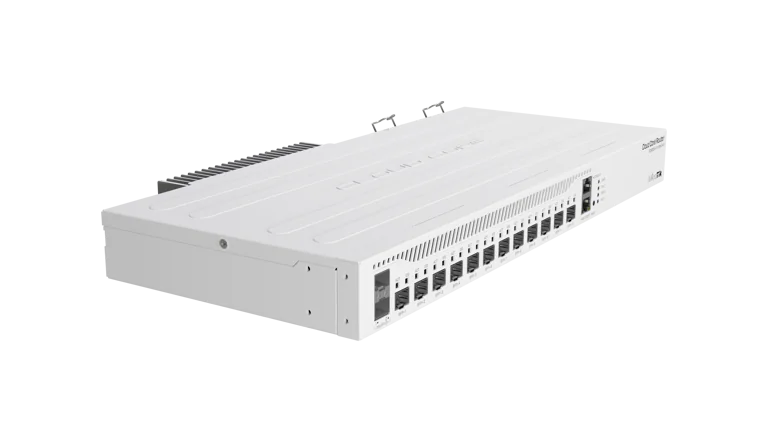
Buy MikroTik CCR2004-1G-12S+2XS Cloud Core Router in Kenya at KSh 65,000. View verified MikroTik specifications, use cases, availabi
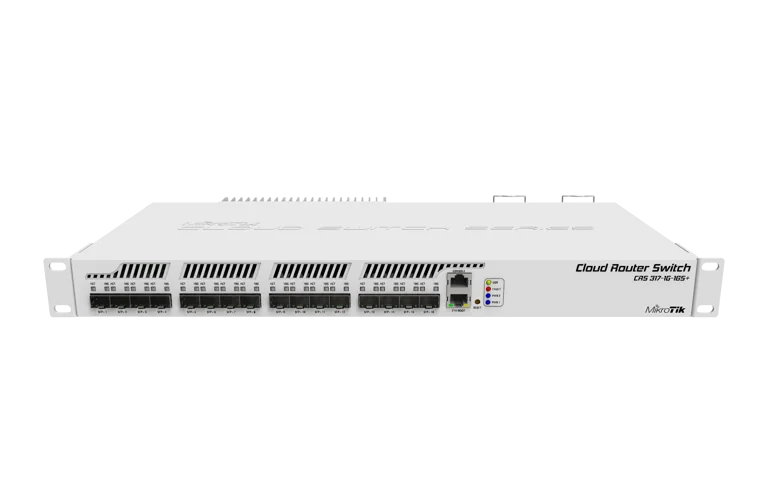
Buy MikroTik CRS317-1G-16S+RM Cloud Router Switch in Kenya at KSh 62,000. View verified MikroTik specifications, use cases, availabi
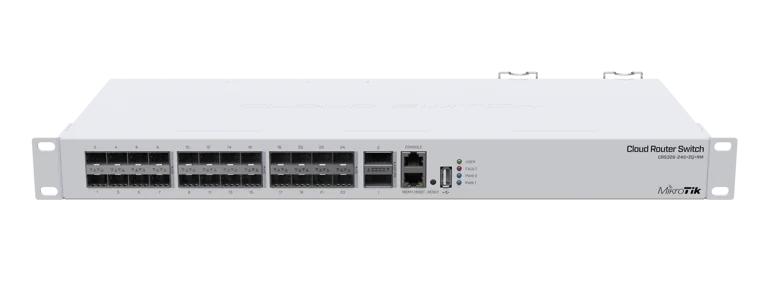
Buy MikroTik CRS326-24S+2Q+RM Cloud Router Switch in Kenya at KSh 65,000. View verified MikroTik specifications, use cases, availabi
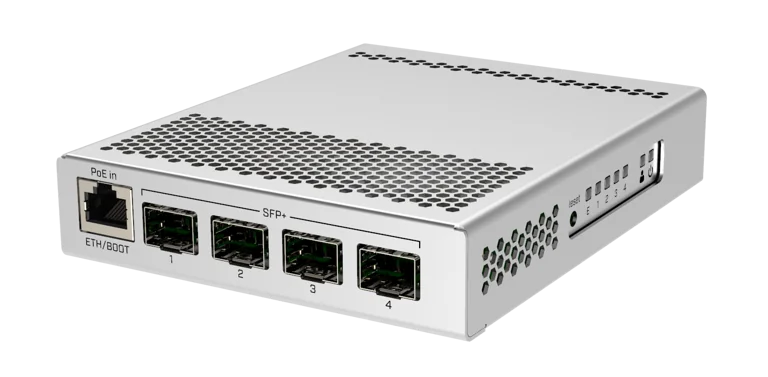
Buy MikroTik CRS305-1G-4S+IN Cloud Router Switch in Kenya at KSh 18,000. View verified MikroTik specifications, use cases, availabil