Who is this product best for?
- Office LAN expansion
- Rack or cabinet switching
- ISP or branch network aggregation

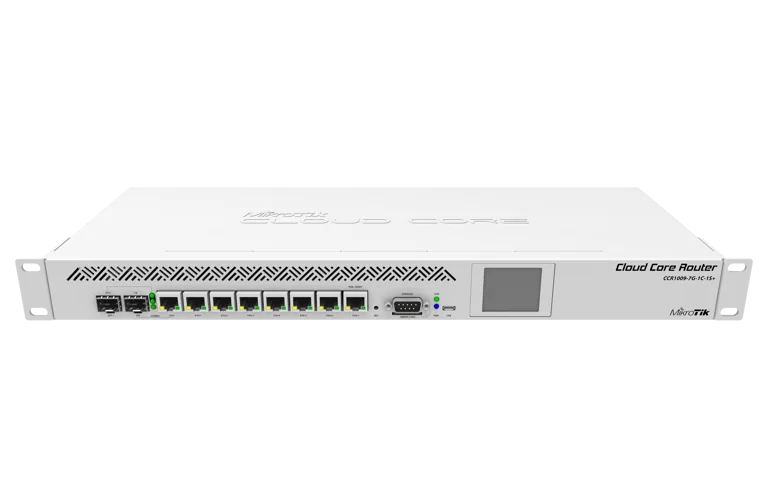
Mikrotik switches Price In Kenya
IN STOCKWorks with compatible MikroTik RouterOS networks and standard Ethernet networking equipment. Confirm port, power and mounting requirements before purchase.
Check the product label or manufacturer datasheet for exact input voltage, PoE support and power adapter requirements.

Processor: 9-core TILE, 1GHz
Memory: 2GB RAM
Connectivity: 7 Gigabit + 1 combo Gigabit/SFP + 1 × 10G SFP+
RouterOS licence: Level 6
Cooling: Passive, fanless
Discontinued by manufacturerImportant product accuracy note: MikroTik officially lists this exact model as discontinued. That does not automatically mean existing stock is unavailable or that RouterOS updates have ended. Buyers should confirm hardware condition, stock, warranty and long-term replacement requirements before ordering. Also, the manufacturer's CPU specification is 9 cores at 1GHz, not 1.2GHz.
Below is the detailed, copy-ready ecommerce description for MikroTik Kenya. It uses H2/H3 headings only, includes setup guidance and integrates all four supplied external URLs naturally within the content.
The MikroTik CCR1009-7G-1C-1S+PC Cloud Core Router is a professional wired networking solution designed for internet service providers (ISPs), business networks, educational institutions, hospitality establishments and network administrators requiring advanced routing capabilities, Gigabit Ethernet connectivity and a high-speed 10G SFP+ interface.
Powered by a nine-core Tilera TLR4-00980 processor operating at 1GHz, the CCR1009 combines 2GB RAM, seven dedicated Gigabit Ethernet ports, one Gigabit Ethernet/SFP combo interface and one 10Gbps-capable SFP+ cage in a compact, passively cooled enclosure.
The router runs MikroTik RouterOS with a Level 6 licence, giving network administrators access to routing, firewall filtering, VLAN configuration, bandwidth management, DHCP, PPPoE, HotSpot services and supported VPN technologies.
One of the CCR1009-7G-1C-1S+PC's defining features is its fanless design. Unlike many enterprise routers that use active cooling fans, this model uses heat pipes and a specially designed heatsink to dissipate heat without mechanical fan noise.
This makes it particularly attractive for offices, equipment rooms and controlled indoor installations where quiet operation is important.
The CCR1009 also includes an LCD touchscreen, microSD card slot, serial console, micro-USB interface and a smart-card slot, providing additional flexibility for supported networking and management applications.
For Kenyan businesses and ISPs, the router can serve as an internet gateway, routing platform, network segmentation device or component within a professionally designed network infrastructure.
However, prospective buyers should understand that the CCR1009-7G-1C-1S+PC is a discontinued MikroTik hardware model. This is important when considering replacement hardware, long-term expansion and commercial availability.
Discontinued hardware can remain useful in properly maintained networks, but its condition, RouterOS compatibility and replacement strategy should be evaluated before purchase.
If you are comparing this router with other equipment available in Kenya, the MikroTik CCR1009-7G-1C-1S+PC product listing at Jupitaz provides another reference for the exact model.
For purchasing information, explore MikroTik routers available in Kenya and request an updated quotation for the CCR1009-7G-1C-1S+PC.
The MikroTik CCR1009-7G-1C-1S+PC price in Kenya varies depending on the supplier, available inventory, hardware condition, exchange rates and additional equipment or services included in the quotation.
Because the manufacturer has discontinued this particular model, buyers should confirm whether a unit is new old stock, previously deployed, refurbished or otherwise supplied in a nonstandard condition.
The exact condition matters because it can affect accessories, warranty arrangements, configuration requirements and long-term reliability.
MikroTik Kenya customers should request a quotation covering the router, applicable taxes, available accessories and any installation or configuration services required.
Several factors influence the total cost of purchasing and deploying this Cloud Core Router.
Hardware condition: A new, unopened unit may have different commercial terms from an opened-box or previously used router.
Availability: Discontinued models may have limited quantities in the Kenyan market.
SFP+ modules: A compatible optical transceiver or direct-attach cable may need to be purchased separately for the 10G interface.
Network switches: Larger installations often require additional switches for wired device connections or fibre distribution.
Power backup: A suitable UPS or protected DC power system may be needed where reliable connectivity is important.
Configuration: More advanced services such as BGP, VLANs, VPNs, PPPoE or HotSpot networks may require experienced RouterOS configuration.
Support and warranty: Customers should confirm the warranty offered by the seller rather than assume that every CCR1009 unit has the same coverage.
For additional pricing research, see the MikroTik CCR1009-7G-1C-1S+PC Cloud Core Router listing at Reisen SEO.
When comparing quotations, make sure every seller is offering the exact CCR1009-7G-1C-1S+PC version, rather than the similarly named CCR1009-7G-1C-PC model without the separate SFP+ port.
The MikroTik CCR1009-7G-1C-1S+PC features a Tilera TLR4-00980 processor with nine CPU cores operating at a nominal 1GHz.
The TILE architecture provides multiple processing cores for supported RouterOS networking operations.
This allows the router to perform a range of functions, including:
IPv4 and IPv6 routing
Network address translation
Firewall filtering
DHCP server and client services
Bandwidth queues and traffic policies
VLAN configuration
PPPoE connectivity
HotSpot authentication
Supported dynamic routing protocols
Compatible VPN connections
Network diagnostics and monitoring
For a small ISP, the router may provide the processing resources required for a planned combination of routing and subscriber services.
For an office network, it can manage internet connectivity, segmentation and firewall policies.
However, processor architecture, packet size and configuration complexity influence actual performance.
Nine cores do not mean that every networking function scales evenly across all nine cores.
Users deploying demanding VPNs, extensive queues or complex firewall rules should test their expected workloads before placing the router into production.
The CCR1009 includes seven standard 10/100/1000Mbps Ethernet ports.
These provide wired connections to compatible network infrastructure such as:
Internet modems and fibre ONTs
Business network switches
Servers
Access points
Subscriber distribution equipment
Network monitoring systems
Dedicated management networks
Each Ethernet port can negotiate a maximum link speed of 1Gbps with suitable equipment and cabling.
MikroTik's updated CCR1009 design provides independent Ethernet connections to the processor rather than grouping the ports behind the shared switch-chip design used in some earlier CCR1009 revisions.
This helps remove the previous shared Gigabit limitation associated with those older switch-chip-connected ports.
For example, a network administrator can assign different ports to WAN, LAN, management and routed network segments.
The actual arrangement is determined by RouterOS configuration and is not permanently fixed by the hardware.
When a network requires additional wired ports, connect suitable MikroTik network switches available in Kenya.
An important feature of the CCR1009-7G-1C-1S+PC is its Gigabit Ethernet/SFP combo interface.
The combo interface provides two physical connection options:
A Gigabit RJ45 Ethernet connector
An SFP cage for compatible optical modules
These connections share one logical RouterOS interface.
This means both connectors cannot be counted as two separate independent network ports.
An administrator selects or configures the physical connection mode according to the deployment.
The combo interface is useful when a network may require copper Ethernet at one time and a compatible fibre Ethernet connection later.
MikroTik also documents hardware media-failover behaviour for the combo interface.
However, switching between physical media is not the same as monitoring the internet for upstream service failures.
For reliable dual-ISP failover, suitable routing, reachability monitoring and appropriate configurations are still needed.
The CCR1009-7G-1C-1S+PC includes one dedicated 10Gbps-capable SFP+ cage.
This can connect to compatible high-speed networking equipment through supported SFP+ fibre transceivers or direct-attach cables.
Typical applications include:
Connecting a 10G aggregation switch
Linking enterprise network infrastructure
Establishing a compatible fibre uplink
Connecting data-centre equipment
Supporting an ISP network backbone
Building suitable high-speed distribution links
For example, an ISP may connect the CCR1009 to a compatible 10G network switch while using Gigabit Ethernet ports for other routed connections.
A 10Gbps interface provides a higher-speed physical connection, but it does not guarantee 10Gbps routed throughput with every firewall, NAT, queue or VPN configuration.
For large installations, administrators should evaluate the router's performance benchmarks under the expected traffic characteristics.
Optical modules are selected separately according to the connected equipment and fibre specifications.
MikroTik identifies compatibility with supported 100BASE-LX, 100BASE-SX and 100BASE-BX modules through the relevant SFP interface.
This can be useful when integrating certain older fibre Ethernet links alongside modern Gigabit network equipment.
Before purchasing an SFP module, confirm the supported interface speed, optical wavelength, connector, fibre type and distance.
The router's SFP connection should not be assumed to replace a GPON or EPON optical network terminal.
PON services require equipment compatible with the internet service provider's optical access technology.
The CCR1009-7G-1C-1S+PC includes 2GB RAM.
Memory supports RouterOS processes, routing information, connection tracking and other configured networking services.
This can be useful in network environments running several services simultaneously.
For example, a business installation might use firewall filtering, DHCP, VLAN routing, monitoring and VPN services.
An ISP installation may include dynamic routing or subscriber-facing services.
However, memory capacity alone does not determine how many users or subscribers a router can handle.
Capacity planning should include packet-processing requirements, routing-table complexity, queues and other resource-intensive features.
The CCR1009 includes a RouterOS Level 6 licence.
RouterOS provides professional networking features for designing and maintaining wired networks.
Available capabilities depend on the installed RouterOS version and include:
Static and dynamic routing
Firewall and NAT
IPv4 and IPv6
DHCP services
VLANs
PPPoE functionality
HotSpot authentication
Bandwidth management
Compatible VPN technologies
Monitoring and diagnostics
Configuration scripting
Administrative access control
The included licence allows administrators to use the supported RouterOS functionality without purchasing a separate standard RouterOS licence.
Because the CCR1009 uses the TILE architecture, administrators must verify software and package compatibility before upgrading.
A RouterOS feature supported on a newer ARM64-based router is not necessarily available with identical performance or hardware acceleration on the CCR1009.
One of the most distinctive benefits of the CCR1009-7G-1C-1S+PC is its passive cooling system.
The router uses heat pipes and a heatsink rather than a mechanical cooling fan.
This offers several practical advantages:
No fan noise
No fan-bearing maintenance
Suitability for quiet office environments
Reduced dependence on moving cooling components
A quiet router can be valuable in offices, school ICT rooms, reception areas and other indoor locations where equipment operates near staff.
However, passive cooling does not eliminate the need for ventilation.
The router must be positioned so heat can dissipate naturally.
Avoid blocking its ventilation surfaces or installing it in an enclosed, excessively hot space without adequate airflow.
The CCR1009 includes an LCD touchscreen.
The display offers local access to certain device information and supported management functions.
It can be useful when checking basic operational status without first connecting a management computer.
The touchscreen does not replace the complete RouterOS configuration environment.
Advanced routing, security policies and network administration should still be handled through supported management tools such as Winbox, WebFig or the command-line interface.
The router supports two DC power input methods:
DC power jack
Passive PoE input
Both accept 18–57V DC according to MikroTik's specifications.
The router is supplied with an external 24V 2.5A power adapter in the manufacturer's documented configuration.
MikroTik also supports a redundant power arrangement when the DC jack and a compatible passive PoE input are used together.
The PoE input is associated with ether7 according to the hardware manual.
Important: The CCR1009 does not provide PoE output for powering access points, cameras or other networking equipment.
If connected devices require Ethernet-based power, use compatible injectors or dedicated PoE switches.
The CCR1009 provides one microSD card slot.
This can be useful for suitable RouterOS storage applications, subject to software support and the selected card.
Network administrators should confirm the storage requirements of the intended application.
The built-in router storage is 128MB NAND, separate from any removable microSD card.
The router includes a Mini-SIM-format smart-card slot and a micro-USB Type-AB connection.
The smart-card slot should not be mistaken for a built-in 4G or 5G cellular modem.
It does not provide mobile broadband connectivity by simply inserting a mobile operator's SIM card.
The micro-USB connection supports compatible peripheral functions, subject to RouterOS support.
Buyers requiring cellular internet should verify the compatibility of any external equipment before purchasing.
The CCR1009 includes an RS232 serial console.
This provides an alternative local administration and recovery method for suitably equipped network technicians.
Serial access can be especially useful when IP addressing, bridge changes or firewall settings prevent normal network management.
The official manual specifies a 115200-bit/s serial configuration with 8 data bits, no parity and 1 stop bit.
Technicians should use the correct serial cable and terminal configuration.
The CCR1009 has a compact enclosure measuring 272 × 190 × 44mm.
It can be placed on a suitable desktop surface or installed into a compatible rack using the supplied rackmount accessories.
This flexibility is useful for offices, network cabinets and protected indoor equipment rooms.
The router has an IP20 environmental rating and is not designed for unprotected outdoor installation.
Model warning: The CCR1009-7G-1C-PC without 1S+ is a different model. It does not have the dedicated 10G SFP+ interface and has a different RAM specification. Always confirm the full model code before ordering.
The CCR1009 can be used in appropriately sized ISP networks where advanced RouterOS routing functions are required.
Possible applications include providing routing between upstream internet connections and downstream distribution networks.
The Gigabit Ethernet ports and SFP+ interface allow suitable connections to network switches and compatible fibre infrastructure.
For example, a small regional ISP could use the CCR1009 as a routed gateway between an upstream service and a managed distribution switch.
However, because the model is discontinued, growing ISPs should compare it against newer Cloud Core Router platforms before choosing it for a fresh long-term network deployment.
For current alternatives, read our MikroTik CCR router buying guide in Kenya.
Businesses with multiple network segments may use the CCR1009 for internet routing, firewall protection and traffic control.
For example, an organisation might separate finance computers, ordinary staff devices, visitor internet and CCTV systems using VLANs or routed interfaces.
RouterOS can then apply suitable firewall rules between those networks.
For buildings requiring more Ethernet connections, attach a compatible managed switch.
Schools, colleges and training centres often require separate networks for administration, staff and students.
The CCR1009 supports appropriate RouterOS segmentation and access policies.
The router can also serve as the main internet gateway while downstream switches and access points distribute connectivity through the institution.
Network sizing should consider the number of devices, applications, available internet bandwidth and firewall or queue processing requirements.
Hotels and guesthouses may deploy the CCR1009 for managed internet access.
RouterOS HotSpot services can support captive-portal authentication and bandwidth policies.
The router can manage access for a suitable network while external wireless access points provide Wi-Fi coverage.
Since the CCR1009 has no built-in Wi-Fi, installation must include appropriate wireless infrastructure.
The dedicated 10G SFP+ interface makes the CCR1009 relevant to suitable fibre networking applications.
For example, an office might connect the router to a 10G aggregation switch through a compatible optical module or DAC cable.
The combo port provides an additional choice between Gigabit copper and compatible SFP connectivity.
For related switching equipment, explore MikroTik switches in Kenya at Orbitlink Solutions and the MikroTik switches category at MikroTik Kenya.
Choose the switch based on the number of ports, required SFP/SFP+ connectivity, VLAN features and switching capacity.
The CCR1009 can provide routing and network separation for IP surveillance installations.
Cameras and recording equipment can be placed in a separate network with firewall policies controlling access.
For camera power, use a compatible PoE switch because the router does not provide PoE output.
RouterOS supports compatible VPN technologies for secure connectivity between business locations.
A business can use a suitable VPN configuration to connect selected networks across different offices.
Actual VPN performance depends on the installed RouterOS version, encryption algorithm and workload.
Newer routers may provide better long-term choices for demanding encrypted traffic.
The CCR1009 supports RouterOS HotSpot and PPPoE services.
These may be useful for suitable managed internet installations.
A commercial setup could use a separate authentication or billing system with appropriate RouterOS integration.
However, the router's processor and RAM do not establish a guaranteed subscriber count.
Heavy queues, connection tracking, firewall filtering and authentication services can affect performance.
The combo port is useful when an organisation is transitioning between copper and compatible fibre connections.
A network may initially use the combo RJ45 interface and later migrate that interface to a supported fibre module.
Because the connectors share one logical interface, the change should be treated as a media transition rather than the addition of another independent uplink.
The CCR1009 can still be useful for network laboratories, RouterOS training and testing compatible older installations.
Administrators can study routing, VLANs, firewall rules, NAT, VPNs and other RouterOS networking concepts.
Before selecting the model for long-term training or production, consider its TILE architecture and possible differences from newer ARM64 devices.
Nine-core processor: Provides processing resources for supported professional routing tasks.
2GB RAM: Offers memory for RouterOS and suitable networking services.
Seven dedicated Gigabit Ethernet ports: Enables multiple independent copper network connections.
Gigabit Ethernet/SFP combo port: Offers flexibility between supported copper and fibre connection types.
Dedicated 10G SFP+ interface: Supports compatible high-speed uplinks.
Fanless design: Provides quiet operation.
RouterOS Level 6: Includes extensive professional networking functionality.
LCD touchscreen: Allows selected local monitoring functions.
Flexible power input: Supports DC-jack and compatible passive PoE input.
Serial console: Useful for recovery and advanced administration.
Desktop or rackmount installation: Suitable for different indoor network environments.
microSD support: Provides optional additional storage for compatible applications.
Discontinued model: Long-term hardware availability and replacement planning require additional consideration.
Older TILE architecture: Different from current ARM64 RouterOS platforms.
No built-in Wi-Fi: Requires separate wireless access points.
No PoE output: Cannot directly power access points or IP cameras.
Only one 10G SFP+ interface: Not suitable for networks requiring several independent 10G uplinks without additional equipment.
Combo interface is shared: The Gigabit RJ45 and SFP connectors cannot operate as two independent logical ports.
No integrated cellular modem: The smart-card slot is not a mobile broadband modem.
Advanced configuration required: RouterOS networking features have a technical learning curve.
Limited resources compared with newer CCR models: Large routing, firewall or VPN workloads may benefit from current hardware.
Passive cooling still requires airflow: The enclosure needs a dry and ventilated installation location.
The CCR1009 can be configured through MikroTik Winbox, WebFig or RouterOS command-line tools.
Unlike many consumer routers, professional Cloud Core Routers may not have a complete ready-to-use home internet configuration.
Do not assume that every interface already has a working firewall, DHCP server, internet connection or LAN bridge.
Before installation, identify the internet connection type and network layout.
Gather the necessary information, including:
Internet connection method
ISP-assigned IP settings
PPPoE credentials if required
DNS servers
Intended WAN port
LAN gateway and subnet
VLAN requirements
Management network
Required firewall policies
VPN or dynamic routing requirements
Use the manufacturer's compatible DC power supply.
The router supports 18–57V DC through its power jack.
A suitable 18–57V passive PoE source can also supply power through ether7.
Verify that the selected power source is electrically compatible.
Do not connect an arbitrary PoE switch or injector without checking its voltage and compatibility.
Connect a computer to the intended local configuration interface.
Open MikroTik Winbox and inspect the Neighbors tab.
If the device is discoverable, connect using the available local connection method.
A new or reset CCR may not have the same IP-addressing defaults as a typical MikroTik home router.
Check the existing configuration or use the appropriate documented recovery method.
Sign in using the valid administrator credentials.
The initial username may be admin, but the password and factory configuration depend on the specific device.
If purchasing previously used hardware, confirm that the seller has supplied valid administrative access.
Set a strong administrator password immediately.
Before making changes, inspect:
IP addresses
Interface assignments
Routing table
DHCP configuration
NAT rules
Firewall rules
Bridges and VLANs
Enabled services
RouterOS version
If an existing configuration must be preserved, save a backup and configuration export.
Use Safe Mode when making changes that could disconnect your Winbox session.
Select the appropriate Ethernet or fibre interface for your ISP connection.
For DHCP-based internet access, open:
IP → DHCP Client
Add or confirm a DHCP client on the intended WAN interface.
For PPPoE, navigate to:
PPP → Interfaces → PPPoE Client
Enter the credentials supplied by your ISP.
For static IP connections, configure the assigned IP address, subnet and gateway.
Verify that the router has a valid default route before proceeding.
Create an appropriate LAN bridge if several physical ports should share one local subnet.
Do not add the WAN interface to the local bridge unless the intended network design specifically requires it.
Assign an appropriate gateway address.
For example:
192.168.20.1/24
This is only an example and should be used only if it does not overlap with an existing network.
Configure a DHCP address pool and DHCP server for the selected LAN interface or bridge.
For a conventional private IPv4 LAN, configure source NAT where necessary.
In Winbox, open:
IP → Firewall → NAT
Create or review the appropriate source NAT policy.
Next, establish firewall rules that permit required traffic and restrict unauthorised access from the WAN.
A suitable firewall policy should consider connection state, trusted management networks, required application traffic and unwanted inbound access.
Source NAT does not replace firewall protection.
If using the Gigabit Ethernet/SFP combo interface, choose the appropriate connection mode through RouterOS.
Connect a compatible RJ45 cable or optical SFP module.
Remember that both physical connectors belong to one logical interface.
Confirm the selected mode and interface status before connecting production traffic.
If configuring media failover, test it under controlled conditions.
Insert a compatible 10G SFP+ transceiver or supported DAC cable.
Connect it to the intended switch or network device.
Verify the negotiated link status.
For fibre installations, confirm the optical module type, wavelength, fibre type and connector compatibility.
If the installation requires separate networks, create the appropriate VLANs and assign IP addresses.
Configure VLAN tags on the associated bridge or interface.
For downstream switch connections, ensure the switch VLAN configuration matches the router.
Maintain a secure management path before changing VLAN filtering.
RouterOS supports HotSpot and PPPoE functions.
For HotSpot, prepare a dedicated client-facing interface, bridge or VLAN.
Then open:
IP → Hotspot
Configure the selected network, authentication and DHCP settings.
For PPPoE subscriber networks, configure the appropriate service, address pools, authentication and subscriber management requirements.
Do not attach untrusted customer-facing interfaces directly to the router's management network.
Where required, configure an appropriate VPN protocol supported by the installed RouterOS version and architecture.
Review credentials, encryption settings, firewall rules and routes.
Test secure connectivity from an authorised endpoint.
For high-throughput VPN installations, verify the router's actual performance under the intended encryption settings.
Before production deployment:
Set strong administrator credentials.
Restrict management access.
Disable unnecessary services.
Configure firewall protection.
Review RouterOS compatibility before updating.
Back up the final configuration.
Document WAN, LAN and VLAN assignments.
Establish a recovery plan.
Because the hardware is discontinued, keep particular attention on software compatibility and the availability of replacement equipment.
After setup, verify:
WAN address and upstream connectivity
Default route
LAN gateway reachability
DHCP address assignment
DNS resolution
NAT behaviour
Firewall policies
Combo interface status
SFP+ connectivity
VLAN communication
VPN connectivity where applicable
Actual client internet access
A successful ping from the router alone does not prove that downstream devices can access the internet.
Test with real client devices and monitor CPU utilisation during expected workloads.
The manufacturer's standard documentation identifies the router, external 24V 2.5A power adapter and mounting accessories for supported installation methods.
The router also has provision for desktop placement with suitable rubber feet.
Because this model is discontinued, the accessories actually supplied may depend on the condition and packaging of the available stock.
Before ordering, confirm:
Exact CCR1009-7G-1C-1S+PC unit
Compatible power adapter
Available rackmount hardware
Device condition
RouterOS administrative access
Seller warranty terms
Do not assume Ethernet cables, optical transceivers, DAC cables or network switches are included.
The CCR1009 remains an option for certain existing network environments, but businesses building new infrastructure should consider newer MikroTik models.
FeatureCCR1009-7G-1C-1S+PCCCR2004-16G-2S+CCR2116-12G-4S+CPU architectureTILEARM64ARM64CPU cores9416CPU frequency1GHz1.7GHz2GHzRAM2GB4GB16GBDedicated Gigabit ports71612Other Ethernet1 combo Gigabit/SFPNone1 management Gigabit10G SFP+124RouterOS licenceLevel 6Level 6Level 6CoolingPassiveActiveActiveMain considerationQuiet legacy networkingModern copper-heavy networksDemanding enterprise and ISP routingThe CCR1009 may still suit a buyer who needs a quiet RouterOS device, compatible copper/fibre interfaces and specific connectivity features in an appropriately sized installation.
It may also be relevant when replacing an existing CCR1009 with the same model to minimise changes to an established network.
The MikroTik CCR2004-16G-2S+ offers a modern ARM64 platform, sixteen Gigabit Ethernet ports and two SFP+ interfaces.
It is worth considering for new business and ISP networks requiring numerous copper ports.
The MikroTik CCR2116-12G-4S+ is more appropriate for demanding routing environments requiring substantial CPU and RAM resources.
It provides sixteen CPU cores, 16GB RAM and four SFP+ interfaces.
For more information, explore the MikroTik CCR2116-12G-4S+ Cloud Core Router and our Cloud Core Router buying guide.
Pricing depends on seller inventory, hardware condition and commercial terms. Request a current quotation from MikroTik Kenya.
Yes. MikroTik's official product listing identifies this exact model as discontinued.
It features nine Tilera CPU cores operating at a nominal 1GHz.
The exact model has 2GB RAM. The similarly named CCR1009-7G-1C-PC has a different RAM specification.
Yes. It includes one dedicated 10Gbps-capable SFP+ interface.
There are seven dedicated Gigabit Ethernet ports plus one Gigabit RJ45/SFP combo interface. The combo's two physical connectors share one logical interface.
They are not independent interfaces. The combo interface selects the appropriate physical connection.
No. Separate wireless access points are required.
No. It accepts compatible passive PoE input but does not power other devices through its Ethernet ports.
Yes. RouterOS supports HotSpot services, but practical capacity depends on configuration, traffic volume and authentication requirements.
Yes. RouterOS supports PPPoE client and server configurations.
It supports compatible RouterOS VPN functionality. Actual throughput varies by protocol, encryption and RouterOS version.
No. The CCR1009-7G-1C-1S+PC uses passive cooling.
Yes. The manufacturer documents a compatible rackmount installation using the appropriate accessories.
No. The smart-card slot should not be treated as a built-in cellular modem or ordinary mobile broadband SIM interface.
Yes. It can connect through a compatible Ethernet fibre ONT, supported SFP module or SFP+ connection, depending on the service and network architecture.
Yes. It can use a compatible Ethernet internet connection from Starlink equipment. The required connection method depends on the Starlink hardware.
The TILE architecture has RouterOS software available, but upgrade eligibility and feature compatibility must be checked against MikroTik's current supported releases and the installed configuration.
Not universally. The CCR2004 uses a newer ARM64 platform and has different interface and performance characteristics. Select the model according to the actual network workload and long-term support needs.
Visit MikroTik Kenya to request current pricing and confirm availability of the exact model.
MikroTik Kenya provides product information and networking equipment for Kenyan businesses, ICT technicians, network installers and internet service providers.
Choosing professional networking equipment requires careful consideration of specifications, connectivity, compatibility and expected traffic requirements.
For discontinued hardware such as the CCR1009, it is particularly important to verify the exact model, hardware condition, available accessories and replacement options.
Customers planning new installations should also compare current RouterOS platforms to determine whether newer equipment provides a better long-term investment.
Explore our MikroTik router prices in Kenya, MikroTik switches and Cloud Core Router guide for related networking equipment and buying advice.
The MikroTik CCR1009-7G-1C-1S+PC Cloud Core Router combines a nine-core 1GHz processor, 2GB RAM, seven dedicated Gigabit Ethernet ports, a Gigabit Ethernet/SFP combo interface and a 10G SFP+ port with RouterOS Level 6.
Its silent passive cooling, flexible network interfaces, LCD touchscreen and professional management capabilities make it relevant for selected enterprise, ISP and institutional networking applications.
Because the manufacturer has discontinued the model, buyers should confirm its availability, condition, software compatibility and replacement requirements before purchasing.
Visit MikroTik Kenya to request the latest CCR1009-7G-1C-1S+PC price in Kenya and obtain guidance on compatible networking equipment.
For a newer Cloud Core Router, you can also review the MikroTik CCR2116-12G-4S+ product page before making your decision.
SEO Meta Title
CopyMikroTik CCR1009-7G-1C-1S+PC Price in Kenya | RouterSEO Meta Description
CopyBuy MikroTik CCR1009-7G-1C-1S+PC Cloud Core Router in Kenya. Features 9-core CPU, 2GB RAM, 10G SFP+ and silent cooling. Enquire about availability today.Primary Focus Keyword
MikroTik CCR1009-7G-1C-1S+PC Cloud Core Router Price in Kenya
Secondary SEO Keywords
MikroTik CCR1009 price Kenya, CCR1009-7G-1C-1S+PC specifications, MikroTik nine-core router, MikroTik fanless Cloud Core Router, MikroTik CCR1009 setup, MikroTik 10G SFP+ Router Kenya, MikroTik enterprise router, MikroTik ISP router Kenya.
Suggested Product URL Slug
mikrotik-ccr1009-7g-1c-1spc-cloud-core-router
Suggested Product Image Alt Text
MikroTik CCR1009-7G-1C-1S+PC Cloud Core Router with 9-core CPU and 10G SFP+ port
I verified the technical specifications using the official MikroTik CCR1009 product page and MikroTik CCR1009 hardware manual. These support the exact model, processor speed, interface arrangement, power configuration, passive cooling and discontinued status.
All four external links have been incorporated within appropriate paragraphs of the product description, while internal links connect the product with the MikroTik Kenya router catalogue, switch category, CCR buying guide and CCR2116 product page.
Before publishing, I recommend these final checks:
Confirm your actual selling price, availability and warranty terms.
Identify whether available units are new old stock, opened-box or used.
Retain the discontinued status in the buying guidance; do not advertise the model as newly manufactured.
Use one H1 for the WooCommerce product title; the description itself already uses H2/H3 headings.
Add accurate Product and BreadcrumbList structured data using the actual product offer. Do not invent review ratings, warranty periods or stock quantities.
Topical authority opportunity: A related article targeting “MikroTik CCR1009 vs CCR2004: Should Kenyan ISPs Upgrade?” would complement this product page, address the model's discontinued status and create a natural internal-link path toward newer MikroTik Cloud Core Routers.
Reviews are not available yet for this product.
MikroTik CCR1009-7G-1C-1S+PC Cloud Core Router Price in Kenya is currently listed as available. Stock can change, so confirm availability before placing a large order.
The current listed price is KSh 47,000.00. Prices are generated from the product catalogue and may change when inventory is updated.