Is the MikroTik L009UiGS-RM the Right Router for Your Business in Kenya?
Choosing a business router starts with understanding how your network will be used. An office with wired computers, separate wireless access points and a network cabinet has different requirements from a home that needs one device to provide both routing and Wi-Fi.
The MikroTik L009UiGS-RM is worth considering when you want a dedicated wired router and intend to manage wireless coverage separately. Before buying, assess your internet connection, equipment layout, configuration needs and total installation budget.
You can check the MikroTik L009UIGS-RM price in Kenya for current purchasing information. This guide explains what to consider when deciding whether it fits your business.
What Is the MikroTik L009UiGS-RM?
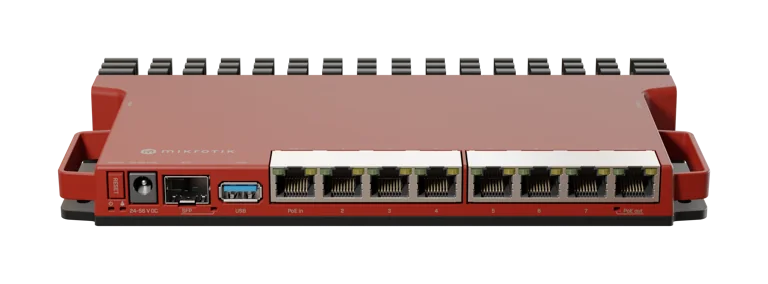
The L009UiGS-RM is a wired MikroTik router supplied with rackmount accessories. Its main specifications include:
| Feature | Manufacturer specification |
|---|---|
| Ethernet connections | Eight Gigabit Ethernet ports |
| SFP connection | One SFP port supporting 1G and 2.5G |
| Processor | Dual-core ARM, 800 MHz |
| Memory | 512 MB RAM |
| Storage | 128 MB NAND |
| Operating system | RouterOS v7 |
| Licence | Level 5 |
| Built-in Wi-Fi | None |
| USB | One USB 3.0 Type-A port |
MikroTik also lists a 24V power adapter and mounting accessories among the included parts.
The purchasing question is whether this combination matches your network. More ports or a longer feature list do not automatically make a router suitable for every workload.
Why Buy a Router Without Built-In Wi-Fi?
A wired router can be a practical choice when the best location for your networking equipment is different from the best location for wireless coverage.
For example, your internet connection may enter a building near a storage room or equipment cabinet. Placing all wireless equipment there could leave work areas poorly served. Separate access points allow you to position wireless coverage closer to the people using it.
This approach also lets you plan routing and wireless coverage independently. You can assess where access points are needed, how they will connect and what equipment suits those locations.
It is worth considering if:
- Your office already has suitable access points.
- Your router will sit in a network cabinet.
- Different rooms or floors need separate wireless coverage.
- You want wired connections for fixed equipment.
- You expect wireless requirements to change over time.
However, include the cost of access points and cabling when comparing a wired router with an all-in-one wireless model.
Which Businesses Should Consider the L009UiGS-RM?
The L009UiGS-RM can be a candidate for a small office, retail outlet or branch network, subject to the intended workload and configuration.
Offices with existing wireless equipment
If access points already provide satisfactory coverage, replacing the main router does not necessarily require replacing the wireless system. Ask your technician whether the existing equipment can remain and what configuration changes are needed.
Shops with several connected systems
A shop may have computers, payment terminals, printers and other networked equipment. Before choosing a router, list those devices and identify which need wired connections.
Also decide whether staff and customer access should be separated. That requirement should be part of the configuration brief.
Businesses organising a network cabinet
A cabinet-based installation benefits from a clear equipment layout, labelled cables and accessible power connections. Include mounting and cable management in your installation plan.
Branches with technical support
A business with an IT technician can assess the proposed configuration, document the installation and maintain it afterwards. That support arrangement matters as much as the hardware purchase.
Avoid selecting the router using staff numbers alone. The applications people use, simultaneous activity and network settings all affect the requirements.
What Should You Check Before Buying a MikroTik L009UiGS-RM?
Start with your internet connection and work through the complete network.
| Question | Why it matters |
|---|---|
| How does the ISP hand over the connection? | Determines how the router will connect and what settings are required |
| Which devices need Ethernet? | Helps establish the port layout and whether a switch is needed |
| Where is Wi-Fi required? | Determines access-point placement and cabling |
| Which applications are business-critical? | Gives the installer meaningful performance and acceptance checks |
| Do guests need access? | Helps define access restrictions |
| Who will maintain the router? | Establishes responsibility for updates, backups and troubleshooting |
Count ports according to their intended roles. A connection used for the internet uplink or another switch is not also available for an individual workstation.
Give your supplier or technician this information before asking for a recommendation.
Will It Deliver the Full Speed of Your Internet Package?
Port speed and real-world routing performance are different measurements.
MikroTik publishes test results for several configurations and packet sizes, and states that different configurations can produce lower performance. Do not treat an aggregate benchmark as a guaranteed internet speed for your installation.
For a demanding connection, ask your technician to evaluate the settings you actually need. Include any planned filtering, bandwidth management or encrypted connections in that assessment.
A useful acceptance test uses your normal business applications while several devices are active. Testing one laptop on an otherwise idle network may not represent the working day.
Can It Connect Directly to Your ISP’s Fibre?
The presence of an SFP port does not establish compatibility with every fibre service.
Before purchasing any module, ask your ISP how the connection must be delivered. You may need to retain the provider’s optical network terminal and connect the router to its Ethernet output.
If direct fibre connectivity is an option, have the provider or installer confirm the module, connection requirements and supported setup in writing.
Do not include an SFP module in your order simply because the router has an available slot. Purchase it for a confirmed connection requirement.
What Should You Know About PoE?
The L009UiGS-RM provides passive PoE output on ether8. MikroTik specifies that this output works when the router is powered through its DC jack.
Before connecting a powered device, have the installer confirm compatibility with the output voltage, power requirements and connection method.
For several access points or cameras, request a separate power plan. A router with one PoE output should not be budgeted as a replacement for a multiport PoE switch.
How Much Should You Budget Beyond the Router Price?
The hardware price is one part of the cost of a working network.
Start with the L009UiGS-RM product page at MikroTik Kenya, then identify any additional requirements.
Your quotation may need to cover:
- Wireless access points.
- An additional Ethernet switch.
- Network cables and installation materials.
- Configuration and testing.
- Power backup.
- Delivery and on-site labour.
- Follow-up technical support.
Request separate prices for hardware and services. This makes it easier to understand the quotation and compare equivalent offers.
Ask whether taxes are included and whether any service attracts recurring charges. Do not assume installation is included in an advertised router price.
How Should You Compare L009UiGS-RM Offers in Kenya?
Compare the exact model, package condition and service scope.
For additional purchasing references, review the Orbitlink Solutions L009UiGS-RM listing, Reisen SEO L009UiGS-RM listing and Jupitaz L009UiGS-RM listing.
Confirm current availability, prices and terms directly with each seller.
Before paying, request confirmation of:
- The full model number: L009UiGS-RM.
- Whether the unit is new, used or refurbished.
- Included power and mounting accessories.
- Hardware warranty and return arrangements.
- Delivery timing.
- Any configuration or installation services.
A lower advertised price may represent a different package. Compare the final payable amount for the equipment and assistance you need.
What If You Are Planning a Paid Hotspot?
A paid hotspot requires a plan for wireless coverage, customer access and billing.
If you are evaluating Hotspot Billing System, ask the provider to confirm support for your proposed router configuration, integration requirements and service charges before buying.
Define how customers should connect, how access will be managed and who will troubleshoot problems. Ask the installer to assess the expected workload rather than promising a fixed customer capacity from the router model alone.
Budget separately for the router, access points, installation and billing service so the operating costs are clear.
Frequently Asked Questions
Does the MikroTik L009UiGS-RM provide Wi-Fi?
No. Plan for separate access points if your devices need wireless access.
Is it suitable for home use?
It may suit a home with wired networking and separate access points. Include setup assistance in the budget if you do not have experience configuring the network.
Can it replace my ISP router?
Confirm this with your provider. The answer depends on the connection method, required credentials and any provider-specific services you use.
How many users can it support?
There is no useful universal number. Assess simultaneous activity, applications, connection speed and configuration. Wireless capacity also depends on the access points and coverage design.
Where can I check the current price?
Visit the MikroTik L009UIGS-RM price and product details page, then confirm stock, package contents and delivery before ordering.
Is the L009UiGS-RM the Right Purchase for You?
Consider the L009UiGS-RM when you want a dedicated wired router, have a clear plan for wireless coverage and can arrange suitable configuration and support.
Before placing an order, write down your connection requirements, list your existing equipment and request an itemised quotation. That preparation helps you buy a router that fits the network you need to build.
