Should You Buy a New or Used MikroTik L009UiGS-RM in Kenya?
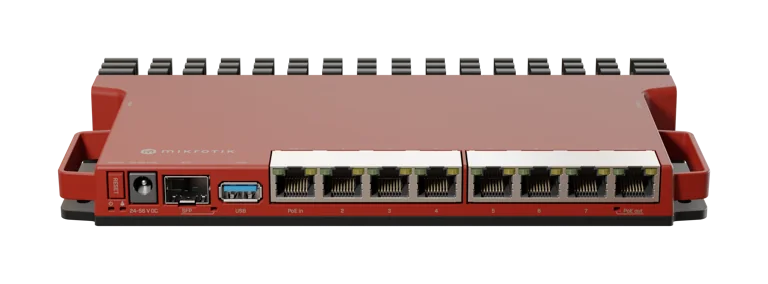
A used MikroTik L009UiGS-RM may offer a lower purchase price, but the saving only matters if the router works properly, includes the equipment you need and can be prepared for your network without unexpected expense.
A new unit may be preferable when you want a clearly documented purchase, a complete package and agreed support terms. However, you should confirm those details rather than assume every new listing includes the same service.
Before comparing offers, check the MikroTik L009UIGS-RM price in Kenya as a reference. Then compare the complete cost and condition of each available unit.
What Is the Difference Between New, Used and Refurbished?
Ask the seller to describe the condition in writing.
| Description | What to clarify |
|---|---|
| New | Whether the unit has been deployed, opened or configured |
| Open-box | Why it was opened and whether anything is missing |
| Used | Previous use, known faults and available testing |
| Refurbished | Who refurbished it, what work was performed and what was tested |
These labels do not provide a complete history.
A refurbished router may have received repairs, cleaning or testing, but the term alone does not tell you which. Likewise, an open box does not necessarily mean a faulty device.
Request specific information that you can assess before deciding.
When Might Buying New Make Sense?
A new purchase is worth considering when the router will support important daily operations and you need straightforward procurement records and clearly agreed after-sales arrangements.
For example, a business opening an office on a fixed date may prefer a complete package that can be delivered, configured and tested before staff arrive.
Ask the seller to confirm:
- The exact model and condition.
- Included accessories.
- Hardware warranty terms.
- The return process for a faulty unit.
- Whether configuration is included.
- Expected delivery timing.
A new router still needs configuration and testing. Its purchase condition does not establish that it is ready for your particular ISP connection or office requirements.
When Might a Used Router Be Worth Considering?
A used unit may suit a buyer who can arrange a proper inspection, test the required interfaces and prepare the device before deployment.
It may also be considered for a learning environment or as a spare, provided its condition and compatibility are established.
The value depends on the price difference after accounting for missing parts and preparation work.
Before accepting a used offer, ask yourself:
- Can the unit be tested before acceptance?
- Are you comfortable with the documented condition?
- Is administrator access available?
- Are suitable power and mounting accessories included?
- What happens if a fault appears shortly after purchase?
If those questions remain unanswered, the apparent discount is difficult to evaluate.
What Should You Check Before Buying a Used MikroTik L009UiGS-RM?
Confirm the exact model
Ask for clear photographs of the device label and the actual unit being sold.
The L009UiGS-RM is the wired model. MikroTik lists eight Gigabit Ethernet ports, an SFP port supporting 1G and 2.5G, and no built-in Wi-Fi.
A listing described simply as “MikroTik L009” is not enough to confirm the model.
Inspect the enclosure and connectors
Look for damaged connectors, corrosion, loose sockets or signs of rough handling.
Cosmetic scratches do not necessarily affect operation, but physical condition can identify areas that deserve closer testing. Ask about repairs or known damage rather than inferring a complete history from appearance.
Check the power supply
Confirm that the adapter is suitable for the router and the intended use.
MikroTik lists a 24V 1.5A adapter in the standard package. If the seller supplies a replacement, have its compatibility verified.
Do not assume an adapter is suitable just because its plug fits.
Confirm the accessories
MikroTik also lists rackmount accessories, a screw kit and adhesive pads among the included parts. Compare these with what the seller is actually providing.
Missing mounting parts may matter if the router is going into a cabinet, even if they would not affect a temporary desk installation.
How Should the Router Be Tested?
Ask for tests that reflect the functions you plan to use.
For a used unit, a brief power-on demonstration is limited evidence. It does not establish the condition of every interface or stability under traffic.
| Test | What it helps establish |
|---|---|
| Start-up and administrator access | The device boots and can be managed |
| Ethernet checks | Required ports establish links and pass traffic |
| Sustained traffic test | The setup remains stable during the agreed test |
| SFP test, if needed | The intended module and connection work |
| Power checks | The chosen supply supports normal operation |
| Controlled restart | The device returns to the expected operating state |
Use known-good cables and compatible equipment so that accessory faults do not confuse the assessment.
No short test can guarantee future reliability, but a defined test is more useful than an unsupported statement that the router “works perfectly.”
What About Existing Passwords and Configuration?
Confirm that the seller can hand over a device you can administer.
Before deploying a previously used router, have a qualified technician establish a clean, trusted setup using the manufacturer’s documented procedures. Do not simply retain an unknown configuration because it provides internet access during a demonstration.
The preparation should address previous administrator access, remote-management arrangements and settings that do not belong in your network.
Avoid importing an old configuration without reviewing it. Rules intended for another business may not match your ISP, addressing or access requirements.
Agree who will perform this work and include the cost in the comparison.
How Should You Compare the Total Cost?
Compare the amount needed to make each option ready for service.
Used purchase total = router + missing accessories + inspection and preparation + delivery + installation.
New purchase total = router package + required configuration + delivery + installation.
These are budgeting categories, not assumptions that every seller charges for each item.
For example, a used unit without a suitable adapter or mounting parts may need additional purchases. A new unit sold without configuration may still require paid technical assistance.
Request itemised quotations so the difference is visible.
What Warranty and Return Questions Matter?
Ask for the terms that apply to the specific unit.
Do not assume that the original owner’s warranty automatically transfers or that a seller’s testing promise is equivalent to a hardware warranty.
Clarify:
- Who handles faults.
- What documentation is required.
- Whether a return window applies.
- Who pays transport costs.
- Whether the remedy involves inspection, repair or replacement.
- What exclusions the seller specifies.
Keep the invoice or receipt and record the device serial number. The written agreement is more useful than a verbal assurance that problems will be “sorted out.”
Where Can You Compare L009UiGS-RM Offers in Kenya?
Begin with the MikroTik Kenya L009UiGS-RM product page.
Additional purchasing references include the supplied Orbitlink Solutions L009UiGS-RM listing, Reisen SEO L009UiGS-RM listing and Jupitaz L009UiGS-RM listing.
Confirm current prices, stock, condition and package contents directly. These references should not be taken as a claim that any particular seller offers used or refurbished units.
What If the Router Will Run a Paid Hotspot?
Treat service continuity and preparation as part of the buying decision.
If you plan to integrate Hotspot Billing System, ask the provider to confirm the proposed configuration, integration requirements and support arrangements.
Test the complete installation before customers depend on it. That includes wireless coverage, customer access and the billing workflow.
A saving on the router should be weighed against the time and cost of preparing and supporting the service.
Frequently Asked Questions
Is a used L009UiGS-RM automatically a bad purchase?
No. Evaluate its condition, testing, accessories, preparation requirements and price. A clearly documented offer is easier to assess than one with an unknown history.
Does a reset prove the hardware is healthy?
No. Configuration preparation and hardware testing answer different questions. Both may be needed before deployment.
Should I buy a router if the seller cannot provide administrator access?
Ask the seller to resolve access and demonstrate the device before acceptance. Budgeting on the assumption that an unknown access problem will be easy to fix adds uncertainty.
Is an unopened box enough to verify the purchase?
Confirm the actual model, invoice, package contents and seller terms. Packaging alone does not establish every detail of the transaction.
Choose Based on Condition and Complete Cost
Compare the saving with the work needed to make the router ready for your network. Ask for clear condition details, test results and written purchase terms.
To establish your starting budget, review the MikroTik L009UIGS-RM price and product details, then compare each offer on the complete package you will receive.
