MikroTik RB750UPr2 Maintenance and Backup Guide for Kenyan Businesses
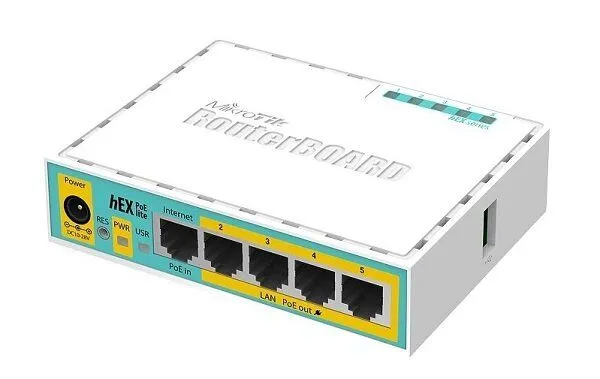
A network is easier to maintain when its configuration, connections and recovery procedures are documented. Without these records, even a small equipment fault can take longer than necessary to resolve.
For businesses using the MikroTik RB750UPr2 hEX PoE lite, routine maintenance should focus on preserving a working configuration, checking physical connections and identifying problems before making changes.
If you are researching the MikroTik RB750UPr2 hEX PoE lite Price in Kenya, include maintenance and installer handover in your purchasing plans. Knowing who will support the router is as useful as knowing where it will be installed.
Record What Your RB750UPr2 Connects To
Start with a simple equipment record.
Identify the internet provider’s equipment, the router, connected switches and wireless access points. Label the Ethernet cables so someone can trace each connection without guessing.
Keep a record of:
- The router’s model and serial number.
- Its installed RouterOS version.
- The purpose of each connected port.
- Devices receiving power through the router.
- The person responsible for administration.
- The location of configuration backups.
Store passwords separately in a secure password manager. A general network diagram should not expose administrative credentials.
Update the record whenever equipment or connections change.
Create a Backup While the Network Is Working
The most useful recovery point is a configuration that you know works.
Create a backup after the initial installation has been tested. Make another before substantial changes, and save a new verified backup after those changes have been accepted.
RouterOS provides a binary backup feature for restoring a configuration on the same device. MikroTik recommends using the same RouterOS version when restoring it. Backup files contain sensitive information and should be encrypted and stored securely. MikroTik Documentation
Give each backup a descriptive filename, such as:
office-rb750upr2-before-network-change-2026-10-18.backup
Keep a short note explaining what was working when the file was created. A filename alone may not tell a future technician whether the backup was made before or after a problem.
Store a Copy Away From the Router
A backup stored only on the router may be unavailable when that device fails or is lost.
Download a copy and keep it in controlled storage that authorised support staff can access. Protect the backup password separately and make sure the person responsible for recovery knows how to retrieve it.
MikroTik’s documentation notes that, on RouterOS versions from 6.43 onward, a backup created without a supplied password is unencrypted. Do not assume that creating a backup automatically protects its contents. MikroTik Documentation
Avoid sending backup files through public support groups or attaching them to unrestricted messages. Share only what an authorised technician needs.
Understand the Limits of a Backup
A backup is not a universal migration file for every MikroTik router.
MikroTik documents that binary backups include device MAC addresses. Restoring them therefore requires care, particularly when replacement hardware is involved. Some services, including User Manager and The Dude, require their own backup procedures. MikroTik Documentation
Ask your installer to explain what the saved files cover and what would need to be recreated separately.
If you later purchase a different model, have its configuration reviewed rather than assuming the existing backup can be loaded unchanged.
For example, the MikroTik hEX RB750Gr3 at Jupitaz is a different product from the RB750UPr2. Any replacement plan should account for both configuration and hardware differences.
Inspect Cables and Power Connections
Physical checks can reveal problems that software changes will not solve.
Look for loose connectors, damaged cable jackets, strained plugs and equipment that has been moved without updating the cable labels. Check that power adapters are secure and protected from accidental disconnection.
For devices powered through the router, keep the approved power arrangement documented. Do not replace an adapter simply because another one has a connector that fits.
The RB750UPr2 uses passive PoE output on ports 2–5, with output voltage following the router’s input voltage. Changing the power source can therefore affect attached equipment. mikrotik.com
If a replacement adapter is needed, provide the supplier with the router model and details of its powered devices.
Plan Software Changes During a Maintenance Window
Avoid making substantial changes while employees depend on the connection for critical work.
Before a software update or configuration adjustment:
- Record the current version and working state.
- Save and download an appropriate backup.
- Review the proposed change and its requirements.
- Arrange local access if remote connectivity is lost.
- Agree on the tests needed before returning the network to service.
After the change, verify internet access, printing, business applications and other essential tasks.
Do not make several unrelated adjustments at once. Keeping changes focused makes it easier to identify which adjustment caused an improvement or a problem.
Investigate Recurring Problems Before Rebooting
A restart may temporarily restore service without explaining why the interruption occurred.
When a problem repeats, record when it happened, who was affected and whether any equipment lost power. Note whether the issue affected wired connections, wireless connections or both.
Useful observations include:
- The time the interruption began.
- Which devices remained reachable.
- Whether the power supply changed over to backup.
- Whether cables or equipment had recently been moved.
- Any configuration changes made beforehand.
This information helps a technician narrow the investigation. Repeated resets or undocumented changes can remove useful clues.
Use a Practical Maintenance Schedule
The following is a suggested routine, not a manufacturer-mandated service interval.
| When | Suggested check |
|---|---|
| After installation | Verify everyday tasks, document connections and save a backup |
| Monthly | Review recurring complaints and inspect accessible cables and power connections |
| Before significant changes | Save a recovery point and confirm administrative access |
| After equipment replacement | Update records and test the complete connection |
| Periodically | Confirm backups are accessible and review the recovery procedure |
Adjust the schedule to the importance of the network and how often it changes.
A quiet home office may need fewer checks than a busy business where several people regularly modify equipment.
Include Maintenance Support in Your Purchase
When comparing quotations, ask what happens after installation.
Does the supplier provide configuration assistance? Will you receive a backup and administrative handover? Are later support visits included or charged separately?
You can enquire through the RB750UPr2 listing at Tawa, the hEX PoE lite listing at Reisen SEO, and the RB750UPr2 listing at Orbitlink Solutions.
Confirm each supplier’s actual terms rather than assuming that configuration, recovery assistance or ongoing maintenance is included.
Frequently Asked Questions About RB750UPr2 Maintenance
How often should I back up my RB750UPr2?
Save a verified backup after installation and around significant configuration changes. A network that changes frequently needs more frequent recovery points.
Is a backup stored on the router enough?
Keep an additional protected copy elsewhere. A file on the router may be inaccessible if the device fails.
Should I factory-reset the router when the internet stops working?
Investigate first. A reset removes configuration and can make recovery harder if you do not have the required records and backup.
Where can I check the MikroTik RB750UPr2 price in Kenya?
Visit the MikroTik RB750UPr2 hEX PoE lite Price in Kenya page. Ask about installation, configuration handover and support alongside the equipment price so your network has a clear maintenance plan from the start.
