MikroTik RB750UPr2 Installation Mistakes to Avoid in Your Network
A successful network installation involves more than connecting cables and checking whether a website opens. Equipment compatibility, cable routing, power arrangements and documentation all affect how easily the network can be maintained.
The MikroTik RB750UPr2 hEX PoE lite can serve a useful role when its capabilities match your requirements. However, buying it without a clear installation plan can lead to additional expenses or disappointing performance.
Before comparing the MikroTik RB750UPr2 hEX PoE lite Price in Kenya, review these common mistakes and the practical steps that help prevent them.
1. Buying Before Listing Your Network Requirements
A router should be selected around the work it needs to perform.
Start by listing your computers, printers, access points and other connected equipment. Record which devices require Ethernet connections, which use WiFi and which need power over Ethernet.
Next, identify your most demanding activities. Routine browsing creates different requirements from large backups or frequent file transfers.
Your installation brief should answer:
- How many wired connections are required?
- Where will wireless coverage be needed?
- Which devices need power from the network?
- What internet speed must the installation accommodate?
- What equipment might be added later?
Giving suppliers this information helps them quote for a complete solution.
2. Assuming the RB750UPr2 Has Gigabit Ethernet
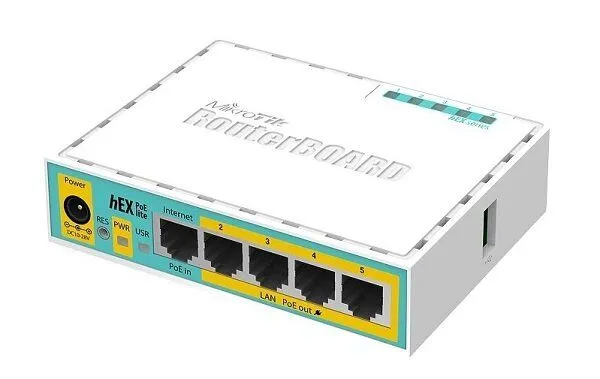
The RB750UPr2 has five 10/100 Ethernet ports. These are Fast Ethernet connections, not Gigabit ports. mikrotik.com
This distinction matters when selecting an internet service or planning data transfers. A faster subscription does not remove a slower physical link in the network.
Check both your current needs and likely upgrades. If you already expect to require faster Ethernet connections, assess suitable alternatives before buying.
The MikroTik hEX RB750Gr3 at Jupitaz is a different model that can be included in your comparison. Review its power capabilities separately rather than assuming it is interchangeable with the RB750UPr2.
3. Connecting PoE Equipment Without Checking Compatibility
The RB750UPr2 supplies passive PoE on Ethernet ports 2–5. Its output voltage follows the input voltage, and MikroTik specifies limits of 1 A per port and 2 A combined. mikrotik.com
Before connecting a powered device, check its accepted voltage, PoE method, polarity, pin arrangement and maximum consumption.
Do not use the presence of an Ethernet socket as evidence of compatibility. Similarly, the word “PoE” in two product descriptions does not establish that the products can safely work together.
Provide your supplier with exact endpoint model numbers. When enquiring through the RB750UPr2 listing at Tawa, request confirmation for the intended combination of router, power supply and connected devices.
4. Installing Cables Before Testing the Equipment
Permanent installation makes troubleshooting harder if you have not first confirmed that the equipment works together.
Begin with a short bench test. Check that the router powers up, the connected equipment operates and the intended internet connection works.
Then test using the actual cable runs before securing everything permanently.
A useful sequence is:
- Verify equipment models and power requirements.
- Test the devices using known-good cables.
- Install and inspect the planned cable runs.
- Repeat the functional tests through those runs.
- Label and secure the completed connections.
This approach helps distinguish an equipment problem from a cabling problem.
5. Choosing an Access-Point Location Only for Convenience
The easiest installation location is not always the best place to provide wireless coverage.
Assess where people actually work. Meeting rooms, reception areas and desks behind walls may need particular attention.
Test coverage before permanently mounting the access point. Use the applications employees rely on, and check several locations rather than standing beside the equipment.
If the signal is weak in one room, investigate placement and the physical environment before assuming the router needs replacement.
When discussing your installation through the MikroTik RB750UPr2 listing at Orbitlink Solutions, include a description of the premises and the areas requiring wireless access.
6. Leaving No Capacity for Additional Connections
A network may begin with a computer, printer and access point, then expand within a few months.
Count every connection in the proposed layout, including links between network devices. Decide whether an additional switch is needed now or likely to be required later.
Also plan physical space for future equipment. Leave cables accessible and avoid tightly packing adapters and network devices into a cabinet that is difficult to service.
A little planning can prevent an otherwise simple expansion from becoming a complete rewiring exercise.
7. Backing Up Only One Part of the Connection
Powering the router during an outage does not help if essential upstream or downstream equipment switches off.
List every device needed to keep users online. Depending on the installation, that may include a modem, fibre terminal, access point and switch.
Choose backup equipment based on the complete load and desired operating time. Then test the arrangement by disconnecting mains power under controlled conditions.
Check what happens when power returns as well. Record any restarts or connection delays so they can be investigated before the network becomes essential to daily operations.
8. Finishing Without Testing Everyday Tasks
Opening one website confirms very little about the completed installation.
Test the work users need to perform. That may include printing, accessing business software, transferring files and joining calls.
Repeat important tests from different work areas. Where possible, test while several devices are active.
Record any problems before accepting the installation as complete. A specific note such as “calls disconnect in the meeting room” gives the installer something concrete to investigate.
Avoid judging the entire network solely by a single speed-test result.
9. Failing to Request Documentation and a Backup
Ask the installer for a clear handover.
It should identify the equipment, cable connections, management arrangements and configuration backup. Administrative credentials should be stored securely and shared only with authorised people.
Record later changes with a date and a short explanation. This helps the next technician understand why the network is configured as it is.
Before substantial changes, establish how access will be recovered if something goes wrong. A backup is useful only when someone knows where it is and how to restore it.
10. Comparing Quotations With Different Inclusions
Two quotations may appear to cover the same installation while including different equipment or services.
Check whether each quotation includes cabling, access points, power accessories, configuration, testing and handover documentation.
You can consult the MikroTik RB750UPr2 listing at Reisen SEO when comparing product information. Confirm current pricing and the exact supplied accessories directly.
Ask for warranty and installation-support terms before purchasing rather than assuming they are identical across suppliers.
Frequently Asked Questions About MikroTik RB750UPr2 Installation
Should I test the RB750UPr2 before mounting it?
Yes. Testing the equipment together first helps identify compatibility or configuration issues before permanent cabling makes them harder to isolate.
Can I connect any PoE access point?
No. Confirm the exact device’s power requirements against the router’s passive PoE capabilities before connecting it.
What should an installer provide at handover?
Request an equipment list, labelled connections, secure administrative access, a configuration backup and confirmation that agreed tasks were tested.
Where can I check the MikroTik RB750UPr2 price in Kenya?
Visit the MikroTik RB750UPr2 hEX PoE lite Price in Kenya page. Include your device list and installation requirements when requesting a quotation so the proposed equipment matches the network you need.
