Is the MikroTik RB4011iGS+RM the Right Router for Your Business in Kenya? 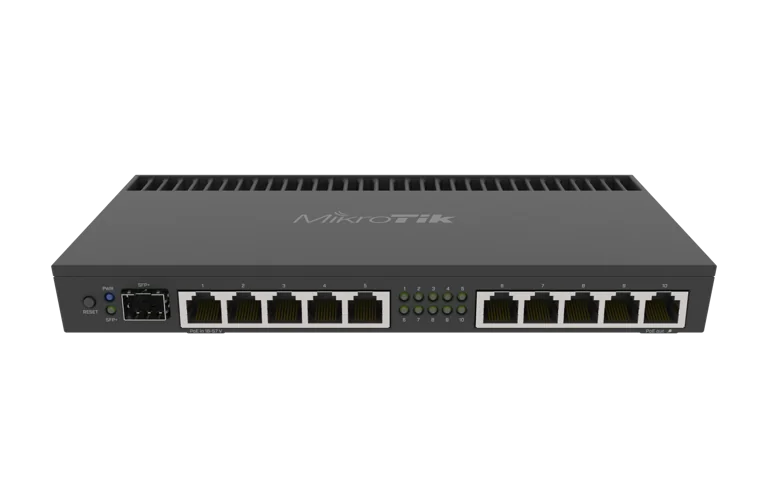
The MikroTik RB4011iGS+RM is worth considering when your business needs a dedicated wired router with several Ethernet connections and a 10G SFP+ interface. Whether it is the right purchase depends on your internet connection, network layout and the configuration you intend to run.
An office using separate wireless access points has different requirements from a shop replacing an all-in-one Wi-Fi router. A busy hotspot also needs a different assessment from a small branch primarily using email and cloud applications.
Before ordering, check the MikroTik RB4011iGS+RM price in Kenya, then compare the complete installation cost against your requirements.
This guide explains the purchasing decisions that matter before choosing the RB4011iGS+RM.
What Is the MikroTik RB4011iGS+RM?
The RB4011iGS+RM is the wired Ethernet model in the RB4011 family. Its key specifications include:
| Feature | Specification |
|---|---|
| Ethernet connections | Ten Gigabit RJ45 ports |
| Additional interface | One 10G SFP+ port |
| Processor | Quad-core ARM |
| RAM | 1 GB |
| Storage | 512 MB NAND |
| Operating system | RouterOS v7 |
| RouterOS licence | Level 5 |
| Built-in Wi-Fi | None |
| PoE output | Passive PoE on ether10 |
| Mounting | Rack ears included for a standard 1U installation |
These specifications are published by MikroTik for the RB4011iGS+RM. Confirm the full model code when purchasing, particularly when comparing it with other RB4011 variants.
When Should a Business Consider the RB4011?
Start with the connections and workload your network needs.
The RB4011 may be a candidate when you have several wired devices, existing access points and a requirement for configurable network access. It may also suit a planned installation involving compatible equipment with an SFP+ uplink.
Useful purchasing questions include:
- How many devices need wired connections?
- Which applications run during the busiest period?
- Does the network need separate staff and guest access?
- Is a faster uplink required for a specific connection?
- Who will configure and maintain the equipment?
The answers give your installer a basis for assessing suitability. Employee count alone is not enough.
You can explore the wider MikroTik router range in Kenya if the assessment identifies different requirements.
Do Ten Ethernet Ports Mean You Do Not Need a Switch?
Not necessarily, but they provide flexibility when planning a small wired installation.
Count the internet handover, access points, printers and uplinks alongside computers. A port used for one connection is unavailable for another.
For example, an illustrative office layout might need:
| Connection | Ports required |
|---|---|
| ISP equipment | 1 |
| Four desktop computers | 4 |
| Two access points | 2 |
| Network printer | 1 |
| Total | 8 |
This leaves two Ethernet ports unallocated in that example. It does not establish that every office with similar equipment should use the same layout.
A separate switch may still be useful for additional desks, equipment in another room or multiple powered devices. Have the installer consider cable routes and future additions before finalising the design.
What Is the Benefit of the 10G SFP+ Port?
The SFP+ port provides a faster interface option for a compatible connection.
Its value depends on what will be connected at the other end. For example, your network design may call for an uplink to suitable switching equipment.
Before buying a module or cable, confirm compatibility with both devices. Identify the required speed, cable type and distance.
The interface does not automatically give every workstation a 10G connection, increase your internet subscription speed or guarantee 10G routing under every configuration.
If you have no planned use for it, treat it as an available capability rather than a reason to buy unnecessary accessories.
Will the RB4011 Improve Your Internet Speed?
It may help if your current router is a demonstrated bottleneck. It cannot increase the speed delivered by your ISP.
Before replacing equipment, identify whether the problem affects wired users, wireless users or both. Check whether it occurs all day or mainly during uploads, backups or simultaneous meetings.
MikroTik publishes different performance results for different configurations and packet sizes, and cautions that other setups may produce lower results.
Ask your technician to assess the intended workload, including any filtering, traffic policies and encrypted connections.
A useful recommendation should explain which limitation the purchase addresses.
Does the RB4011iGS+RM Provide Wi-Fi?
This model requires separate wireless access points.
That arrangement allows the router to sit near the internet handover or in a cabinet while access points are positioned where coverage is needed.
For an existing office, check whether suitable wireless equipment can be reused. For a new installation, request a coverage plan that accounts for work areas, meeting rooms and building layout.
Include access-point power and cabling in the budget. The router price alone does not represent the cost of a complete wireless network.
Can It Power Access Points or Cameras?
The passive PoE output on ether10 can be useful for a compatible device, but compatibility needs checking.
MikroTik lists different output-current limits for low- and high-voltage operation. Ask the installer to verify the receiving device’s PoE type, accepted voltage and maximum demand against the chosen power arrangement.
Do not assume that every device labelled “PoE” can be powered directly.
For several cameras or access points, budget for suitable power equipment such as a compatible PoE switch. One powered output is not a replacement for a multi-device power plan.
Is It Suitable for a Hotspot Business?
Assess the router as one component of the complete hotspot installation.
A paid Wi-Fi service also needs suitable access points, an appropriate internet subscription, customer-access controls and a tested payment workflow.
If you are considering Hotspot Billing System or Tajira, ask the provider to confirm compatibility with the exact router and proposed configuration.
Discuss:
- Expected simultaneous activity.
- Package speeds and durations.
- Required payment integration.
- Wireless coverage.
- Support responsibilities.
- Recurring platform charges.
Avoid choosing hardware from a fixed “maximum users” claim without understanding the conditions behind it. Registered accounts and active customers are different measurements.
What Should You Check Before Buying the MikroTik RB4011iGS+RM?
Prepare a purchasing brief and send the same requirements to each supplier.
| Check | What to confirm |
|---|---|
| Exact model | RB4011iGS+RM |
| Condition | New, open-box, used or refurbished |
| ISP compatibility | Supported handover and required settings |
| Package contents | Power supply, mounting parts and any bundled accessories |
| Configuration | Specific work and testing included |
| Warranty | Terms, claim process and responsible seller |
| Delivery | Availability, destination and timing |
| Support | Included assistance and separately charged services |
MikroTik lists a 24V 1.5A adapter and rackmount accessories with the standard package. Confirm what the actual seller’s offer contains.
Ask for optical modules and other extras to be itemised rather than assuming they are included.
How Should You Compare RB4011 Prices in Kenya?
Begin with the RB4011iGS+RM product page at MikroTik Kenya.
Additional purchasing references include the supplied Tawa RB4011iGS+RM listing and Reisen SEO RB4011iGS+RM listing. For broader model comparisons, review Orbitlink Solutions’ MikroTik routers and gateways category.
Confirm current prices, stock and terms directly.
Compare the total cost of equivalent offers:
Router + required accessories + configuration + installation + delivery.
Record recurring support or billing-platform fees separately. A hardware-only quotation and a complete installation package represent different purchases.
What Should You Test After Installation?
Agree on acceptance checks before the installer starts.
Test normal business activity, including wired access, wireless coverage, printing and important applications. Include simultaneous use that resembles a busy working period.
Also verify:
- Guest restrictions operate as intended.
- Authorised administrators can manage the network.
- Settings remain in place after an agreed restart.
- Equipment and port assignments are documented.
- Recovery information is available.
If you are replacing a working router, keep the previous setup available until the new installation passes its checks.
Frequently Asked Questions
Is the RB4011iGS+RM an all-in-one wireless router?
No. Include separate access points if your devices need Wi-Fi.
Can it replace my ISP router?
Possibly, depending on the service requirements. Confirm which provider equipment must remain before changing the connection.
Is the SFP+ port necessary for every installation?
No. Purchase modules or cables only for a confirmed compatible connection.
Can I configure it myself?
That depends on your networking experience and required setup. If needed, include professional configuration and a documented handover in the quotation.
Should I upgrade just because my current router has fewer ports?
First determine whether the issue is connection count, processing capacity or another limitation. An additional switch may address a port shortage without requiring a router replacement.
Choose the RB4011 Around a Defined Requirement
The RB4011iGS+RM is worth assessing when its wired connections and capabilities match your business network. Confirm the workload, wireless arrangements and installation scope before committing to the purchase.
Review the MikroTik RB4011iGS+RM price and product details, then request an itemised quotation based on the equipment and services your business needs.
