What Does It Cost to Buy and Set Up a MikroTik L009UiGS-RM in Kenya?
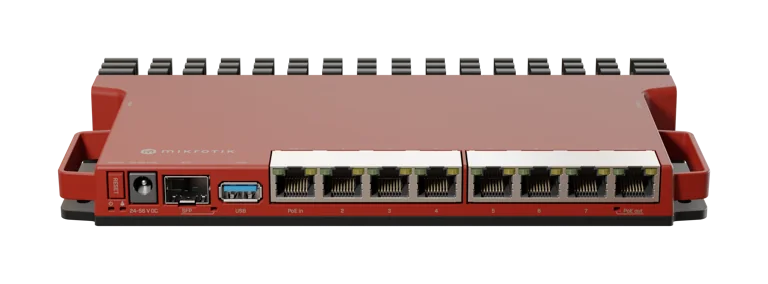
The cost of a MikroTik L009UiGS-RM installation depends on what you already have and what your network needs. Replacing a router in a working office is a different project from installing equipment, cabling and wireless coverage in new premises.
Start with the MikroTik L009UIGS-RM price in Kenya, then add the equipment and services required to make your installation work.
A useful budget separates the router purchase from configuration, physical installation and ongoing services. This helps you compare quotations fairly and avoid discovering missing costs after placing an order.
Why Does the Total Setup Cost Vary?
Two buyers can purchase the same router and spend different amounts on installation.
One business may already have suitable cables, switches and access points. Another may need those items installed before staff can connect.
The L009UiGS-RM is a wired router with eight Gigabit Ethernet ports and an SFP port supporting 1G and 2.5G. It does not include built-in Wi-Fi. These details affect which additional equipment your setup may require.
Your budget should therefore follow the planned network, including the equipment you can reuse.
What Costs Should Your MikroTik L009UiGS-RM Quotation Include?
Ask for an itemised quotation showing the quantity, unit cost and total for each purchase.
| Cost category | What to clarify |
|---|---|
| Router | Exact model, condition and package contents |
| Configuration | Settings and testing included |
| Wireless equipment | Access points, mounts and power accessories |
| Switching | Additional ports and any required management features |
| Cabling | Cable runs, outlets, termination and testing |
| Installation labour | Mounting, connection and on-site work |
| Delivery | Destination, charge and expected timing |
| Support | Included assistance and separately charged services |
Confirm whether taxes are already included in each amount.
A practical calculation is:
Initial setup cost = hardware + materials + configuration + installation + delivery.
Track recurring services separately so you can see both the amount needed to start and the cost of maintaining the setup.
What Comes With the Router?
MikroTik lists a 24V 1.5A power adapter, rackmount accessories, a screw kit and adhesive pads among the included parts. The device also comes with its operating system preinstalled and licensed.
Confirm the actual seller’s package before paying, particularly if the unit is advertised as used, refurbished or part of a bundle.
Ask for additional items to be identified clearly. An SFP module, extra switch or wireless access point should have its own description and price if included in the offer.
Also distinguish included hardware from services. Having a licensed operating system does not mean a seller has configured the router for your internet connection and business requirements.
How Does Your Existing Network Affect the Budget?
Consider three common purchasing situations.
Replacing a router in an existing network
You may be able to reuse the current switch, access points and cabling.
Budget for checking compatibility, recording the existing setup, configuring the replacement and testing business applications. Agree on a changeover window and a way to restore the previous setup if necessary.
Installing a new office network
A new office may need cable routes, outlets, mounting equipment, switches and access points.
Ask for a site assessment or provide a floor plan. A quotation based only on the number of staff may overlook physical installation work.
Expanding into additional rooms
You may need new cable runs and wireless coverage while keeping existing equipment in service.
Ask the installer to identify exactly which additions are required and whether the current switch and power arrangements can support them.
These scenarios help explain why a universal installation price would be misleading.
Should You Pay for Configuration?
Configuration is worth budgeting for when you do not have someone who can implement and maintain the required setup.
Ask the provider to describe the work in terms you can verify. For example:
- Connecting the router to the agreed ISP service.
- Establishing staff network access.
- Applying agreed guest restrictions.
- Preserving access to printers and business systems.
- Setting up authorised administrator access.
- Testing and documenting the completed configuration.
If you need additional services, such as remote access or more complex traffic policies, request separate pricing.
A quotation that says only “router setup” is difficult to compare. A defined scope shows what you are paying for and helps establish when the work is complete.
How Much Should You Allow for Wi-Fi?
Your wireless budget depends on coverage requirements and existing equipment.
Before buying access points, identify the rooms where people work, how many devices will be active and whether suitable cabling is available.
Ask the installer to quote for:
- The required access points.
- Mounting accessories.
- Ethernet cable runs.
- Compatible power equipment.
- Wireless configuration and testing.
If you already have access points, request an assessment before replacing them. Reusing suitable equipment may reduce your initial cost.
Avoid assuming that the lowest-priced access point will meet every requirement. Equally, do not buy a more expensive model without understanding which of its capabilities your installation needs.
Do You Need a Switch or SFP Module Immediately?
Only purchase them for a confirmed requirement.
An additional switch may be needed when the planned wired connections exceed the available ports. Count uplinks, printers and access points alongside computers.
An SFP module should be selected for a specific compatible connection. Ask your technician to confirm the device at the other end, the required speed and the cable type before ordering.
Leaving an unused slot empty is a reasonable choice. You can budget for expansion when the requirement is clear.
What Ongoing Costs Should You Expect?
Separate the router purchase from services that may continue after installation.
Possible recurring costs include your internet subscription, an optional support arrangement and any third-party platform you choose to use.
Ask the support provider to define:
- What assistance is included.
- Whether support is remote or on site.
- How additional configuration changes are charged.
- Who handles software maintenance and backups.
- Whether there is a minimum contract period.
Hardware warranty and technical support are different arrangements. Confirm who handles each and what information you need when requesting help.
What If You Are Building a Paid Hotspot?
A paid hotspot needs a separate operating budget.
If you are considering Hotspot Billing System, ask the provider to confirm compatibility with the proposed network and explain setup, integration and recurring charges.
Your quotation should distinguish between the router, wireless coverage, billing integration and ongoing services.
Request a clear explanation of who will handle customer login problems, network faults and billing issues. This helps you assess the cost of supporting the service after launch.
How Can You Compare Supplier Quotations Fairly?
Send each supplier the same requirements and exact model number: L009UiGS-RM.
Begin with the MikroTik Kenya L009UiGS-RM product page. Additional purchasing references include the supplied Orbitlink Solutions L009UiGS-RM listing, Reisen SEO L009UiGS-RM listing and Jupitaz L009UiGS-RM listing.
Confirm current prices, availability and terms directly.
Compare the following before selecting an offer:
| Comparison point | What you need to know |
|---|---|
| Final payable amount | All agreed equipment, services and delivery |
| Package contents | What you will physically receive |
| Installation scope | Work included and exclusions |
| Availability | Confirmed stock and delivery timing |
| Warranty | Applicable terms and claim process |
| Handover | Credentials, records and configuration documentation |
| Follow-up assistance | Included period and limits |
A higher quotation may include additional work, while a lower one may suit you if you can handle that work yourself. The scope determines which offer provides better value for your needs.
Frequently Asked Questions
Is installation included in the advertised router price?
Only if the seller explicitly includes it. Request a written breakdown of hardware and services.
Can I buy the router first and add equipment later?
Yes, but confirm the planned design before buying. This reduces the chance of purchasing equipment that does not meet your requirements.
Do I need a monthly subscription just to own the router?
The router comes with a licensed operating system. Internet access, optional support and third-party services have their own terms and charges.
How can I reduce setup costs?
Reuse suitable equipment, define the work clearly and purchase accessories for confirmed requirements. Ask which costs can be deferred without compromising the initial installation.
Where should I check the current hardware price?
Visit the MikroTik L009UIGS-RM price and product details page, then request a quotation covering your delivery and setup requirements.
Request a Quote for the Network You Need
Prepare a short list of your existing equipment, internet service, wired devices and wireless coverage requirements. Share it with the supplier or installer and request separate prices for hardware, configuration and physical work.
That gives you a clear budget for purchasing the MikroTik L009UiGS-RM and getting your network ready to use.
