MikroTik hEX PoE lite Hotspot Bandwidth Management for Kenyan Businesses
A hotspot can have strong WiFi coverage and a working payment system yet still disappoint customers when several people connect at once. One large download may slow browsing, while heavy uploads can interrupt calls and other everyday activities.
Managing bandwidth helps you match customer packages to the internet capacity available. It also gives you a clearer basis for deciding when to upgrade your connection or equipment.
For businesses comparing the MikroTik RB750UPr2 hEX PoE lite Price in Kenya, bandwidth planning should be part of the buying decision. The router, wireless access points, internet connection and billing configuration all influence the service customers receive.
Understand the Router’s Limits Before Designing Packages
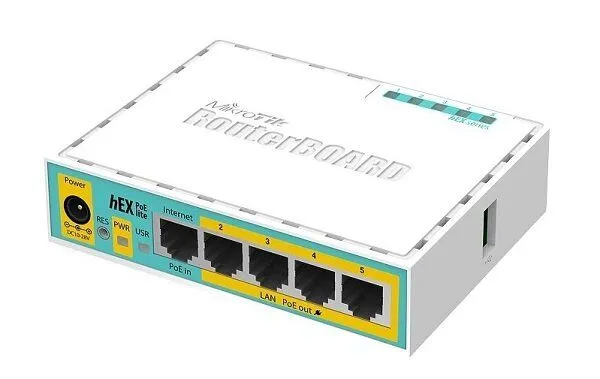
The RB750UPr2 hEX PoE lite has five 10/100 Ethernet ports, a 650 MHz processor and 64 MB of RAM. Its ports are Fast Ethernet, not Gigabit. MikroTik also notes that actual throughput varies with configuration. hEX PoE lite
These specifications matter when planning a paid hotspot. A faster internet subscription does not remove a slower Ethernet connection from the traffic path. Likewise, published laboratory results should not be treated as guaranteed performance with your firewall rules, customer sessions and bandwidth controls.
Avoid choosing the router based on an unsupported promise that it will serve a particular number of customers. Twenty people reading messages create a different workload from twenty people downloading large files.
Plan around simultaneous activity, then test your intended configuration.
Measure Your Internet Connection During Busy Hours
Before creating packages, establish how much usable bandwidth your connection delivers.
Take measurements at different times, especially when customers are likely to use the hotspot most. Record download speed, upload speed and how responsive the connection feels while someone transfers a large file.
A useful assessment includes:
- A wired test to establish a baseline.
- A wireless test near each access point.
- Tests during quiet and busy periods.
- A comparison between one active device and several active devices.
Do not build your package structure around the highest result from a single speed test. Use repeatable results that reflect normal operating conditions.
If performance varies substantially throughout the day, allow for that variation when deciding what to advertise.
Distinguish a Speed Limit From Guaranteed Bandwidth
A customer speed limit sets a ceiling. It does not create additional internet capacity or automatically reserve that speed for the customer.
For example, suppose a hotspot has 40 Mbps of usable download capacity and ten customers each purchase a package capped at 5 Mbps. If all ten attempt to download at their maximum speed simultaneously, their combined demand is 50 Mbps.
The hotspot cannot supply that demand continuously from a 40 Mbps connection.
This is an illustrative calculation, not a capacity recommendation for the hEX PoE lite. It shows why package limits and total available bandwidth need to be considered together.
Use clear wording when describing packages. Customers should understand whether the advertised figure is a maximum speed and whether access is shared.
Set Upload Limits Alongside Download Limits
Download speed often receives most of the attention, but upload capacity also needs planning.
Customers may upload videos, synchronise cloud files or send large attachments. If these activities consume the available upload connection, other users can experience delays even when download capacity remains available.
Set package limits with both directions in mind. Avoid copying download values into upload settings without checking what your internet service can support.
RouterOS HotSpot user profiles include a rate-limit setting. MikroTik documents its receive/transmit values from the router’s perspective: receive corresponds to customer upload, while transmit corresponds to customer download. Reversing them can produce the wrong package behaviour. MikroTik Documentation
After applying a profile, test both directions using a customer account.
Keep Your Initial Package Structure Simple
A small hotspot is easier to operate when its packages are easy to explain and verify.
You might begin with a basic browsing option and a higher-speed option, each with clearly stated access duration and device rules. Add more choices only when customer demand justifies them.
For every package, define:
- Maximum download and upload speeds.
- Access duration.
- Any data allowance.
- Number of permitted simultaneous devices.
- What happens when the allowance or validity ends.
These are separate conditions. A package lasting one day does not, by itself, tell customers its speed or whether it includes unlimited data.
Keep the purchase page, voucher instructions and support messages consistent.
Confirm That the Billing System Applies the Intended Limits
A package name displayed on a payment page is not proof that the router is enforcing its settings.
Create a test purchase and verify the resulting customer session. Check the assigned profile, observed speeds and expiry behaviour. Repeat the process when a customer renews or changes packages.
When reviewing Hotspot Billing System Kenya, ask how package speeds are communicated to MikroTik equipment and how administrators confirm that the settings have taken effect.
You can also consult Tajira about its supported MikroTik integration and package-management workflow. Confirm the details directly before relying on any particular feature.
Choose one clearly documented method for managing customer limits. Conflicting settings across the router and billing platform make faults harder to diagnose.
Separate Bandwidth Problems From WiFi Problems
Increasing a customer’s speed limit will not resolve every complaint about slow internet.
If wired performance is good but wireless performance is poor, investigate access-point placement, coverage and interference. If only one area struggles, compare it with another area using the same package.
A practical test is to use the same device and account in several locations. This keeps the comparison more useful than testing different phones on different packages.
Adding access points may improve coverage or distribute wireless demand, but it does not increase the internet capacity supplied by your provider.
For hardware enquiries, compare the RB750UPr2 hEX PoE lite at Tawa and the hEX PoE lite listing at Orbitlink Solutions. Explain your intended access-point arrangement when requesting advice.
Test Under Realistic Load Before Expanding
A successful test with one phone is only the beginning.
Run a controlled trial with several devices performing different activities. Include browsing, downloads, uploads and a call. Observe whether the service remains responsive and whether each package behaves as intended.
During the trial, check:
- Whether customer speed limits take effect.
- Whether heavy transfers disrupt other users.
- Whether the router remains responsive.
- Whether performance differs between access points.
- Whether login and payment activation still work normally.
Keep a record of the configuration used for the trial. When you change a setting, repeat the same workload so you can assess whether the change helped.
Know When to Consider Different Hardware
An upgrade should address a measured limitation.
If the upstream internet connection is consistently full, investigate additional internet capacity. If wireless coverage is weak, address the access-point layout. If the router becomes the limiting factor under your required configuration, evaluate a more capable model.
You can consult the hEX PoE lite listing at Reisen SEO when comparing equipment costs.
The MikroTik hEX RB750Gr3 at Jupitaz is a different model. Compare its specifications and power arrangement carefully rather than assuming it is interchangeable with the RB750UPr2.
Frequently Asked Questions
Does a higher speed limit make every customer’s internet faster?
Only when sufficient capacity is available elsewhere in the network. Raising a limit cannot overcome congestion, poor wireless coverage or a slower physical connection.
How many hotspot customers can the hEX PoE lite support?
There is no single reliable number for every installation. Customer activity, configuration, internet capacity and wireless equipment all affect the result. Test the expected workload before committing to a service target.
Should every package have the same upload and download speed?
Not necessarily. Choose values that reflect your internet connection and customer needs, and explain the package conditions clearly.
Where can I check the current price in Kenya?
Visit the MikroTik RB750UPr2 hEX PoE lite Price in Kenya page for current product information and pricing enquiries. Before purchasing, confirm that the router fits your expected traffic, access-point power requirements and expansion plans.
