MikroTik hEX PoE lite Hotspot Guide: Planning a Small Wi-Fi Business in Kenya
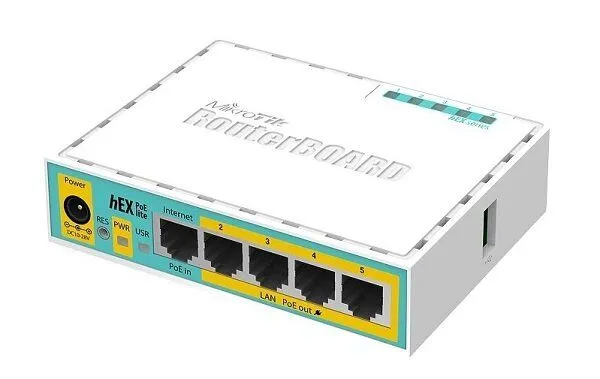
Starting a paid Wi-Fi hotspot requires more than a router and an internet subscription. Customers need reliable coverage, a straightforward login process, and packages that match the available capacity.
The MikroTik RB750UPr2 hEX PoE lite can be considered for a modest installation where its wired speeds, processing capabilities, and passive PoE output match the project. It needs a separate access point to provide Wi-Fi.
Before comparing the MikroTik RB750UPr2 hEX PoE lite Price in Kenya, define the service you intend to offer and the equipment needed to deliver it.
This guide covers planning, billing integration, and launch testing rather than a universal configuration script.
Understand the Components of a Hotspot
Each component has a separate responsibility.
| Component | Main role |
|---|---|
| Internet connection | Supplies upstream connectivity |
| hEX PoE lite | Handles the assigned gateway and hotspot functions |
| Wireless access point | Connects customers over Wi-Fi |
| Billing platform | Manages supported packages, payments, and account workflows |
| Power equipment | Keeps the router and other required devices operating |
| Administrator | Maintains configuration and resolves customer problems |
RouterOS HotSpot supports captive-portal authentication and accounting using local accounts or a remote RADIUS server. These functions provide a basis for controlled access, but payment automation requires an appropriately integrated system. MikroTik Documentation
Do not assume that purchasing the router includes a billing subscription, payment integration, or installation service.
Decide Whether This Router Fits Your Expected Demand
The hEX PoE lite has 10/100Mbps Ethernet interfaces. A single WAN connection therefore cannot deliver the full capacity of an internet service exceeding that interface speed.
Its suitability also depends on the configuration and traffic workload. Authentication, queues, firewall rules, and simultaneous sessions all need assessment.
Avoid choosing the device from an unsupported promise such as “it handles 100 users.” Registered accounts, connected wireless devices, authenticated sessions, and actively downloading customers are different measurements.
For a pilot, record:
- Expected simultaneous active customers.
- Typical applications.
- Available download and upload bandwidth.
- Number of access points.
- Required package controls.
- Likely growth over the next year.
If Gigabit interfaces are important, compare the MikroTik hEX RB750Gr3 at Jupitaz. It is a different model and does not provide the same four-port passive PoE output arrangement.
Select Access Points for the Actual Coverage Area
The router does not determine how far the Wi-Fi signal reaches. Access point placement, antennas, building materials, interference, and client devices affect coverage.
Survey the intended location before deciding how many access points to purchase.
For a small shop, test the seating area and entrance. For a larger property, assess each intended coverage zone separately. Outdoor coverage requires equipment and installation methods appropriate to the environment.
Avoid judging performance only while standing next to the access point. Test from the places customers will actually use the service.
Where the access point must bridge clients to the MikroTik HotSpot gateway, verify its operating mode. An unintended downstream NAT arrangement can obscure individual clients and complicate per-device control.
Verify Passive PoE Compatibility
The hEX PoE lite’s power output must match the selected access point.
Confirm the endpoint’s accepted voltage, passive PoE support, wiring, polarity, and maximum consumption. Do not connect an unknown device simply because its description includes “PoE.”
The power supplied to the router also affects its passive output voltage. A replacement adapter or DC backup supply therefore needs assessment against the whole installation.
Calculate the combined demand of powered endpoints and leave appropriate capacity for peak operation and cable losses.
When requesting equipment through the hEX PoE lite listing at Tawa, provide the exact access point models you intend to use.
Choose a Billing Platform Before Final Configuration
Decide how customers will purchase access and how the router will enforce the purchased package.
You can explore Hotspot Billing System Kenya when assessing billing options. Before subscribing, request confirmation of compatibility with your router, RouterOS version, and preferred payment workflow.
Ask the provider:
- How does the platform authorise a customer?
- Which integration method does it use?
- How are sessions and usage reported?
- When does a package’s validity begin?
- What happens when a payment confirmation is delayed?
- How are expired accounts disconnected?
- What happens if the billing service is temporarily unreachable?
- Which setup and recurring fees apply?
You can also assess Tajira as another paid-Wi-Fi operations option.
Test the selected platform rather than assuming different systems use identical package rules or integration methods.
Define Packages Customers Can Understand
A package description should explain what the customer receives.
Separate these concepts:
| Package term | What it means |
|---|---|
| Speed limit | Maximum configured rate under suitable conditions |
| Validity period | Calendar time before the package expires |
| Usage time | Allowed connected time, where supported |
| Data allowance | Permitted transfer volume |
| Device allowance | Number of devices or sessions permitted |
For example, “one hour” could mean one hour after purchase, one hour after first login, or one accumulated hour online. State which rule applies and verify that the platform enforces it.
Do not describe a per-user speed cap as guaranteed bandwidth unless the service has been designed and provisioned to provide that guarantee.
Start with a few clearly defined packages. Add complexity only when customer demand justifies it.
Plan Bandwidth Around Simultaneous Use
Package speed limits do not create internet capacity.
For illustration, 20 customers simultaneously requesting 5Mbps would represent 100Mbps of demand. A slower upstream service cannot satisfy all those requests at that rate at once.
Actual use varies, but the example shows why customer count and package speed must be considered together.
Monitor download and upload demand separately. Upload congestion can affect calls, acknowledgements, and other everyday activity.
Test the router with the intended hotspot and bandwidth-control configuration. Do not assume a basic routing benchmark represents performance with all services enabled.
For another equipment reference, review the RB750UPr2 at Orbitlink Solutions.
Prepare the Login and Payment Journey
A working hotspot should take a customer from joining Wi-Fi to receiving the correct access without unnecessary confusion.
Test this sequence:
- The customer joins the intended wireless network.
- The device receives appropriate network settings.
- The login or package page becomes accessible.
- The customer selects a package.
- Payment or voucher validation completes.
- The router grants the intended access.
- Expiry and reconnection behave as described.
Permit only the pre-login resources required by the chosen workflow. Broad exceptions can unintentionally allow unpaid access.
Use a suitable portal hostname and certificate where HTTPS login is configured. Do not instruct customers to ignore certificate warnings.
MikroTik documents HotSpot as relying on IPv4. Account for IPv6 separately so it does not provide an uncontrolled alternative path around the intended access policy. Also verify that HotSpot is permitted by the device’s current device-mode settings. MikroTik Documentation
Protect Administration and Customer Networks
Customers should not be able to administer the router, billing integration, or access points.
Restrict management access, use strong administrator credentials, and retain a tested recovery method. Keep credentials and configuration backups outside publicly accessible files.
Configure suitable client isolation where required. A captive portal authenticates access; it does not automatically prevent customers from communicating with one another.
Confirm that your internet subscription permits the intended hotspot use. Discuss the service arrangement with the provider before advertising paid access.
Test a Small Pilot Before Launch
Start with a controlled pilot covering representative phones and laptops.
Test successful payments, delayed confirmations, expired packages, reconnection, and the permitted number of devices. Confirm that an unpaid client cannot access services beyond the intended exceptions.
Also test:
- Coverage at the edges of the service area.
- Several active users at once.
- Router CPU and memory use.
- Internet recovery after an interruption.
- Behaviour when the billing connection is unavailable.
- Backup-power operation.
When requesting installation support through the Reisen hEX PoE lite listing, specify these acceptance tests.
Frequently Asked Questions
Can the hEX PoE lite broadcast hotspot Wi-Fi?
No. It requires a separate wireless access point.
Does buying the router include automated payments?
No. Payment processing and account automation require a suitable platform and integration.
How many customers can it support?
There is no reliable universal number for every installation. Test the intended workloads, configuration, access points, and internet capacity.
Can it power my access point?
Only if the access point matches its passive PoE requirements and power limits.
Should I start with many packages?
A small set of clearly defined packages is easier to test, explain, and support.
Build the Hotspot Around a Tested Customer Experience
Start with coverage, compatible equipment, realistic bandwidth, and a verified billing workflow. Expand after the pilot demonstrates that customers can connect, purchase access, and use the service reliably.
Visit the MikroTik RB750UPr2 hEX PoE lite Price in Kenya page to check the current listing and request a quotation. Include your expected active users, internet speed, access point models, and billing requirements so the proposed installation matches the service you intend to offer.
