MikroTik RB750UPr2 hEX PoE lite: A Buying Guide for Small Networks in Kenya
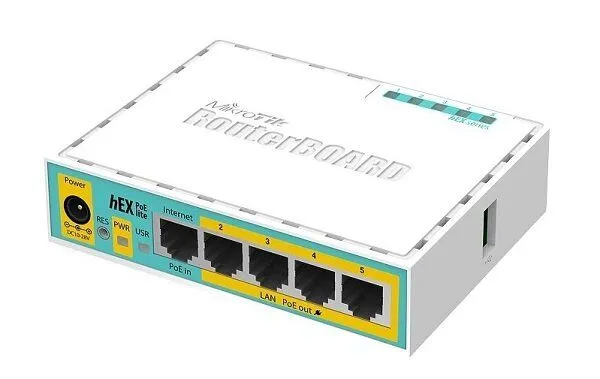
The MikroTik RB750UPr2 hEX PoE lite combines wired routing with power output for compatible network devices. It can be useful where a small installation needs fewer separate power adapters and manageable Ethernet connections.
However, two details should guide your purchase: its ports are 10/100Mbps, and its power output uses passive PoE. It is not a Gigabit router or a universal PoE supply for every camera and access point.
If you are comparing the MikroTik RB750UPr2 hEX PoE lite Price in Kenya, check your connection speeds and endpoint power requirements before ordering.
What Is the Listed Price in Kenya?
The MikroTik Kenya product page displays KSh 8,500 at the time of checking on 18 October 2026. Confirm the current price, stock, VAT treatment, delivery charges, and warranty terms before purchase. Router
For a complete installation budget, include cabling, compatible powered devices, configuration, and any required backup power.
Ask the supplier to identify the included accessories rather than assuming every listing contains the same bundle.
Key Specifications
| Feature | Specification |
|---|---|
| Product code | RB750UPr2 |
| Ethernet connections | Five 10/100Mbps ports |
| PoE output | Passive PoE on Ether2–Ether5 |
| Maximum output current per port | 1A |
| Maximum total output current | 2A |
| Power input | DC jack or passive PoE input |
| Supported input voltage | 8–30V |
| Operating system | RouterOS, Level 4 licence |
| Processor | Single-core 650MHz |
| Memory | 64MB RAM |
| Cooling | Passive |
| Included manufacturer-listed adapter | 24V, 2.5A |
MikroTik states that the output voltage follows the voltage supplied to the unit. The router has no built-in wireless radio, so Wi-Fi requires a separate access point. hEX PoE lite
Decide Whether 100Mbps Ports Meet Your Needs
Assess the internet connection and local workloads before choosing this model.
If your internet service exceeds 100Mbps, a single 100Mbps WAN connection will prevent you from using the full subscribed speed through that link. Usable application throughput will also be below the nominal link rate.
For local traffic, consider whether users regularly copy large files, access shared storage, or transfer backups. A small network with modest requirements has different needs from a design studio or busy server installation.
Use these questions to guide the decision:
- What internet speed do you subscribe to?
- How many users will be active simultaneously?
- Do users access local storage?
- Are faster connections likely to be needed soon?
- Which routing and traffic-management functions will be enabled?
Do not interpret aggregate benchmark figures as the speed available through one physical port.
Understand Passive PoE Before Connecting Equipment
Passive PoE compatibility must be checked for the exact endpoint.
A camera or access point labelled “PoE” may require a different voltage or standards-based power negotiation. The label alone does not establish that the hEX PoE lite can power it.
For each proposed device, verify:
- Its accepted input-voltage range.
- Whether it explicitly supports the relevant passive PoE arrangement.
- Its power pinout and polarity.
- Maximum consumption.
- Cable length and expected voltage drop.
Do not assume the router converts its input into a different voltage suitable for every endpoint.
When enquiring through the hEX PoE lite listing at Tawa, provide the models of the devices you want to power.
Calculate the Combined Power Requirement
Per-port capacity and total output capacity are separate limits.
Using the published current limits, a 24V supply gives an arithmetic total of:
24V × 2A = 48W
This is an illustrative output calculation before cable losses and other practical constraints. It is not a promise that 48W reaches the endpoints.
Similarly, the per-port current limit does not mean all four output ports can simultaneously draw 1A. That would exceed the stated total limit.
Prepare a worksheet based on the actual devices. For example:
| Endpoint | Hypothetical switch-side allocation |
|---|---|
| Compatible access point | 8W |
| Compatible wireless radio | 10W |
| Second compatible access point | 8W |
| Total | 26W |
These figures are examples, not specifications for particular products.
Verify startup demand and peak operation. A device that powers up successfully may still become unstable when its consumption increases.
Where the hEX PoE lite May Fit
Consider it for a small wired installation where its connection speeds and passive-power capabilities match the equipment.
Possible uses include a modest office network, a small collection of compatible wireless devices, or a learning environment for RouterOS.
Start with a connection plan:
| Port | Example assignment |
|---|---|
| Ether1 | Upstream internet connection |
| Ether2 | Compatible powered access point |
| Ether3 | Compatible powered radio |
| Ether4 | Wired workstation |
| Ether5 | Spare or another approved endpoint |
This is an example topology, not a claim about the configuration of every supplied unit. Inspect the installed settings before deployment.
For a second product reference, review the RB750UPr2 listing at Orbitlink Solutions.
Plan Wi-Fi as a Separate Component
The router’s role and the access point’s role should be clear.
An access point provides wireless coverage. The router handles the functions assigned to it, such as the internet gateway and network policy.
Choose access point locations according to the building layout and user requirements. Centralising power does not solve poor signal coverage or interference.
Also check the access point’s Ethernet interface and power requirements. Purchasing a high-performance wireless device does not remove a slower wired connection elsewhere in its path.
Test the complete arrangement with representative clients before expanding it.
Do Not Confuse It with the hEX RB750Gr3
The RB750UPr2 hEX PoE lite and RB750Gr3 hEX are different products.
The RB750Gr3 has five Gigabit Ethernet ports, making it a different candidate when wired speed is the priority. It does not provide the same four-port passive PoE output arrangement. hEX
You can review the MikroTik hEX RB750Gr3 at Jupitaz when comparing alternatives.
Choose by exact product code. Similar names can otherwise lead to ordering a device that lacks the power output or connection speed your project needs.
Include Configuration and Security in the Quote
RouterOS offers extensive configuration options, but the installation should remain focused on the required services.
Specify the upstream connection method, local addressing, wireless access arrangement, and any guest-network requirements.
Before handover, confirm that:
- Administrator credentials have been set securely.
- Internet-facing access is appropriately restricted.
- Local devices receive the correct network settings.
- Required services work.
- A configuration backup has been saved.
- The business has the information needed for authorised administration.
If the project requires demanding VPN processing, complex queues, or many simultaneous sessions, assess performance with the intended configuration instead of relying on the product category alone.
When comparing the hEX PoE lite at Reisen SEO, ask whether configuration support is included or quoted separately.
Plan Backup Power for the Complete Installation
Backup sizing should include the router and any devices receiving power through it.
If you measure consumption at the AC input with all endpoints connected, do not add those same endpoint loads again.
Also identify equipment powered elsewhere. An internet terminal or separate access point adapter must remain operational if the service depends on it.
For a DC backup solution, verify output voltage, polarity, connector compatibility, and capacity. Changing the router’s supply voltage can also affect the voltage delivered to connected passive-PoE devices.
Test the complete system during a controlled interruption before relying on it.
Frequently Asked Questions
Is the RB750UPr2 a Gigabit router?
No. Its five Ethernet ports support 10/100Mbps connections.
Does it provide Wi-Fi?
No. Wireless connectivity requires a separate access point.
Can it power any PoE camera?
No. Confirm the camera’s passive PoE compatibility, voltage, wiring, and consumption before connecting it.
Can all four output ports deliver their maximum current together?
No. The combined output must remain within the router’s total limit as well as each individual port limit.
Is it suitable for a small hotspot installation?
It may fit a modest deployment if the traffic, power, and configuration requirements are within its capabilities. A separate access point is required, and the router purchase alone does not provide a complete billing service.
Request a Quote Based on Your Devices
The hEX PoE lite is best evaluated through its practical fit: connection speed, compatible passive power, endpoint count, and the configuration your network needs.
Visit the MikroTik RB750UPr2 hEX PoE lite Price in Kenya page to check the current listing and request a quotation. Include your internet speed, powered-device models, and cable distances so the proposed installation matches your requirements.
