MikroTik hEX PoE lite Hotspot Packages and Vouchers: A Practical Planning Guide
A hotspot package should be easy to understand, straightforward to purchase, and enforced consistently. Customers should know when access begins, when it expires, and how many devices they can connect.
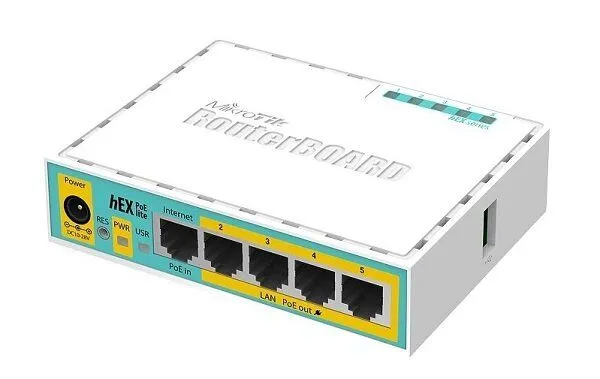
The MikroTik RB750UPr2 hEX PoE lite can form part of a modest hotspot installation, working with separate wireless access points and a suitable account-management arrangement.
If you are researching the MikroTik RB750UPr2 hEX PoE lite Price in Kenya, plan the customer packages alongside the hardware. The router, billing platform, and wireless network must work together to deliver what you advertise.
This guide explains how to define packages and test vouchers before launching paid access.
Define Exactly What Each Package Includes
Begin with a written package specification. Avoid creating accounts first and deciding what they mean afterwards.
| Package setting | Question to answer |
|---|---|
| Price | What does the customer pay? |
| Activation | Does access begin at purchase or first login? |
| Validity | When does the entitlement expire? |
| Usage allowance | Is access limited by time, data, or both? |
| Speed | What upload and download limits apply? |
| Devices | How many simultaneous sessions are permitted? |
| Reconnection | Can the customer reconnect within the remaining allowance? |
Keep these definitions consistent across the payment page, voucher, and support instructions.
A package described as “one day” should have an explicit expiry rule. It could mean 24 hours from activation or access until a stated time. Customers should not have to guess.
Separate Session Time from Package Validity
One connection session and a purchased entitlement are different things.
A session ends when the customer disconnects or reaches a configured session condition. Package validity describes how long the purchased access remains usable.
Similarly, an accumulated usage allowance is different from elapsed calendar time. A customer might buy two hours of connected usage that can be consumed within a longer validity period.
Do not assume that setting a session timeout implements the full commercial expiry rule. Reconnection may create a new session unless the account or billing system also enforces the intended overall limit.
Ask the platform provider to demonstrate the complete behaviour, including disconnecting, reconnecting, and returning the following day.
Choose Local Accounts or a Billing Integration
RouterOS HotSpot supports local user accounts and remote RADIUS authentication and accounting. User profiles group common settings, including rate limits. MikroTik Documentation
For a small pilot, locally managed accounts can help establish that the access process works. However, automated sales, payment reconciliation, package expiry, and voucher distribution require additional planning.
Explore Hotspot Billing System Kenya when assessing a platform for your installation. Confirm its supported integration method, fees, and behaviour with your RouterOS version.
You can also review Tajira as another paid-Wi-Fi operations option.
Before choosing a service, request a demonstration using the package rules you actually intend to sell. Do not assume that every platform interprets validity and usage time identically.
Start with a Small Package Catalogue
A short package list is easier to configure, test, and explain.
For example, a pilot could offer:
| Package concept | Intended use | Rule to clarify |
|---|---|---|
| Short access | Brief browsing or a temporary visit | Elapsed validity versus accumulated usage |
| Day access | Customers staying longer | Exact activation and expiry times |
| Data allowance | Customers buying a fixed volume | Whether uploads and downloads both count |
These are package concepts, not recommended prices or guaranteed service levels.
Choose prices after reviewing internet charges, billing costs, payment fees, electricity, maintenance, and expected sales.
Avoid publishing many overlapping offers before you understand demand. Every additional package creates more combinations to test and support.
Set Speeds That Match Available Capacity
A per-customer speed limit is a ceiling, not automatically reserved bandwidth.
For illustration, ten customers each requesting 5Mbps create 50Mbps of demand. If the available connection is smaller, they cannot all receive that rate simultaneously.
The hEX PoE lite also has 100Mbps Ethernet interfaces, so assess the complete traffic path before advertising packages.
Check upload demand as well as downloads. Video calls, file uploads, and backups can consume upstream capacity and affect other users.
Measure performance with the intended authentication, queues, and firewall rules enabled. If faster wired connections are needed, compare the MikroTik hEX RB750Gr3 at Jupitaz, while accounting for its different power-output capabilities.
Create Vouchers with Clear Instructions
A voucher should contain the information a customer needs to connect successfully.
Include:
- The correct Wi-Fi network name.
- The voucher code or login credentials.
- The package purchased.
- The activation and expiry rules.
- Any data or simultaneous-device limits.
- A legitimate support contact.
Use unique, difficult-to-guess credentials. Do not print router administrator details on customer vouchers.
Track whether vouchers are unused, issued, activated, expired, or cancelled. Protect unused voucher lists as saleable inventory.
If staff issue vouchers, define who can create them, who can distribute them, and how sales are reconciled.
Make Payment Activation Reliable
A payment confirmation and a working internet session are separate events.
Test that a verified payment creates or activates the intended entitlement and that the router applies it correctly.
Check these cases before launch:
| Situation | Behaviour to verify |
|---|---|
| Successful payment | Correct package becomes available |
| Delayed confirmation | Customer receives a clear pending status |
| Duplicate notification | Access is not unintentionally granted twice |
| Failed payment | No paid entitlement is activated |
| Customer refreshes the page | Purchase status remains consistent |
| Payment completes but access fails | Support can trace and resolve the transaction |
Use the payment provider’s verified confirmation process. A screenshot alone should not be treated as proof that an automated payment has settled.
Document how authorised staff handle exceptions without creating uncontrolled permanent access.
Test Device Limits and Reconnection
Define whether a package permits one device, several simultaneous sessions, or another supported arrangement.
Then test with actual phones and laptops.
A one-session limit is not necessarily permanent binding to one physical device. Device identification can also be affected by private or randomised MAC addresses.
Check what happens when a customer:
- Disconnects and reconnects.
- Moves between access points.
- Changes devices.
- Leaves Wi-Fi enabled while the phone sleeps.
- Attempts to use the same credentials on two devices.
Use the results to write accurate customer instructions. Avoid promising restrictions that your tested configuration does not enforce.
Keep the Hardware Installation Consistent
Package problems can be confused with wireless or power faults.
A customer may have valid access but poor coverage. An access point may restart because its power source is unsuitable. Either problem can appear to be a failed voucher.
Test the basic network before investigating billing.
When purchasing through the hEX PoE lite listing at Tawa, provide the access point models so passive PoE compatibility can be checked.
You can also review the RB750UPr2 at Orbitlink Solutions when comparing the complete equipment requirements.
Prepare a Support and Outage Policy
Decide how you will handle interruptions before customers encounter them.
For example, establish whether an eligible outage results in an extension, replacement voucher, or another defined remedy. Ensure staff can identify affected purchases without exposing unnecessary customer information.
Keep payment references, account records, and support notes accessible only to authorised people. Collect only the information needed to operate and support the service.
Also test billing-platform outages. Determine whether existing sessions continue, whether new logins succeed, and how service recovers.
When requesting configuration assistance through the Reisen hEX PoE lite listing, include these operational tests in the scope.
Run a Pilot Before Public Sales
Create test vouchers for each package and follow the entire customer journey.
Confirm purchase, activation, login, speed control, reconnection, expiry, and support lookup. Test both normal use and unsuccessful transactions.
Record the expected and observed results. Resolve mismatches before printing vouchers or publishing package advertisements.
Only expand after the pilot demonstrates that the equipment and billing workflow deliver the advertised service consistently.
Frequently Asked Questions
Does RouterOS automatically collect mobile payments?
Not simply by enabling HotSpot. Payment collection requires a suitable integration and verified activation workflow.
Is a session timeout the same as voucher expiry?
No. One limits a session; the other describes the purchased entitlement. Configure and test the complete expiry policy.
Can one voucher work on multiple devices?
That depends on the package and authentication configuration. State the rule clearly and verify it with real devices.
Does a 5Mbps package guarantee 5Mbps at all times?
A configured cap does not by itself reserve capacity. Actual performance depends on the connection, concurrent demand, wireless conditions, and equipment.
Should I offer many packages immediately?
Begin with a small, tested catalogue. Add options when customer demand and operational experience justify them.
Plan Packages Around a Service You Can Deliver
Clear terms, reliable activation, and consistent expiry make a hotspot easier to operate and support.
Visit the MikroTik RB750UPr2 hEX PoE lite Price in Kenya page to check the current listing and request a quotation. Include your expected demand, access points, proposed packages, and billing platform so the installation can be tested as a complete service.
