What Does the MikroTik L009UiGS-RM’s 2.5G SFP Port Do?
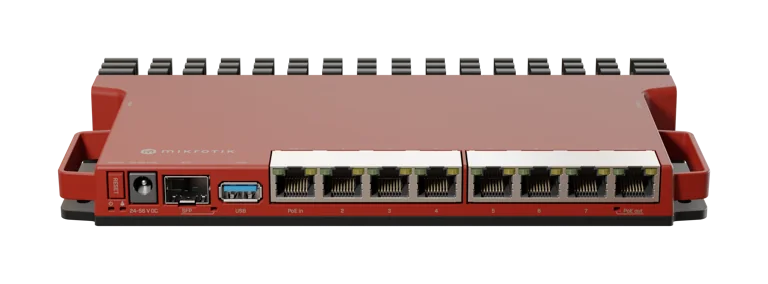
The MikroTik L009UiGS-RM includes an SFP port that supports 1G and 2.5G connectivity. It gives you an additional connection option alongside the router’s eight Gigabit Ethernet ports. It is not a 10G SFP+ port, and its 2.5G capability does not turn the built-in Ethernet ports into 2.5G connections.
For buyers planning an office network, a switch uplink or a fibre connection, understanding this distinction can prevent an expensive purchasing mistake.
Before ordering the router and accessories, check the MikroTik L009UIGS-RM price in Kenya, then confirm what you intend to connect to its SFP port.
This guide explains the practical buying questions to ask before choosing a module or cable.
What Is an SFP Port?
An SFP port is a slot designed to accept a compatible connection module or supported cable assembly.
With an appropriate optical module, it can provide a fibre connection. Other connection options depend on the router’s support and the exact accessory used.
The slot alone does not establish compatibility. The router, module, cable and device at the other end must work together.
Think of an SFP purchase as a complete link with two ends. Buying a module because it fits physically into the router does not prove that the intended connection will work.
When Would You Use the L009UiGS-RM’s SFP Port?
Possible uses include connecting to compatible networking equipment or receiving a suitable service handover.
The right use depends on your network design.
| Proposed connection | What to establish first |
|---|---|
| Router to switch | Supported speed and compatible interfaces at both ends |
| Fibre link within premises | Fibre type, distance and matching optical requirements |
| ISP handover | Provider approval and the exact connection specification |
| Connection to existing equipment | Compatibility with the equipment’s port and module |
Start with the connection you need, then select the accessories.
For a straightforward installation using an Ethernet handover from the ISP and ordinary Ethernet connections to local equipment, you may not need to use the SFP port at all.
Does 2.5G Mean Your Internet Will Run at 2.5 Gbps?
No. Link speed describes the connection between interfaces. Your usable internet speed also depends on your service package, provider equipment, network configuration and the devices involved.
A faster link cannot increase a lower-speed internet subscription.
Likewise, a connection passing through a slower interface remains limited by that part of the path. A computer connected through a Gigabit Ethernet port does not gain a 2.5G wired connection simply because another port on the router supports that speed.
When assessing an upgrade, identify the specific bottleneck you want to address. Ask whether it is the internet service, a shared uplink, an individual device connection or something else.
Does the Router Guarantee 2.5 Gbps Routing Performance?
No. An interface capability is not a guarantee of forwarding performance under every configuration.
MikroTik publishes different test results for different packet sizes and configurations, and warns that other configurations may produce lower performance.
For a demanding installation, ask your technician to assess the actual workload. That should include the planned filtering, bandwidth management and any encrypted connections.
Avoid using a single headline benchmark to promise what the finished network will deliver. A useful assessment tests the services and settings you intend to run.
What Should You Check Before Buying an SFP Module?
Ask the supplier to confirm compatibility with the exact router model and the equipment at the other end.
Provide a written description of the proposed connection.
| Check | Question to ask |
|---|---|
| Router compatibility | Is this exact module supported for the intended use in the L009UiGS-RM? |
| Link speed | Will both ends operate at the required speed? |
| Remote equipment | What switch, router or provider device is at the other end? |
| Cable type | Does the cable match the selected modules? |
| Optical requirements | Are the fibre type, wavelength arrangement and connector compatible? |
| Distance | Is the complete optical link suitable for the cable run? |
| Configuration | Are any specific port settings required? |
| Returns | What happens if the agreed combination does not work? |
Do not assume that every module labelled “SFP” supports 2.5G operation. Also avoid buying a 10G-only accessory on the assumption that it will automatically operate at a lower speed.
Request a confirmed combination rather than assembling parts from product names alone.
Can You Connect Your ISP’s Fibre Directly?
Only if the provider’s service and equipment requirements permit it.
A fibre cable entering your premises does not establish that it can connect directly to a conventional Ethernet optical module. Your ISP may require its own optical network terminal, registration process or other service-specific equipment.
Before buying anything, ask the provider:
- Must its optical terminal remain in use?
- Can your router connect through an Ethernet handover?
- Is direct connection through your own equipment supported?
- What exact interface and module requirements apply?
- Who will assist with activation and troubleshooting?
If the provider requires its terminal, plan around that requirement. Do not remove working ISP equipment merely because the new router includes an SFP slot.
Is a Module Included With the Router?
MikroTik’s published included-parts list identifies the power adapter and mounting accessories, but does not list an SFP transceiver. A seller may offer a separate bundle, so confirm the contents of the actual quotation.
Ask the seller to itemise:
- The L009UiGS-RM router.
- Any module or supported cable assembly.
- Required patch cables.
- Accessories needed at the remote end.
- Configuration and installation services.
This prevents a quotation for the router alone from being mistaken for the cost of a complete fibre connection.
How Should You Compare Prices in Kenya?
Begin with the L009UiGS-RM product page at MikroTik Kenya, then request pricing for the confirmed accessories your installation requires.
For additional purchasing references, review the supplied Orbitlink Solutions L009UiGS-RM listing, Reisen SEO L009UiGS-RM listing and Jupitaz L009UiGS-RM listing.
Confirm current stock, prices and package contents directly with each seller.
Compare equivalent quotations. A router-only price and a package including optical modules, cabling and installation represent different purchases.
The useful comparison is the final cost of the working connection you need.
Will an SFP Connection Improve a Paid Hotspot?
It may help if an existing uplink is a demonstrated bottleneck and the proposed replacement is compatible. It will not automatically improve wireless coverage, billing behaviour or an undersized internet service.
Before upgrading a hotspot, ask the installer to identify where performance is being limited.
If you are evaluating Hotspot Billing System, discuss the billing integration and service requirements separately from the physical uplink. Confirm the proposed network design with both the installer and the platform provider.
Budget for a faster link only when it addresses a clear requirement.
What Should You Test After Installation?
Ask the installer to verify the agreed connection speed and test traffic across the completed link.
The checks should include normal operation under a representative workload, not just confirmation that a link light is on.
Request a record of:
- The installed module models.
- The equipment connected at each end.
- The configured and operating link speed.
- Relevant interface errors observed during testing.
- The agreed performance test and its result.
If the connection is unstable, the installer should investigate the complete link, including settings, modules and cabling, before recommending more hardware.
Frequently Asked Questions
Can I leave the SFP port unused?
Yes. Use it when your network has a suitable requirement. There is no need to buy a module simply to fill an available slot.
Is SFP always better than Ethernet cabling?
No. Choose the connection that fits your equipment, distance, speed and budget. A suitable Ethernet connection may meet the requirement without additional optical accessories.
Can a 10G switch connect to this router?
Possibly, if the switch port and chosen accessories support a compatible lower-speed connection. Verify the exact combination; the switch’s headline speed does not establish compatibility.
Should I buy the module before the router?
Plan both together. Confirm the router, remote device, cable and intended speed before ordering either end of the link.
Buy the Connection Your Network Needs
The L009UiGS-RM’s SFP port provides another way to connect compatible equipment, but the useful starting point is your network requirement.
Identify what you are connecting, confirm compatibility at both ends and request an itemised quotation. You can then review the MikroTik L009UIGS-RM price and product details with a clear understanding of the accessories and installation work your project needs.
