Who is this product best for?
- Home and small office routing
- Business internet edge routing
- ISP customer or branch deployments

Works with compatible MikroTik RouterOS networks and standard Ethernet networking equipment. Confirm port, power and mounting requirements before purchase.
Check the product label or manufacturer datasheet for exact input voltage, PoE support and power adapter requirements.

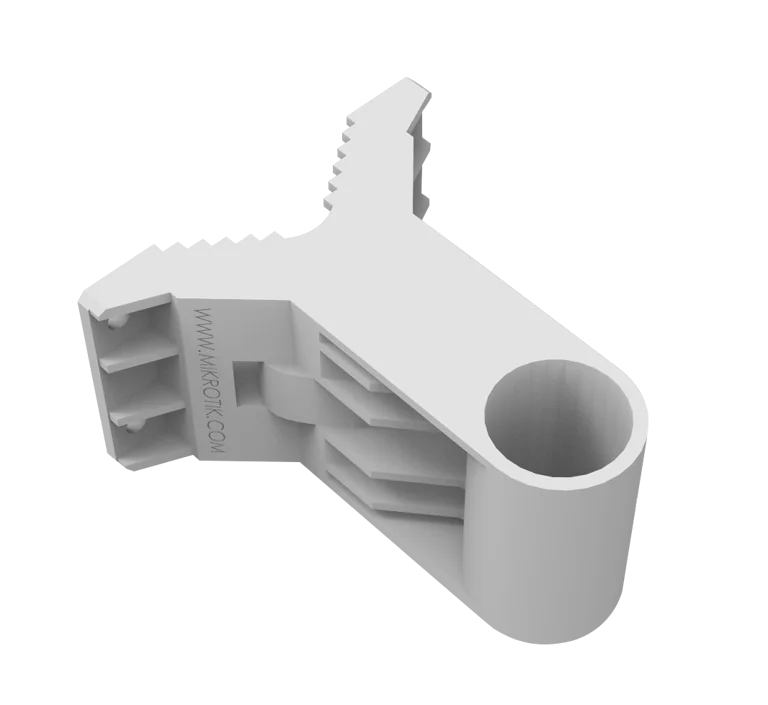
The MikroTik QM, commonly called quickMOUNT, is a basic and affordable mounting adapter designed for small point-to-point and sector antennas. It can be installed directly on a wall or used as an adapter between a large-diameter pole and a smaller antenna mounting clip. MikroTik designed it to provide a more secure and flexible mounting arrangement for compatible outdoor networking equipment.
One of the key advantages of quickMOUNT is its ability to rotate compatible MikroTik antennas through approximately 190°. It can also hold two SXT devices simultaneously, allowing installers to create configurations such as a wireless repeater, dual-direction links or wider sector coverage.
The QM supports compatible pole-mountable equipment weighing up to 1.5 kg, including MikroTik SXT-series devices, OmniTIK, BaseBox and appropriate third-party pole-mountable antennas. Its body is manufactured from MikroTik's durable anvilNITE™ composite material, with published dimensions of approximately 96 × 107.5 × 56 mm.
MikroTik currently lists the QM quickMOUNT at a suggested manufacturer price of US$6, with an MTBF of approximately 100,000 hours at 25°C. (MikroTik) A reliable current Kenya-specific retail price was not found during the latest check, so buyers should request a current local quotation from Mikrotik Kenya.
MikroTik QM Detailed SpecificationsSpecificationDetailsProduct NameMikroTik quickMOUNTProduct CodeQMProduct TypeBasic wall/pole antenna mounting adapterMain ApplicationSmall point-to-point and sector antennasDimensionsApprox. 96 × 107.5 × 56 mmTube Diameter35 mmMaximum Pole Diameter65 mmMaximum Antenna Weight1.5 kgMaximum Wind Load100 NAdjustment / Turn AngleUp to 190° for compatible MikroTik productsOperating TemperatureApprox. -40°C to +40°CMaterialanvilNITE™ compositeMultiple Device SupportUp to two SXT unitsPower RequiredNoRouterOS RequiredNoSuggested PriceUS$6MTBFApprox. 100,000 hours at 25°CMikroTik's official quickMOUNT brochure specifies the dimensions, 35 mm tube diameter, 65 mm maximum attachment diameter, 1.5 kg maximum antenna weight, 100 N wind load, 190° turn range and anvilNITE construction.
What Is the MikroTik QM quickMOUNT?The QM quickMOUNT is a mechanical accessory that helps installers attach compatible MikroTik wireless devices to a wall or pole while providing additional positioning flexibility.
A typical installation can look like:
Wall → QM → MikroTik antenna
or:
Large pole → QM → smaller antenna mounting clip → wireless device
It is particularly useful where the antenna's standard pole clamp alone does not provide the desired position or where the installer needs a compact wall-mounting solution.
Key Features of MikroTik QMThe QM can be installed directly onto a suitable wall, allowing compatible antennas to be positioned away from the surface.
This can be useful for:
Building-to-building links
ISP customer installations
CCTV wireless links
Rural internet installations
Hotels and resorts
Schools and campuses
Industrial sites
MikroTik specifically describes the QM as a basic wall mount adapter for small point-to-point and sector antennas.
2. Pole-to-Antenna AdapterquickMOUNT can also function as an adapter between a larger-diameter pole and a smaller antenna mounting clip.
This gives installers more flexibility when the existing mast is too large for the antenna's normal mounting hardware.
3. Up to 190° Antenna RotationThe QM allows compatible MikroTik equipment to be turned through approximately 190°.
This makes it easier to direct a wireless device toward:
A remote access point
Another building
A WISP tower
A CCTV location
A sector requiring wireless coverage
The QM provides rotational positioning rather than the dual-axis fine adjustment available from more advanced mounts such as QMP.
4. Supports Two SXT DevicesA particularly useful feature is the ability to mount two SXT devices simultaneously.
MikroTik specifically notes that this arrangement can be used to create:
A wireless repeater access point
Coverage in two directions
Larger sector coverage
This makes QM useful where two compact directional radios must share one mounting position.
MikroTik QM CompatibilityDevice / FamilyCompatibility GuidanceMikroTik SXT SeriesOfficially supported familyOmniTIKOfficially supportedBaseBoxSupported according to MikroTik brochureCompatible Pole-Mountable MikroTik DevicesMay be used if weight and mounting requirements are metThird-Party Pole-Mountable AntennasSupported where mechanically compatible and below weight limitMaximum Device Weight1.5 kgTwo SXT UnitsCan be mounted simultaneouslyLHG SeriesUse the mount specifically intended for LHG where appropriateSXTsq requiring dual-axis adjustmentQM-X may be a better dedicated choiceLarge Heavy AntennasQME or another suitable heavy-duty mount may be more appropriateMikroTik's official documentation identifies the SXT series and OmniTIK and also states that suitable third-party pole-mountable devices under 1.5 kg can be used. The brochure additionally references BaseBox compatibility.
5. Maximum Antenna Weight of 1.5 kgThe QM is intended for small antennas.
MikroTik specifies a maximum antenna weight of:
1.5 kg
Installers should not exceed this limit, particularly in outdoor environments where wind adds additional mechanical loading.
6. Maximum Wind Load of 100 NMikroTik rates the QM for a maximum wind load of approximately 100 N.
Actual installation safety also depends on:
Antenna size
Wind exposure
Pole strength
Wall condition
Fastening hardware
Mount orientation
Local weather conditions
The wall or mast must therefore be structurally appropriate for the installation.
7. Supports Poles Up to 65 mmThe official brochure specifies a 35 mm mount tube diameter and a maximum tube or pole diameter of approximately 65 mm for the structure to which the mount can be attached.
This makes it compatible with many common outdoor antenna poles and masts.
8. anvilNITE™ Composite ConstructionThe QM is manufactured using MikroTik's anvilNITE™ composite material.
MikroTik describes this material as durable while keeping the accessory simple and relatively lightweight.
Since the main structure is composite rather than ordinary steel, it also avoids many of the corrosion concerns associated with basic untreated metal mounting brackets.
9. Compact DimensionsThe QM measures approximately:
96 × 107.5 × 56 mm
Its compact size makes it practical for technicians carrying multiple mounting accessories to customer sites.
10. Included Mounting HardwareMikroTik's official product information lists:
1 × metal mounting ring
K-41 fastening set
as included parts.
The actual screws or anchors required for a particular wall may still depend on the wall construction.
11. No Electricity RequiredThe QM is entirely mechanical.
It requires:
No AC power
No DC power
No PoE
No battery
Only the wireless equipment attached to the QM may require electricity.
12. No RouterOS ConfigurationThe quickMOUNT has:
No processor
No Ethernet port
No firmware
No IP address
No RouterOS
No management interface
Installing it does not change any networking configuration.
MikroTik QM Price in KenyaMikroTik currently lists the QM at a suggested manufacturer price of US$6. (MikroTik)
A dependable current retail listing for the standard QM in Kenya was not clearly available in the latest search. Note that Kenyan listings for QMP quickMOUNT Pro should not be confused with QM; QMP is a different, more advanced accessory. For example, a current Kenyan retailer lists QMP at KSh 1,500 before VAT, but that price should not be used as the price of QM. (Shopit)
Pricing InformationDetailsOfficial MikroTik Suggested PriceUS$6Kenya Retail PriceRequest current quotationVATMay affect final Kenya priceExchange RateMay affect local landed costWireless Device IncludedNoMetal Mounting RingIncludedK-41 Fastening SetIncludedRecommended PurchaseConfirm exact QM model and stock before orderingFor current MikroTik QM price in Kenya, availability and compatible mounting equipment, contact Mikrotik Kenya.
QM vs QMP vs QM-X vs QMEFeatureQMQMPQM-XQMEFull NamequickMOUNTquickMOUNT proquickMOUNT-XquickMOUNT extraMain PurposeBasic mount for small antennasAdvanced adjustable mount for small antennasAdditional adjustment for SXTsqAdvanced mount for larger antennasOfficial Suggested PriceUS$6US$9.50US$3US$10AdjustmentUp to 190° rotation140° horizontal and verticalVertical and horizontal SXTsq adjustmentUp to 190°Maximum Antenna Weight1.5 kg1.5 kgDevice-specificDesigned for larger/heavier antennasTwo SXT SupportYesNot the key design featureNoNoIntegrated Alignment ScaleNoYesNoNoBest UseSimple wall/pole mountingPrecision alignmentSXTsq pole alignmentHeavy antennasMikroTik currently lists QM at US$6, QMP at US$9.50, QM-X at US$3, and QME at US$10. QMP specifically adds two-axis adjustment and an integrated graduated alignment scale, while QME is intended for larger antennas. (MikroTik)
Common Applications of MikroTik QM in KenyaWireless Internet Service Providers can use QM when attaching compatible SXT or similar equipment to walls and poles at customer premises.
The wide rotation range makes it easier to point a directional radio toward the serving access point.
Businesses can use two compatible directional radios to link nearby buildings.
QM provides a simple method of positioning the equipment on exterior walls.
Remote CCTV locations sometimes use wireless bridges rather than fiber or long Ethernet runs.
QM can hold compatible directional radios used for the wireless link.
Hotels may use outdoor wireless bridges and access points to connect:
Accommodation blocks
Offices
Security points
Restaurants
Remote buildings
QM provides a compact mounting option for suitable equipment.
Educational institutions can use quickMOUNT for building-to-building links and outdoor networking where compatible MikroTik antennas are deployed.
In rural areas, customers often receive internet connectivity through a directional radio mounted outdoors.
A QM can provide the positioning needed to point a compatible antenna toward the ISP tower.
Why Buy MikroTik QM?The main advantages include:
Basic, affordable antenna mount
Wall-mount capability
Pole adapter capability
Up to 190° rotation
Supports devices up to 1.5 kg
Maximum 100 N wind load
Works with SXT-series equipment
Supports OmniTIK and BaseBox
Supports compatible third-party pole-mounted antennas
Can hold two SXT units
Durable anvilNITE composite
Compact size
Metal mounting ring included
K-41 fastening set included
No electrical requirements
No RouterOS configuration required
Mikrotik Kenya can help customers source the correct mounting accessory for their MikroTik wireless hardware rather than confusing the standard QM with similar products such as QMP, QM-X, QME or QMP-LHG.
Customers can also source compatible:
MikroTik SXT devices
OmniTIK access points
BaseBox wireless routers
Outdoor Ethernet cable
PoE injectors
Ethernet surge protectors
Routers
Switches
Wireless antennas
Pole mounting equipment
The MikroTik QM quickMOUNT is a basic wall and pole mounting adapter for small point-to-point and sector antennas. It allows compatible wireless equipment to be positioned securely on walls or used with larger-diameter poles.
The official product code is QM.
QM refers to MikroTik's quickMOUNT product.
MikroTik currently lists the suggested manufacturer price at US$6.
A reliable current Kenyan listing for the standard QM was not identified in the latest search. Local pricing will vary with exchange rates, VAT and availability, so request the current price from Mikrotik Kenya.
No.
QM is the basic quickMOUNT.
QMP is quickMOUNT pro, an advanced version that offers horizontal and vertical adjustment and an integrated graduated scale. MikroTik currently lists QMP at US$9.50.
No. QM-X is designed primarily to add vertical and horizontal adjustment when pole mounting compatible SXTsq-series devices.
No. QME is quickMOUNT extra, designed for larger point-to-point and sector antennas such as heavier MikroTik antenna equipment.
It is intended primarily for small point-to-point and sector antennas.
Yes. The SXT series is explicitly listed as compatible in MikroTik's QM documentation.
Yes. MikroTik specifically states that the QM can simultaneously mount two SXT units.
Two units can be used to create configurations such as a repeater installation or coverage in different directions. MikroTik specifically mentions repeater access point and large-sector configurations.
Yes. OmniTIK is specifically identified as a compatible device family in MikroTik's documentation.
Yes. MikroTik's official quickMOUNT brochure identifies BaseBox among supported device types.
Potentially yes. MikroTik says it can support third-party antennas designed for pole mounting, provided they meet the applicable mechanical requirements.
MikroTik specifies 1.5 kg as the maximum antenna weight.
You should not exceed MikroTik's published 1.5 kg maximum load. A stronger mounting solution such as QME or another appropriate bracket should be considered for heavier equipment.
The official specification is 100 N.
No. Actual wind loading depends on antenna surface area, installation height, wind speed, orientation and other conditions. Structural mounting should always be appropriate for the location.
MikroTik specifies approximately 96 × 107.5 × 56 mm.
The official tube diameter is approximately 35 mm.
MikroTik specifies approximately 65 mm as the maximum tube diameter to which the mount can be attached.
Yes. Wall mounting is one of the product's primary purposes.
Yes. It can be used as an adapter from a larger-diameter pole to a smaller antenna mounting interface.
Yes, provided the mast diameter and mechanical installation meet the mount specifications.
Yes, assuming the mounting structure is secure and all outdoor installation and grounding requirements for the attached wireless device are followed.
MikroTik specifies an antenna turn angle of approximately 190° for compatible MikroTik products.
No. The published range is approximately 190°.
The standard QM mainly provides its 190° turn range. If precise independent horizontal and vertical adjustment is required, QMP quickMOUNT pro may be a better option because it provides up to 140° in both planes.
No integrated graduated scale is specified for QM.
The QMP quickMOUNT pro includes a graduated scale for more precise alignment.
MikroTik specifies anvilNITE™, its special composite material.
The main mounting body is a composite product rather than a conventional steel bracket. Some included mounting hardware is metallic.
MikroTik describes the adapter as durable because of its special anvilNITE composite construction.
MikroTik's brochure gives an operating temperature specification of approximately ±40°C, meaning roughly -40°C to +40°C.
It is intended to mount outdoor-capable antenna equipment, but the installer must still follow the weather-protection requirements of the actual radio.
QM is a mechanical accessory and contains no electronics. MikroTik does not publish an IP networking enclosure rating for it in the quickMOUNT specification.
No.
Weather resistance is determined by the wireless device and its installation.
Yes. MikroTik lists a metal mounting ring among the included parts.
Yes. MikroTik lists the K-41 fastening set as included.
No. The mount and wireless device are separate products.
No.
No. QM does not require power.
No.
It is entirely mechanical.
No. Only the connected radio may require PoE.
No.
No.
No.
No.
No. WinBox would be used to configure the attached MikroTik radio, not the mount.
No.
Not electronically. The mount does not modify radio frequency, transmit power or protocol.
It does not amplify signals. However, correctly positioning a directional antenna can improve the actual wireless link if poor alignment was previously reducing performance.
No. Antenna gain comes from the antenna itself.
No.
It can make physical positioning easier, which may help achieve better alignment. The final performance still depends on the radio, antennas, distance, interference and line of sight.
Yes. Its wall/pole mounting flexibility makes it practical for compatible outdoor customer-premises radios.
Yes, when used with compatible directional radios.
Yes, where the selected compatible equipment and network design support the required configuration.
Yes. A compatible wireless bridge carrying CCTV traffic can be mounted using QM.
Yes. It can be useful for outdoor wireless links connecting buildings, accommodation areas and network infrastructure.
Yes. It can support appropriate outdoor wireless equipment used for campus connectivity.
Yes. Directional wireless CPE equipment used for rural WISP connections may be installed with a compatible QM mounting arrangement.
Potentially, provided the mast/pole dimensions, load and installation are suitable. Professional tower work should follow appropriate structural and safety procedures.
No. QM is intended for small antennas and has a maximum antenna weight of 1.5 kg.
For larger equipment, consider the appropriate MikroTik heavy-duty mounting solution.
The quickMOUNT extra (QME) is intended for larger point-to-point and sector antennas, including products such as the mANT30 and mANT19s.
It depends on the installation.
Choose QM when you need:
A simple wall/pole mount
Low cost
Up to 190° rotation
Support for two SXT units
Choose QMP when you need:
Horizontal adjustment
Vertical adjustment
A graduated alignment scale
More precise antenna aiming
QM is a general basic wall/pole mount for compatible small antennas.
QM-X is specifically designed for easier vertical and horizontal adjustment of SXTsq devices on a pole.
Mechanical compatibility should be verified for the exact model. MikroTik specifically recommends QM-X as an optional adjustable bracket for the SXTsq family.
For LHG products, use the mount specifically designed for the relevant LHG device where available, such as QMP-LHG. Do not assume all MikroTik mounts are interchangeable.
Yes. OmniTIK is specifically listed by MikroTik as a compatible family.
Yes. MikroTik specifically highlights the ability to mount two SXT units for creating a repeater access point.
The dual-device arrangement is intended to allow configurations such as wider sector coverage or repeater applications. Exact positioning depends on the installation geometry.
For normal low-level wall installation, an experienced network technician can usually install it easily. Rooftop, tower and high-mast work should follow appropriate professional safety procedures.
Yes. Directional antennas should be aligned using the actual radio's signal measurements after initial physical positioning.
No. The mount helps position the antenna, but final optimization should be based on link measurements from the radios.
Outdoor MikroTik equipment should be installed according to the grounding requirements specified for the actual radio and site infrastructure. The QM itself contains no electrical circuitry.
MikroTik lists an MTBF of approximately 100,000 hours at 25°C.
Yes. MikroTik currently lists QM in its product catalogue at a suggested price of US$6.
You can source the MikroTik QM quickMOUNT, compatible wireless devices and outdoor networking accessories through Mikrotik Kenya.
MikroTik QM Video GuideWatch the MikroTik networking video guide on YouTube
The MikroTik QM quickMOUNT provides a straightforward way to install compatible small point-to-point and sector wireless devices on walls and poles. With up to 190° of antenna rotation, support for equipment weighing up to 1.5 kg, and compatibility with products such as SXT, OmniTIK and BaseBox, it is a versatile accessory for professional outdoor wireless deployments.
An especially useful feature is the ability to mount two SXT devices at the same time. This can simplify installations where an operator wants to create a repeater or provide wireless coverage in multiple directions from a single mounting location. The 100 N maximum wind-load specification and anvilNITE composite construction also make the QM suitable for properly designed outdoor installations.
The QM remains the simpler and lower-cost option within MikroTik's quickMOUNT family. Installers who need independent vertical and horizontal fine adjustment can move to QMP, while SXTsq installations may benefit from QM-X, and large heavy antennas may require QME. With an official suggested price of US$6, QM remains an affordable mounting option for many standard wireless deployments.
The MikroTik QM quickMOUNT is a compact wall and pole adapter designed for small point-to-point and sector antennas. It provides up to 190° positioning, supports antennas weighing up to 1.5 kg, can attach to poles up to approximately 65 mm, and even allows two SXT radios to be mounted together for repeater or wider-coverage applications.
Its 96 × 107.5 × 56 mm dimensions, 100 N maximum wind load, durable anvilNITE composite construction, included mounting ring and K-41 fastening set make it a practical accessory for WISPs, businesses, CCTV networks, schools, hotels and rural connectivity installations.
For MikroTik QM quickMOUNT, SXT equipment, OmniTIK, BaseBox, outdoor wireless devices, PoE equipment and other MikroTik mounting accessories in Kenya, visit Mikrotik Kenya for current pricing, stock availability and professional networking solutions.
Reviews are not available yet for this product.
QM is currently listed as available. Stock can change, so confirm availability before placing a large order.
The current listed price is KSh 2,000.00. Prices are generated from the product catalogue and may change when inventory is updated.
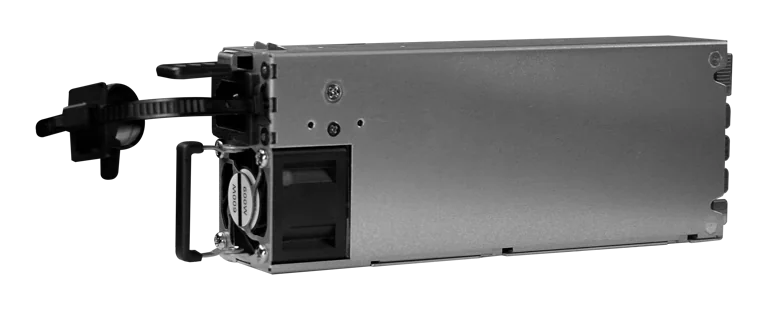
Buy MikroTik G1483-0600WNB in Kenya, a 600W hot-swappable 54.5V 10.35A power supply for the CRS320-8P-8B-4S+RM PoE++ switch, support
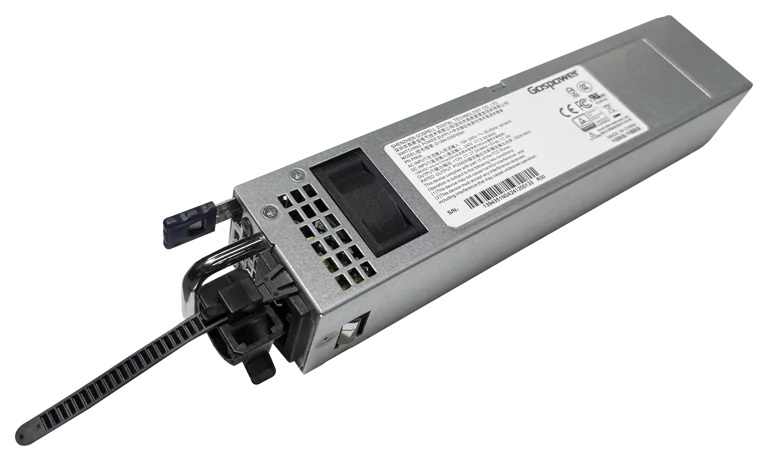
Buy MikroTik G1394-0350WNA in Kenya, a 350W hot-swappable 12V DC 27.5A AC power supply designed for the MikroTik CRS804 DDQ 400G swi
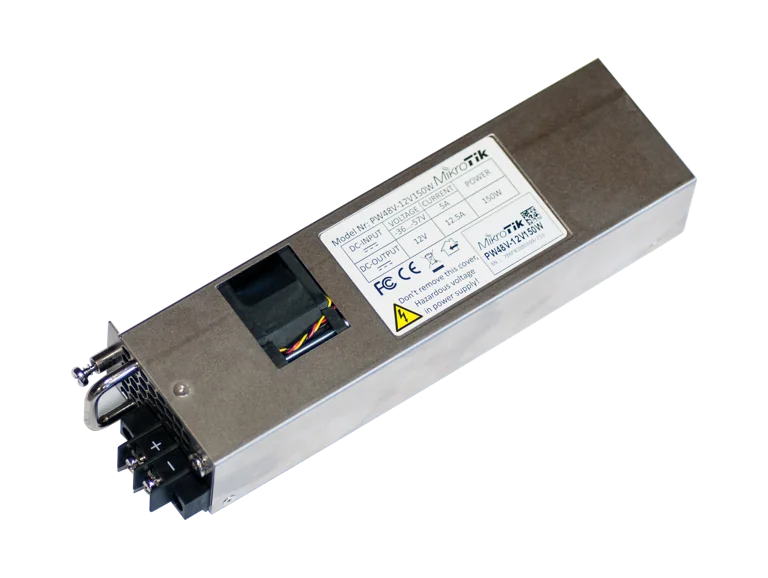
Buy MikroTik PW48V-12V150W in Kenya, a 150W hot-swappable -48V DC telecom power supply for CCR1072, CCR2216, CRS518 and CRS520 high-
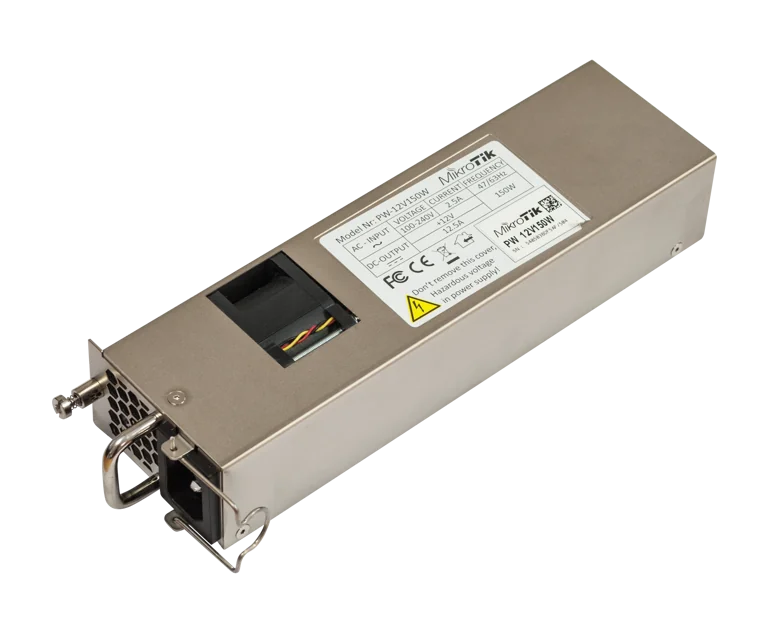
Buy MikroTik 12POW150 in Kenya, a 12V 150W hot-swap AC/DC power supply for CCR1072, CCR2216, CRS518 and CRS520 high-availability net