Who is this product best for?
- Home and small office routing
- Business internet edge routing
- ISP customer or branch deployments

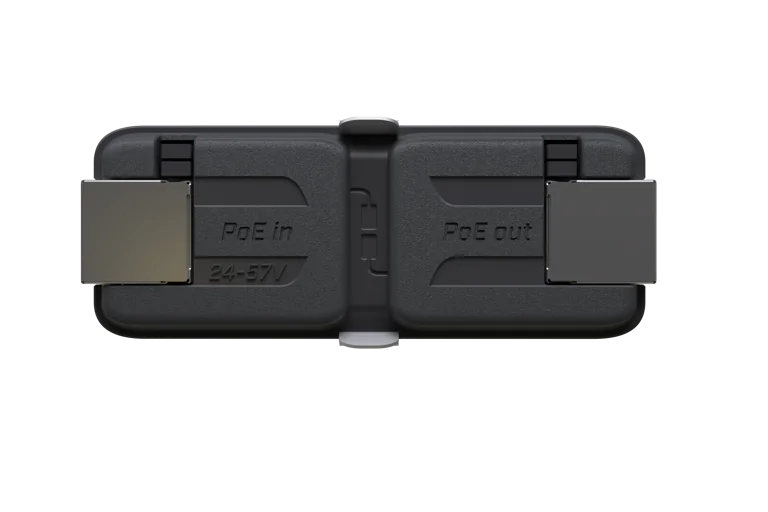
Works with compatible MikroTik RouterOS networks and standard Ethernet networking equipment. Confirm port, power and mounting requirements before purchase.
Check the product label or manufacturer datasheet for exact input voltage, PoE support and power adapter requirements.
The MikroTik GPeR, short for Gigabit Passive Ethernet Repeater, is a compact Ethernet extension device designed to increase the distance of Gigabit Ethernet links beyond the normal limit of a single copper cable segment. MikroTik states that one GPeR can add roughly 100–150 metres when connecting to regular network equipment and up to around 210 metres when connecting to another GPeR, with multiple repeaters allowing a total link length of up to approximately 1,500 metres in suitable installations.
The GPeR is particularly valuable for ISPs, apartment networks, estates, schools, farms, hotels, industrial sites, CCTV networks and campus infrastructure where Ethernet must travel considerably farther than a conventional 100-metre link. Instead of immediately converting a long run to fiber, installers can use strategically placed GPeR units to regenerate Gigabit Ethernet while allowing PoE power to continue along the network.
The device accepts passive PoE or IEEE 802.3af/at power in the 24–57V range, uses two Gigabit Ethernet ports, and consumes up to approximately 2W itself. It can also pass power toward downstream compatible devices, making it useful within MikroTik's wider GPEN architecture.
For outdoor installations, the GPeR itself is not weatherproof and has an IPX0 rating, but MikroTik sells a dedicated GPeR IP67 Case, which current testing actually rates to IP68. This allows the repeater to be protected when installed on walls, poles, underground infrastructure or exposed outdoor locations.
For genuine MikroTik GPeR repeaters, GPEN equipment, PoE accessories and professional network-design assistance, customers can source suitable equipment through Mikrotik Kenya.
MikroTik GPeR SpecificationsSpecificationDetailsProduct CodeGPeRFull NameGigabit Passive Ethernet RepeaterProduct CategoryEthernet Repeater / ExtenderEthernet Ports2 × Gigabit EthernetMaximum Ethernet Speed1 GbpsPoE InputPassive PoE or IEEE 802.3af/atInput Voltage24–57V DCPoE PassthroughYesPower ConsumptionUp to approx. 2WTypical Distance to Regular DeviceApprox. 100–150 mMaximum Distance Between GPeRsUp to approx. 210 mMaximum Multi-GPeR LinkUp to approx. 1,500 mOutdoor RatingIPX0 without enclosureOutdoor CaseGPeR IP67 Case availableDedicated Case RatingIP68 in current MikroTik testingEthernet Cable RecommendationCat5/Cat6Management SoftwareNoneRouterOS RequiredNoInstallation TypeInline Ethernet repeaterBest ForLong Ethernet runs, GPEN, ISP and CCTV deploymentsMikroTik's official manual confirms two Gigabit Ethernet ports, 24–57V PoE input and a maximum power draw of approximately 2W.
What Is the MikroTik GPeR?The GPeR is designed to regenerate and extend an Ethernet connection, allowing a network cable run to continue beyond the normal distance expected from one copper Ethernet segment.
A simple deployment could look like:
Router/Switch → Ethernet Cable → GPeR → Ethernet Cable → Remote Device
For even longer distances:
Switch → GPeR → GPeR → GPeR → Remote Device
ComponentFunctionRouter/SwitchProvides Ethernet connectionPoE SourcePowers the linkGPeRRegenerates Gigabit EthernetEthernet CableCarries data and powerAdditional GPeRExtends the link furtherRemote DeviceReceives network connectivityKey Features of the MikroTik GPeRA normal copper Ethernet link is generally designed around a maximum structured-cabling distance of approximately 100 metres. The GPeR allows the installer to add another powered Ethernet segment without installing a full switch at every intermediate point.
Link TypeApproximate DistanceGPeR to Regular Network Device100–150 mGPeR to Another GPeRUp to 210 mMultiple GPeR ChainUp to approx. 1,500 mMikroTik notes that actual distance depends on cable quality and installation conditions.
This can be highly useful for large compounds, campuses, warehouses and outdoor CCTV infrastructure.
2. Gigabit Ethernet PerformanceThe GPeR uses two Gigabit Ethernet ports, allowing modern broadband and LAN traffic to continue without intentionally limiting the link to 100 Mbps.
Ethernet CapabilityGPeREthernet Ports2Gigabit EthernetYesMaximum Nominal Port Speed1 GbpsInline RepeatingYesMulti-Hop DeploymentYesThis makes the GPeR suitable for applications such as:
High-resolution CCTV
Wireless backhaul
Office internet
Apartment broadband
Campus connectivity
Enterprise networking
MikroTik's current manual specifies that the Ethernet interface can accept passive PoE or IEEE 802.3af/at in the 24–57V DC range.
Power FeatureSpecificationPassive PoE InputSupported802.3afSupported802.3atSupportedInput Voltage24–57VMaximum Device ConsumptionApprox. 2WPoE PassthroughYesThis broad input flexibility allows the GPeR to work in different MikroTik and standards-based PoE infrastructures.
4. PoE PassthroughThe GPeR can forward PoE power toward downstream equipment or the next repeater.
This creates a powerful network design option:
One PoE source can power multiple GPeR units along the same Ethernet path, provided voltage drop, cable resistance and the total power budget remain within supported limits.
PoE FunctionBenefitPoE InputPowers GPeRPower PassthroughPowers next segmentMultiple RepeatersPossibleRemote Device PowerPossible if compatibleNo AC Outlet at Each HopSimplifies deployment5. Adjustable PoE-Out Using JumpersThe GPeR includes internal jumper options allowing the installer to disable PoE passthrough when the destination equipment should not receive PoE.
Jumper ConfigurationResultJumpers InstalledPoE passthrough activePoE-Out Jumpers RemovedDownstream PoE disabledAll Four Jumpers ConnectedDevice can work in both directionsMikroTik notes an important limitation: disabling PoE passthrough this way only works when the GPeR itself is powered from a passive PoE source; an 802.3af/at switch may not be able to power the GPeR in that configuration.
6. Works in Either DirectionWhen the jumpers are configured appropriately, the GPeR can operate in either cable direction.
This simplifies installation because technicians do not necessarily need to treat the physical enclosure as having a permanently fixed network direction in every deployment.
MikroTik GPeR Distance TableDeployment ScenarioApproximate Supported DistanceStandard Ethernet Without RepeaterAround 100 mGPeR to Standard DeviceMikroTik's public product specification advertises multi-hop links of up to approximately 1.5 km. Cable Quality and DistanceCable quality has a significant effect on both Ethernet reliability and PoE voltage drop.
Cable FactorImpactPure Copper ConductorsBetter PoE performanceCat5e/Cat6RecommendedCable ResistanceAffects available voltageCable LengthAffects power and signal marginConnectorsPoor termination causes faultsCCA CableHigher resistance; generally less desirableMikroTik explicitly recommends Cat5/6 Ethernet cabling for the GPeR.
For longer multi-hop links, using quality pure-copper cable becomes increasingly important.
MikroTik GPeR in the GPEN EcosystemThe GPeR forms part of MikroTik's GPEN – Gigabit Passive Ethernet Network concept. This ecosystem aims to provide a practical Ethernet-based alternative for certain ISP last-mile and apartment-network deployments.
GPEN ProductFunctionGPEN11Subscriber-side PoE injectorGPEN21Managed GPEN endpointGPeREthernet distance extensionnetPower Lite 7RReverse-powered distribution switchGPEN Power SuppliesLong-run network poweringA typical GPEN topology might therefore use:
GPEN11 → GPeR → GPeR → netPower → ISP uplink
MikroTik GPeR vs Normal Ethernet ExtenderFeatureMikroTik GPeRTypical Ethernet ExtenderGigabit EthernetYesModel dependentPoE InputYesModel dependentPoE PassthroughYesOften NoMulti-Hop ChainingYesModel dependentGPEN IntegrationYesNoCompact DesignYesYesSoftware ConfigurationNoneVariesLong-Run ISP UseExcellentDepends on modelMikroTik GPeR vs Network SwitchFeatureGPeRNetwork SwitchMain PurposeExtend EthernetConnect multiple devicesEthernet Ports2Usually 5+PoE PassthroughYesModel dependentPower ConsumptionVery lowHigherConfigurationNoneModel dependentMulti-Hop Cable ExtensionExcellentPossibleBranching NetworkNoYesThe GPeR is best where the objective is continuing one Ethernet path, while a switch is better when several devices need to connect at one location.
MikroTik GPeR vs GPEN11FeatureGPeRGPEN11Main PurposeEthernet repeaterPoE injectorGigabit EthernetYesYesExtends Cable DistanceYesNoPoE InputYesDC-powered injectorPoE PassthroughYesPoE outputSubscriber Wall MountNoYesGPEN IntegrationYesYesThe GPEN11 commonly provides power into the GPEN link, while GPeR units extend the distance.
MikroTik GPeR vs GPEN21FeatureGPeRGPEN21Gigabit EthernetYesYesEthernet RepeatingYesYesManagementNoYesSFP PortNoYesVLANsNoYesSNMPNoYesPoE FunctionPassthroughSmart injectorMain PurposeDistance extensionManaged endpointMikroTik GPeR vs FiberConsiderationGPeR EthernetFiberCablingCopper EthernetOptical fiberPower PassthroughYesNo through fiberEMI ImmunityLowerExcellentVery Long DistanceLimitedExcellentInstallation CostCan be lowerCan be higherExisting Ethernet ReuseExcellentNoLightning IsolationLowerBetterMulti-Hop MaintenanceMore active pointsFewer powered intermediatesFor very long distances, electrically noisy environments or high-capacity backbone links, fiber is often the better technical solution.
GPeR is attractive where Gigabit Ethernet and PoE need to travel together and copper infrastructure is practical.
GPeR IP67 Outdoor CaseThe GPeR itself has an IPX0 rating and MikroTik specifies it for indoor use unless placed inside a suitable weatherproof enclosure. (MikroTik Help)
MikroTik therefore offers the dedicated GPeR IP67 Case.
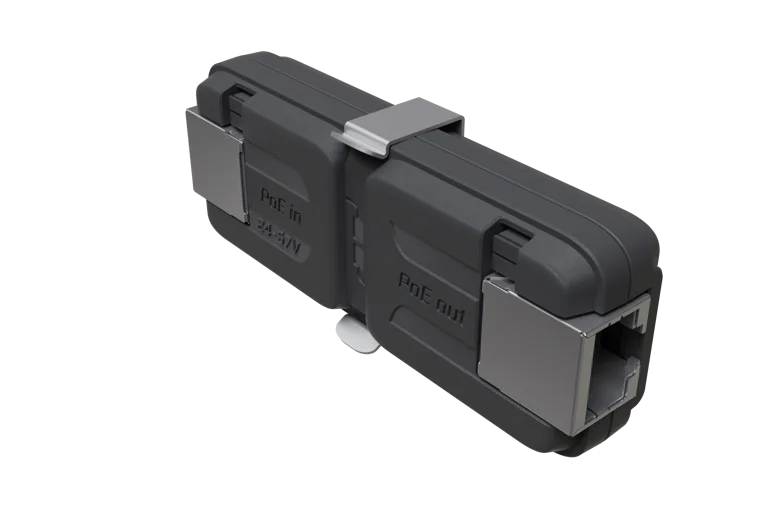
Although the product name retains “IP67,” MikroTik states that later testing demonstrated an IP68 rating.
Outdoor ApplicationsWith the correct enclosure, the GPeR can be used for networks installed in:
Farms
Mines
Caves
Maintenance shafts
CCTV poles
Gatehouses
Outdoor estates
Industrial sites
Campus pathways
MikroTik specifically mentions mines, caves, maintenance shafts and outdoor use in relation to the dedicated protective case.
MikroTik GPeR Applications in KenyaThe GPeR can extend Ethernet across large apartment buildings with multiple floors and sections.
A provider might deploy:
Customer GPEN11 → GPeR → GPeR → netPower → ISP uplink
This allows long Ethernet paths without requiring conventional powered switches at every intermediate location.
Estate Internet NetworksLarge residential estates can use GPeR repeaters to extend Ethernet toward:
Security gates
Clubhouses
Remote houses
CCTV points
Wi-Fi hotspots
Management offices
High-resolution cameras may be installed several hundred metres from the main network cabinet.
GPeR units can help extend Ethernet toward remote surveillance equipment while allowing compatible PoE power to continue through the link.
Schools and UniversitiesCampuses can use GPeR to connect:
Classrooms
Hostels
Libraries
Security posts
Administration buildings
Wi-Fi access points
For very long campus backbones, however, fiber should also be evaluated.
Farms and Agricultural NetworksFarms can deploy Ethernet toward:
CCTV cameras
Pump houses
Gatehouses
Wi-Fi access points
IoT gateways
Staff buildings
A weatherproof GPeR enclosure becomes particularly valuable in these environments.
Hotels and ResortsLarge resorts often include several detached buildings.
GPeR can help extend Ethernet to remote network devices where fiber may not be necessary or economical.
Industrial NetworksWarehouses, factories and compounds can use GPeR to extend Ethernet through long corridors and remote equipment areas.
Electrical noise and lightning risk should still be evaluated when deciding between copper and fiber.
Advantages of MikroTik GPeRAdvantageBenefitGigabit EthernetSupports modern networksExtended DistanceBeyond normal Ethernet limitUp to 210 m Between GPeRsFewer repeatersUp to 1.5 km Multi-HopUseful for large sitesPoE PassthroughPowers downstream units24–57V InputFlexible powering802.3af/at Input SupportWorks with common PoE infrastructureLow Power ConsumptionApprox. 2WCompact DesignEasy deploymentGPEN IntegrationSuitable for ISP networksImportant Limitations of the GPeRThe GPeR is useful, but it is not always the best choice.
LimitationConsiderationCopper-BasedSusceptible to electrical surgesPoE Voltage DropIncreases with distanceIPX0 DeviceNeeds enclosure outdoorsNo ManagementNo RouterOS/SwOS interfaceLinear ExtensionNot a multi-port distribution switchVery Long BackboneFiber may be preferableCable Quality DependentPoor cable reduces distancePowering the MikroTik GPeRThe GPeR does not use a conventional DC jack. Power arrives through Ethernet.
MikroTik specifies:
Passive PoE input
IEEE 802.3af/at input
24–57V DC
Maximum consumption around 2W
A typical power source might be:
PoE switch
GPEN11
GPEN21
Compatible MikroTik injector
Dedicated GPEN power supply
MikroTik offers higher-voltage power supplies specifically for long GPEN Ethernet runs, including:
ModelOutputMT48-480095-11DG48V, 0.95AMT48-570080-11DG57V, 0.8AMikroTik positions both as GPEN power supplies for long Ethernet cable runs.
Using higher voltage can help compensate for voltage drop on longer PoE cable runs, provided all connected equipment supports the selected voltage.
Who Should Buy the MikroTik GPeR?The GPeR is ideal for:
Internet Service Providers
WISPs
CCTV installers
Property developers
Estate network operators
Schools and universities
Hotels and resorts
Farms
Industrial facilities
Network integrators
Enterprise IT teams
GPEN installers
It is particularly valuable where Gigabit Ethernet needs to travel significantly beyond 100 metres while PoE must also continue through the same cabling.
Why Buy MikroTik GPeR from Mikrotik Kenya?Using genuine GPeR units ensures predictable integration with the wider MikroTik GPEN ecosystem.
Professional guidance can help determine:
Number of GPeR units required
Cable segment length
PoE voltage
Voltage drop
Cable specification
Final device power requirement
Mikrotik Kenya can assist with networks involving:
GPeR
GPEN11
GPEN21
netPower
MikroTik PoE supplies
SFP/fiber uplinks
Where the GPeR must be placed outdoors, customers can also select suitable weatherproof enclosures and network-protection equipment.
Frequently Asked Questions About MikroTik GPeRThe MikroTik GPeR is a Gigabit Passive Ethernet Repeater designed to extend Ethernet beyond the normal single-cable distance while supporting PoE powering and passthrough.
GPeR means Gigabit Passive Ethernet Repeater. It is part of MikroTik's wider GPEN networking ecosystem.
The exact Kenya price varies according to stock, exchange rates, VAT and supplier. International listings currently place the GPeR around the US$29 manufacturer-price region, but customers should request the current Kenyan selling price before ordering.
MikroTik specifies approximately 100–150 metres to ordinary network devices and up to approximately 210 metres between two GPeR units, depending on cable quality.
MikroTik advertises multi-hop deployments reaching approximately 1,500 metres under suitable powering and cabling conditions.
Yes. It contains two Gigabit Ethernet ports.
Yes. It is powered through Ethernet using PoE. Despite the word “Passive” in its product name, the repeater itself requires power to regenerate the Ethernet link.
The current MikroTik manual specifies 24–57V DC PoE input.
Yes. MikroTik states that the Ethernet port accepts passive PoE or IEEE 802.3af/at.
MikroTik specifies maximum consumption of approximately 2W.
Yes. The device supports power passthrough toward compatible downstream equipment or another GPeR.
Yes. MikroTik provides internal jumpers that allow downstream power passthrough to be disabled in suitable passive-PoE configurations.
Yes. With all four jumpers installed, MikroTik states that the GPeR can operate in either direction.
No. It does not run RouterOS.
No. It does not have a conventional web-management or RouterOS interface. It is designed primarily for inline Ethernet extension.
Not in the normal multi-port distribution sense. It has two Ethernet ports and is designed primarily to regenerate traffic from one segment to the next.
For some medium-distance Ethernet and PoE installations, yes. However, fiber remains preferable for many very long-distance, high-capacity, electrically noisy or lightning-prone environments.
Yes. The GPeR can help extend network connectivity toward remote surveillance equipment, provided the PoE and Ethernet design meets the requirements of the connected devices.
Potentially, if sufficient compatible PoE remains available after cable and repeater losses and the endpoint's power requirements are compatible. The full power budget should be calculated before deployment.
Yes. Chaining multiple GPeR units is one of the main purposes of the device.
Yes. MikroTik explicitly notes that achievable distances depend on cable quality. High-quality Cat5e/Cat6 pure-copper cable is strongly recommended.
MikroTik recommends Cat5/6 Ethernet cable. For long PoE links, pure-copper conductors are preferable because they reduce resistance and voltage drop.
No. The GPeR itself is rated IPX0 and is intended for indoor/protected use.
Yes, but it should be placed in a suitable weatherproof enclosure. MikroTik offers the dedicated GPeR IP67 Case, which current MikroTik testing states actually achieves IP68 protection.
It is a purpose-built outdoor enclosure for the GPeR. It can be mounted on walls or poles and provides protection against dust and water.
MikroTik specifically promotes the protective enclosure for difficult locations such as mines, caves and maintenance shafts. Any underground installation should still follow proper cable, enclosure and drainage engineering.
Yes. GPeR is part of MikroTik's GPEN concept and is particularly useful for apartment and multi-building Ethernet distribution.
The GPeR extends Ethernet distance, while the GPEN11 injects PoE at the subscriber side. The products can be used together within a GPEN architecture.
The GPeR is an unmanaged inline repeater. GPEN21 is a managed network-edge device with Ethernet, SFP, VLAN, SNMP and other SwOS Lite functions.
Yes. MikroTik specifically gives distance figures for connections between a GPeR and regular network devices.
A properly designed chain is intended to maintain Gigabit Ethernet connectivity, but real-world throughput, latency and reliability depend on cable quality, power delivery, the number of hops and endpoint equipment.
Yes. It is particularly relevant to ISPs deploying apartment broadband, estate networks and copper last-mile infrastructure where Gigabit Ethernet and PoE need to cover longer distances.
Yes. It is useful for extending Ethernet toward gatehouses, CCTV cameras, Wi-Fi access points and remote facilities. Outdoor units should be placed in appropriate weatherproof cases.
You can purchase MikroTik GPeR repeaters and obtain GPEN, PoE and long-distance Ethernet design assistance through Mikrotik Kenya.
MikroTik GPeR Video Guide
Watch the video: MikroTik GPeR Networking Guide
The MikroTik GPeR solves a practical limitation of copper Ethernet: a standard network cable cannot simply be extended indefinitely while maintaining reliable Gigabit communication. By regenerating the Ethernet link at intermediate points, the GPeR allows installers to add roughly 100–150 metres toward ordinary network devices and, under suitable conditions, up to approximately 210 metres between repeaters. Chaining multiple units allows considerably longer network paths without installing a conventional powered Ethernet switch at each segment.
PoE passthrough makes this approach particularly useful for ISP, CCTV and campus deployments. Power supplied at one side of the network can travel through the Ethernet cabling, run the repeaters and potentially continue toward compatible downstream equipment. This can simplify projects involving security cameras, remote access points, apartment internet and estate networks where installing mains electrical sockets along every section of the route would be expensive or inconvenient. Careful voltage-drop and power-budget calculations remain important as the number and length of cable segments increase.
For Kenyan installations, the GPeR can provide a useful middle ground between conventional 100-metre Ethernet and a full fiber deployment. It is particularly attractive where existing copper infrastructure can be reused and where data and power need to travel together. However, fiber may still be the better choice for very long distances, electrically noisy environments or exposed links with significant lightning risk. Correct cable selection, PoE voltage, weatherproofing and surge protection should therefore form part of the overall network design.
The MikroTik GPeR is a compact Gigabit Passive Ethernet Repeater designed to extend Ethernet well beyond the normal distance of a single copper cable run. With two Gigabit Ethernet ports, 24–57V passive/802.3af/at PoE support, power passthrough and multi-hop operation, it is particularly useful for ISPs, apartment networks, CCTV systems, campuses, estates and other large sites.
Its ability to support around 100–150 metres toward standard devices, up to 210 metres between GPeR units and approximately 1.5 km in suitable multi-repeater configurations gives installers significant flexibility when fiber installation is not required or practical. For outdoor deployments, MikroTik's dedicated weatherproof enclosure provides the necessary environmental protection.
Whether you require a GPeR for apartment internet, a CCTV network, an ISP deployment, a farm, school campus, hotel, estate or long-distance Gigabit Ethernet project, Mikrotik Kenya provides genuine MikroTik networking equipment, GPEN products, PoE accessories and professional network-design solutions for projects across Kenya.
Reviews are not available yet for this product.
GPeR is currently listed as available. Stock can change, so confirm availability before placing a large order.
The current listed price is KSh 6,000.00. Prices are generated from the product catalogue and may change when inventory is updated.
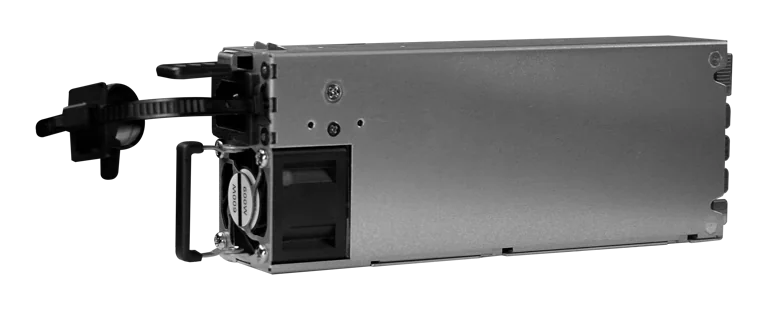
Buy MikroTik G1483-0600WNB in Kenya, a 600W hot-swappable 54.5V 10.35A power supply for the CRS320-8P-8B-4S+RM PoE++ switch, support
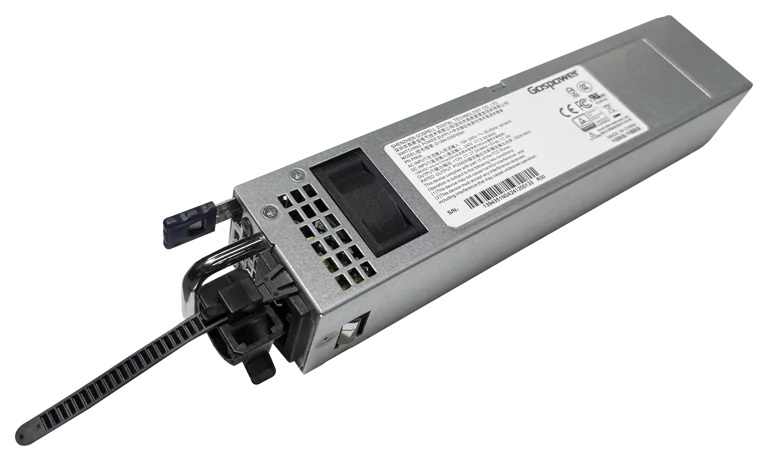
Buy MikroTik G1394-0350WNA in Kenya, a 350W hot-swappable 12V DC 27.5A AC power supply designed for the MikroTik CRS804 DDQ 400G swi
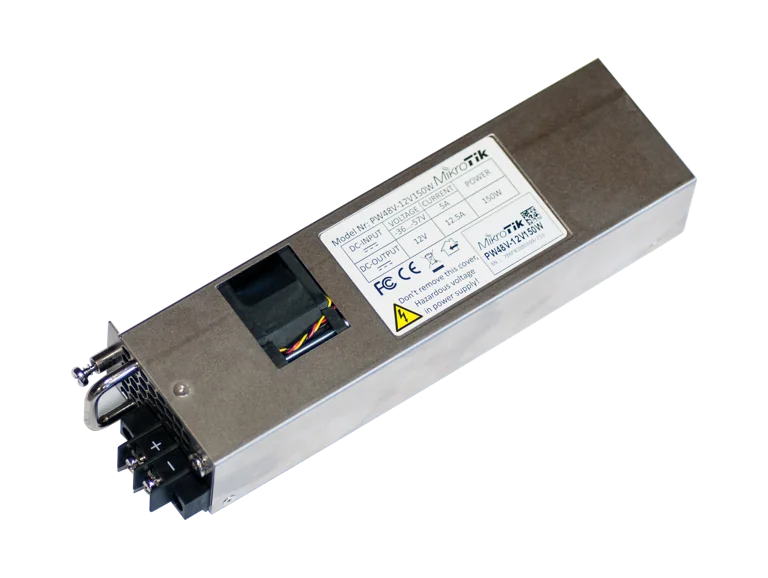
Buy MikroTik PW48V-12V150W in Kenya, a 150W hot-swappable -48V DC telecom power supply for CCR1072, CCR2216, CRS518 and CRS520 high-
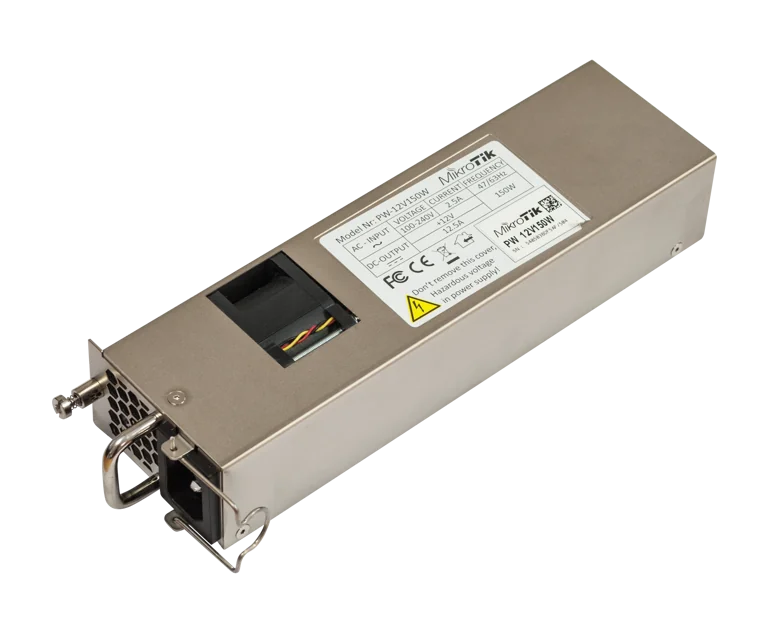
Buy MikroTik 12POW150 in Kenya, a 12V 150W hot-swap AC/DC power supply for CCR1072, CCR2216, CRS518 and CRS520 high-availability net