Who is this product best for?
- Home and small office routing
- Business internet edge routing
- ISP customer or branch deployments

Works with compatible MikroTik RouterOS networks and standard Ethernet networking equipment. Confirm port, power and mounting requirements before purchase.
Check the product label or manufacturer datasheet for exact input voltage, PoE support and power adapter requirements.
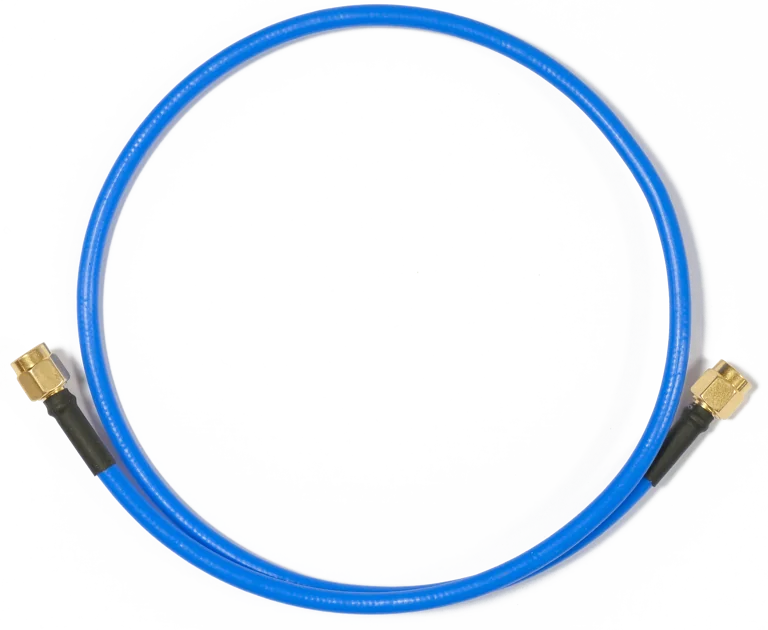
Buy MikroTik Flex-guide ACRPSMA in Kenya, a 50 cm super low-loss RPSMA cable with silver-plated copper, soldered connectors and less than 0.65 dB signal loss for indoor and outdoor wireless installations.

The MikroTik Flex-guide, product code ACRPSMA, is a premium 50 cm low-loss RPSMA antenna cable assembly designed for high-quality connections between MikroTik wireless devices and compatible external antennas. MikroTik describes it as a “super low loss” cable with less than 0.65 dB loss, making it useful where installers want to minimize signal loss between a radio and antenna.
The cable uses a silver-plated copper inner conductor, while both RPSMA connectors are soldered rather than crimped. MikroTik states that this construction is intended to provide superior matching and signal quality. It is suitable for both indoor and outdoor use and is particularly well suited to BaseBox, NetBox, NetMetal and other devices that use RPSMA antenna connectors.
MikroTik currently lists the Flex-guide at an official suggested price of US$9. A reliable current Kenyan retail listing for the exact ACRPSMA model was not confirmed during the latest search, so buyers should request the latest local quotation from MikroTik Kenya.
MikroTik Flex-guide SpecificationsSpecificationDetailsProduct NameMikroTik Flex-guideProduct CodeACRPSMAProduct TypeLow-loss RF antenna cable assemblyCable Length50 cmConnector TypeRPSMA on both endsMaximum Published LossLess than 0.65 dBInner ConductorSilver-plated copperConnector ConstructionSoldered, not crimpedFrequency SupportUp to 6 GHzIndoor UseYesOutdoor UseYesRecommended DevicesBaseBox, NetBox, NetMetal and compatible RPSMA equipmentAntenna CompatibilityWorks with most compatible RPSMA antennasSuggested Manufacturer PriceUS$9MTBFApprox. 100,000 hours at 25°CMikroTik's current product page confirms the 50 cm length, RPSMA design, silver-plated copper conductor, soldered connectors and sub-0.65 dB loss. MikroTik's accessory catalogue also describes the cable as suitable for frequencies up to 6 GHz. (download2.mikrotik.com)
What Is the MikroTik Flex-guide?The MikroTik Flex-guide is an RF cable, not an Ethernet cable.
A typical installation looks like:
MikroTik wireless radio → Flex-guide → external antenna
For example:
BaseBox → Flex-guide → mANT antenna
Its purpose is to carry radio-frequency signals between the wireless device and antenna while keeping cable losses as low as possible.
Key Features of MikroTik Flex-guideMikroTik specifies cable loss of less than 0.65 dB.
RF cable loss matters because every decibel lost between the radio and antenna reduces the effective signal delivered to or received from the antenna.
A low-loss cable is therefore especially useful in:
Point-to-point wireless links
WISP base stations
Sector antenna installations
Long-distance wireless networks
Outdoor wireless deployments
The Flex-guide is approximately 50 cm long.
This relatively short length helps limit unnecessary RF attenuation while still giving technicians enough flexibility to connect an outdoor radio to an antenna.
The cable uses RPSMA connectors on both ends. MikroTik specifically designed it for equipment that uses compatible RPSMA interfaces. (download2.mikrotik.com)
Before buying, installers should verify that both the MikroTik radio and antenna use the correct compatible connector type.
MikroTik Flex-guide CompatibilityDevice / EquipmentCompatibilityBaseBox 5Official related productBaseBox 2Official related productBaseBox 6Official related productNetBox 5Official related productNetBox 5 axOfficial related productNetMetal 5Official related productNetMetal 5SHPOfficial related productNetMetal ac²Official related productmANT AntennasSuitable where RPSMA interface is usedOther RPSMA RadiosPotentially compatibleOther Compatible AntennasWorks with most suitable antennasSMA-only EquipmentRequires correct connector compatibility; do not assume fitU.FL/MMCX EquipmentRequires a different pigtail or adapterMikroTik currently lists BaseBox 5, BaseBox 2, NetBox 5, NetMetal 5SHP, NetMetal 5, BaseBox 6, NetMetal ac² and NetBox 5 ax as related products for Flex-guide.
The cable's inner conductor is silver-plated copper.
This is part of MikroTik's effort to minimize RF losses and maintain good conductivity across the cable.
Both connectors are soldered rather than crimped. MikroTik specifically emphasizes this construction as a way to achieve better signal quality.
This makes the Flex-guide more purpose-built for RF performance than a generic inexpensive extension cable.
MikroTik's accessory catalogue specifies the Flex-guide for use at frequencies up to 6 GHz. (download2.mikrotik.com)
This makes it suitable for common MikroTik wireless bands such as:
2.4 GHz
5 GHz
Other compatible sub-6 GHz RF applications
It is not intended as a 60 GHz waveguide connection.
MikroTik specifically states that the Flex-guide is suitable for both indoor and outdoor use. (download2.mikrotik.com)
Outdoor installations should still be properly secured and weather-managed according to the radio and antenna installation requirements.
The name Flex-guide combines the concepts of “flexible” and “waveguide,” reflecting MikroTik's intention to provide a flexible cable with higher-grade RF characteristics.
It is useful when the radio and antenna cannot be connected directly but the installer still wants to minimize losses.
Common Applications of MikroTik Flex-guide in KenyaThe Flex-guide is useful for WISP installations, particularly where BaseBox or NetMetal devices connect to external sector or directional antennas. Keeping RF cable runs short can help preserve signal strength.
It can also be used in building-to-building wireless networks, CCTV backhaul, schools, hotels, farms and industrial sites where compatible MikroTik outdoor radios are connected to external antennas.
MikroTik's mANT-series installation guidance specifically lists Flex-guide as an accessory and advises installers to secure cables so their weight does not pull on antenna connectors. (MikroTik Help)
MikroTik Flex-guide Price in KenyaMikroTik currently lists the Flex-guide ACRPSMA at a suggested manufacturer price of US$9. (mikrotik.com)
A dependable current Kenyan retail listing for the exact product was not found during the latest check, so the safest approach is to request the latest quotation rather than estimate a local price from the US dollar figure.
Pricing InformationDetailsOfficial Suggested PriceUS$9Kenya Retail PriceRequest current quotationProduct CodeACRPSMACable Length50 cmRPSMA ConnectorsIncluded on both endsAntenna IncludedNoWireless Radio IncludedNoRecommended Purchase CheckConfirm RPSMA compatibility before orderingFlex-guide vs ACMMCXRPSMA vs ACSMAUFLFeatureFlex-guide ACRPSMAACMMCXRPSMAACSMAUFLMain PurposeRPSMA-to-RPSMA low-loss RF extensionMMCX to RPSMA pigtailU.FL to SMA female pigtailLength50 cmApprox. 26 cmDevice-specific short pigtailRadio-Side ConnectorRPSMAMMCXU.FLAntenna-Side ConnectorRPSMARPSMASMA femaleBest UseExternal antenna connection with RPSMA devicesMiniPCI/miniPCIe wireless cards with MMCXLTE/LoRa/wireless cards with U.FLIndoor/Outdoor Flex-guide RatingYesDepends on installationDepends on installationSuggested PriceUS$9US$9US$9The correct cable depends mainly on the connector present on your radio. Flex-guide is specifically intended for RPSMA-to-RPSMA applications, while MikroTik's other pigtails serve MMCX and U.FL devices. (mikrotik.com)
Why Choose MikroTik Flex-guide?The Flex-guide is a useful choice when you need a short, high-quality RF connection between a compatible MikroTik radio and external antenna.
Its main benefits include:
Less than 0.65 dB cable loss
50 cm length
RPSMA connectors on both ends
Silver-plated copper conductor
Soldered connectors
Support for frequencies up to 6 GHz
Indoor and outdoor use
Compatibility with BaseBox, NetBox and NetMetal equipment
Works with most suitable antennas
Official MikroTik accessory
No configuration required
No electrical power required
The MikroTik Flex-guide ACRPSMA is a 50 cm low-loss RF cable with RPSMA connectors on both ends. It is designed to connect compatible MikroTik wireless devices to external antennas while minimizing signal loss.
The official product code is ACRPSMA.
MikroTik currently lists the suggested manufacturer price at US$9. (mikrotik.com)
A reliable current Kenyan price for ACRPSMA was not confirmed in the sources checked. Request a current quotation from MikroTik Kenya because local pricing may vary with stock, VAT and exchange rates.
It is 50 cm long.
It uses RPSMA connectors on both ends. (download2.mikrotik.com)
No. SMA and reverse-polarity SMA use different center-pin arrangements, so connector compatibility must be checked carefully.
Not necessarily. Both sides need compatible connector types. Do not force an RPSMA connector onto an incompatible SMA interface.
MikroTik specifies less than 0.65 dB loss.
For a short 50 cm RF jumper, it is intended as a low-loss connection. The practical importance is that less RF energy is wasted in the cable compared with a higher-loss assembly.
Yes. RF cable attenuation reduces both transmitted and received signal levels between the radio and antenna. Minimizing cable loss is therefore useful in directional and long-range wireless systems.
No. It does not amplify the signal or increase the antenna's rated gain.
It can help avoid unnecessary cable loss compared with a poorer-quality or longer cable. It does not generate additional RF power.
Yes. MikroTik specifies a silver-plated copper inner conductor.
Silver plating provides highly conductive RF contact characteristics and forms part of the cable's low-loss design.
Yes. MikroTik specifically states that both connectors are soldered rather than crimped.
For this product, MikroTik uses soldered termination as part of its design for good matching and low signal loss. The overall RF performance still depends on the complete cable design and installation.
MikroTik's accessory catalogue specifies use at frequencies up to 6 GHz. (download2.mikrotik.com)
Yes, where the equipment and antenna use compatible RPSMA interfaces.
Yes. This is one of its common applications.
MikroTik specifies the cable for use up to 6 GHz. (download2.mikrotik.com)
No. It is not a 60 GHz antenna cable system.
Yes. MikroTik specifically describes it as ideally suited to BaseBox devices with RPSMA connectors.
Yes. BaseBox 5 is an official related product.
Yes. MikroTik also lists BaseBox 2 as a related product.
Yes. BaseBox 6 is currently listed among related products.
Yes. MikroTik lists NetBox 5 and NetBox 5 ax among related products.
Yes. NetMetal products with suitable RPSMA antenna interfaces are among the main intended applications.
MikroTik lists NetMetal ac² among related products for Flex-guide.
Yes, where the particular mANT antenna uses the appropriate compatible RPSMA interface. MikroTik's mANT documentation lists Flex-guide as an available accessory. (MikroTik Help)
MikroTik's historical antenna catalogue states that mANT30 includes two Flex-guide cables. (download2.mikrotik.com)
A dual-chain antenna system normally requires a separate RF connection for each chain. Check the radio and antenna connector count before ordering.
Often yes, if there are two RPSMA radio chains and two antenna inputs. The exact requirement depends on the equipment.
MikroTik says it works with most antennas, but the connector type and frequency range must still be compatible.
Yes, potentially, if the antenna uses the appropriate compatible RPSMA connector and works within the required frequency range.
Yes. MikroTik explicitly states that it is suitable for indoor and outdoor use.
MikroTik states that the cable is suited for outdoor use, but it does not mean every connector junction is automatically waterproof in every installation. Outdoor RF connections should be weatherproofed appropriately.
Yes. Proper outdoor installation practices should be used around RF connector joints.
It is better to secure RF cabling so the cable's weight does not pull on the connector. MikroTik's mANT guidance specifically recommends securing cables to the wall or pole rather than leaving them loose. (MikroTik Help)
It is designed to be flexible, but RF cables should not be sharply kinked or repeatedly bent beyond reasonable limits because that can damage the internal structure or connectors.
Physically this may be possible with the correct RF coupler, but every extra connector and additional cable length introduces more RF loss. It is generally better to keep the RF cable path short.
The official Flex-guide ACRPSMA is specified as 50 cm. For longer runs, choose a suitable RF cable system designed for the required frequency and acceptable attenuation.
No. In RF systems, longer cable normally means more loss.
Where practical, yes. Outdoor wireless designs often keep the RF cable short and use Ethernet for the longer cable run because Ethernet does not introduce RF antenna-feed loss in the same way.
No.
No.
It carries analog RF energy between the wireless radio and antenna, not Ethernet frames.
No. It is a passive RF cable.
No.
No.
No.
No. WinBox is used to configure the wireless radio.
Flex-guide has RPSMA connectors at both ends and is a 50 cm low-loss cable.
ACMMCXRPSMA converts from an MMCX connector to RPSMA, commonly for compatible wireless cards.
ACSMAUFL is a U.FL-to-SMA female pigtail, often used to connect wireless, LTE or LoRa cards to external antennas. Flex-guide is an RPSMA-to-RPSMA RF cable. (Starlink Kenya)
Only if the radio already has an RPSMA connector. If the device has MMCX internally, Flex-guide alone cannot replace the required MMCX pigtail.
Not where the device requires a U.FL connection.
Yes. It is particularly relevant for WISP radios connected to external sector or directional antennas.
Yes. Low-loss RF cables are valuable where directional antennas are used for point-to-point links.
Yes, if the backhaul radio and antenna use compatible RPSMA connectors.
Yes. It can be used wherever compatible MikroTik outdoor radios and antennas are installed for campus connectivity.
Yes. Compatible wireless links between buildings can use Flex-guide where the selected radio and external antenna require an RPSMA cable.
Yes. It can be used in rural WISP, CCTV and point-to-point wireless installations.
Yes. Its low-loss construction and soldered connectors are specifically aimed at better-quality RF connections.
The cable itself is not a substitute for grounding. MikroTik recommends proper grounding of towers, masts and outdoor wireless equipment.
No. Use appropriate grounding and surge protection for the installation.
Yes. MikroTik lists an MTBF of approximately 100,000 hours at 25°C.
Yes. It remains listed in MikroTik's current accessories catalogue at a suggested price of US$9. (mikrotik.com)
You can source MikroTik Flex-guide ACRPSMA through MikroTik networking suppliers in Kenya. Since a reliable exact current Kenya retail price was not confirmed, request current stock and quotation before ordering.
Installing MikroTik Flex-guideInstallation is straightforward: connect one RPSMA end of the Flex-guide to the compatible MikroTik wireless device and the other end to the external antenna. Both connections should be correctly threaded and tightened without excessive force, and connector types should be verified before installation.
Keep the cable route as short and direct as practical, avoid sharp bends, and secure it so that its weight does not pull on the radio or antenna connector. MikroTik specifically recommends securing external antenna cabling to a wall or pole to avoid connector damage from cable weight. (MikroTik Help)
For outdoor wireless installations, also consider proper weather protection around connections, grounding of masts and wireless equipment, and appropriate Ethernet surge protection. Flex-guide helps preserve the RF signal between the radio and antenna, but it does not replace good overall installation practices.
The MikroTik Flex-guide ACRPSMA is a premium 50 cm RPSMA cable designed to provide a low-loss RF connection between compatible MikroTik wireless equipment and external antennas. With less than 0.65 dB loss, a silver-plated copper conductor and soldered connectors, it is well suited to professional wireless installations where signal loss should be kept as low as practical.
Its support for frequencies up to 6 GHz, indoor and outdoor use, and compatibility with products such as BaseBox, NetBox and NetMetal make it useful for WISP, point-to-point, CCTV, campus and rural wireless networks.
MikroTik currently lists Flex-guide at US$9. For the latest MikroTik Flex-guide price in Kenya, RPSMA antenna cables, BaseBox, NetBox, NetMetal, mANT antennas and professional MikroTik wireless accessories, visit Mikrotik Kenya for current pricing and availability.
Reviews are not available yet for this product.
Flex-guide is currently listed as available. Stock can change, so confirm availability before placing a large order.
The current listed price is KSh 2,500.00. Prices are generated from the product catalogue and may change when inventory is updated.
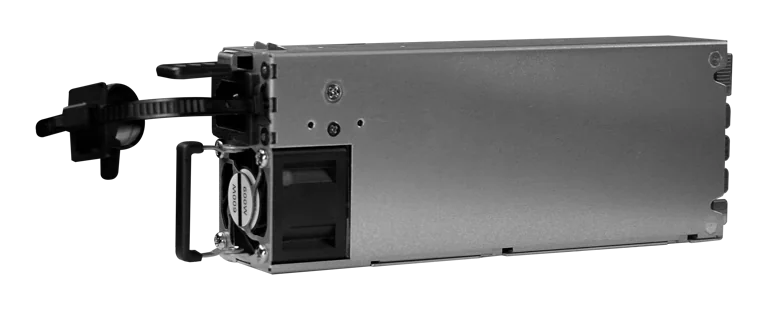
Buy MikroTik G1483-0600WNB in Kenya, a 600W hot-swappable 54.5V 10.35A power supply for the CRS320-8P-8B-4S+RM PoE++ switch, support
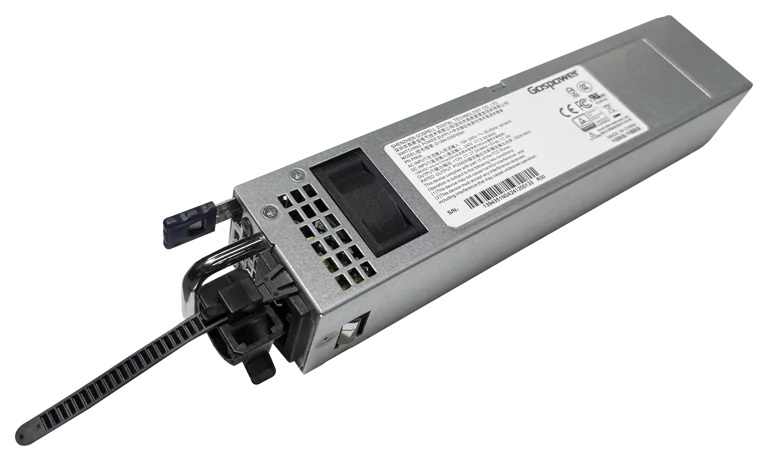
Buy MikroTik G1394-0350WNA in Kenya, a 350W hot-swappable 12V DC 27.5A AC power supply designed for the MikroTik CRS804 DDQ 400G swi
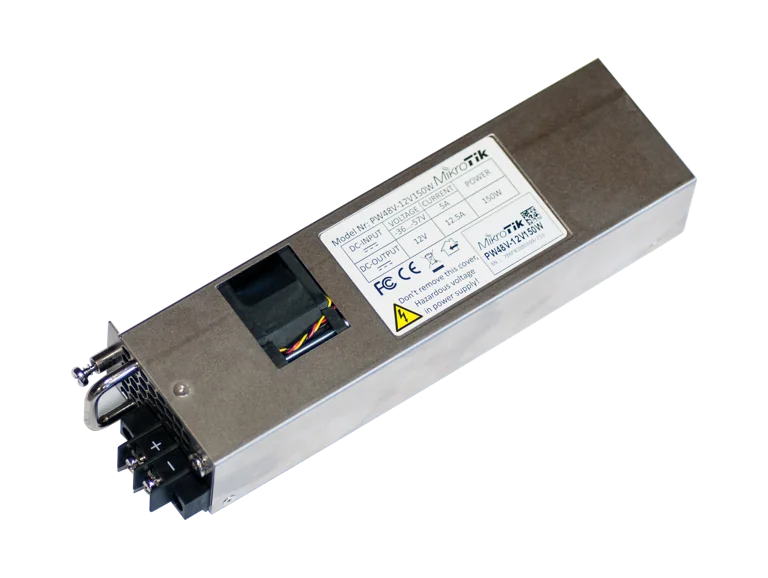
Buy MikroTik PW48V-12V150W in Kenya, a 150W hot-swappable -48V DC telecom power supply for CCR1072, CCR2216, CRS518 and CRS520 high-
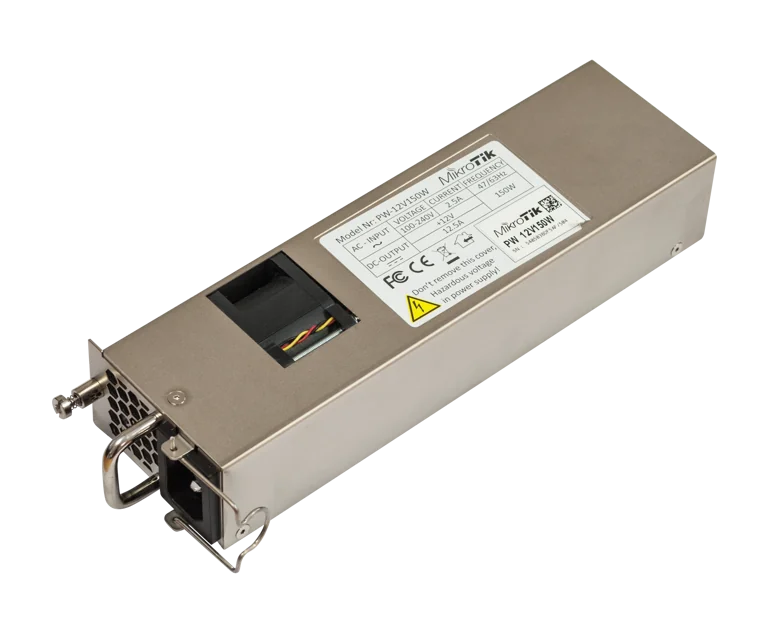
Buy MikroTik 12POW150 in Kenya, a 12V 150W hot-swap AC/DC power supply for CCR1072, CCR2216, CRS518 and CRS520 high-availability net