
MikroTik RB4011iGS+RM Review
Read our MikroTik RB4011iGS+RM review covering performance, 10 Gigabit ports, SFP+, RouterOS, ISP use, pros, cons and whether it is worth buying.
MikroTik RB4011iGS+RM Review
Is the MikroTik RB4011 Still Worth Buying?
MikroTik RB4011iGS+RM Review | Is RB4011 Still Worth It?
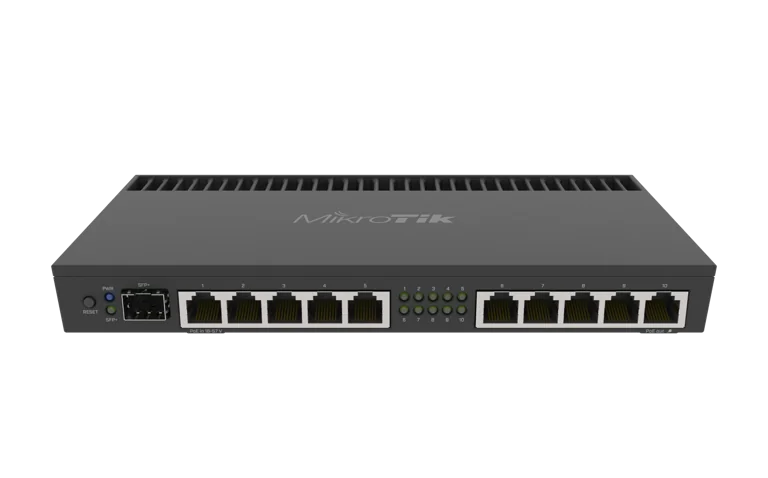
The MikroTik RB4011iGS+RM is one of MikroTik’s most established professional wired routers, offering a strong combination of routing performance, ten Gigabit Ethernet ports, a 10G SFP+ interface, rackmount support and the flexibility of RouterOS.
For businesses, ISPs, CCTV installers, network technicians and organizations in Kenya, the RB4011 remains an attractive option when a basic MikroTik router is no longer powerful enough but a higher-end Cloud Core Router may be unnecessary.
In this MikroTik RB4011iGS+RM review, we look at its performance, ports, RouterOS capabilities, ISP suitability, business applications, advantages, limitations and whether it is still worth buying.
You can view the MikroTik RB4011iGS+RM or browse other MikroTik products in Kenya.
MikroTik RB4011iGS+RM at a Glance
The RB4011iGS+RM is built around a quad-core ARM processor and provides:
10 × Gigabit Ethernet ports
1 × 10G SFP+ interface
1 GB RAM
512 MB NAND storage
RouterOS v7
RouterOS Level 5 licence
Passive PoE input
Passive PoE output on Ether10
rackmount support
fanless operation
This specification set places the RB4011 firmly in the professional networking category.
RB4011 Performance Review
Performance is one of the strongest reasons to consider the RB4011.
The router uses a quad-core AL21400 ARM processor, giving it significantly more capability than entry-level MikroTik devices.
This makes it suitable for workloads such as:
PPPoE
firewall filtering
VLAN routing
bandwidth queues
VPN
hotspot services
NAT
multi-WAN
traffic management
routing protocols
For many small and medium-sized professional networks, the RB4011 provides enough processing headroom to run several RouterOS services at the same time.
That is particularly important for ISPs and businesses where the router is doing much more than simply sharing an internet connection.
Ten Gigabit Ethernet Ports Review
The ten Gigabit Ethernet ports are a major practical advantage.
Many routers in this performance range provide fewer physical interfaces, forcing administrators to depend on external switches earlier.
With ten Ethernet ports, the RB4011 can directly connect several network segments.
For example:
WAN
Office LAN
CCTV
Servers
Access Points
Management
Backup WAN
VoIP
Guest Network
PoE device
This makes the router especially useful for network technicians who want flexibility when designing installations.
10G SFP+ Review
The RB4011 includes one 10 Gigabit SFP+ interface.
This is one of the features that separates it from many lower-priced MikroTik routers.
The SFP+ interface can be used for:
fibre uplinks
managed switches
ISP backbone connections
server networks
high-speed LAN aggregation
For networks that are currently Gigabit but may move toward faster backbone connectivity, the SFP+ interface provides useful upgrade potential.
RouterOS Review
RouterOS is one of the biggest reasons to buy the RB4011.
The router runs RouterOS v7 and gives administrators access to advanced features including:
VLANs
firewall
NAT
DHCP
PPPoE
hotspot
VPN
bandwidth queues
multi-WAN
failover
load balancing
dynamic routing
scripting
monitoring
Compared with normal consumer routers, RouterOS provides much more control.
The downside is that RouterOS also has a steeper learning curve.
Beginners may need time to understand:
bridges
VLAN filtering
routing tables
firewall chains
queues
interfaces
PPP profiles
For experienced MikroTik users, however, this flexibility is one of the router’s greatest strengths.
MikroTik RB4011 for ISPs
The RB4011 is particularly attractive for smaller and medium ISP deployments.
An ISP can use it for:
PPPoE
subscriber routing
bandwidth profiles
VLANs
firewall rules
hotspot services
multiple internet links
Its suitability depends on the actual workload rather than simply the number of customers.
Important factors include:
total bandwidth
number of subscribers
firewall complexity
queue configuration
VPN usage
packet size
routing requirements
For larger networks, the RB5009 or CCR series may provide more headroom.
ISPs can also combine MikroTik networking with Tajira for subscriber and billing management.
RB4011 for PPPoE
PPPoE remains a common subscriber-authentication method for ISPs.
RouterOS allows the RB4011 to manage:
PPPoE users
PPP profiles
address pools
bandwidth limits
authentication
routing policies
For smaller deployments, subscribers can be managed directly in RouterOS.
For larger networks, centralized authentication such as RADIUS may be more practical.
RB4011 for Business Networks
The RB4011 is also an excellent business router.
A business can use it to create separate network segments for:
staff
management
CCTV
guest Wi-Fi
servers
VoIP
VLANs can be used to separate these services while firewall rules control communication between them.
This makes the RB4011 suitable for:
offices
hotels
schools
warehouses
hospitals
retail businesses
multi-branch organizations
RB4011 for CCTV Networks
CCTV networks often become complicated as camera numbers increase.
The RB4011 can be used to manage:
IP cameras
NVR systems
remote viewing
CCTV VLANs
VPN access
multi-site connections
A dedicated CCTV VLAN can help keep surveillance traffic separate from normal office traffic.
This improves organization and can make security policies easier to manage.
Multi-WAN Review
Another strong use case is multi-WAN.
The RB4011 can be configured with:
primary fibre
secondary fibre
Starlink
LTE or other backup links
RouterOS can then provide:
failover
policy routing
load balancing
For businesses that depend heavily on internet connectivity, this can reduce downtime.
VPN Review
The RB4011 is a much better VPN platform than entry-level MikroTik routers.
Possible uses include:
remote employee access
branch-to-branch VPN
technician access
secure CCTV access
RouterOS supports multiple VPN technologies, while the RB4011 platform provides enough processing capability for more demanding encrypted traffic.
Bandwidth Management Review
Bandwidth management is another area where the RB4011 performs well.
RouterOS includes:
Simple Queues
Queue Tree
PCQ
PPP profiles
These can be used by ISPs to define subscriber packages or by businesses to prioritize important services.
For example:
VoIP
cloud applications
video conferencing
ERP systems
can be prioritized over less critical traffic.
Build Quality
The RB4011 uses a solid metal enclosure.
This gives it a professional appearance and helps with heat dissipation.
The router is fanless, so there is no internal fan noise.
That makes it suitable for:
offices
server rooms
network cabinets
home labs
The lack of moving cooling parts can also reduce maintenance concerns.
Rackmount Design
The RB4011iGS+RM includes rackmount capability.
This is important for professional deployments where equipment needs to be installed neatly alongside:
switches
patch panels
fibre equipment
NVRs
UPS systems
servers
For installers and businesses, the rackmount design is a major advantage over desktop-only routers.
PoE Review
The RB4011 supports Passive PoE input and Passive PoE output on Ether10.
PoE output can help power compatible networking devices.
However, Passive PoE requires care.
Always verify the voltage requirements of the connected device before enabling PoE output.
RB4011 vs L009UiGS-RM
The MikroTik L009UiGS-RM is newer and more affordable.
The L009 offers:
8 Gigabit ports
2.5G SFP
USB 3.0
modern ARM architecture
The RB4011 offers:
stronger routing performance
10 Gigabit Ethernet ports
10G SFP+
more headroom for demanding networks
Choose the L009 for lighter professional networks.
Choose the RB4011 when performance matters more.
RB4011 vs L009UiGS-2HaxD-IN
The MikroTik L009UiGS-2HaxD-IN includes integrated 2.4 GHz Wi-Fi 6.
The RB4011 does not include Wi-Fi.
Choose L009UiGS-2HaxD-IN when:
built-in wireless is important
the network is smaller
you want an all-in-one device
Choose RB4011 when:
you already use dedicated access points
routing performance is the priority
10G uplink capability matters
RB4011 vs RB5009
The RB5009 is one of the biggest alternatives to the RB4011.
The RB5009 provides:
newer ARM64 architecture
2.5G Ethernet
10G SFP+
USB 3.0
compact design
The RB4011 provides:
more physical Gigabit ports
strong rackmount suitability
proven routing performance
For new networks, the better option depends on requirements.
Choose based on:
number of required ports
CPU workload
rack design
uplink requirements
budget
What We Like About the RB4011
The strongest features are:
quad-core processor
1 GB RAM
ten Gigabit ports
10G SFP+
RouterOS
VLAN support
PPPoE
VPN
multi-WAN
bandwidth management
rackmount design
fanless operation
It is a well-balanced router for professional users.
What Could Be Better?
The RB4011 is not perfect.
No Built-In Wi-Fi
You need dedicated access points for wireless coverage.
For professional deployments, this is often not a problem because separate access points are preferable anyway.
No USB Port
The RB4011 does not include USB.
Users needing USB storage or LTE modem functionality may prefer another MikroTik model.
Older Than the RB5009
The RB5009 uses a newer hardware platform.
For some new installations, the RB5009 may offer a more modern upgrade path.
However, the RB4011 still offers more Gigabit Ethernet ports.
Who Should Buy the RB4011?
The RB4011 is a strong choice for:
ISPs
WISPs
network technicians
CCTV installers
businesses
hotels
schools
apartment internet providers
enterprise branches
advanced home labs
Who Should Not Buy the RB4011?
You may not need the RB4011 if:
your network is very small
you only need basic Wi-Fi
you have fewer than a handful of devices
you do not use VLANs, VPNs or advanced routing
A smaller MikroTik router may provide better value.
Is the MikroTik RB4011 Still Worth Buying?
Yes, particularly when you need:
many Ethernet ports
10G SFP+
professional routing
rackmount design
RouterOS flexibility
The RB5009 is newer, but that does not automatically make the RB4011 obsolete.
The RB4011 continues to make sense where its ten Gigabit Ethernet ports and rackmount design fit the network better.
MikroTik RB4011 Price in Kenya
Customers looking for the current MikroTik RB4011iGS+RM price in Kenya can check the dedicated MikroTik RB4011iGS+RM product page.
You can also compare MikroTik router prices in Kenya or explore additional MikroTik products through Orbitlink Solutions.
Frequently Asked Questions
Is the MikroTik RB4011 good?
Yes. It remains a powerful professional router for businesses, ISPs and advanced networks.
Is RB4011 good for an ISP?
Yes, provided its performance matches the subscriber count, bandwidth and RouterOS workload.
Does RB4011 support 10G?
Yes. It includes a 10G SFP+ interface.
How many Ethernet ports does RB4011 have?
It has ten Gigabit Ethernet ports.
Does RB4011 have Wi-Fi?
No. The RB4011iGS+RM is a wired router.
Does RB4011 support VLANs?
Yes. RouterOS provides advanced VLAN functionality.
Can the RB4011 manage PPPoE?
Yes. It supports PPPoE server and client functionality.
Is RB4011 better than L009?
For raw routing performance, the RB4011 is generally stronger. The L009 may provide better value for smaller networks.
Is RB4011 better than RB5009?
It depends on the network. RB5009 uses a newer platform, while RB4011 provides more Gigabit Ethernet ports.
Where can I buy MikroTik RB4011 in Kenya?
You can view the MikroTik RB4011iGS+RM on MikroTik Kenya.
Final MikroTik RB4011iGS+RM Review
The MikroTik RB4011iGS+RM remains one of the strongest mid-range professional routers in MikroTik’s lineup.
Its combination of:
quad-core processing
ten Gigabit Ethernet ports
10G SFP+
RouterOS
rackmount design
VLAN support
PPPoE
VPN
multi-WAN
bandwidth management
makes it suitable for a wide range of business and ISP environments.
Its biggest limitations are the lack of built-in Wi-Fi and the fact that newer models such as the RB5009 now exist.
However, for networks that benefit from ten physical Gigabit interfaces and professional rack installation, the RB4011 remains extremely relevant.
If you are considering one, check the current MikroTik RB4011iGS+RM price in Kenya before purchasing.