Who is this product best for?
- Home and small office routing
- Business internet edge routing
- ISP customer or branch deployments

Works with compatible MikroTik RouterOS networks and standard Ethernet networking equipment. Confirm port, power and mounting requirements before purchase.
Check the product label or manufacturer datasheet for exact input voltage, PoE support and power adapter requirements.
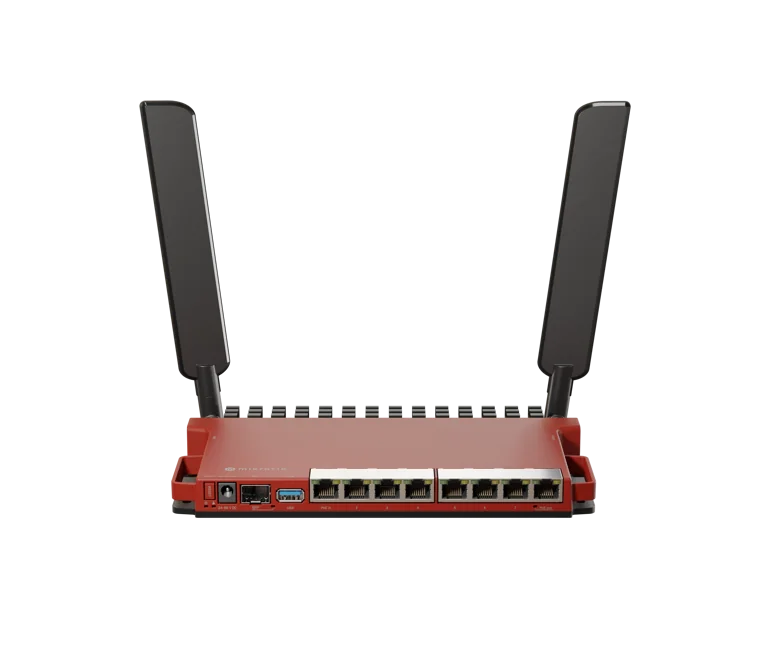
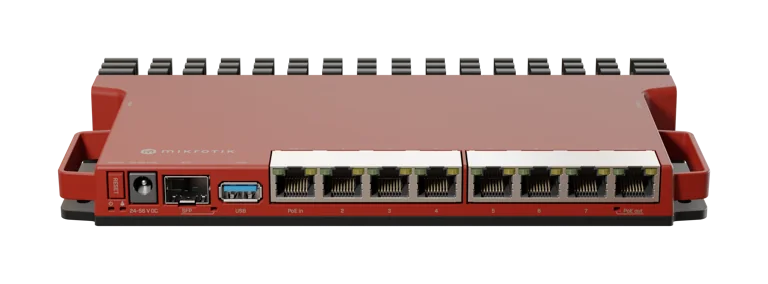
The MikroTik L009UiGS-2HaxD-IN is a compact, budget-friendly router built for home networks, small offices, and light home lab use. It pairs a full Gigabit Ethernet switch with a 2.5G SFP uplink, built-in Wi-Fi 6 (802.11ax) wireless, and flexible PoE support, all inside the same slim, heat-sink chassis used by MikroTik's popular RB5009 line. It's aimed at users who want more capability than a typical consumer router without stepping up to a full rack-mount platform.
The L009UiGS-2HaxD-IN is built around a dual-core IPQ-5018 ARM processor running at 800 MHz, with 512 MB of RAM and 128 MB of NAND storage for the operating system and configuration. It ships with RouterOS v7 pre-installed and includes a RouterOS Level 5 license, giving it access to MikroTik's full routing, firewall, VPN, and traffic-management feature set, along with free RouterOS updates for the life of the product (a minimum of five years).
The router offers eight Gigabit Ethernet ports (10/100/1000) for LAN and WAN connections, plus a single SFP cage that supports 2.5G speeds for a fast fiber or copper-SFP uplink. Port 1 accepts PoE-in (802.3af/at, 24–56V), so the router itself can be powered over Ethernet, while port 8 provides passive PoE-out (up to 1.0A) for powering a downstream device such as an access point or camera. Rounding out the I/O is a USB 3.0 Type-A port (1.5A max) for storage or USB peripherals, an RJ45 serial console port for direct CLI access, and a physical mode button for reset and recovery functions.
Unlike the RB5009 series, the L009UiGS-2HaxD-IN includes onboard wireless: a dual-chain 2.4 GHz radio supporting 802.11b/g/n/ax (Wi-Fi 6) with a maximum data rate of 574 Mbps. It ships with an HGO indoor antenna kit rated at 4 dBi gain, making it a genuine all-in-one router and access point for smaller spaces, rather than requiring a separate AP for Wi-Fi coverage.
Power can be supplied either through the included 24V/1.5A DC power adapter or via PoE-in on port 1, which makes installation easier in locations where running a separate power outlet is inconvenient. Maximum power consumption is rated at 47W when powering attached PoE-out devices and USB peripherals, or as low as 14W for the router alone. Like the rest of MikroTik's RB5009-style lineup, it's entirely fanless, relying on its metal case as a passive heat sink.
The router shares its compact 220 x 125 x 22 mm form factor and case design with the RB5009 series, meaning up to four units can be mounted side by side in a single 1U rack space with the optional K-79 rackmount kit. The included K-55 screw kit allows for simple wall or surface mounting as well. The unit is rated for a wide operating temperature range of -40°C to 70°C and carries an estimated MTBF of around 200,000 hours at 25°C, with CE, FCC, IC, EAC, and RoHS certifications.
Running RouterOS v7 with a Level 5 license, the L009UiGS-2HaxD-IN supports advanced firewalling and NAT, VLANs, VPN protocols (WireGuard, IPsec, OpenVPN), dynamic and static routing (OSPF, BGP, RIP), wireless configuration including CAPsMAN for managing additional access points, traffic shaping and queueing, hotspot/captive portal features, and container support, all configurable through WinBox, WebFig, or the command-line interface.
This router suits home users and small offices that want a single device to handle routing, switching, and Wi-Fi 6 wireless without juggling separate boxes, especially where a 2.5G internet plan or NAS needs a faster-than-gigabit uplink. The PoE-in capability makes it easy to power from a wiring closet or PoE injector, while PoE-out on port 8 lets it directly power a small downstream device like a camera or a second access point. It's also a practical, low-cost option for RouterOS learning, home labs, and remote or branch-site deployments where wireless coverage and routing need to come from a single compact unit.
Specifications sourced from MikroTik's official product page and datasheet. Actual retail pricing (approximately $129 USD suggested) and availability vary by region and reseller.
Note: As with all MikroTik devices, the L009UiGS-2HaxD-IN runs RouterOS, which offers extensive configurability but has a steeper learning curve than typical consumer routers. New users should plan to spend time with WinBox or the CLI to get the most out of the device.
Setting up the MikroTik L009UiGS-2HaxD-IN is straightforward for a basic home, office or business network. The router runs RouterOS, giving you access to both simple and advanced networking features through WinBox, WebFig or the MikroTik mobile application.
Attach the supplied antennas before powering the router.
Connect your internet connection to Ether1. Depending on your installation, this may come from:
A fiber ONT
An ISP Ethernet cable
A Starlink Ethernet connection
A wireless ISP radio
Another modem or upstream router
Connect your computer to one of the available LAN Ethernet ports.
You can configure the L009UiGS-2HaxD-IN using WinBox or WebFig.
For WebFig, open your browser and enter:
192.168.88.1
Alternatively, open WinBox and check the Neighbors section. The router should appear automatically when your computer is connected to the same network.
WinBox can also connect to the MikroTik router using its MAC address, which is useful during initial configuration or troubleshooting.
After logging in, change the default administrator password immediately.
A strong password is especially important when the router is being used in:
Offices
Schools
Hotels
Restaurants
Cyber cafés
CCTV networks
Hotspot businesses
Public Wi-Fi installations
Avoid leaving the router with default login credentials.
The WAN configuration depends on your Internet Service Provider.
Common connection types include:
DHCP or automatic IP
Static IP
PPPoE
If your ISP automatically assigns an IP address, the router may connect to the internet with minimal additional configuration.
For PPPoE or static-IP connections, enter the account or network details supplied by your ISP.
The MikroTik L009 can provide IP addresses automatically to computers, phones, access points, CCTV cameras and other devices through its DHCP server.
For more advanced networks, you can create separate network segments for:
Staff devices
Guest Wi-Fi
CCTV cameras
VoIP phones
Servers
Network management
Hotspot customers
These networks can later be separated using VLANs and firewall rules.
The MikroTik L009UiGS-2HaxD-IN includes built-in 2.4 GHz Wi-Fi 6.
Configure your preferred:
Wi-Fi name or SSID
Wireless password
Country settings
Wireless security settings
Use a strong Wi-Fi password and appropriate WPA2 or WPA3 security settings depending on the devices connecting to the network.
It is important to note that the L009UiGS-2HaxD-IN has 2.4 GHz wireless only. If you require 5 GHz Wi-Fi or wider wireless coverage, you can connect additional MikroTik access points to the router.
For a normal internet installation, NAT allows multiple devices on the local network to share one internet connection.
RouterOS also includes advanced firewall features that can be used to control traffic and improve network security.
Depending on the installation, you can configure:
Guest network isolation
Port forwarding
CCTV access rules
VPN access
Inter-VLAN firewall rules
Hotspot restrictions
User bandwidth limits
For most basic networks, the default MikroTik firewall provides a good starting point, but more complex business installations may require additional configuration.
After completing the basic setup, check whether a newer stable RouterOS version is available.
Updating RouterOS helps ensure that the router has the latest security fixes, stability improvements and supported features.
It is also advisable to create a backup before making major configuration changes.
After completing the setup, test the router using both wired and wireless devices.
Confirm that:
The router has internet access
Connected devices receive IP addresses
Websites load correctly
Wi-Fi devices can connect
Wired devices communicate properly
DNS resolution works correctly
If you have configured VLANs, VPNs, CCTV systems or hotspot users, test each service separately.
Once the MikroTik L009UiGS-2HaxD-IN is working correctly, save a backup of the configuration.
A backup makes it easier to restore the router if configuration changes, upgrades or troubleshooting cause problems later.
The MikroTik L009UiGS-2HaxD-IN can also be configured for more advanced business and professional networks.
Common advanced configurations include:
VLAN configuration
Dual WAN
Internet failover
Load balancing
MikroTik Hotspot
Bandwidth management
Firewall configuration
VPN connections
Guest Wi-Fi
Starlink integration
Fiber internet routing
CCTV network separation
For advanced installations, proper MikroTik router configuration helps ensure that the L009 is set up according to the actual requirements of the network instead of relying only on the default RouterOS configuration.
The MikroTik L009UiGS-2HaxD-IN is suitable for a wide range of home, office and small-business networking environments in Kenya. Its combination of Gigabit Ethernet connectivity, RouterOS features, integrated 2.4 GHz Wi-Fi 6 and an SFP interface makes it useful for networks that require more control than a standard home router can provide.
Below are some of the most common ways the MikroTik L009 can be deployed.
The L009UiGS-2HaxD-IN is a practical option for small and medium-sized businesses that need centralized control over their internet connection and internal network.
It can be used to connect:
Desktop computers
Network printers
IP phones
CCTV systems
Wireless access points
Servers
Network switches
Point-of-sale systems
Using RouterOS, an administrator can create separate networks for different departments, control bandwidth usage and apply firewall policies according to the needs of the organization.
For offices that require guest Wi-Fi, the guest network can also be separated from internal company devices using VLANs and firewall rules.
The MikroTik L009UiGS-2HaxD-IN can also be used in advanced home networks where the user needs more control than is normally available from an ISP-supplied router.
It can manage connections for:
Smart televisions
Computers and laptops
CCTV cameras
Network storage devices
Smart-home equipment
Gaming devices
Wireless access points
The router is particularly useful in homes where several network devices need to be connected by Ethernet or where the owner wants greater control over firewall rules, bandwidth and network segmentation.
Because the built-in wireless radio operates on 2.4 GHz, larger homes or users who require 5 GHz Wi-Fi can connect additional wireless access points to the L009.
The L009 can be used as the main router behind a fiber ONT or another Ethernet handoff supplied by an Internet Service Provider.
This makes it suitable for homes and businesses using fiber internet connections in Kenya.
Depending on the ISP, the WAN connection may use:
DHCP
Static IP addressing
PPPoE
RouterOS allows the administrator to configure the required connection method while also controlling the local network, firewall, DHCP, VLANs and bandwidth policies.
This makes the MikroTik L009 a useful option for customers looking for a MikroTik router for fiber internet in Kenya.
The MikroTik L009UiGS-2HaxD-IN can also be used as a network-management router in a Starlink installation where an Ethernet connection is available.
In this type of deployment, Starlink provides the internet connection while the MikroTik router can handle the local network.
The L009 can be used for:
DHCP management
Firewall rules
VLANs
Guest networks
Bandwidth control
VPN connections
Hotspot management
Multiple access points
CCTV network separation
This can be particularly useful for businesses, schools, hotels and other organizations that require more network control than a basic internet connection alone provides.
The MikroTik L009 can be configured for hotspot deployments using RouterOS Hotspot features.
A hotspot network can be designed to manage users who connect through Wi-Fi access points connected to the router.
Depending on the configuration, the network administrator can control:
User authentication
Session duration
Bandwidth limits
User profiles
Speed packages
Access restrictions
Captive portal pages
For larger hotspot deployments, the MikroTik router can also be integrated with compatible external authentication or billing platforms.
This makes the L009 worth considering for smaller MikroTik hotspot businesses in Kenya where the expected traffic and user load match the router's capabilities.
Hotels, lodges, apartments and guest houses often require separate networks for guests, staff and management systems.
The L009 can form part of this type of network by creating different VLANs or subnets.
For example:
Staff network
Guest Wi-Fi network
CCTV network
Management network
Point-of-sale network
Separating these services can improve security and make network management easier.
For properties that require broader wireless coverage, several access points can be connected to the L009 rather than relying only on the router's built-in Wi-Fi.
Schools and training institutions can use the MikroTik L009 to manage internet access for staff, students and administrative systems.
A typical configuration may include separate networks for:
Teachers and staff
Students
Computer laboratories
CCTV cameras
Administration
Guest Wi-Fi
RouterOS bandwidth management features can also help administrators control how available internet capacity is distributed across different users or departments.
The L009 can be incorporated into CCTV installations that require IP cameras, network video recorders and remote internet access.
CCTV equipment can be placed on a dedicated VLAN or subnet instead of sharing the same network directly with office computers and guest devices.
A separate CCTV network can help simplify:
Access control
Network security
Device management
Troubleshooting
Bandwidth planning
For installations containing many cameras, additional network switches may be required.
Restaurants, cafés and retail businesses often need to support several different network services at the same location.
These may include:
Point-of-sale systems
Staff devices
Guest Wi-Fi
CCTV cameras
Online payment terminals
Network printers
Cloud-based business systems
The MikroTik L009 can be used to separate these services and apply different network policies to each group.
For example, guest Wi-Fi traffic can be kept separate from the point-of-sale and management networks.
Businesses that depend heavily on internet connectivity may connect more than one ISP to a MikroTik router.
With the correct RouterOS configuration, the L009 can be used in network designs involving:
Primary and backup internet connections
Fiber plus Starlink
Fiber plus fixed wireless
Two different ISP connections
A failover configuration can switch traffic to a backup connection when the primary service becomes unavailable.
More advanced configurations may also use policy routing or load balancing depending on the network requirements.
RouterOS supports VPN functionality that can be useful for businesses with remote workers or multiple locations.
Depending on the configuration, a MikroTik router can be used to create secure connections between:
Head office and branch offices
Remote employees and company resources
Two business locations
Administrators and remote network equipment
VPN configuration should be planned according to the security requirements, internet connection and number of users involved.
One of the useful applications of the MikroTik L009 is managing networks where devices need to be separated into different logical groups.
A small office, for example, could use:
VLAN 10 – Management
VLAN 20 – Staff
VLAN 30 – Guest Wi-Fi
VLAN 40 – CCTV
VLAN 50 – VoIP
Firewall rules can then control whether devices on one VLAN are allowed to communicate with devices on another VLAN.
This makes the L009 suitable for businesses looking for a MikroTik router for VLAN configuration in Kenya.

The MikroTik L009UiGS-2HaxD-IN is best suited to users who want more network-management capability than a normal consumer router provides.
It can be a good fit for:
Homes with advanced networking requirements
Small and medium businesses
Offices
Schools
Restaurants
Hotels and guest houses
Retail shops
Small hotspot operators
CCTV installations
Fiber internet users
Starlink users requiring advanced local network control
The correct router should always be selected according to the required internet speed, number of users, firewall complexity, VPN requirements and expected traffic. Larger or more demanding networks may require a higher-performance MikroTik model.
The difference in hardware is substantial. The RB5009 uses a quad-core ARM64 CPU running at up to 1.4 GHz and includes 1 GB RAM and 1 GB NAND storage, while the L009 uses a dual-core 800 MHz CPU with 512 MB RAM and 128 MB NAND storage.
For heavier routing workloads, the RB5009UG+S+IN has the stronger hardware platform.
Its quad-core CPU, additional memory and faster interfaces make it more appropriate for networks involving demanding firewall rules, larger numbers of users, more complex VLAN configurations, higher-speed WAN connections or heavier VPN workloads.
The L009 is designed for lig
Reviews are not available yet for this product.
MikroTik L009UIGS-2HAXD-IN is currently listed as available. Stock can change, so confirm availability before placing a large order.
The current listed price is KSh 17,000.00. Prices are generated from the product catalogue and may change when inventory is updated.