
MikroTik L009UiGS-2HaxD-IN Review
Read our MikroTik L009UiGS-2HaxD-IN review covering performance, WiFi 6, 8 Gigabit ports, 2.5G SFP, PoE, RouterOS, pros, cons and suitability in Kenya.
MikroTik L009UiGS-2HaxD-IN Review
Is the MikroTik L009UiGS-2HaxD-IN Worth Buying?
MikroTik L009UiGS-2HaxD-IN Review | Is It Worth Buying?
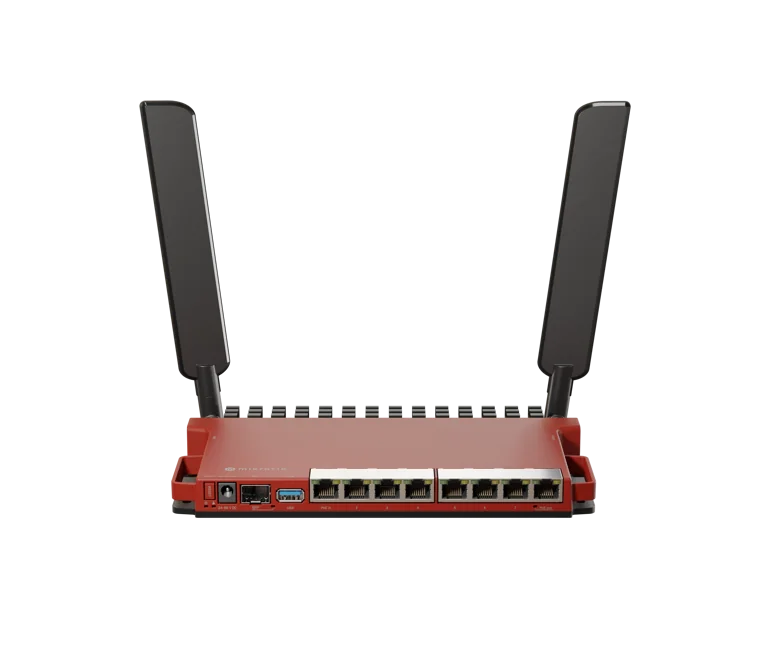
The MikroTik L009UiGS-2HaxD-IN is a versatile wired-first router with built-in 2.4 GHz Wi-Fi 6, eight Gigabit Ethernet ports, a 2.5G-capable SFP interface, PoE support, USB 3.0 and RouterOS v7.
It is best understood not as a traditional consumer Wi-Fi router, but as a professional MikroTik router with wireless capability added on top. That makes it particularly interesting for Kenyan businesses, small ISPs, network technicians, CCTV installers, offices and advanced home users who need more Ethernet connectivity and RouterOS flexibility.
MikroTik positions the L009 as the successor to the older RB2011 family and says it can be up to four times faster in many workloads while adding a modern ARM processor, more memory, Gigabit Ethernet across all eight ports, PoE and 2.5G SFP support.
You can view the MikroTik L009UiGS-2HaxD-IN or browse other MikroTik products in Kenya.
MikroTik L009UiGS-2HaxD-IN at a Glance
The L009UiGS-2HaxD-IN combines several professional networking features in a compact design.
Key specifications include:
8 × Gigabit Ethernet ports
1 × SFP interface with 2.5G support
dual-core IPQ-5018 processor
800 MHz CPU frequency
512 MB RAM
128 MB NAND storage
2.4 GHz Wi-Fi 6
dual-chain wireless
up to 574 Mbps advertised wireless data rate
RouterOS v7
RouterOS Level 5 licence
USB 3.0 Type-A
PoE input
Passive PoE output on Ether8
RJ45 serial console
passive cooling
These specifications make it a strong option for wired networks where Wi-Fi is useful but is not the main reason for purchasing the router.
Design and Build Quality
One of the first things you notice about the L009 is its distinctive MikroTik design.
The red metal enclosure gives it a professional appearance and also helps with passive heat dissipation.
Because the router uses passive cooling, there is no internal fan generating noise. This can be useful in:
offices
home labs
retail businesses
reception areas
network cabinets
The chassis is compact enough for desktop or wall installation, while an optional rackmount kit allows multiple L009 units to be mounted together in a 1U rack arrangement. MikroTik specifically designed the enclosure so that up to four units can fit within one rack space using the appropriate mounting accessories.
Performance Review
The L009 uses a dual-core IPQ-5018 ARM processor running at 800 MHz with 512 MB RAM.
That does not make it one of MikroTik's most powerful routers, but it represents a substantial improvement over older products such as the RB2011.
MikroTik's own benchmark results show approximately 3.4 Gbps routing throughput using large 1518-byte packets in fast-path testing. With 25 firewall filter rules, its published routing result is approximately 970 Mbps using the same packet size. Real-world performance will depend greatly on packet size, firewall rules, queues, VPN configuration and other RouterOS services.
For many small and medium networks, that level of performance is more than sufficient.
The L009 is particularly suitable for networks involving:
Gigabit internet
multiple VLANs
firewall rules
business routing
CCTV networks
hotspot services
moderate PPPoE workloads
bandwidth management
For substantially heavier ISP workloads, however, products such as the RB4011, RB5009 or CCR series may provide more processing headroom.
Eight Gigabit Ethernet Ports
One of the strongest reasons to buy the L009 is its port count.
Unlike many modern routers that provide only four or five Ethernet interfaces, the L009 includes eight Gigabit Ethernet ports.
This gives network administrators much greater flexibility.
For example:
Ether1 — WAN
Ether2 — Office LAN
Ether3 — CCTV
Ether4 — Access points
Ether5 — Servers
Ether6 — VoIP
Ether7 — Management
Ether8 — PoE-powered device
You can also bridge ports together or separate them using VLANs according to the network design.
For businesses and installers, the additional ports may reduce the need to add a separate switch immediately.
2.5G SFP Support
The L009 includes one SFP cage that supports both standard Gigabit SFP and compatible 2.5 Gigabit connectivity.
This is one of its strongest future-facing features.
It can be used for:
fibre uplinks
connecting to an ISP network
connecting to a managed switch
backbone links
server-room connections
This makes the L009 particularly useful where your internet connection or internal network may eventually exceed standard Gigabit speeds.
MikroTik states that the switch chip has a 2.5 Gigabit full-duplex link to the CPU for most ports, while Ether1 has its own dedicated Gigabit full-duplex CPU connection.
Wi-Fi 6 Review
The L009UiGS-2HaxD-IN includes Wi-Fi 6, but there is an important limitation:
It is 2.4 GHz only.
The wireless interface supports:
802.11b
802.11g
802.11n
802.11ax
with a maximum advertised PHY rate of 574 Mbps.
This is both a strength and a weakness.
The advantage
2.4 GHz generally provides better wall penetration and compatibility with devices such as:
IoT devices
CCTV devices
older phones
printers
smart devices
sensors
One independent owner reported stable practical Wi-Fi results around 90–100+ Mbps in a clean 20 MHz channel environment, although individual results will vary according to interference, channel width and client capabilities.
The disadvantage
There is no built-in 5 GHz radio.
That means users looking for very high Wi-Fi throughput for laptops, smartphones and modern Wi-Fi devices may still want a separate 5 GHz or dual-band access point.
This is why the L009 is better viewed as:
A professional wired router with useful 2.4 GHz Wi-Fi
rather than:
A premium all-in-one Wi-Fi router.
An independent long-term user came to essentially the same conclusion, describing the L009 as particularly useful when considered as a wired router with "bonus" 2.4 GHz wireless rather than as a replacement for a high-performance dual-band access point.
RouterOS v7
One of the strongest reasons to choose any professional MikroTik device is RouterOS.
The L009 runs RouterOS v7 with a Level 5 licence.
RouterOS allows you to configure:
DHCP
NAT
firewall
VLANs
PPPoE
hotspot
VPN
bandwidth queues
load balancing
multi-WAN
routing protocols
failover
scripts
traffic monitoring
This makes the L009 far more configurable than most ordinary consumer routers.
For network technicians and ISPs, that flexibility is one of the product's biggest selling points.
Container Support
Because the L009 uses an ARM processor and RouterOS v7, it also supports RouterOS container functionality where correctly configured.
MikroTik specifically highlights potential uses such as running a Pi-hole-style DNS filtering service or combining the USB port with an LTE modem.
This makes the L009 particularly interesting for:
home labs
network administrators
developers
advanced ISP deployments
It offers considerably more flexibility than a typical basic router.
USB 3.0 Port
The L009 includes a full-size USB 3.0 Type-A port.
Potential uses include:
compatible LTE/4G modems
external storage
container-related storage
network monitoring applications
MikroTik specifies a maximum USB current of 1.5 A.
The USB port makes the router more versatile for custom projects and backup connectivity.
PoE Input
The L009 supports 802.3af/at PoE input, meaning the router can be powered through Ethernet instead of using the DC power connector when used with compatible PoE equipment.
MikroTik specifies an input voltage range of 24–56 V.
This can make network cabinet and professional installation layouts cleaner.
PoE Output on Ether8
Ether8 supports Passive PoE output.
That can be useful for powering compatible equipment such as:
MikroTik access points
wireless CPEs
other compatible networking devices
However, this is Passive PoE, so installers should always verify voltage compatibility before connecting equipment.
Do not assume that every PoE device can safely be powered from Ether8.
L009UiGS-2HaxD-IN for ISPs
The L009 can be useful for smaller ISP and WISP networks.
RouterOS provides features such as:
PPPoE
subscriber profiles
VLANs
Simple Queues
PCQ
firewall rules
hotspot
routing
network monitoring
Small ISPs can also combine MikroTik networking equipment with Tajira for billing and subscriber management.
For example:
Tajira → customer and package management
MikroTik L009 → routing, PPPoE and bandwidth enforcement
As an ISP grows, however, traffic and subscriber numbers should be monitored carefully. Larger deployments may require more powerful MikroTik routers.
L009UiGS-2HaxD-IN for Businesses
The L009 is arguably even better suited to small and medium-sized businesses.
A business can use the router to separate:
staff
management
guest Wi-Fi
CCTV
VoIP
servers
using VLANs.
The eight Gigabit interfaces make it easier to connect multiple parts of the network, while the SFP port provides an upgrade path for fibre or higher-speed uplinks.
The built-in Wi-Fi can serve basic wireless requirements, although organizations with many users should deploy dedicated access points.
L009 for CCTV Installers
CCTV installers should find the L009 particularly interesting.
It provides enough physical ports to connect several network segments while RouterOS can manage:
CCTV VLANs
firewall policies
remote access
VPN
failover
multiple WANs
You could, for example, keep CCTV cameras and NVRs on a dedicated VLAN while preventing them from accessing sensitive office devices.
For professional CCTV networks, this is much better than putting every device on one unrestricted subnet.
L009 for Hotels and Apartments
Hotels and apartment internet providers can also use the L009 for smaller deployments.
Possible applications include:
guest Wi-Fi
staff network
CCTV
hotspot
internet failover
VLANs
bandwidth control
However, the built-in 2.4 GHz Wi-Fi should not be expected to provide complete wireless coverage across a hotel or apartment building.
Dedicated access points should be deployed for larger properties.
MikroTik L009 vs RB2011
The L009 was designed as the modern successor to the RB2011.
The improvements include:
faster ARM processor
more RAM
all-Gigabit Ethernet ports
Wi-Fi 6
2.5G-capable SFP
USB 3.0
container support
improved PoE options
MikroTik claims the L009 can be up to four times faster than the RB2011 depending on workload and configuration.
For anyone still using an RB2011, the L009 is therefore a logical modernization option.
L009UiGS-2HaxD-IN vs L009UiGS-RM
The MikroTik L009UiGS-RM uses the same general L009 platform but does not include the integrated Wi-Fi radio.
Choose the L009UiGS-2HaxD-IN when:
you want built-in Wi-Fi
you need 2.4 GHz coverage
you have IoT devices
you want an all-in-one compact installation
Choose the L009UiGS-RM when:
you already use dedicated access points
Wi-Fi is unnecessary
the router will remain inside a rack
your deployment is predominantly wired
L009 vs RB4011
The MikroTik RB4011iGS+RM is more suitable when raw routing performance is the priority.
The RB4011 offers:
stronger processing capability
ten Gigabit Ethernet ports
SFP+ 10G connectivity
The L009 offers:
newer architecture
2.4 GHz Wi-Fi 6
USB 3.0
2.5G-capable SFP
lower entry cost
For demanding ISP or enterprise routing, the RB4011 is generally the stronger platform.
For smaller business networks and deployments that benefit from built-in Wi-Fi, the L009 may offer better value.
Advantages of the L009UiGS-2HaxD-IN
The strongest points of the L009 include:
eight Gigabit Ethernet ports
2.5G SFP capability
built-in Wi-Fi 6
RouterOS v7
VLAN support
PPPoE
bandwidth management
PoE input
PoE output
USB 3.0
container capability
fanless operation
compact professional enclosure
good upgrade from RB2011
Disadvantages of the L009UiGS-2HaxD-IN
No router is perfect.
The main limitations include:
No 5 GHz Wi-Fi
This is probably the biggest disadvantage.
Customers expecting high-speed modern wireless performance may need a separate access point.
Only Dual-Core CPU
The CPU is more than sufficient for many business networks, but heavy ISP workloads, advanced VPN use and large numbers of firewall or queue rules may justify moving to the RB4011, RB5009 or CCR series.
RouterOS Learning Curve
RouterOS is extremely powerful, but beginners may find the number of configuration options intimidating.
Users coming from normal home routers should expect some learning.
One SFP Interface
The 2.5G capability is useful, but larger networks requiring several fibre interfaces will need a MikroTik switch or higher-end router.
Who Should Buy the L009UiGS-2HaxD-IN?
The router is particularly suitable for:
small businesses
professional offices
network technicians
CCTV installers
small ISPs
WISPs
home labs
schools
retail businesses
apartment internet providers
advanced home networks
Who Should Not Buy It?
Consider another MikroTik product if:
you primarily want high-speed Wi-Fi
you require 5 GHz wireless
you need multiple 10G interfaces
you operate a very large ISP
you require much higher routing performance
In those situations, a dedicated access point combined with an RB5009, RB4011 or CCR router may make more sense.
MikroTik L009UiGS-2HaxD-IN Price in Kenya
The MikroTik L009UiGS-2HaxD-IN price in Kenya depends on supplier availability and current market conditions.
When comparing prices, consider the complete feature set:
eight Gigabit Ethernet ports
2.5G SFP
Wi-Fi 6
PoE
USB 3.0
RouterOS Level 5
It can potentially replace several separate networking components in a smaller deployment.
You can view the current MikroTik L009UiGS-2HaxD-IN listing or compare additional MikroTik router prices in Kenya.
Additional products can also be explored through Orbitlink Solutions.
Our Verdict
The MikroTik L009UiGS-2HaxD-IN is a strong professional router for buyers who value Ethernet connectivity and RouterOS flexibility more than cutting-edge wireless performance.
Its biggest strengths are:
eight Gigabit ports
2.5G-capable SFP
RouterOS v7
PoE
USB 3.0
compact fanless design
Wi-Fi 6 for 2.4 GHz devices
Its biggest weakness is the absence of 5 GHz Wi-Fi.
For this reason, we would recommend viewing the L009 primarily as a wired professional router with useful integrated 2.4 GHz Wi-Fi, rather than as a high-end wireless router.
For businesses, installers and smaller ISP environments in Kenya, it offers an appealing balance between price, connectivity and functionality.
Frequently Asked Questions
Is the MikroTik L009UiGS-2HaxD-IN good?
Yes. It is a strong choice for wired business and professional networks that need eight Gigabit ports, SFP connectivity, RouterOS and basic Wi-Fi 6.
Does the L009 have Wi-Fi 6?
Yes. It supports 2.4 GHz 802.11ax Wi-Fi 6 with dual-chain wireless and a maximum advertised PHY rate of 574 Mbps.
Does MikroTik L009 support 5 GHz?
No. The L009UiGS-2HaxD-IN has a 2.4 GHz wireless radio only.
How many Ethernet ports does the L009 have?
It has eight Gigabit Ethernet interfaces.
Does L009 support 2.5Gbps?
Its SFP interface supports compatible 2.5G connectivity.
Is L009 suitable for an ISP?
Yes, for appropriately sized ISP deployments. Larger subscriber networks should consider more powerful models depending on bandwidth and RouterOS workload.
Is L009 better than RB2011?
Yes, as an upgrade platform. MikroTik says it offers significantly better performance together with Gigabit ports, modern ARM processing, PoE, Wi-Fi 6 and 2.5G SFP support.
Is L009 better than RB4011?
Not in raw routing performance. The RB4011 is generally better for demanding routing, while the L009 offers newer features such as built-in Wi-Fi 6 and USB 3.0 at a different price/performance level.
Where can I buy L009UiGS-2HaxD-IN in Kenya?
You can view the MikroTik L009UiGS-2HaxD-IN on MikroTik Kenya and compare it with other available MikroTik routers.
Final L009UiGS-2HaxD-IN Review
The L009UiGS-2HaxD-IN fills an interesting position in MikroTik's product lineup.
It provides significantly more flexibility than an ordinary home router without requiring customers to immediately move to higher-end MikroTik hardware.
For a small business, technician, CCTV installer or growing ISP, the combination of eight Gigabit Ethernet ports, 2.5G SFP, Wi-Fi 6, PoE and RouterOS makes it a highly versatile networking platform.
If your priority is professional wired networking with some integrated wireless capability, the L009UiGS-2HaxD-IN is easy to recommend.
If your primary requirement is fast 5 GHz Wi-Fi or substantially higher routing performance, consider using a dedicated MikroTik access point or moving to a more powerful router.
Visit MikroTik Kenya to compare the L009 with other MikroTik routers and networking equipment available in Kenya.