MikroTik PoE Switches in Kenya: Choosing Equipment for CCTV and WiFi
Installing cameras and wireless access points often means providing both a network connection and electricity at each location. A compatible Power over Ethernet switch can supply both through an Ethernet cable, simplifying the power arrangement.
However, choosing a PoE switch requires more than counting cameras or access points. Power compatibility, total electrical demand, connection speeds and cable routes all affect the installation.
This guide explains how to evaluate MikroTik PoE switches in Kenya for offices, hotels, shops, warehouses and other business premises. You can use it to prepare an equipment list before requesting a quotation from MikroTik Kenya.
Start With the Exact Devices You Want to Power
List every camera, access point and other powered device planned for the network.
Record the complete model number rather than using descriptions such as “outdoor camera” or “ceiling access point.” Products with similar appearances may have different power requirements.
For each device, identify:
- The supported PoE standard or passive power requirements.
- Maximum power consumption.
- Required Ethernet speed.
- Installation location.
- Approximate cable route.
- Whether it must remain operational during a power outage.
Use manufacturer specifications when preparing this list. If a requirement is unclear, confirm it before purchasing the switch.
Check PoE Compatibility Before Comparing Prices
A switch and an endpoint must support a suitable powering arrangement.
Do not assume that every product described as PoE is compatible with every PoE switch. Check the required standard, voltage and power level against the exact switch model.
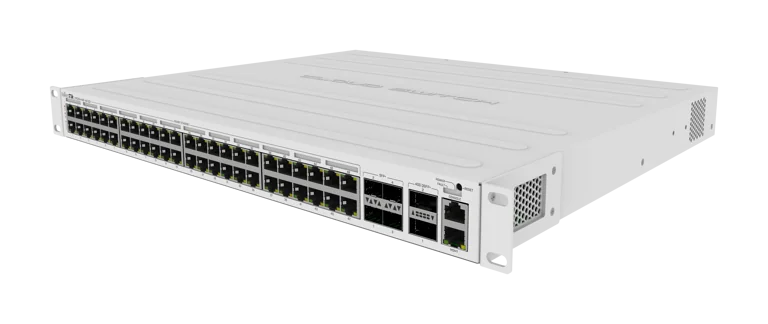
For example, the MikroTik CRS354-48P-4S+2Q+RM supports 802.3af/at and passive PoE output options. That does not establish compatibility with every higher-power device or every passive PoE endpoint. CRS354-48P-4S+2Q+RM
Ask the supplier to confirm your proposed device combination. A low purchase price offers little benefit if the installation subsequently requires additional injectors or replacement equipment.
Calculate the Total PoE Budget
The total PoE budget is the power available for connected endpoints. It is separate from the number of powered ports.
For an initial estimate, multiply the maximum demand of each device type by its quantity, then add the results.
Consider this illustrative installation:
| Equipment | Quantity | Assumed maximum demand each | Combined demand |
|---|---|---|---|
| IP cameras | 16 | 12 W | 192 W |
| Wireless access points | 8 | 20 W | 160 W |
| IP phones | 4 | 7 W | 28 W |
| Total endpoint demand | 28 | — | 380 W |
These are example figures, not specifications for particular devices. Replace them with the requirements of your actual equipment.
The final assessment must account for cable losses, any difference between endpoint consumption and switch-side allocation, and planned additions. Each device must also fit the switch’s individual port limits.
Distinguish Power-Supply Rating From PoE Output
A switch’s power-supply rating should not be treated as the amount available to endpoints.
The switch itself consumes electricity, and its specified PoE output limit is the figure relevant to powering connected devices.
For the CRS354-48P-4S+2Q+RM, MikroTik specifies 700 W of total PoE output. Its specifications separately list maximum total consumption of 800 W. CRS354-48P-4S+2Q+RM
Keep these figures separate when discussing the project:
- PoE output budget: power available for compatible endpoints.
- Total input consumption: relevant when sizing the electrical supply and backup system.
- Per-port limit: the maximum available through an individual connection.
A suitable total budget does not overcome an insufficient per-port rating.
Plan for Cameras’ Maximum Operating Demand
Assess cameras under the conditions in which they will actually operate.
Depending on the model, infrared illumination, heaters or motorised movement may increase demand. A camera that works during a brief daytime test may behave differently when additional functions activate.
Use the manufacturer’s maximum figures and test the completed installation under representative conditions.
Also identify which cameras must remain operational during an outage. This affects the backup-power plan and may influence how equipment is distributed between switches.
You can review the MikroTik CRS354 48-port PoE switch when assessing a larger camera and access-point installation.
Match Access-Point Power and Data Requirements
An access point needs both sufficient power and an appropriate data connection.
Confirm its Ethernet-interface speed as well as its PoE requirements. A device may power up successfully but still connect through a slower link than your design requires.
Consider the traffic expected from users connected to each access point. Several busy access points can place significant combined demand on the switch uplink.
When enquiring through the MikroTik PoE switch listing at Tawa, provide the exact access-point models and expected connection layout.
Choose Uplinks Around the Traffic Path
The switch’s uplink carries traffic towards other switches, routers or servers. Its required capacity depends on where that traffic travels.
For CCTV, identify the recorder’s location and the path camera streams follow. For WiFi, consider the combined user traffic heading towards the internet or internal services.
The CRS354 provides 48 Gigabit Ethernet ports, four 10G SFP+ ports and two 40G QSFP+ ports. These interfaces offer different connection options, but the installed modules and equipment at the other end must match the design. CRS354-48P-4S+2Q+RM
For projects needing a separate aggregation switch, the MikroTik CRS326-24S+2Q+RM is another model to assess for the uplink role.
Decide Between Centralised and Distributed Switching
One large switch may simplify management in a compact building. Multiple switches may suit premises where devices are spread across floors or separate areas.
Compare the options using cable routes, cabinet locations, backup power and maintenance requirements.
A distributed arrangement introduces more equipment to maintain, but it may reduce long endpoint cable runs. A centralised arrangement concentrates more connections on one device.
Neither design is automatically better. Ask the installer to explain the effect of a switch failure and how each area would be serviced.
For broader equipment comparisons, browse the MikroTik switches category at Orbitlink Solutions.
Include Configuration and Backup Power
A complete installation needs more than powered ports.
Where cameras, staff devices and guest WiFi share infrastructure, define the required network separation and access rules. Identify who should reach camera management pages, recorders and switch administration.
Include the switch and its powered endpoints when sizing backup power. Essential recorders, routers and upstream equipment may need backup as well.
Request labelled connections, a configuration backup and an equipment list at handover.
You can compare product ranges through Jupitaz’s MikroTik switches page and Network Switch Kenya’s MikroTik listings.
Compare Complete Installation Costs
When researching MikroTik PoE switch prices in Kenya, request an itemised quotation.
It should identify the switch, uplink accessories, cabling, cabinet requirements, backup power and configuration work. Confirm whether VAT, delivery and testing are included.
The CRS354 PoE switch listing at Reisen SEO provides another product reference when comparing quotations.
Ask suppliers to confirm compatibility and support terms directly. Compare equivalent installation scopes rather than relying only on the advertised switch price.
Frequently Asked Questions About MikroTik PoE Switches
Can one PoE switch power cameras and access points?
Yes, provided every device is compatible and the individual and combined power requirements remain within the switch’s limits.
Does a 48-port PoE switch power 48 devices at maximum output?
Not necessarily. The total PoE budget may be lower than the combined maximum capacity of all ports.
Do all MikroTik switches provide PoE output?
No. Check the exact product specifications. PoE input, which powers the switch itself, is different from PoE output.
Should I leave spare power and ports?
Plan for known additions and operating variation. The appropriate allowance depends on the installation rather than a fixed percentage suitable for every project.
Where can I find MikroTik PoE switches in Kenya?
Visit MikroTik Kenya and review the CRS354-48P-4S+2Q+RM PoE switch. Share your device models, quantities and cable layout when requesting a quotation.
