What Should You Check Before Buying a MikroTik RB760iGS hEX S in Kenya?
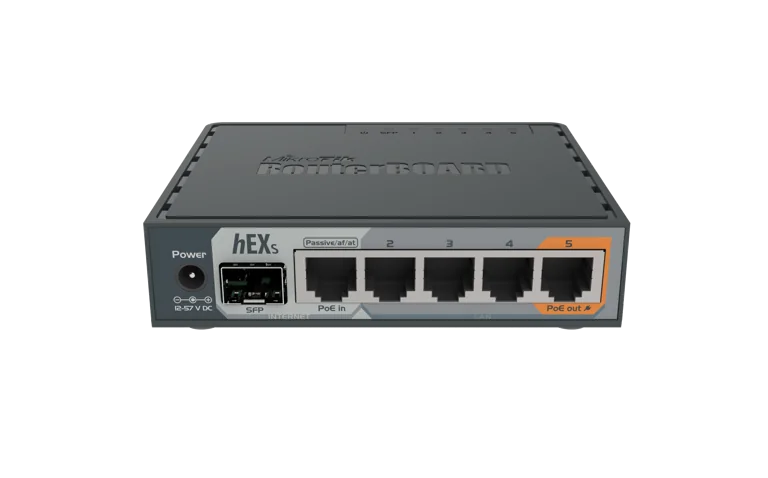
Before buying a MikroTik RB760iGS hEX S, confirm three things: you are ordering the correct model, the package includes what you need, and someone will configure it for your network.
The lowest advertised price does not necessarily represent the lowest cost of a working installation. Missing accessories, additional wireless equipment and configuration services can change the total.
Begin with the MikroTik RB760iGS hEX S price in Kenya, then compare written quotations against your actual requirements.
This checklist explains what to confirm before paying and what to inspect when the router arrives.
1. Confirm the Exact Product Code
Ask the seller to include RB760iGS on the quotation and invoice.
Product-family names and similar-looking routers can cause confusion. The exact code provides a clearer basis for comparing offers than a listing described only as “MikroTik hEX.”
MikroTik identifies the RB760iGS as a wired router with five Gigabit Ethernet ports, one SFP port, a dual-core 880 MHz processor and 256 MB RAM. It has no built-in Wi-Fi or integrated LTE modem.
If your quotation describes a wireless or LTE router, ask the seller to clarify the model before proceeding.
2. Check Whether It Fits Your Network
Prepare a short equipment list before selecting the router.
Record your computers, printers, access points and other wired devices. Include the connection to your ISP equipment when counting ports.
Also explain the activities the network must support, such as video meetings, cloud applications or guest access.
| Requirement | What to tell the seller or installer |
|---|---|
| Internet connection | Provider and handover method |
| Wired equipment | Number and location of devices |
| Wireless coverage | Rooms or areas requiring Wi-Fi |
| Business applications | Systems that must work reliably |
| Access restrictions | Who should reach which devices |
| Future additions | Confirmed equipment or expansion plans |
If the required setup goes beyond this model’s assessed capacity or available interfaces, compare alternatives in the MikroTik router range at MikroTik Kenya.
3. What Should the MikroTik RB760iGS Price Include?
Ask for the package contents in writing.
MikroTik lists a 24V 1.2A power adapter with the standard package. The router comes with its operating system preinstalled and licensed.
A seller may offer additional equipment or services, but those should be identified separately.
| Item | Question to ask |
|---|---|
| Router | Is the exact RB760iGS model included? |
| Power adapter | Is the specified compatible adapter supplied? |
| Ethernet cables | Are any included, and what lengths? |
| SFP module | Is it included or separately priced? |
| Configuration | What settings and testing are covered? |
| Delivery | Is the charge included in the total? |
| Support | What assistance is available after purchase? |
Do not assume that a router listing includes an SFP module, access point or installation service.
4. Confirm Whether the Unit Is New or Previously Used
Ask the seller to state whether the device is new, open-box, used or refurbished.
If it is open-box, find out why it was opened and whether it has been configured or deployed.
For used or refurbished equipment, ask what was tested, whether any repairs were performed and what return arrangements apply.
A lower purchase price should be assessed alongside preparation costs, missing accessories and available support. Keep the condition description with your purchase records.
5. Decide Who Will Configure It
Buying the hardware and preparing it for your network are separate tasks.
If you have an experienced technician, agree on the setup work before ordering. If you need assistance from the seller, request a defined scope rather than a general promise of “free setup.”
A configuration quote should explain whether it includes:
- Connecting to the agreed ISP service.
- Setting up local network addressing.
- Applying the required access restrictions.
- Connecting existing switches and access points.
- Testing important applications.
- Providing administrator access and handover records.
Remote configuration and on-site installation are also different services. Confirm who will connect the equipment physically and what happens if cabling problems are discovered.
6. Budget for Wi-Fi Separately
If phones and laptops need wireless access, include a suitable access point or confirm that existing wireless equipment can be reused.
Ask your installer to assess coverage in the rooms where people actually work. A wireless device already on the premises may still need repositioning or a different configuration.
The budget may include an access point, cable installation, mounting and compatible power equipment.
Compare the complete network cost when deciding between a wired router setup and an all-in-one wireless option.
7. Check Power Compatibility Before Buying Accessories
The RB760iGS provides passive PoE output on ether5. MikroTik states that the output voltage follows the voltage supplied to the router, with a 500 mA output-current limit.
If you want to power an access point or camera through it, have the exact device combination checked before ordering.
Confirm the receiving device’s accepted voltage, PoE type and maximum demand. If it requires a different arrangement, include a compatible injector or switch in the quotation.
The presence of PoE output does not establish compatibility with every powered networking device.
8. Compare the Complete Cost
Use the same purchasing brief when requesting several quotations.
A useful calculation is:
Total initial cost = router + required accessories + configuration + installation + delivery.
Check whether taxes are already included in the quoted amounts. Record recurring support or third-party service charges separately.
For example, a router-only offer may suit a buyer who already has cabling, wireless equipment and technical support. Another buyer may get better value from a clearly defined installation package.
Compare what each offer delivers rather than selecting solely by the first price displayed.
9. Check Warranty and Return Arrangements
Ask who handles faults and what documentation is required.
Clarify whether the seller’s assistance covers hardware faults, configuration problems or both. A hardware warranty does not automatically include future network changes or on-site support.
Before payment, confirm:
- The applicable warranty terms.
- How a faulty unit is assessed.
- The process for reporting a problem.
- Any return window and its conditions.
- Responsibility for transport costs.
- Whether configuration services have separate terms.
Keep the invoice and record the device serial number after delivery.
10. Compare Available Offers in Kenya
Use the MikroTik Kenya RB760iGS hEX S product page as your starting point.
Additional purchasing references include the supplied Orbitlink Solutions RB760iGS listing, Reisen SEO hEX S listing and Tawa RB760iGS listing.
Confirm current prices, stock, condition and package contents directly. A public listing does not establish that delivery or configuration is included.
Ask for a written quote with a validity date, especially if the purchase must pass through a business approval process.
What If You Are Buying for a Paid Hotspot?
Prepare the hotspot requirements before purchasing the router.
If you are evaluating Hotspot Billing System or Tajira, ask the provider to confirm compatibility with the intended setup and explain integration costs.
Keep the hardware purchase, wireless coverage and billing service as separate budget items.
Also establish who will support customer-login issues, access-point faults and the internet connection. Test the complete setup before relying on it for paying customers.
What Should You Inspect When the Router Arrives?
Check the actual device against the quotation.
Confirm the model label, condition and included adapter. Record the serial number and retain the purchase documentation.
During setup, ask for the required Ethernet connections and business applications to be tested. If you purchased configuration services, verify the agreed outcomes before accepting the work as complete.
Receive administrator credentials securely and confirm who will maintain configuration records afterwards.
Frequently Asked Questions
Is the cheapest RB760iGS offer always the best value?
No. Compare condition, accessories, setup work, delivery and support. The relevant figure is the total cost of meeting your requirements.
Do I need to purchase RouterOS separately?
The device comes with a licensed operating system. Configuration services and third-party platforms are separate purchasing considerations.
Can I order the router before speaking to my ISP?
You can, but confirming the connection requirements first reduces uncertainty. Ask which provider equipment must remain and what settings your installer will need.
Should I buy an SFP module immediately?
Only for a confirmed compatible connection. You do not need a module simply because the router has an available slot.
Request a Complete Quotation Before Paying
Confirm the exact model, identify the equipment you already have and decide who will handle setup. Then request an itemised quotation covering the remaining work.
Review the MikroTik RB760iGS hEX S price and product details and use this checklist to prepare a purchase that fits your network and budget.
