
Original MikroTik RB4011 in Kenya
Learn how to identify an original MikroTik RB4011 in Kenya. Check the RB4011iGS+RM model, serial number, RouterOS, packaging and signs of used or fake units.
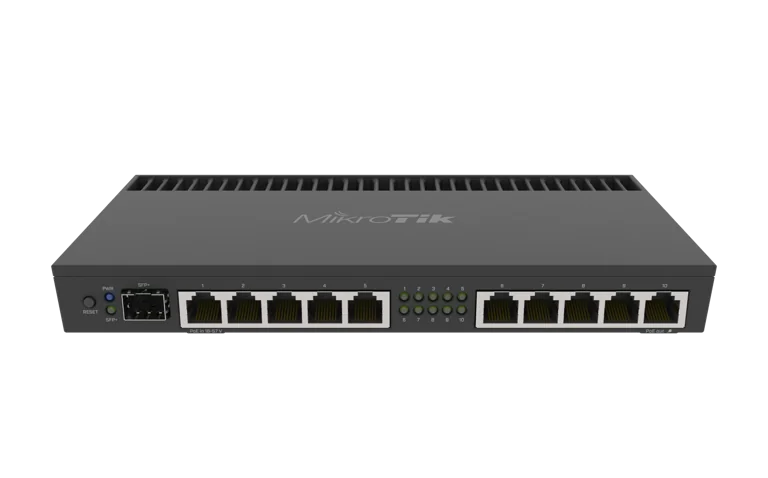
Original MikroTik RB4011 in Kenya
How to Check if a MikroTik RB4011iGS+RM Is Original
Original MikroTik RB4011 in Kenya | How to Avoid Fake Units
If you are planning to buy an original MikroTik RB4011 in Kenya, it is important to verify the exact model, serial number, packaging, accessories and seller before making payment.
The MikroTik RB4011iGS+RM is a professional router used by ISPs, businesses, CCTV installers, hotels, schools and advanced network users. Because professional networking equipment can be expensive, buyers should avoid purchasing devices that are misrepresented, refurbished without disclosure, incomplete, previously configured or supplied with incorrect accessories.
You can view the MikroTik RB4011iGS+RM or browse other MikroTik products in Kenya.
How to Check if a MikroTik RB4011 Is Original
The first step is to confirm the full model code:
RB4011iGS+RM
Do not rely only on a seller saying “RB4011.”
Check the label on the unit and packaging and confirm that the model matches the product you intended to buy.
Check the Serial Number
An original MikroTik device should have a clear serial-number label.
Inspect:
router label
packaging label
product information
If the serial number appears damaged, removed or inconsistent, ask the seller for clarification before buying.
Check the Product Label
The product label should clearly show key information such as:
model
serial number
MAC information
product identifiers
Avoid purchasing a router whose label has been deliberately removed or altered.
Check the Packaging
Inspect the box carefully.
Look for:
correct product name
matching model number
serial-number information
professional packaging
signs of previous opening
A damaged box does not automatically mean the router is fake, but it is a reason to inspect the product more carefully.
Check the Physical Condition
A new RB4011 should generally not show obvious signs of previous use.
Check for:
scratches
damaged Ethernet ports
bent rack ears
missing screws
dust inside ports
signs of previous rack installation
If the product is being sold as new but appears used, ask for an explanation.
Verify the Exact RB4011 Model
The full model is important because different MikroTik routers can look similar.
For the RB4011iGS+RM, confirm that the device has:
ten Gigabit Ethernet ports
one SFP+ interface
rackmount design
If the hardware does not match the expected product, do not proceed with the purchase until the model is confirmed.
Check the Ethernet Port Count
The RB4011iGS+RM should have:
10 Gigabit Ethernet ports
If the device has a different number of Ethernet ports, it is not the expected RB4011iGS+RM model.
Check the SFP+ Port
The RB4011iGS+RM includes:
1 × SFP+ interface
This is one of its key features.
The router is designed for optional 10Gbps connectivity with compatible SFP+ equipment.
Check RouterOS
After powering the router, log into RouterOS using WinBox.
Check:
System → Resources
and:
System → RouterBOARD
Confirm the model information shown by RouterOS.
This is an important step when verifying a device before deployment.
Check RouterBOARD Information
RouterOS can provide hardware identification information.
Go to:
System → RouterBOARD
Review the details shown by the router.
If the displayed model does not match the product label or what the seller advertised, investigate before using the device.
Check the MAC Addresses
MikroTik devices have MAC addresses associated with their network interfaces.
These may be visible through:
RouterOS
WinBox
labels
If something appears inconsistent, ask the supplier to verify the device.
Check the Included Accessories
The RB4011iGS+RM is normally supplied with rackmount and power accessories.
Before buying, confirm:
power adapter
rack ears
mounting hardware
If accessories are missing, determine whether the unit is:
new
open-box
refurbished
used
The condition should be disclosed clearly.
Does the RB4011 Include an SFP+ Module?
Normally, no.
The router includes an SFP+ port, but the optical transceiver is typically purchased separately.
Do not assume a missing SFP+ module means the router is incomplete.
Instead, confirm what is officially included and what must be purchased separately.
Check the Power Adapter
Make sure the supplied power adapter is appropriate for the router.
Avoid using unknown or poorly matched adapters.
Incorrect power supplies can cause:
instability
failure to boot
unexpected shutdowns
hardware damage
Watch Out for Used Units Sold as New
One of the bigger risks is not necessarily a counterfeit device, but a used or refurbished unit being sold as new.
Signs may include:
scratches
changed configuration
unusual usernames
old backups
modified settings
damaged packaging
If buying a used unit, that is fine as long as the seller is transparent about its condition.
Factory Reset Before Deployment
If you buy a second-hand or open-box RB4011, perform a controlled factory reset before using it.
This removes unknown configuration such as:
firewall rules
VPNs
users
routes
PPPoE
scripts
Then update RouterOS and configure the router from scratch.
Check for Unknown Administrator Accounts
After logging in, go to:
System → Users
Review existing accounts.
If the router contains unknown users, this may indicate it was previously configured.
Remove unauthorized accounts before deployment.
Check for Unknown Scripts
Go to:
System → Scripts
Review any existing scripts.
A used or previously configured router may contain:
scheduled tasks
scripts
remote-management settings
A clean factory reset is usually preferable before production use.
Check RouterOS Version
After verifying the router, update RouterOS to an appropriate current stable version.
This helps with:
security
compatibility
bug fixes
stability
Do not rely on whatever software version happens to be installed on a second-hand unit.
Buy From a Networking-Focused Supplier
One of the simplest ways to reduce risk is to buy from a supplier that specializes in networking equipment.
A knowledgeable supplier should be able to explain:
exact model
specifications
package contents
warranty terms
accessories
stock condition
You can check the MikroTik RB4011iGS+RM product page before ordering.
Avoid Buying Based Only on the Lowest Price
An unusually low price should make you verify the product carefully.
Check:
whether it is used
whether it is refurbished
whether accessories are missing
whether the model is correct
whether warranty applies
The cheapest listing is not always the best value.
Ask for the Exact Model Before Paying
A good message to a supplier is:
“Please confirm this is the MikroTik RB4011iGS+RM, brand new, with the correct power adapter and rackmount accessories.”
This reduces ambiguity.
Confirm Stock Before Payment
Before sending money, ask:
Is the RB4011iGS+RM physically in stock?
Is it new?
What is included?
Is delivery available?
This is especially important for high-value networking equipment.
Original RB4011 for ISP Use
ISPs should be particularly careful because a core router may affect many customers.
Before deployment:
verify model
update RouterOS
reset configuration
create new admin accounts
configure firewall
create backups
ISPs can also use Tajira for billing and subscriber-management workflows alongside MikroTik infrastructure.
Original RB4011 for CCTV Installers
CCTV installers should confirm the router before using it in commercial surveillance networks.
The RB4011 can manage:
CCTV VLANs
VPN
remote access
multiple WANs
firewall policies
A misrepresented or unstable device could cause serious network problems.
Original RB4011 for Businesses
Businesses should purchase from a supplier that can provide clear documentation and support.
The router may become responsible for:
internet access
VPN
CCTV
servers
VLANs
guest Wi-Fi
Reliability therefore matters more than saving a small amount on an uncertain unit.
How to Verify After Purchase
After receiving the RB4011:
Inspect packaging.
Confirm model.
Check serial number.
Inspect physical condition.
Connect using WinBox.
Check System → Resources.
Check System → RouterBOARD.
Review users.
Update RouterOS.
Create a backup after configuration.
RB4011 vs Mislabelled Models
Do not accept a different model because it “looks similar.”
Confirm:
RB4011iGS+RM
If you actually need:
10 Gigabit Ethernet ports
10G SFP+
rackmount design
then the exact model matters.
Where to Buy Original MikroTik RB4011 in Kenya
You can check the MikroTik RB4011iGS+RM product page for current pricing and availability.
You can also browse:
and:
MikroTik products from Orbitlink Solutions
For broader comparison, review MikroTik router prices in Kenya.
Frequently Asked Questions
How do I know if my MikroTik RB4011 is original?
Check the exact model, serial number, product label, hardware configuration and RouterOS information under System → Resources and System → RouterBOARD.
What is the correct RB4011 model?
The wired rackmount model discussed here is RB4011iGS+RM.
How many Ethernet ports should RB4011iGS+RM have?
It should have ten Gigabit Ethernet ports.
Does the RB4011 have SFP+?
Yes. It includes one SFP+ interface.
Does a missing SFP+ module mean the router is fake?
No. The SFP+ transceiver is normally purchased separately.
Should I factory reset a used RB4011?
Yes, if appropriate. A factory reset removes unknown previous configuration and allows you to configure the router cleanly.
Can I check the model in WinBox?
Yes. RouterOS provides hardware information under System → Resources and System → RouterBOARD.
Should I buy the cheapest RB4011 I can find?
Not necessarily. Verify condition, model, accessories, warranty and seller reliability before buying.
Can a genuine RB4011 be sold used?
Yes. A used genuine router is still genuine, but the seller should clearly disclose that it is used.
Where can I buy RB4011 in Kenya?
You can check the MikroTik RB4011iGS+RM product page for current availability.
Final Thoughts: How to Buy an Original MikroTik RB4011 in Kenya
If you want an original MikroTik RB4011 in Kenya, do not rely only on the seller's description.
Verify:
RB4011iGS+RMmodel numberserial number
packaging
physical condition
ten Gigabit ports
SFP+ interface
RouterOS hardware information
included accessories
seller reputation
Also distinguish between:
counterfeit equipment
genuine used equipment
genuine refurbished equipment
new genuine equipment
A used genuine router is not automatically a bad purchase, but its condition should be disclosed accurately.
For a professional ISP, CCTV or business deployment, buying from a networking-focused supplier and verifying the device before configuration is the safest approach.
You can check the latest MikroTik RB4011iGS+RM price in Kenya before purchasing.