
MikroTik Router for 100 Hotspot Users in Kenya
Find the best MikroTik router for 100 hotspot users in Kenya. Compare RB5009, RB4011 and L009 for hotspot billing, bandwidth and WiFi networks.
MikroTik Router for 100 Hotspot Users in Kenya
MikroTik Router for 100 Hotspot/Wifi Users in Kenya
MikroTik Router for 100 Hotspot Users in Kenya
Choosing the right MikroTik Router for 100 Hotspot Users requires more than looking at the number of users a router can theoretically support. A commercial hotspot network may have 100 registered customers but only 30 to 60 customers online simultaneously, while another hotspot may have almost all 100 users actively streaming, downloading or browsing at the same time.
These two networks place very different demands on the router.
For a hotspot business in Kenya targeting around 100 users, MikroTik routers such as the L009, RB4011 and RB5009 are among the models worth considering. The right choice depends on your internet bandwidth, simultaneous active users, bandwidth queues, firewall configuration, RADIUS authentication and future expansion plans.
If you are still comparing router classes for different hotspot sizes, start with our guide to the Best MikroTik Router for Hotspot Business.
This guide focuses specifically on designing a MikroTik hotspot network for approximately 100 customers.
Can a MikroTik Router Handle 100 Hotspot Users?
Yes.
Several MikroTik routers can be used in networks with around 100 hotspot customers.
However, there is an important distinction between:
100 registered users
and
100 simultaneously active users.
A router with 100 customer accounts stored in a hotspot or RADIUS database is not necessarily handling a heavy workload.
The workload increases when many customers simultaneously:
Stream video
Download large files
Make video calls
Browse social media
Run cloud applications
Play online games
Perform software updates
Generate large numbers of connections
The router must also process services such as:
NAT
Firewall rules
Hotspot authentication
Queues
DHCP
DNS
VLANs
RADIUS requests
VPN connections
Routing
This is why there is no trustworthy universal statement such as "Router X supports exactly 100 users."
The entire network workload must be considered.
Best MikroTik Router for 100 Hotspot Users
For a commercial hotspot targeting approximately 100 users, the following MikroTik models deserve consideration:
MikroTik ModelRecommended UseGrowth PotentialMikroTik L009Smaller 100-user networks with moderate trafficGoodMikroTik RB4011Medium commercial hotspotVery goodMikroTik RB5009Growing professional hotspotExcellentMikroTik CCR SeriesHeavy or rapidly expanding networkVery highFor many new deployments, the RB5009UG+S+IN provides an attractive combination of processing capacity and modern network interfaces.
However, the network design should determine the choice rather than simply selecting the most powerful router.
MikroTik RB5009 for 100 Hotspot Users
The MikroTik RB5009UG+S+IN is one of the strongest options for a growing hotspot network around the 100-user level.
The RB5009 includes:
Quad-core ARM64 processor
1 GB RAM
7 × Gigabit Ethernet ports
1 × 2.5 Gigabit Ethernet port
1 × 10G SFP+ port
USB 3.0
RouterOS
These interfaces make the RB5009 suitable for networks where the hotspot may eventually require higher bandwidth, fibre uplinks or integration with managed switching infrastructure.
A typical commercial hotspot network could look like:
Internet Connection
↓
MikroTik RB5009
↓
Managed PoE Switch
↓
Multiple Wireless Access Points
↓
100 Hotspot Customers
The MikroTik router handles the network gateway functions while dedicated access points handle WiFi coverage.
This is generally better than expecting one WiFi router to cover an entire apartment block, hostel or commercial building.
You can compare this model with another popular professional router in our MikroTik RB4011 vs RB5009 comparison.
MikroTik RB4011 for 100 Hotspot Users
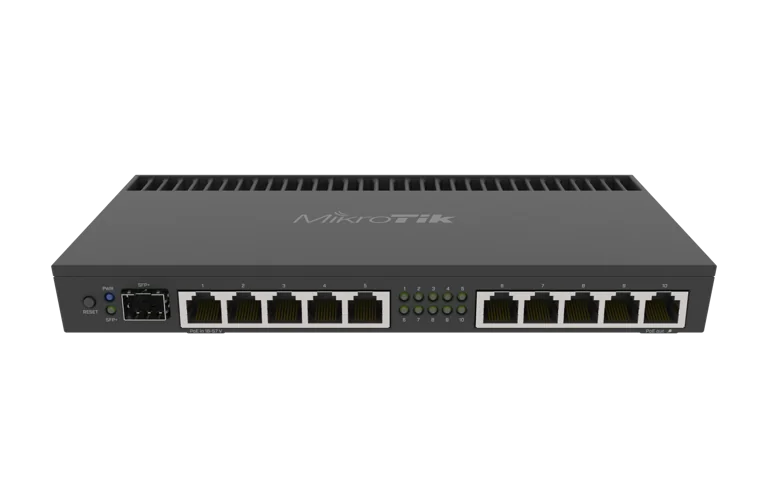
The RB4011iGS+RM is another capable option for a commercial hotspot.
It provides:
Quad-core ARM CPU
1 GB RAM
10 Gigabit Ethernet ports
1 × 10G SFP+ interface
Rackmount format
RouterOS
One major advantage of the RB4011 is its physical Ethernet port count.
Ten Gigabit Ethernet ports can be useful where the router needs direct connections to several network segments.
For example:
WAN connection
Backup WAN
Hotspot LAN
Management LAN
CCTV network
Office network
Server network
Access-point network
Billing server
Additional building
In a properly designed hotspot network, VLANs and managed switches can also reduce the need for a large number of physical router interfaces.
RB4011 vs RB5009 for 100 Hotspot Customers
The RB4011 and RB5009 can both fit professional hotspot deployments.
The key differences include:
FeatureRB4011RB5009CPU architectureARMARM64RAM1 GB1 GBGigabit Ethernet1072.5G EthernetNoYes10G SFP+YesYesUSBNoUSB 3.0FormatRackmountCompactBest considerationMore direct Ethernet portsModern high-speed deploymentFor a completely new network, the RB5009's ARM64 platform and 2.5G interface can be useful where future growth is expected.
The RB4011 remains useful when direct Gigabit port density is more important.
Is MikroTik L009 Enough for 100 Users?
The MikroTik L009 can be considered for smaller or moderate hotspot installations around the 100-customer mark.
However, the number of registered users alone should never determine whether the L009 is suitable.
Consider the actual load.
For example, a network may have:
100 registered customers
but only:
25 to 40 concurrent users
with packages ranging between 2 Mbps and 5 Mbps.
That network can present a very different workload from a hotspot where 80 to 100 users are online simultaneously with much higher speeds.
The L009 can therefore make sense where:
Internet bandwidth is moderate
Concurrent usage is relatively low
Firewall rules are simple
Queue configuration is reasonable
The network is not expected to grow rapidly
Where substantial growth is expected, moving directly to an RB4011 or RB5009 may provide more headroom.
Browse our current MikroTik products in Kenya when comparing available router options.
How Much Internet Bandwidth Do 100 Hotspot Users Need?
There is no fixed bandwidth requirement because users do not consume their package speeds continuously.
The correct bandwidth depends on:
Number of simultaneous users
Customer packages
Usage patterns
Video streaming
Social media usage
Business applications
Oversubscription ratio
Quality-of-service targets
Consider a simple hypothetical example.
Suppose you sell:
5 Mbps hotspot packages
to:
100 customers.
Providing a dedicated 5 Mbps simultaneously to every customer would theoretically require:
500 Mbps.
In practice, commercial networks often rely on the fact that not every customer consumes their full package bandwidth simultaneously.
However, aggressive oversubscription creates slow internet during busy periods.
A hotspot operator therefore needs to monitor traffic and upgrade upstream capacity when peak demand starts affecting customers.
Example Bandwidth Packages for a 100-User Hotspot
A small commercial hotspot could offer plans such as:
PackageDownload SpeedTypical CustomerBasic2 MbpsMessaging and browsingStandard5 MbpsGeneral internet usePlus10 MbpsStreaming and workPremium20 MbpsHeavy usersThese numbers are examples rather than fixed recommendations.
Your packages should be based on:
Upstream internet capacity
Competition
Customer requirements
Monthly costs
Desired service quality
MikroTik bandwidth-management tools can then enforce the limits assigned to each user or customer profile.
Why Bandwidth Management Matters
Without bandwidth control, one customer can consume a large percentage of the internet connection.
Imagine a hotspot with a 100 Mbps internet connection.
If several customers start large downloads simultaneously, other users may experience:
Slow browsing
Buffering
High latency
Poor video-call quality
Delayed messaging
Interrupted online applications
MikroTik RouterOS provides multiple mechanisms for traffic and bandwidth management.
Your exact queue architecture should depend on the network design.
MikroTik HotSpot Authentication for 100 Users
RouterOS includes a HotSpot gateway designed to authenticate users before they receive access to a public network.
According to MikroTik's RouterOS documentation, the HotSpot gateway supports authentication through either a local router database or a remote RADIUS server.
This makes it possible to build a commercial login system where users connect to WiFi and are redirected to a captive portal.
A typical flow is:
Customer connects to WiFi
↓
Customer opens browser
↓
Hotspot login page appears
↓
Customer enters credentials
↓
MikroTik checks authorization
↓
Internet access is provided
For a very small network, local MikroTik user accounts may be sufficient.
For a growing commercial hotspot, a RADIUS-based billing system usually becomes more practical.
MikroTik RADIUS for Hotspot Billing
MikroTik RouterOS includes a RADIUS client that can be used with HotSpot authentication and accounting.
MikroTik's documentation confirms that RouterOS RADIUS can provide authentication and accounting for services including HotSpot and PPP.
This allows the MikroTik router to communicate with an external subscriber-management platform.
A typical architecture becomes:
Customer
↓
WiFi Access Point
↓
MikroTik Router
↓
RADIUS / Billing Platform
↓
Internet
For hotspot operators in Kenya, a platform such as Tajira can be considered for ISP and hotspot customer management.
The MikroTik router and the billing platform serve different purposes.
The MikroTik controls network access and traffic, while the billing system can handle the commercial subscriber-management process.
Why You Should Not Use the Router as Your Main WiFi Access Point
One common mistake when designing a 100-user hotspot is expecting one MikroTik wireless router to provide WiFi coverage for all 100 customers.
This is usually poor network design.
Customer capacity is determined not only by the main router but also by the wireless infrastructure.
A better network architecture is:
Internet
↓
MikroTik Gateway Router
↓
Managed PoE Switch
↓
Access Point 1
Access Point 2
Access Point 3
Access Point 4
Access Point 5
The exact number of access points depends on:
Building size
Wall construction
Frequency bands
Client density
Access-point model
Interference
Required signal strength
Indoor or outdoor installation
Expected traffic
A site survey is therefore important.
How Many Access Points Do You Need for 100 Users?
There is no universal number.
A common mistake is dividing 100 customers by the advertised maximum client count of an access point.
For example, if an access point claims a large client capacity, that does not mean it should necessarily carry that many active hotspot customers.
Real-world performance depends on airtime utilisation.
A professional hotspot installation should consider:
Number of concurrent devices
Bandwidth per customer
Physical area
Walls and obstacles
2.4 GHz interference
5 GHz coverage
Channel planning
Access-point positioning
A multi-storey apartment may require access points on several floors even if customer numbers are relatively low.
An outdoor open-air hotspot may cover customers differently.
Example 100-User Hotspot Network
Here is a simplified design for a growing hotspot business.
Internet Source
Possible connections include:
Fibre
Fixed wireless
Satellite internet
Dedicated internet
Business broadband
Gateway Router
Use an appropriate MikroTik such as:
RB5009UG+S+IN
Core Switch
Use a managed switch, preferably with suitable PoE capacity if your access points require PoE.
Wireless Network
Deploy multiple access points based on a coverage survey.
Subscriber Management
Connect the MikroTik gateway to a hotspot billing or RADIUS platform.
Network Layout
ISP/Fibre
↓
RB5009
↓
Managed PoE Switch
↓
AP 1 — Building A
AP 2 — Building A
AP 3 — Building B
AP 4 — Outdoor Area
AP 5 — Reception/Public Area
This design allows the hotspot network to expand gradually.
Should You Use VLANs in a Hotspot Network?
VLANs can become extremely useful as the hotspot grows.
Instead of placing everything on one flat network, VLANs can separate different services.
For example:
VLANPurposeVLAN 10Hotspot CustomersVLAN 20Network ManagementVLAN 30Office NetworkVLAN 40CCTVVLAN 50ServersVLAN 60Guest NetworkThis helps improve network organisation and allows appropriate firewall policies to be created between different services.
A commercial hotspot should avoid exposing router-management interfaces to ordinary public WiFi users.
Firewall Configuration for 100 Hotspot Users
A hotspot router should not simply route users to the internet with no security planning.
Firewall configuration should protect:
MikroTik management access
Billing server
Network switches
Access points
Other customer networks
Office devices
CCTV systems
Servers
You may also want to control communication between hotspot customers depending on the network design.
Correct firewall rules become increasingly important as the subscriber base grows.
Should You Use Simple Queues for 100 Users?
Simple Queues can be useful, but your queue strategy should be designed carefully.
Creating large numbers of poorly structured queues can unnecessarily complicate the router configuration.
Depending on your network, options can include:
Simple Queues
Queue Trees
PCQ
RADIUS-delivered rate limits
HotSpot user-profile limits
The appropriate method depends on how packages are sold and how the billing platform integrates with MikroTik.
Avoid copying queue scripts from the internet without understanding their effect on your network.
MikroTik Hotspot Packages for 100 Customers
A commercial hotspot may sell packages based on time, speed or both.
Examples include:
Time-Based Packages
1 hour
3 hours
6 hours
12 hours
24 hours
7 days
30 days
Speed-Based Packages
2 Mbps
5 Mbps
10 Mbps
20 Mbps
Combined Packages
For example:
5 Mbps – 24 Hours
or
10 Mbps – 30 Days
The billing system can then map the purchased package to the appropriate MikroTik or RADIUS profile.
Do You Need a Billing System for 100 Users?
It is technically possible to manage hotspot users directly from MikroTik.
However, manually creating and removing users becomes increasingly inconvenient as the business expands.
With around 100 customers, automation becomes much more valuable.
A suitable hotspot billing platform can help manage:
User registration
Packages
Payments
Account activation
Expiry
Renewals
Vouchers
Customer records
Session information
For automated subscriber management, explore Tajira hotspot and ISP billing.
Can You Use Starlink with a 100-User MikroTik Hotspot?
Technically, a MikroTik router can be placed downstream of different internet connections, including satellite services, provided the service plan and provider terms allow the intended usage.
The architecture would typically be:
Internet Service
↓
MikroTik Router
↓
Managed Switch
↓
Access Points
↓
Hotspot Customers
The MikroTik handles local network functions such as:
Hotspot login
DHCP
NAT
Firewalling
Queues
RADIUS
VLANs
The upstream service provides internet connectivity.
Should You Use Two Internet Connections?
For a commercial hotspot where downtime directly affects revenue, redundancy can be worthwhile.
For example:
Primary Fibre ISP
Backup Internet Connection
↓
MikroTik Router
A suitable MikroTik router can be configured to fail over to a secondary WAN if the primary connection becomes unavailable.
The exact design should be tested carefully before deployment.
MikroTik RB5009 vs CCR for 100 Users
For an ordinary 100-user hotspot, moving directly to a Cloud Core Router may not always be necessary.
The RB5009 already provides a powerful platform for many medium-sized networks.
A CCR becomes more relevant as requirements increase, such as:
Hundreds of active customers
Multiple high-bandwidth WAN connections
Large PPPoE deployments
Complex routing
Heavy firewall processing
Larger ISP infrastructure
Multi-gigabit throughput requirements
Therefore, choose the router according to actual workload.
Do not purchase expensive hardware solely for the sake of saying you have a CCR.
Can an RB951 Handle 100 Hotspot Users?
The RB951 family has historically been used in many small MikroTik hotspot installations.
However, it is an older platform.
For a brand-new commercial deployment targeting around 100 users, newer routers offer considerably more processing headroom and modern connectivity.
Instead of building a new 100-user commercial hotspot around older hardware, compare current models such as:
L009
RB4011
RB5009
You can browse MikroTik routers available in Kenya when selecting hardware.
MikroTik Router for 100 Users Price in Kenya
Router prices depend on:
Model
Supplier
Exchange rates
Stock availability
Hardware revision
Accessories
Warranty arrangements
Instead of choosing purely based on the cheapest price, compare the cost against the expected revenue of the hotspot.
If your hotspot has 100 paying customers, the router is one of the most critical pieces of equipment in the business.
Saving a relatively small amount by undersizing the router can become expensive if you need to replace it shortly afterwards.
See our MikroTik router price in Kenya guide for current model comparisons.
You can also browse additional MikroTik products from Tawa Kenya.
Example Equipment Checklist for a 100-User Hotspot
A commercial hotspot normally requires more than the MikroTik router.
Your equipment list may include:
MikroTik gateway router
Managed network switch
PoE switch
Multiple WiFi access points
CAT6 network cable
Fibre cable where required
Patch cords
Network cabinet
UPS or power backup
Surge protection
RADIUS/billing server
Internet connection
Mounting accessories
Outdoor installations may additionally require:
Weatherproof enclosures
Outdoor access points
Poles
Lightning protection
Outdoor-rated cable
Network design should come before equipment purchasing.
How to Configure MikroTik for 100 Hotspot Users
A simplified configuration process includes:
Step 1: Configure WAN
Connect the MikroTik router to the upstream internet provider and confirm reliable internet access.
Step 2: Create the LAN
Create the appropriate LAN or VLAN structure.
Step 3: Configure DHCP
Provide IP addresses to hotspot clients.
Step 4: Configure DNS
Make sure hotspot users can resolve domain names correctly.
Step 5: Configure NAT
Configure appropriate internet access from the internal networks.
Step 6: Configure Firewall Rules
Protect the router and internal infrastructure.
Step 7: Configure HotSpot
Create the HotSpot gateway and captive portal.
Step 8: Create User Profiles
Define appropriate customer packages and policies.
Step 9: Configure RADIUS
Connect your external authentication or billing platform where required.
Step 10: Configure Bandwidth Management
Apply speed profiles according to the packages being sold.
Step 11: Configure Access Points
Install access points based on the coverage plan.
Step 12: Test the Complete Customer Journey
Test:
Connection
Login
Payment
Authentication
Speed limits
Expiry
Reconnection
Logout
Do not launch a commercial hotspot until the entire customer journey has been tested.
For general RouterOS setup guidance, see how to configure a MikroTik router in Kenya.
How to Scale Beyond 100 Customers
A good network should be designed so growth does not require rebuilding everything.
As subscriber numbers increase, you can expand:
Internet Capacity
Move from lower bandwidth to higher-capacity fibre or add additional connections.
Access Points
Add more APs as customer density increases.
Switching
Upgrade access and distribution switches as required.
Router
Move from:
L009 → RB5009 → CCR
as the workload genuinely requires it.
Billing System
Use centralized customer and RADIUS management.
Fibre Backbone
For larger properties, fibre can be introduced between buildings or network cabinets.
Good initial design makes each expansion step easier.
Common Mistakes When Building a 100-User Hotspot
Choosing a Router Based Only on User Count
The router workload depends on traffic and configuration, not simply registered accounts.
Installing Too Few Access Points
The router may be powerful while customers still experience poor WiFi.
No Bandwidth Policies
Heavy users can negatively affect everybody else.
Running Everything on One Network
Separate customers, management and internal services appropriately.
No Power Backup
Commercial internet businesses need to consider power reliability.
Poor Cabling
Bad Ethernet connections can cause intermittent faults that look like router or internet problems.
No Monitoring
Watch:
CPU utilisation
RAM
Interface traffic
Queue performance
Latency
Packet loss
Access-point utilisation
Active users
Upgrade before the network consistently reaches its practical limits.
Frequently Asked Questions
Which MikroTik router is best for 100 hotspot users?
The MikroTik RB5009UG+S+IN is a strong option for a growing commercial hotspot around 100 users, while the RB4011 and L009 can also be suitable depending on traffic, bandwidth, simultaneous users and configuration.
Can MikroTik RB5009 handle hotspot billing?
Yes. RouterOS supports HotSpot and RADIUS functionality, allowing an RB5009 to act as the gateway while an external billing platform handles subscriber authentication and accounting. MikroTik documents HotSpot and RADIUS support directly in RouterOS.
How much bandwidth do I need for 100 hotspot users?
There is no fixed amount. It depends on concurrent users, package speeds and customer behaviour. Monitor peak consumption rather than calculating capacity purely from registered subscriber count.
Can I use one access point for 100 hotspot users?
It is generally better to distribute users among multiple access points, especially in commercial installations. Coverage, interference, client density and bandwidth requirements should determine AP quantity.
Is RB951 good for 100 users?
For a new commercial network, newer MikroTik hardware such as the L009, RB4011 or RB5009 generally provides more processing and expansion capacity than older RB951 devices.
Where to Buy a MikroTik Router for 100 Hotspot Users
Before purchasing, calculate:
Expected registered subscribers
Expected concurrent users
Total internet bandwidth
Number of access points
Number of VLANs
Billing architecture
Expansion target
Then choose the router.
You can explore available options through MikroTik Kenya, browse our MikroTik products in Kenya, or compare additional models through Tawa's MikroTik range.
For businesses comparing MikroTik devices for general commercial networks as well as hotspots, see this guide from Orbitlink Solutions on the best MikroTik router for small business in Kenya.
Final Thoughts
The right MikroTik Router for 100 Hotspot Users depends on how those customers actually use the network.
A hotspot with 100 registered users and 30 people online simultaneously may require much less processing capacity than a hotspot where nearly 100 customers are active at peak periods.
For smaller deployments with moderate traffic, the MikroTik L009 may be worth considering.
The RB4011 provides strong routing capability and a high number of physical Gigabit interfaces.
For a growing professional hotspot, the RB5009UG+S+IN is particularly attractive because it combines a modern ARM64 platform with Gigabit, 2.5G Ethernet and 10G SFP+ connectivity.
The router, however, is only part of the solution.
A reliable 100-user hotspot also requires correctly positioned access points, sufficient upstream bandwidth, managed switching, sensible bandwidth control, strong firewall configuration and an appropriate billing system.
Plan these components together and leave room for growth.
For a broader model comparison, read our complete guide to the Best MikroTik Router for Hotspot Business.