
MikroTik RB4011 Default Password
Find the MikroTik RB4011 default password, username and IP address. Learn how to login with WinBox, recover access and secure your RB4011 router.
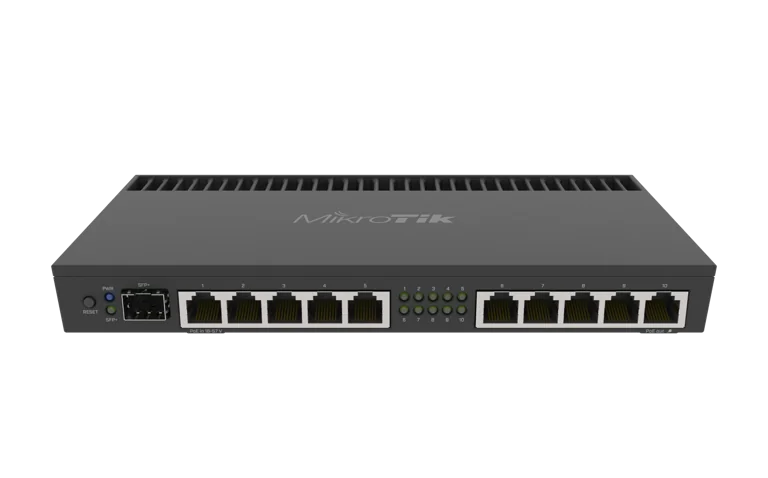
MikroTik RB4011 Default Password
MikroTik RB4011 Default Username, Password and IP Address
MikroTik RB4011 Default Password | Login, IP & WinBox
If you have just purchased, reset or inherited a MikroTik RB4011iGS+RM, one of the first things you may need is the default login information.
The standard MikroTik username is usually:
Username: admin
For the password, behavior can vary depending on the device generation and factory configuration. Some MikroTik devices use a blank password after reset, while newer units may use a unique factory password printed on the device label or packaging.
You can view the MikroTik RB4011iGS+RM or browse more MikroTik products in Kenya.
What Is the Default Password for MikroTik RB4011?
The default username is normally:
admin
For the password, first check the physical router and its packaging.
If a factory password is printed on the label, use that password.
On devices configured without an individual factory password, the admin account may initially have no password.
Because MikroTik has changed factory credential practices over time, you should not assume that every RB4011 uses a blank password.
MikroTik RB4011 Default Username
The standard administrator username is:
admin
This account provides access to RouterOS configuration.
After your first successful login, it is recommended to create your own administrator account and use strong credentials.
MikroTik RB4011 Default IP Address
With MikroTik's standard default RouterOS configuration, the router commonly uses:
192.168.88.1
This address is normally used to access the router from the LAN.
You can connect using:
WinBox
WebFig
SSH, if enabled
For most users, WinBox is the easiest option.
How to Login to MikroTik RB4011 Using WinBox
Connect your laptop or desktop computer to a LAN port on the RB4011.
Then open WinBox.
Go to:
Neighbors
The router should appear automatically.
Select the RB4011 and connect using either:
its IP address
its MAC address
Use:
Username: admin
Password: the factory password shown on the device, if supplied
If no factory password is configured, the password field may initially be blank.
How to Login Using WebFig
Connect your computer to the router.
Open a browser and enter:
http://192.168.88.1
or, where configured:
https://192.168.88.1
You should see the RouterOS login page.
Enter the administrator username and password.
If the page does not open, use WinBox and connect through MAC address instead.
Where to Find the MikroTik Factory Password
Check:
the sticker on the router
product packaging
included documentation
The label may contain:
model
serial number
MAC address
factory login credentials
Keep these details private.
Avoid posting photos of your router label online if login credentials are visible.
What If admin With a Blank Password Does Not Work?
If the blank password does not work, do not keep trying random passwords.
Instead:
Check the router label.
Check the original box.
Look for factory credentials.
Confirm the username is
admin.Make sure the router has actually been reset to factory configuration.
If the router was previously configured, another administrator may have changed the username or password.
What If the RB4011 Is Second-Hand?
A used router may no longer have its factory login.
The previous administrator could have changed:
username
password
IP address
management services
firewall rules
In this situation, try WinBox MAC discovery first.
If you still cannot access RouterOS and do not know the credentials, a factory reset may be required.
What If I Forgot the RB4011 Password?
RouterOS does not provide a simple password-recovery feature that displays a forgotten administrator password.
If no working administrator account is available, you may need to reset the router.
Before doing this, remember that a reset can remove:
WAN configuration
LAN settings
VLANs
firewall rules
PPPoE
VPN
bandwidth queues
routes
hotspot configuration
For a business or ISP, this can cause major downtime.
How to Factory Reset RB4011 After Forgotten Password
A common method is:
Disconnect power.
Press and hold the reset button.
Reconnect power while holding the button.
Release the button at the appropriate LED indication.
Allow the router to reboot.
After reset, reconnect through WinBox and check the factory credentials again.
If you need the full procedure, refer to your MikroTik RB4011 factory reset guide.
Default Login After Factory Reset
After a normal factory reset, the router should return to its standard factory configuration behavior.
Typical details are:
Username: admin
IP: 192.168.88.1
Password: factory password if supplied, otherwise possibly blank depending on the unit
The safest approach is always to check the device label.
Change the Default RB4011 Password Immediately
Once you successfully log in, change the administrator password.
Do not leave a production router with factory credentials.
Go to:
System → Users
Select the administrator account and create a strong password.
A strong password should be:
long
unique
difficult to guess
not reused elsewhere
Avoid passwords such as:
admin
12345678
mikrotik
password
rb4011
Create a New Administrator Username
For better security, create a new administrator account instead of relying permanently on the default admin account.
Go to:
System → Users
Create a new user with the required administrator privileges.
Confirm the new account works before disabling or removing the original administrator account.
This reduces exposure to attacks that assume the username is admin.
Restrict WinBox Access
WinBox is one of the most useful MikroTik management tools, but it should not be openly exposed.
Where possible, allow management only from:
management VLAN
trusted LAN
VPN
approved IP addresses
Avoid unrestricted internet-facing WinBox access.
Restrict WebFig Access
If you do not use WebFig, disable or restrict the related HTTP/HTTPS services.
Go to:
IP → Services
Review:
www
www-ssl
Either disable them or restrict them to trusted networks.
Disable Unused RouterOS Services
Under:
IP → Services
review services such as:
Telnet
FTP
SSH
WWW
WWW-SSL
API
API-SSL
WinBox
Disable anything you do not need.
Fewer exposed services generally means a smaller attack surface.
Secure SSH Access
If SSH is required, restrict access to trusted addresses or management networks.
Avoid exposing SSH to the whole internet unless there is a specific operational reason.
Using a VPN for remote router management is usually safer.
Use a Management VLAN
For professional environments, create a separate management VLAN.
For example:
VLAN 10 – Network Management
Only trusted technicians should be able to access:
router
switches
access points
network controllers
Normal staff, guests and CCTV devices should not have direct management access.
RB4011 Password Security for ISPs
ISPs should take RB4011 credential security seriously.
The router may control:
PPPoE subscribers
bandwidth packages
routing
customer access
VLANs
firewall rules
upstream connections
Unauthorized access could affect many subscribers at once.
For ISP deployments:
use strong administrator credentials
create separate technician accounts
restrict WinBox
use VPN management
keep RouterOS updated
maintain configuration backups
ISPs can also use Tajira for subscriber and billing management alongside MikroTik infrastructure.
RB4011 Password Security for Businesses
For business networks, do not share the main administrator password with employees.
Instead, restrict access to:
IT staff
network technicians
authorized administrators
The router may control access to:
internet
CCTV
guest Wi-Fi
servers
VoIP
VPN
business applications
Credential security is therefore critical.
RB4011 Password Security for CCTV Installations
CCTV installers frequently use MikroTik routers to connect:
NVRs
IP cameras
switches
remote monitoring systems
The router administrator password should not be the same as:
NVR password
Wi-Fi password
camera password
Use separate credentials for each system.
Can I Use MAC WinBox If I Don't Know the IP?
Yes.
This is one of the advantages of WinBox.
Open:
Neighbors
The router may appear even if you do not know its IP address.
You can then connect using the MAC address, provided MAC management access has not been disabled.
What If 192.168.88.1 Does Not Work?
Possible reasons include:
IP address was changed
router was configured without default settings
your computer is on the wrong subnet
DHCP is disabled
you are connected to the wrong interface
firewall rules block access
Use WinBox Neighbors and try MAC connectivity.
Router Appears in WinBox but Login Fails
If you can see the RB4011 but login fails, the most likely causes are:
incorrect username
incorrect password
previously changed credentials
keyboard entry error
If it is a factory-new unit, check the label carefully.
If it is previously configured, contact the administrator or reset the router if appropriate.
Update RouterOS After First Login
After gaining access, check the installed RouterOS version.
Go to:
System → Packages
Install appropriate stable updates when required.
Keeping RouterOS updated is important for:
security
stability
feature improvements
bug fixes
Back Up the Router After Setup
Once your RB4011 is securely configured, create a backup.
Use:
Files → Backup
You should also create a configuration export:
/export file=rb4011-secure
Store the backup somewhere other than the router itself.
Default Password vs Wi-Fi Password
The RB4011iGS+RM does not include built-in Wi-Fi.
Therefore, there is no RB4011 wireless password to configure directly on this model.
If you connect external access points, their Wi-Fi passwords are configured separately.
This is different from wireless MikroTik routers such as the L009UiGS-2HaxD-IN.
RB4011 vs L009 Login Process
The general RouterOS login process is similar on both routers.
You can use:
WinBox
WebFig
MAC connectivity
The main difference is the hardware platform and features, not the basic RouterOS login method.
MikroTik RB4011 Price in Kenya
If you are purchasing the router, check the current MikroTik RB4011iGS+RM price in Kenya.
You can also browse MikroTik products in Kenya.
For additional comparison, visit MikroTik router prices in Kenya or browse MikroTik products from Orbitlink Solutions.
Frequently Asked Questions
What is the MikroTik RB4011 default username?
The standard MikroTik administrator username is normally admin.
What is the MikroTik RB4011 default password?
Depending on the device and factory configuration, the password may be blank or a unique factory password may be printed on the router or packaging.
What is the RB4011 default IP address?
With the standard MikroTik default configuration, the router commonly uses 192.168.88.1.
How do I login to RB4011?
Connect your computer to the router and use WinBox or WebFig. WinBox can connect using either IP or MAC address.
Why does admin with no password not work?
Your device may have a factory password printed on its label, or the credentials may already have been changed.
Can I recover a forgotten RB4011 password?
There is no simple RouterOS feature that reveals a forgotten administrator password. If no valid account exists, a factory reset may be necessary.
Will a factory reset restore the default login?
A standard reset restores the router's factory configuration behavior, including the applicable default credential setup.
Can I access the router if I don't know its IP?
Yes. WinBox can often discover MikroTik routers using MAC address.
Should I change the default username?
For professional networks, creating a different administrator username and disabling the default account can improve security.
Does RB4011 have a default Wi-Fi password?
No. The RB4011iGS+RM does not include built-in Wi-Fi.
Final Thoughts on MikroTik RB4011 Default Password
The standard login for a MikroTik RB4011iGS+RM normally uses:
Username: admin
Default IP: 192.168.88.1
For the password, check the router label and packaging first because factory credential behavior can differ between units and production generations.
After your first login:
Create a strong password.
Consider creating a new administrator username.
Restrict WinBox and other management services.
Update RouterOS.
Configure a management VLAN where appropriate.
Create a backup.
For professional ISP, business and CCTV networks, administrator credentials should be treated as critical infrastructure information.
If you are planning to buy or replace the router, check the current MikroTik RB4011iGS+RM price in Kenya.