
MikroTik RB4011 Bandwidth Management
Learn MikroTik RB4011 bandwidth management using Simple Queues, Queue Tree, PCQ and PPP profiles for ISPs, businesses, guest WiFi and subscribers.
MikroTik RB4011 Bandwidth Management
How to Manage Bandwidth on MikroTik RB4011
MikroTik RB4011 Bandwidth Management | Queues & PCQ Guide
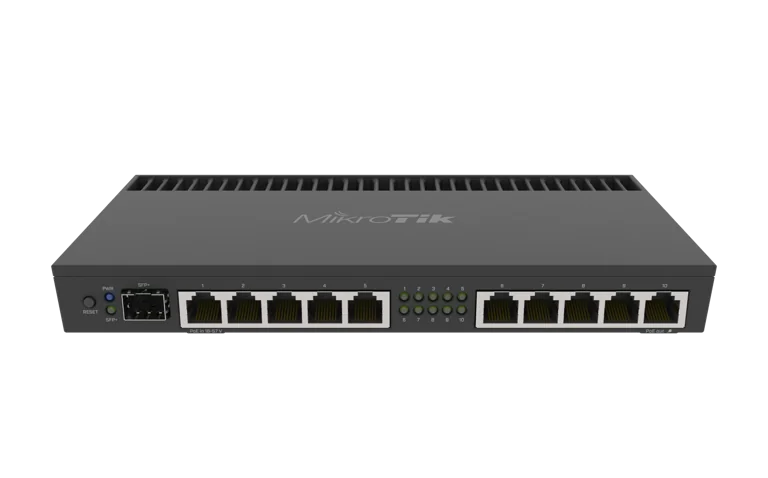
The MikroTik RB4011iGS+RM is a strong router for bandwidth management in ISP, business, hotel, school, apartment and office networks. With RouterOS, administrators can control how much bandwidth individual users, departments, subscribers or applications receive.
MikroTik RouterOS provides several bandwidth-management tools, including Simple Queues, Queue Tree and PCQ. Simple Queues are intended for relatively straightforward bandwidth-limiting tasks, while Queue Tree is designed for more advanced traffic-prioritization and hierarchical policies. PCQ can dynamically divide or shape bandwidth among multiple users.
The RB4011 provides enough processing capability for many professional traffic-management deployments, with a quad-core AL21400 CPU, 1 GB RAM, ten Gigabit Ethernet ports and a 10G SFP+ interface.
You can view the MikroTik RB4011iGS+RM or browse other MikroTik products in Kenya.
What Is MikroTik Bandwidth Management?
Bandwidth management is the process of controlling how internet or network capacity is distributed between users and devices.
For example, if an office has a 100 Mbps internet connection, you may want to ensure that:
management receives sufficient bandwidth
VoIP remains responsive
CCTV does not consume unnecessary WAN capacity
guest users have limited speeds
individual staff members cannot use the entire connection
For an ISP, bandwidth management can be used to create packages such as:
5 Mbps
10 Mbps
20 Mbps
30 Mbps
50 Mbps
100 Mbps
RouterOS can enforce these limits automatically.
Why Use the RB4011 for Bandwidth Management?
The RB4011 is suitable for professional bandwidth management because it combines strong RouterOS functionality with capable hardware.
Key specifications include:
quad-core AL21400 processor
1 GB RAM
10 Gigabit Ethernet ports
1 × 10G SFP+ interface
RouterOS v7
RouterOS Level 5 licence
MikroTik also publishes strong routing-performance results for the RB4011, although actual performance always depends on packet size, firewall rules, queues and other RouterOS features in use.
Main Bandwidth Management Methods in RouterOS
There are three important technologies to understand:
Simple Queues
Best for:
single users
individual IP addresses
small offices
simple subscriber limits
Queue Tree
Best for:
advanced QoS
traffic prioritization
departmental bandwidth policies
more complex networks
PCQ
Best for:
many users
equal bandwidth distribution
ISP subscriber groups
scalable bandwidth sharing
MikroTik's official RouterOS documentation describes Simple Queues as a convenient method for everyday queueing tasks and Queue Tree as the method for more advanced policies.
Method 1: Simple Queue Bandwidth Management
Simple Queue is the easiest place to start.
Suppose you want to limit a device with IP:
192.168.10.50
to:
10 Mbps download
and:
5 Mbps upload
Go to:
Queues → Simple Queues
Click:
Add
Configure:
Name:
USER-10MBPS
Target:
192.168.10.50/32
Max Limit:
Upload:
5M
Download:
10M
Apply the configuration.
The device should now be restricted to the configured speeds.
Simple Queue Command Example
You can also use Terminal:
/queue simple add name="USER-10MBPS" target=192.168.10.50/32 max-limit=5M/10M
This can be useful when configuring many routers or creating scripts.
Important FastTrack Consideration
One very important consideration is FastTrack.
MikroTik's documentation notes that traffic processed through FastTrack can bypass Simple Queues, meaning the queue may not work as expected for FastTracked traffic.
If your bandwidth limits are not working correctly, review:
IP → Firewall → Filter Rules
and check whether FastTrack is affecting the traffic you are trying to shape.
Do not simply disable FastTrack everywhere without understanding the performance impact.
Creating Different Internet Packages
An ISP can create several subscriber speed profiles.
For example:
5 Mbps Package
Download:
5M
Upload:
5M
10 Mbps Package
Download:
10M
Upload:
10M
20 Mbps Package
Download:
20M
Upload:
20M
50 Mbps Package
Download:
50M
Upload:
50M
The exact upload/download ratio depends on the ISP's commercial packages.
Bandwidth Management Through PPPoE
For an ISP, manually creating Simple Queues for every customer may become difficult.
If subscribers authenticate using PPPoE, bandwidth limits can be assigned using PPP profiles.
For example:
PPP → Profiles
Create:
10Mbps
and set:
Rate Limit:
10M/10M
Any subscriber using that profile can automatically receive the configured bandwidth.
This can be combined with RADIUS and an ISP billing platform for larger deployments.
Using Tajira With RB4011 Bandwidth Management
ISPs using MikroTik infrastructure can also use Tajira for customer and billing management.
A typical system may look like:
Tajira
Customer records, billing and packages
↓
MikroTik RB4011
PPPoE, subscriber authentication and bandwidth enforcement
This is more scalable than manually editing subscriber configurations each time a customer upgrades or changes a package.
What Is PCQ?
PCQ stands for Per Connection Queue.
MikroTik describes PCQ as a queueing discipline that can dynamically equalize or shape traffic between multiple users with relatively little administration.
PCQ is especially useful when many customers share bandwidth.
Instead of creating hundreds of separate queue types manually, PCQ can divide capacity between multiple substreams.
PCQ Download and Upload Classifiers
For a typical setup:
Download traffic usually uses:
dst-address
Upload traffic usually uses:
src-address
This allows RouterOS to identify individual subscribers and create separate PCQ substreams.
Example PCQ Configuration
A simplified RouterOS configuration could include:
/queue type add name=PCQ-DOWNLOAD kind=pcq pcq-classifier=dst-address
/queue type add name=PCQ-UPLOAD kind=pcq pcq-classifier=src-address
You can then use these queue types in:
Simple Queues
Queue Tree
according to the network design.
Equal Bandwidth Distribution
Suppose an office has:
100 Mbps
and multiple active users.
PCQ can dynamically share available bandwidth between users.
If only a few users are active, they may use more available capacity.
As more users become active, the capacity can be distributed between them according to the configured queue rules.
This is useful for:
apartments
hotels
schools
hotspots
offices
ISPs
What Is Queue Tree?
Queue Tree provides more advanced control than Simple Queues.
MikroTik notes that Queue Tree is useful for advanced queueing tasks such as global prioritization and user-group limits. It typically works with traffic classification or packet marks where necessary.
Queue Tree can be used to prioritize:
VoIP
business applications
video conferencing
critical servers
while giving lower priority to less important traffic.
Bandwidth Prioritization
Not all traffic should always be treated equally.
For example, an office might prioritize:
VoIP
Video conferencing
Business applications
Web browsing
Downloads and entertainment
RouterOS priority values can be incorporated into queue policies to ensure important traffic receives capacity first during congestion.
RB4011 Bandwidth Management for ISPs
The RB4011 can be particularly useful for smaller and medium-sized ISPs.
You can use it for:
PPPoE packages
subscriber speed limits
PCQ
Queue Tree
Simple Queues
traffic prioritization
VLANs
firewall
RADIUS
An ISP can therefore use one RouterOS platform for both routing and subscriber traffic control.
RB4011 Bandwidth Management for Apartment Internet
Apartment internet providers can create packages for individual tenants.
Example:
Tenant A:
10 Mbps
Tenant B:
20 Mbps
Tenant C:
50 Mbps
Subscribers can authenticate using PPPoE, and the appropriate bandwidth policy can be applied automatically.
RB4011 Bandwidth Management for Businesses
Businesses often have different bandwidth requirements from ISPs.
Instead of selling individual packages, businesses may prioritize departments.
Example:
Management
High priority
Finance
High priority
General Staff
Normal priority
CCTV
Controlled WAN usage
Guest Wi-Fi
Restricted bandwidth
RouterOS can implement these policies using VLANs, IP subnets and queues.
Limiting Guest Wi-Fi Bandwidth
Guest Wi-Fi should generally not consume the entire internet connection.
For example, you could limit the guest VLAN:
192.168.40.0/24
to:
20 Mbps total
while staff continue using the remaining connection.
This prevents a few guest devices from affecting important business services.
Bandwidth Management for CCTV
CCTV traffic needs to be handled carefully.
Most camera-to-NVR traffic is internal LAN traffic and should not necessarily be shaped like internet traffic.
However, you may want to limit:
remote camera viewing
cloud uploads
offsite backups
external CCTV traffic
This prevents surveillance systems from consuming excessive WAN bandwidth.
Prioritizing VoIP
VoIP is sensitive to:
latency
jitter
packet loss
If employees are making business calls while other users perform large downloads, call quality may deteriorate.
Queue Tree and QoS policies can be used to prioritize VoIP traffic during congestion.
Prioritizing Video Conferencing
Applications such as video conferencing can also benefit from prioritization.
You can design policies that favor important real-time traffic over:
large file downloads
operating-system updates
entertainment traffic
The exact classification method depends on the network.
Limit Bandwidth Per VLAN
If your network uses VLANs, each VLAN can have its own bandwidth policy.
Example:
VLAN 20 – Staff:
100 Mbps
VLAN 30 – CCTV:
20 Mbps WAN limit
VLAN 40 – Guest:
30 Mbps
VLAN 50 – Servers:
Higher priority
This is useful for businesses, hotels and schools.
Bandwidth Management for Hotels
Hotels often have:
management systems
staff
CCTV
guest Wi-Fi
VoIP
Guest traffic should not interfere with operational services.
A MikroTik RB4011 can separate these services into VLANs and apply different queue policies.
Bandwidth Management for Schools
Schools can use bandwidth management to control:
administration
teachers
students
computer laboratories
guest Wi-Fi
For example, administration and online teaching platforms can receive higher priority while student entertainment traffic receives a lower priority.
Bandwidth Management for Hotspots
MikroTik Hotspot can also be combined with bandwidth policies.
Users can receive different profiles according to:
voucher
package
user account
This can be useful for:
hotels
cafés
campuses
public Wi-Fi
estates
Limit Bandwidth by IP Address
Simple Queues can easily target an individual IP.
Example:
192.168.10.20/32
This is useful for fixed devices such as:
servers
NVRs
workstations
access points
For users whose IP addresses frequently change, PPPoE or DHCP-based organization may be more practical.
Limit Bandwidth by Subnet
You can also target an entire subnet.
Example:
192.168.20.0/24
This can be useful for controlling the total bandwidth used by one department or VLAN.
Burst Bandwidth
RouterOS queues can also use burst parameters.
Burst allows a user to temporarily exceed the normal bandwidth limit according to the configured thresholds and timing.
For example, a subscriber with a normal:
10 Mbps
package may temporarily receive a higher speed for short transfers.
Burst configuration should be planned carefully because poorly configured bursts can make network capacity unpredictable.
Guaranteed Bandwidth With Limit-At
RouterOS includes a limit-at parameter that can provide guaranteed bandwidth when the parent queue has available capacity.
For example, MikroTik's documentation demonstrates using limit-at to guarantee a server a minimum amount of bandwidth while allowing it to use more up to the maximum configured limit.
This can be useful for:
servers
VoIP systems
essential business services
Maximum Bandwidth With Max-Limit
max-limit sets the maximum amount of bandwidth that a queue can use.
For example:
max-limit=10M/20M
can control the maximum upload and download according to the queue configuration.
Monitoring Queues
Go to:
Queues
to monitor:
current rate
bytes transferred
packets
dropped packets
queue activity
Monitoring is important because bandwidth-management policies should be adjusted based on real network usage.
Watch for Dropped Packets
Excessive packet drops can indicate:
congestion
queue limits that are too restrictive
inadequate upstream capacity
poorly designed QoS
Monitor queues together with:
CPU
latency
interface traffic
to understand network performance.
RB4011 CPU Usage and Queues
Queues require CPU processing.
As your network grows, monitor:
System → Resources
Check CPU utilization during peak traffic.
If the router is consistently close to its processing limits, you may need to:
simplify queues
optimize firewall rules
change queue architecture
upgrade hardware
Avoid Creating Too Many Simple Queues
MikroTik notes that Simple Queues are processed in strict order, so traffic may need to traverse multiple queue entries before reaching a match. The documentation gives the example that with 1,000 Simple Queues, traffic matching the final queue may need to pass through the preceding 999 checks.
For a very large customer base, this is one reason to consider:
PCQ
PPP profiles
Queue Tree
RADIUS-based policies
instead of creating an excessive number of individual Simple Queues.
Simple Queue vs PCQ
Use Simple Queue when:
network is small
users are few
policies are simple
Use PCQ when:
many users need similar rules
bandwidth should be distributed automatically
scalability matters
Simple Queue vs Queue Tree
Use Simple Queue when:
you want straightforward user limits
configuration should remain easy
Use Queue Tree when:
you need advanced prioritization
traffic classes need different priorities
the network has more complex QoS requirements
PCQ vs Queue Tree
These are not necessarily competitors.
PCQ is a queue type, while Queue Tree provides an advanced hierarchy where queue types and traffic classes can be applied.
Professional networks often use them together.
Suggested ISP Bandwidth Architecture
For a growing ISP:
Customer Authentication
PPPoE/RADIUS
↓
Package Assignment
5 Mbps / 10 Mbps / 20 Mbps / 50 Mbps
↓
Bandwidth Enforcement
PPP profile / queues / PCQ
↓
RB4011
Routing and traffic management
↓
Billing
This gives the ISP a more organized subscriber-management system.
Common Bandwidth Management Mistakes
Creating Too Many Simple Queues
This can become inefficient and difficult to maintain.
Forgetting FastTrack
FastTracked traffic can bypass certain queues.
Wrong Upload and Download Order
Be careful when configuring rate values.
No Capacity Planning
You cannot reliably sell unlimited bandwidth from an undersized upstream connection.
Overcomplicated Queue Trees
More rules do not automatically mean better QoS.
Ignoring CPU Usage
Complex traffic shaping can consume significant processing resources.
How Much Bandwidth Can RB4011 Manage?
There is no single guaranteed figure.
The RB4011 hardware is capable of high routing throughput, but real-world bandwidth-management performance depends on:
packet sizes
queues
number of subscribers
firewall rules
NAT
VLANs
VPN traffic
FastTrack
routing configuration
MikroTik's published laboratory results show strong routing throughput for the platform, but these figures should not be interpreted as guarantees for complex ISP queue configurations.
When Should You Upgrade From RB4011?
Consider an upgrade when:
CPU usage stays high during peak hours
subscriber numbers have grown significantly
traffic exceeds the router's practical workload
you need more high-speed interfaces
queue configuration becomes too demanding
Possible upgrades include:
RB5009
CCR2004
CCR2116
other MikroTik CCR models
The best model depends on the network.
MikroTik RB4011 Price in Kenya
If you are planning a bandwidth-managed network, check the current MikroTik RB4011iGS+RM price in Kenya.
You can also browse MikroTik products in Kenya.
For additional options, compare MikroTik router prices in Kenya or browse MikroTik products from Orbitlink Solutions.
Frequently Asked Questions
Can MikroTik RB4011 manage bandwidth?
Yes. RouterOS supports Simple Queues, Queue Tree, PCQ and PPP-profile rate limits.
How do I limit internet speed on RB4011?
For a simple setup, create a Simple Queue targeting the user's IP address and specify the required upload and download limits.
Is RB4011 good for ISP bandwidth management?
Yes, for appropriately sized ISP deployments. Capacity depends on traffic, subscriber count and configuration complexity.
What is PCQ in MikroTik?
PCQ is Per Connection Queue, a RouterOS queue type that can dynamically divide or shape bandwidth among multiple traffic streams.
What is the difference between Simple Queue and Queue Tree?
Simple Queues are easier for straightforward bandwidth limits, while Queue Tree is designed for more advanced prioritization and traffic-management policies.
Can I create 10 Mbps packages using RB4011?
Yes. You can create 10 Mbps limits using Simple Queues, PPP profiles or other queue mechanisms.
Can I manage PPPoE customer speeds?
Yes. PPP profiles can assign rate limits when subscribers authenticate.
Does FastTrack affect MikroTik queues?
Yes. FastTracked traffic can bypass certain queue processing, so the firewall configuration should be reviewed when bandwidth limits do not behave as expected.
Can RB4011 prioritize VoIP?
Yes. RouterOS queue policies can prioritize latency-sensitive traffic such as VoIP.
Can I limit an entire VLAN?
Yes. You can apply queue policies to a VLAN subnet or use more advanced Queue Tree configurations.
Final Thoughts on MikroTik RB4011 Bandwidth Management
The MikroTik RB4011iGS+RM provides powerful bandwidth-management capabilities for professional networks.
RouterOS gives you several options:
Simple Queues for straightforward limits.
PPP Profiles for subscriber packages.
PCQ for scalable bandwidth distribution.
Queue Tree for advanced traffic prioritization.
For ISPs, the RB4011 can be used to create packages such as 5 Mbps, 10 Mbps, 20 Mbps, 50 Mbps and 100 Mbps while integrating subscriber authentication and billing workflows.
For businesses, bandwidth management can prioritize important services while controlling guest, CCTV and non-essential traffic.
The key is to keep the configuration appropriate to the size of the network. A simple network does not require a complicated Queue Tree, while a large ISP should not depend entirely on hundreds or thousands of individual Simple Queues.
If you are building or upgrading your network, check the current MikroTik RB4011iGS+RM price in Kenya before purchasing.