
MikroTik L009 Maximum Users
Find out the MikroTik L009 maximum users, realistic Wi-Fi capacity, hotspot performance, and whether the L009UiGS-2HaxD-IN can handle 50, 100 or more users.
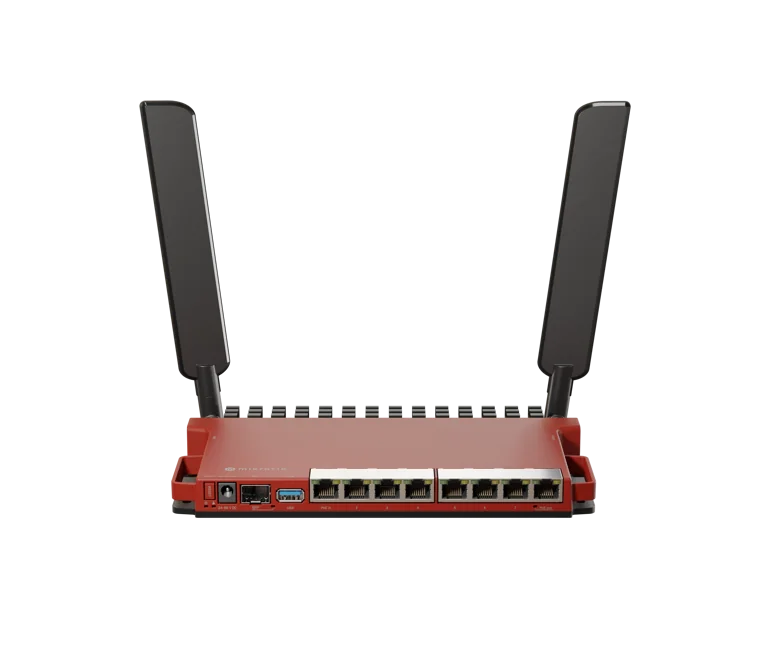
MikroTik L009 Maximum Users
How Many Users Can MikroTik L009UiGS-2HaxD-IN Handle?
MikroTik L009 Maximum Users – How Many Users Can It Handle?
MikroTik L009 Maximum Users: How Many Users Can L009UiGS-2HaxD-IN Handle?
If you are considering the MikroTik L009UiGS-2HaxD-IN for a home, office, hotspot, apartment, school or small ISP network, one of the first questions you may have is: What is the MikroTik L009 maximum users capacity?
The MikroTik L009UiGS-2HaxD-IN is a significantly more capable router than older MikroTik models such as the RB951 and RB2011. It features a dual-core ARM processor, 512 MB RAM, eight Gigabit Ethernet ports, an SFP cage supporting up to 2.5 Gigabit connectivity and built-in 2.4GHz Wi-Fi 6.
However, MikroTik does not publish a fixed specification stating that the L009 supports exactly 50, 100 or 200 users.
That is because the number of users a router can handle depends on several factors, including:
Whether users are connected through Wi-Fi or Ethernet
Number of simultaneously active users
Internet connection speed
Bandwidth consumed by each user
Firewall configuration
Queue configuration
Hotspot or PPPoE configuration
Number of active connections
Wireless interference
Signal quality
Number of dedicated access points connected to the router
As a practical planning guideline, the L009 can be an excellent router for networks with dozens of users, while larger deployments can use the L009 as the main router and distribute wireless clients across multiple dedicated access points.
You can view the model here: MikroTik L009UiGS-2HaxD-IN.
What Is the MikroTik L009UiGS-2HaxD-IN?
The MikroTik L009UiGS-2HaxD-IN is a modern RouterOS v7 router designed as an upgrade to MikroTik's long-running RB2011 series.
It combines advanced routing capabilities, Gigabit networking and Wi-Fi 6 connectivity in one device.
Some of its key specifications include:
Dual-core IPQ-5018 ARM CPU
800 MHz CPU frequency
512 MB RAM
128 MB NAND storage
RouterOS v7
RouterOS Level 5 license
8 × Gigabit Ethernet ports
1 × SFP cage with 2.5G support
2.4GHz Wi-Fi 6
802.11b/g/n/ax wireless standards
Dual-chain wireless
Maximum theoretical 2.4GHz data rate of 574 Mbps
USB 3.0 Type-A
PoE input
PoE output on Ether8
Serial console port
MikroTik specifically highlights improved stability and responsiveness when multiple wireless clients are connected, thanks to the 802.11ax wireless technology.
For buyers in Kenya, the router can also be viewed at Tawa Kenya – MikroTik L009UiGS-2HaxD-IN.
What Is the MikroTik L009 Maximum Users Capacity?There is no official fixed maximum-user number published by MikroTik for the L009UiGS-2HaxD-IN.
Therefore, claims such as:
"Maximum users: 100"
or
"Maximum users: 200"
should not be treated as guaranteed manufacturer specifications.
A more accurate way to estimate capacity is to separate the question into two areas:
1. How many users can the L009 route?
and
2. How many users should connect directly to its built-in Wi-Fi?
These are two very different questions.
The L009 has considerably stronger routing hardware than its built-in single-band wireless interface would suggest.
When multiple dedicated access points are connected to the L009, it can act as the central router for a much larger network than you would want to place directly on its built-in Wi-Fi radio.
MikroTik L009 Maximum Wi-Fi UsersThe L009UiGS-2HaxD-IN includes a dual-chain 2.4GHz Wi-Fi 6 radio with a theoretical maximum data rate of 574 Mbps.
Wi-Fi 6 improves efficiency when multiple devices are connected, but the L009 is still operating on a single 2.4GHz radio.
For practical planning, you could think of the network approximately like this:
Active Wi-Fi UsersPractical Assessment1–10Excellent10–20Excellent20–30Very good30–40Good under normal usage40–50Possible, but usage and interference matter50+Dedicated additional APs recommended100+Multiple access points strongly recommendedThese are network-planning estimates, not manufacturer maximums.
The actual experience could be considerably better or worse depending on what those users are doing.
How Many Active Users Can MikroTik L009 Handle?For normal small-business, office and hotspot usage, 20–40 active wireless users can be a reasonable planning range for the built-in access point when signal conditions and bandwidth are good.
However, the L009's routing capabilities can support a broader network when users are distributed through switches and additional access points.
For example, consider a network containing:
30 smartphones
15 laptops
10 POS terminals
10 CCTV devices
5 printers
That is already 70 network devices.
It does not necessarily mean that all 70 devices are heavily consuming bandwidth simultaneously.
The L009 may therefore manage the overall network comfortably even though putting 70 heavily active clients directly onto one 2.4GHz wireless radio would be poor network design.
Connected Users vs Active UsersUnderstanding this difference is essential when searching for the MikroTik L009 maximum users.
Connected Users
A connected device has obtained network access but may currently be doing almost nothing.
Examples include:
An idle smartphone
A network printer
A POS terminal waiting for a transaction
An idle laptop
A CCTV recorder
A smart TV in standby
Such devices may consume relatively little bandwidth.
Active Users
Active users are continuously sending or receiving traffic.
Examples include people:
Watching YouTube
Using TikTok
Streaming Netflix
Downloading large files
Uploading videos
Making Zoom calls
Running cloud backups
Performing speed tests
Streaming CCTV footage
Fifty connected devices therefore do not automatically create the same workload as fifty heavily active devices.
Can MikroTik L009 Handle 20 Users?Yes.
A network of 20 active users should generally be well within the intended use of an L009 when the router is configured correctly.
Typical activities might include:
Web browsing
Email
WhatsApp
Facebook
Office systems
Cloud applications
POS transactions
Occasional video streaming
For a small business or office with 10–20 users, the L009 offers substantial flexibility.
Its eight Gigabit Ethernet interfaces also make it easier to connect switches, access points, servers and other network equipment.
Can MikroTik L009 Handle 30 Users?Yes.
Thirty users is a realistic scenario for the MikroTik L009.
For example, it could serve a:
Medium-sized office
Restaurant
Café
Small hotspot
Shop
Cyber café
Small school office
Small apartment hotspot
At this level, however, proper configuration becomes important.
You should consider:
Bandwidth management
Good Wi-Fi positioning
Frequency/channel selection
User rate limits
Firewall optimization
Quality internet bandwidth
For 30 normal users, the L009 is a much stronger choice than older Fast Ethernet MikroTik models.
Can MikroTik L009 Handle 50 Users?This depends on how the 50 users are connected.
50 users on the entire network?
This is a reasonable use case when users are distributed between wired connections and/or dedicated access points.
50 active clients directly connected to the built-in Wi-Fi?
This becomes more challenging.
The L009 has Wi-Fi 6, but its built-in wireless is still 2.4GHz only.
With 50 active wireless clients competing for a single radio, performance will depend greatly on:
Signal quality
Interference
Client capabilities
Distance from the router
Bandwidth requirements
Internet speed
Application usage
For a professional 50-user deployment, a better solution is:
Internet → MikroTik L009 → Gigabit/PoE Switch → Multiple Access Points
This allows the L009 to perform routing while dedicated access points handle wireless users.
Can MikroTik L009 Handle 100 Users?This is where network architecture becomes more important than the router's Wi-Fi specification.
If you're asking:
"Can MikroTik L009 route a network containing 100 users?"
A properly designed network can potentially use the L009 as its central router for a substantial number of clients, depending on traffic levels and RouterOS configuration.
But if you're asking:
"Can 100 active users connect to the L009's built-in Wi-Fi?"
You should not design a professional network around 100 active users sharing one 2.4GHz radio.
Instead, install several access points.
For example:
Internet
↓
MikroTik L009
↓
Gigabit PoE Switch
↓
AP 1 — 20–30 users
AP 2 — 20–30 users
AP 3 — 20–30 users
AP 4 — 20–30 users
This type of architecture is significantly more scalable.
Can MikroTik L009 Handle 200 Users?A 200-user deployment should be viewed as a network design project, not simply a router specification question.
The L009 should not be expected to provide built-in Wi-Fi directly to 200 simultaneously active users.
For a network of that size, you would normally require:
A central router
Managed Gigabit or faster switches
Multiple dedicated access points
Proper VLAN configuration
Bandwidth management
User authentication
Network monitoring
Appropriate firewall rules
Whether the L009 itself is suitable as the central router will then depend on the traffic profile and complexity of the configuration.
Networks carrying hundreds of demanding users may justify upgrading to more powerful MikroTik models such as the RB5009, CCR series or other appropriate hardware.
Why the L009 Handles Users Better Than Older MikroTik RoutersThe L009 provides several major improvements compared with older entry-level MikroTik routers.
512 MB RAM
The L009 contains 512 MB RAM, giving RouterOS significantly more room for advanced configurations than older routers with much smaller memory capacities.
This is particularly useful for configurations involving:
Firewall rules
Queues
Hotspot
PPPoE
VLANs
VPNs
DHCP
Routing
Network monitoring
Dual-Core ARM Processor
The router uses the IPQ-5018 dual-core ARM processor running at 800 MHz.
MikroTik states that the L009 product line can be up to four times faster than the older RB2011 series, making it a major hardware upgrade for users moving from older MikroTik routers.
Eight Gigabit Ethernet Ports
The L009 includes eight 10/100/1000 Mbps Ethernet ports.
This is particularly important for networks with many users.
You can connect:
Network switches
Wireless access points
Computers
CCTV NVRs
Servers
NAS devices
POS networks
Other routers
Gigabit connectivity also makes the L009 much more suitable for modern high-speed broadband than older MikroTik models limited to 100 Mbps Ethernet.
2.5G SFP SupportAnother useful feature is the SFP cage, which supports Gigabit and 2.5 Gigabit connectivity.
This gives network administrators more flexibility when connecting the router to:
Fiber networks
High-speed switches
ISP infrastructure
Other MikroTik equipment
For expanding networks, this is a significant advantage.
Wi-Fi 6 Helps With Multiple UsersThe L009UiGS-2HaxD-IN supports:
802.11b/g/n/ax
with Wi-Fi 6 on the 2.4GHz band.
MikroTik states that the newer generation wireless provides improved speed, stability and responsiveness with multiple connected clients compared with older wireless generations.
This makes the L009 more suitable for busy environments than older 2.4GHz MikroTik routers.
However, Wi-Fi 6 does not eliminate wireless capacity limitations entirely.
A single radio still has finite airtime.
Why 2.4GHz Can Become the Limiting FactorThe built-in Wi-Fi is often likely to reach practical limitations before the routing hardware itself.
The 2.4GHz frequency band is commonly crowded because it is shared by:
Neighboring Wi-Fi routers
Bluetooth devices
Wireless cameras
IoT equipment
Smartphones
Mobile hotspots
Other access points
This can be particularly noticeable in:
Apartment buildings
Shopping centres
Offices
Schools
Hotels
Dense residential areas
Therefore, for larger deployments, dedicated dual-band or Wi-Fi 6 access points should be considered.
MikroTik L009 for Hotspot UsersThe MikroTik L009 can be an excellent foundation for a hotspot network because RouterOS supports advanced network-management features.
These include:
MikroTik Hotspot
PPPoE
User profiles
DHCP
RADIUS
Firewall rules
Simple Queues
Queue Trees
PCQ
NAT
VLANs
Bandwidth management
For a smaller hotspot, you can use the built-in Wi-Fi.
As the business grows, you can connect external access points while keeping the L009 as the central router.
This gives hotspot operators a clear upgrade path.
MikroTik L009 for an ISPThe L009 can also be useful for smaller ISP deployments.
An ISP can configure RouterOS to manage:
PPPoE customers
Hotspot customers
Static IP customers
DHCP
User authentication
Rate limits
Firewall policies
VLANs
Network monitoring
The important consideration is traffic.
A network containing 100 customers who only occasionally browse the internet places a completely different workload on the router from 100 customers simultaneously performing high-bandwidth activities.
Therefore, ISPs should size their routers according to:
Traffic + configuration complexity + concurrent users
rather than customer count alone.
MikroTik L009 for Apartment Wi-FiThe L009 can also serve as a central router for apartment internet installations.
For example:
ISP/Fiber Connection
↓
MikroTik L009
↓
Managed PoE Switch
↓
AP Floor 1
AP Floor 2
AP Floor 3
AP Floor 4
Rather than attempting to cover an entire building using the L009's built-in wireless radio, multiple strategically positioned access points can provide better:
Coverage
Capacity
Signal quality
Roaming
User experience
The L009 then handles the main routing and network policies.
MikroTik L009 for OfficesFor offices, the L009 can be used to manage:
Staff Wi-Fi
Guest Wi-Fi
Desktop computers
VoIP phones
CCTV
Printers
NAS devices
Servers
Access points
VLANs can also be configured to separate different types of traffic.
For example:
VLAN 10 – Management
VLAN 20 – Staff
VLAN 30 – Guest Wi-Fi
VLAN 40 – CCTV
This provides considerably more network control than a basic consumer router.
MikroTik L009 for CCTV InstallationsThe eight Gigabit Ethernet ports make the L009 useful in networks containing CCTV systems.
It can connect to:
NVRs
PoE switches
IP cameras through switches
Remote monitoring systems
Access points
However, CCTV traffic can generate significant continuous network traffic.
For larger CCTV installations, use proper switches and avoid sending unnecessary local camera traffic through the router CPU.
MikroTik L009 and Bandwidth ManagementOne of the best ways to serve many users is to control bandwidth properly.
Imagine a 100 Mbps connection with 30 users.
Without bandwidth management, one user could start a large download and consume a significant percentage of the connection.
Other users may then complain that:
"The Wi-Fi is slow."
The router may actually be functioning perfectly — the problem is bandwidth distribution.
RouterOS provides tools such as:
Simple Queues
PCQ
Queue Trees
Hotspot rate limits
These can help distribute internet capacity more fairly.
Internet Speed MattersThe MikroTik L009 maximum users capacity should never be considered without looking at available internet bandwidth.
For example:
20 users sharing 10 Mbps
Average available capacity during simultaneous use is very limited.
20 users sharing 100 Mbps
There is considerably more bandwidth available.
20 users sharing 500 Mbps
Internet bandwidth may no longer be the primary bottleneck, although Wi-Fi and router configuration still matter.
Therefore, buying a more powerful router does not automatically solve an undersized internet connection.
How to Improve MikroTik L009 Performance for Many UsersIf you plan to use the L009 for a busy network, consider the following.
1. Add Dedicated Access Points
For more than roughly 30–50 active wireless clients, distributing users among dedicated access points is generally better than relying entirely on one radio.
2. Use Gigabit Switches
Because the L009 provides Gigabit Ethernet, use Gigabit switches to avoid unnecessary 100 Mbps bottlenecks.
3. Configure Bandwidth Management
Apply appropriate bandwidth limits so individual users cannot monopolize the connection.
4. Use VLANs
Separate network traffic where appropriate.
For example:
Staff
Guests
CCTV
Management
Hotspot users
This improves security and network management.
5. Optimize Wi-Fi Placement
Place the router or external APs:
Centrally
Away from metal obstacles
Away from severe interference
At an appropriate height
Where users have strong signal coverage
6. Keep RouterOS Updated
Keeping RouterOS on an appropriate current stable release provides access to security fixes, improvements and newer functionality.
MikroTik L009 vs RB951 Maximum UsersIf you're deciding between an older RB951 and the L009, the L009 is clearly the stronger platform.
FeatureRB951Ui-2HnDL009UiGS-2HaxD-INCPU600 MHzDual-core 800 MHzRAM128 MB512 MBEthernet10/100 MbpsGigabitEthernet Ports58Wi-FiWi-Fi 4Wi-Fi 6Wi-Fi Band2.4GHz2.4GHzSFPNoYes, 2.5G supportedRouterOSOlder platformRouterOS v7Large Network PotentialLimitedSignificantly betterThe L009 is therefore far more suitable for growing business, hotspot and ISP networks.
When Should You Upgrade Beyond the MikroTik L009?The L009 is powerful for its class, but it is not designed to replace every MikroTik router.
Consider a higher-performance model when your network requires:
Hundreds of heavily active clients
Multiple high-speed WAN connections
Complex VPN processing
Very high firewall throughput
Extensive queue processing
Multi-gigabit routing
Large ISP deployments
Large enterprise networks
Models such as MikroTik's RB5009 and CCR families may be more appropriate depending on the workload.
Where to Buy MikroTik L009UiGS-2HaxD-IN in KenyaIf you are looking for the MikroTik L009 in Kenya, you can compare the router through the following product pages.
MikroTik L009UiGS-2HaxD-IN – Tawa Kenya
You can also view the product at:
MikroTik L009UiGS-2HaxD-IN – MikroTik Kenya
Another option is:
MikroTik L009UiGS-2HaxD-IN Router – Orbitlink Solutions
Before purchasing, consider your expected:
Number of users
Internet speed
Wireless coverage
Number of access points
Hotspot requirements
PPPoE requirements
Future network growth
This will help determine whether the L009 is suitable for your installation.
Frequently Asked Questions About MikroTik L009 Maximum UsersWhat is the MikroTik L009 maximum users capacity?
MikroTik does not publish a fixed official maximum number of users for the L009UiGS-2HaxD-IN. Capacity depends on traffic, configuration, wireless conditions and whether users are connected directly to its Wi-Fi or through external access points.
How many Wi-Fi users can MikroTik L009 handle?
For planning purposes, around 20–40 actively used Wi-Fi devices is a sensible range for many normal installations. Higher numbers may work, but dedicated access points are recommended as client density increases.
Can MikroTik L009 handle 30 users?
Yes. Thirty users is a reasonable use case, assuming adequate internet bandwidth and good network configuration.
Can MikroTik L009 handle 50 users?
Yes, particularly if the clients are distributed between wired connections and dedicated access points. For 50 heavily active wireless devices, it is better to use additional access points rather than relying entirely on the L009's built-in radio.
Can MikroTik L009 handle 100 users?
The L009 can form the core of a 100-user network when the network is designed appropriately. For 100 wireless users, multiple access points should be installed rather than connecting everyone directly to the L009's 2.4GHz Wi-Fi.
Can MikroTik L009 handle 200 users?
A 200-user network requires careful design. Do not use the built-in wireless interface for 200 active clients. Depending on traffic and configuration complexity, you may also want to consider more powerful MikroTik hardware for such a deployment.
Is MikroTik L009 good for hotspot use?
Yes. RouterOS supports Hotspot, queues, RADIUS, DHCP, firewalling and other useful network-management features. External access points can be added as the hotspot grows.
Is MikroTik L009 good for an ISP?
It can be suitable for small ISP deployments depending on subscriber traffic and configuration complexity. Larger ISPs with hundreds of active subscribers should evaluate more powerful MikroTik hardware.
Does MikroTik L009 have Wi-Fi 6?
Yes. The L009UiGS-2HaxD-IN provides 2.4GHz 802.11ax Wi-Fi 6, with a maximum theoretical wireless data rate of 574 Mbps.
Does MikroTik L009 have 5GHz Wi-Fi?
No. The L009UiGS-2HaxD-IN has a 2.4GHz wireless interface only.
Does MikroTik L009 have Gigabit ports?
Yes. It provides eight Gigabit Ethernet ports, plus an SFP cage supporting up to 2.5G connectivity.
Final Verdict: How Many Users Can MikroTik L009 Handle?So, what is the MikroTik L009 maximum users capacity?
There isn't a single official maximum number.
For practical planning:
1–20 active Wi-Fi users: Excellent.
20–30 active Wi-Fi users: Very good.
30–40 active Wi-Fi users: A reasonable workload under suitable conditions.
40–50 active Wi-Fi users: Possible, but performance becomes increasingly dependent on traffic and wireless conditions.
50+ users: Consider dedicated access points.
100 users: Use the L009 as the router with multiple access points rather than putting all users on its built-in Wi-Fi.
200+ users: Design the network around multiple APs, managed switching and appropriate routing capacity; evaluate whether a higher-performance MikroTik router is warranted.
The key advantage of the L009 is that its routing capacity and expansion options make it suitable for a much larger network than its built-in wireless interface should serve by itself.
Its dual-core ARM CPU, 512 MB RAM, eight Gigabit Ethernet ports, Wi-Fi 6 and 2.5G-capable SFP interface make it a substantial upgrade from older MikroTik routers.
For current purchasing options, see the MikroTik L009UiGS-2HaxD-IN at Tawa Kenya, MikroTik L009UiGS-2HaxD-IN at MikroTik Kenya, or MikroTik L009UiGS-2HaxD-IN Router at Orbitlink Solutions.