How Many Users Can the MikroTik RB760iGS hEX S Support?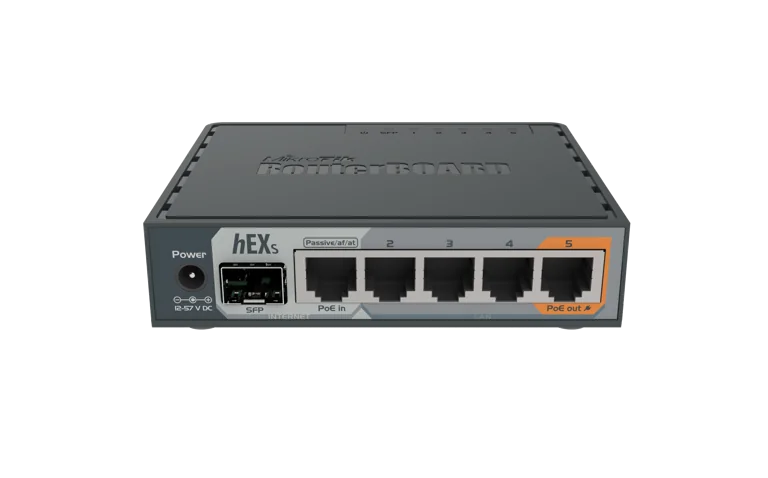
There is no single reliable user count that describes the MikroTik RB760iGS hEX S’s capacity for every network. The answer depends on what people are doing, how many devices are active simultaneously, the available internet bandwidth and the router’s configuration.
A network with many mostly idle phones can place less demand on equipment than a smaller group running video calls, uploading files and using encrypted connections.
Before buying, assess the intended workload alongside the MikroTik RB760iGS hEX S price in Kenya. A useful recommendation should explain the expected operating conditions, rather than promise an unsupported maximum number of users.
What Does “Number of Users” Actually Mean?
The word “users” can refer to several different measurements.
| Measurement | What it tells you |
|---|---|
| People using the premises | Potential demand |
| Connected devices | Equipment currently attached to the network |
| Active devices | Devices transferring data at that moment |
| Concurrent application sessions | Calls, downloads, streams and other activity |
| Registered hotspot accounts | Customer records, which may not represent active use |
One person may connect a laptop and two phones. Several devices may remain connected while transferring very little traffic.
For capacity planning, describe both the number of devices and their expected simultaneous activity. That gives an installer more useful information than staff or customer count alone.
What Determines the MikroTik RB760iGS User Capacity?
Several parts of the network work together to determine the experience users receive.
Internet bandwidth
The internet connection must accommodate the traffic sent to and from online services.
Download and upload capacity both matter. A connection that handles ordinary browsing comfortably may struggle when several people upload large files while others attend video meetings.
Router workload
The router needs to process the traffic passing through it under the selected settings.
Wireless capacity
Wireless clients depend on access-point placement, signal quality, interference and the access points’ capabilities.
Shared connections
A switch uplink or another shared connection can limit traffic from several devices.
Application requirements
Messaging, streaming, backups and interactive calls create different patterns of demand.
A router assessment should consider all these factors rather than treating the model name as a complete capacity specification.
What Do the RB760iGS Specifications Tell You?
MikroTik lists a dual-core 880 MHz processor, 256 MB RAM, five Gigabit Ethernet ports and an SFP port for the RB760iGS. It is a wired router without built-in Wi-Fi.
These details describe the hardware. They do not translate directly into a guaranteed number of people.
Likewise, five Ethernet ports do not mean the network is limited to five users. Suitable switches and access points can connect additional devices, subject to the capacity and configuration of the complete installation.
The relevant question is whether the proposed design can handle the intended activity reliably.
Why Do Simultaneous Activities Matter More Than Headcount?
Consider two hypothetical offices with the same number of staff.
In one office, people mainly browse websites and send messages. In the other, several people join video meetings while others upload media and synchronise large files.
Those offices can produce very different network demands despite having the same headcount.
Prepare a workload list covering the busiest expected period:
- Simultaneous video meetings.
- Streaming or online training.
- Cloud backups and file uploads.
- Large downloads.
- Remote camera viewing.
- Business applications.
- Guest access.
Include background tasks. A scheduled backup can affect other users even when nobody is actively interacting with the computer running it.
Can You Estimate the Bandwidth Required?
You can build an initial estimate, but it should be checked against actual applications.
For illustration, suppose ten active devices each require 3 Mbps of download capacity at the same time:
10 × 3 Mbps = 30 Mbps of download demand.
This is an arithmetic example, not a recommendation that the RB760iGS supports a particular number of users or that every device needs 3 Mbps.
Upload requirements need a separate calculation. Allow for variations, overhead and additional background traffic.
Use application guidance and measurements where available. Then test the estimate during a representative busy period rather than treating it as a guarantee.
Does a Gigabit Port Guarantee Gigabit Routing?
No. Link speed and routing performance are different measurements.
MikroTik publishes results for several packet sizes and configurations. The manufacturer notes that other configurations may produce lower throughput than the stated maximum test results.
When comparing equipment, ask your technician to evaluate the settings you plan to use. Filtering, traffic management and encrypted connections can change the workload.
A laboratory result should not be converted into a customer-capacity claim without assessing the actual deployment.
Can Poor Wi-Fi Make the Router Look Overloaded?
Yes. Users experience the complete connection, so wireless problems can be mistaken for a router limitation.
If performance is poor, compare a suitable wired connection with wireless performance in the affected area.
If wired devices perform well while wireless devices struggle, investigate access-point placement, interference, signal quality and wireless demand.
Do not assume that replacing the router will fix coverage in distant rooms.
When planning an installation, include access-point selection and placement alongside the main router. You can review the wider MikroTik router range in Kenya when comparing the equipment needed for the complete design.
How Should You Assess Capacity for a Paid Hotspot?
A hotspot needs several distinct capacity checks.
Assess the internet service, wireless coverage, router workload and the chosen customer-access platform. Any applicable software session limits must also be checked separately; a permitted session count is not a performance guarantee.
If you are considering Hotspot Billing System or Tajira, ask the provider to confirm compatibility with the exact router and proposed configuration.
Describe:
- Expected peak simultaneous customers.
- Typical activities.
- Proposed customer packages.
- Access-point locations.
- Bandwidth policies.
- Any recurring platform limits or charges.
A database containing hundreds of customer accounts does not establish that the network can serve them all simultaneously.
What Should You Ask an Installer to Test?
Agree on observable results before deployment.
A useful test should resemble the expected workload and use the configuration intended for service.
| Test | What it helps assess |
|---|---|
| Wired application use | Performance without relying on Wi-Fi |
| Wireless use in occupied areas | Coverage and access-point behaviour |
| Simultaneous calls and transfers | Experience during busy periods |
| Upload activity | Effects on other applications |
| Router resource monitoring | Whether resource pressure accompanies problems |
| Interface error checks | Possible link or cabling faults |
Ask the technician to record the conditions and results. A brief speed test with one laptop does not answer every capacity question.
For a business replacing an existing router, keep a recovery plan available until the new setup passes the agreed checks.
When Should You Consider a Different Router?
Consider alternatives when the proposed workload cannot be supported with acceptable performance, or when required interfaces and features do not fit the design.
Before upgrading, identify the limiting component.
| Observed problem | Area to investigate |
|---|---|
| Poor performance only in certain rooms | Wireless coverage |
| Problems during heavy uploads | Upload saturation and traffic management |
| One wired device connects slowly | Cable, interface and device settings |
| Widespread degradation with router resource pressure | Router workload and configuration |
| More devices than available connections | Switching and port planning |
A measured limitation gives you a stronger reason to upgrade than a generic claim that another router supports “more users.”
How Should You Compare Buying Options?
Begin with your expected workload, then request an equipment recommendation and quotation.
Review the RB760iGS hEX S product page alongside the supplied Orbitlink Solutions listing, Reisen SEO listing and Tawa listing.
Confirm current prices, availability and package contents directly. Compare configuration and testing services as well as hardware cost.
Frequently Asked Questions
Can the RB760iGS support more than five devices?
Yes. Switches and access points can provide additional connections. The workload and complete network design still determine practical capacity.
Can it support a specific number such as 20 or 50 users?
That number alone is insufficient to make a reliable recommendation. Describe simultaneous activity, internet speed, wireless equipment and required settings first.
Does limiting each user’s speed guarantee good performance?
No. Bandwidth policies need to match the available connection and workload, and they do not resolve every wireless or processing limitation.
Should I choose a router by its advertised maximum user count?
Ask how that figure was established, under which configuration and with what activities. Prefer a recommendation supported by a clear workload assessment.
Plan Around the Busiest Period
List the devices, applications and simultaneous activities your network must support. Ask for a design and test plan that reflect those conditions.
Then review the MikroTik RB760iGS hEX S price and specifications and decide whether it fits the assessed requirement and budget.
