
Best Mikrotik Router for Hotspot Business in Kenya
Find the best Mikrotik router for hotspot business in Kenya. Compare hEX, L009, RB4011, RB5009 and CCR routers for WiFi hotspot billing and users.
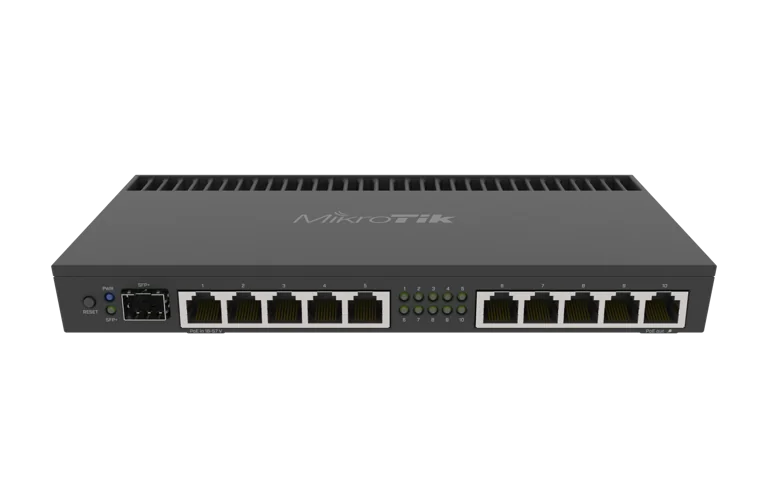
Best Mikrotik Router for Hotspot Business in Kenya
Best Mikrotik Router for ISP/Hotspot Business in Kenya - Wifi Business
Best Mikrotik Router for Hotspot Business in Kenya
Starting a WiFi hotspot business requires more than simply buying a router and connecting customers to the internet. You need a router that can authenticate users, control bandwidth, manage multiple packages, maintain stable connections, work with a billing system, and continue performing as your customer base grows.
For these reasons, MikroTik routers are widely used for hotspot businesses in Kenya. MikroTik RouterOS provides hotspot management, queues, firewall controls, VLANs, RADIUS integration and several other features required when selling or managing internet access.
But which is the Best Mikrotik Router for hotspot business?
There is no single MikroTik model suitable for every hotspot. A small hotspot serving 20 customers has very different requirements from an apartment network with 200 subscribers or a commercial hotspot operator managing hundreds of users.
For most growing hotspot businesses, however, models such as the MikroTik hEX S, L009, RB4011, RB5009 and selected Cloud Core Routers provide practical options depending on the size of the network.
This guide explains which MikroTik router to choose for your hotspot business, what specifications matter, and when you should upgrade.
What Is a MikroTik Hotspot Business?
A hotspot business provides internet access to customers through WiFi or a wired network, normally in exchange for payment.
Examples include hotspots installed in:
Apartment buildings
Hostels
Universities and colleges
Shopping centres
Restaurants
Hotels
Cyber cafés
Residential estates
Rural trading centres
Bus terminals
Offices
Schools
Hospitals
Public WiFi locations
Instead of giving everyone the normal WiFi password, the network operator can configure a MikroTik HotSpot gateway.
Customers connect to the network and are redirected to a login or captive portal where they authenticate before receiving internet access.
Depending on the system being used, customers may purchase packages such as:
1 hour
3 hours
24 hours
7 days
30 days
2 Mbps
5 Mbps
10 Mbps
Unlimited daily access
For automated management, the router can also be integrated with a hotspot or ISP billing platform such as Tajira.
Why MikroTik Is Good for a Hotspot Business
One reason MikroTik has become popular among hotspot operators is RouterOS.
Instead of functioning only as a basic internet router, RouterOS provides many of the network-management features required by hotspot operators and Internet Service Providers.
A properly configured MikroTik network can provide:
Hotspot User Authentication
MikroTik RouterOS allows an administrator to create a HotSpot gateway where users authenticate before receiving internet access.
Authentication can be handled locally or through an external RADIUS server.
Bandwidth Management
A hotspot operator normally does not want one customer consuming all available internet bandwidth.
MikroTik provides queues and other traffic-management functions that can be used to control customer speeds and create different internet packages.
For example:
PackageExample SpeedBasic2 MbpsStandard5 MbpsPremium10 MbpsBusiness20 MbpsThese are simply examples. Your actual packages should depend on your internet capacity, customer requirements and business model.
User Management
A hotspot operator can create and manage different users and user profiles.
You can configure factors such as:
User credentials
Connection duration
Speed profiles
Session timeouts
Simultaneous sessions
Different customer groups
When a billing platform is used, much of the customer lifecycle can be automated.
Firewall Control
Hotspot networks are public or semi-public environments, making proper firewall configuration particularly important.
MikroTik provides extensive firewall functionality for controlling traffic between customers, the router, management networks and the internet.
Multiple Internet Connections
As your hotspot business grows, internet redundancy may become important.
Depending on your MikroTik model and network design, you can connect different WAN providers and configure failover or suitable multi-WAN arrangements.
You can learn more about selecting and setting up MikroTik equipment in our MikroTik Router Kenya buying and deployment guide.
Best Mikrotik Router for Hotspot Business: Quick Comparison
The following models cover different hotspot business sizes.
MikroTik RouterSuitable Hotspot LevelMain AdvantagehEX / hEX SSmall hotspotAffordable entry pointL009Small to medium hotspotGood upgrade pathRB4011Medium to large hotspotStrong routing performanceRB5009UG+S+INGrowing professional hotspotPowerful modern hardwareCCR SeriesLarge hotspot/ISPHigh-capacity routingThe actual number of customers a router can handle should not be determined from a single advertised number.
Performance depends heavily on:
Total bandwidth
Number of active customers
Queue configuration
Firewall rules
NAT
RADIUS traffic
VPN usage
Number of VLANs
Packet sizes
RouterOS configuration
Customer traffic patterns
Therefore, choose your router based on network workload rather than simply looking for a claimed maximum user count.
1. MikroTik hEX and hEX S – Best for Starting a Small Hotspot Business
If you are launching a small hotspot business and need to control your initial investment, the MikroTik hEX family is worth considering.
The hEX series provides wired routing without requiring you to pay for an integrated wireless access point that may not be needed.
This is especially useful because professional hotspot networks normally separate the router from the wireless access points.
Your topology might look like:
Internet → MikroTik Router → Network Switch → Access Points → Hotspot Customers
The MikroTik router handles routing, customer authentication and network policies while dedicated access points provide WiFi coverage.
The hEX family can be suitable for:
Small cafés
Small hostels
Small apartment hotspots
Cyber cafés
Shops
Small office guest networks
Startup hotspot businesses
If you're trying to keep the deployment affordable, also see our guide to cheap MikroTik routers in Kenya.
When Should You Avoid an Entry-Level hEX?
If your plan is to expand quickly, run many queues, introduce multiple VLANs, handle substantial traffic or serve a large number of simultaneously active customers, starting with a more powerful model may reduce the need for an early upgrade.
2. MikroTik L009 – Good for a Growing Hotspot
The MikroTik L009 family offers another practical option between entry-level routers and higher-performance models.
It can make sense for hotspot businesses that have moved beyond a very small network but do not yet require a high-end Cloud Core Router.
The L009 can fit environments such as:
Apartment hotspots
Student hostels
Small managed WiFi businesses
Schools
Restaurants
Small hotels
Small ISP edge networks
Its position in MikroTik's product range makes it attractive for operators looking for more expansion capacity than very basic RouterBOARD devices.
You can compare current models through our MikroTik products in Kenya section.
3. MikroTik RB4011 – Strong Option for Medium Hotspot Networks
The RB4011 remains an important MikroTik router for professional networks.
The RB4011iGS+RM offers multiple Gigabit Ethernet interfaces and an SFP+ interface, making it suitable for networks that require numerous wired connections or integration into larger network infrastructure.
A hotspot operator may consider the RB4011 for:
Medium-sized apartment networks
Hotels
Schools
Managed WiFi deployments
Growing WISPs
Multi-access-point networks
Networks with substantial bandwidth-management requirements
The RB4011 also provides considerably more processing capability than entry-level devices.
If you are considering the RB4011 and RB5009, see our detailed MikroTik RB4011 vs RB5009 comparison.
4. MikroTik RB5009UG+S+IN – Excellent Choice for a Growing Hotspot Business
For many professional hotspot deployments, the RB5009UG+S+IN deserves serious consideration.
The RB5009 uses a quad-core ARM64 processor and includes 1 GB RAM, seven Gigabit Ethernet ports, one 2.5 Gigabit Ethernet port and one 10G SFP+ interface.
That combination provides significantly more headroom than entry-level routers, particularly where the hotspot is expected to grow.
It is particularly appropriate for operators planning a network around:
Multiple access points
VLAN segmentation
Customer bandwidth policies
RADIUS authentication
Large internet connections
Multiple network segments
Fibre uplinks
Firewall rules
Business expansion
RB5009 Hotspot Network Example
A professional deployment could be structured as:
Fibre / Starlink / ISP Connection
↓
MikroTik RB5009
↓
Managed PoE Switch
↓
Multiple Wireless Access Points
↓
Hotspot Customers
The router acts as the hotspot gateway while the wireless infrastructure handles customer coverage.
This approach is usually more scalable than expecting one wireless router to provide routing, billing control and WiFi coverage across a large building.
5. MikroTik Cloud Core Router – For Large Hotspot and ISP Networks
Once a hotspot operation becomes sufficiently large, a Cloud Core Router may become appropriate.
MikroTik's CCR family is intended for substantially heavier routing workloads than small RouterBOARD devices.
CCR models may be considered for:
Large WISPs
Large apartment internet networks
Campus networks
Large hospitality deployments
Multi-building hotspot systems
High-bandwidth ISP networks
Networks with hundreds of subscribers
Complex routing environments
However, buying a Cloud Core Router for a small 20-user hotspot is usually unnecessary.
The better approach is to size the router according to current traffic while leaving reasonable capacity for future growth.
Read our MikroTik router price in Kenya guide to compare the different router classes currently available.
RB5009 vs RB4011 for Hotspot Business
Both are capable professional routers, but they differ in hardware layout.
FeatureRB4011RB5009CPU ArchitectureARMARM64Ethernet emphasisMore 1G portsMix of 1G and 2.5GSFP+YesYes2.5G EthernetNoYesBest fitNetworks needing more physical Ethernet portsModern growing networksRack formatRackmount-orientedCompact; rack accessories availableFor many new installations, the RB5009 provides a modern platform with useful higher-speed interfaces.
However, an RB4011 can still be attractive where having more physical Gigabit Ethernet interfaces directly on the router is important.
See the full RB4011 vs RB5009 comparison before deciding.
Do You Need a WiFi MikroTik Router for a Hotspot?
Not necessarily.
This is one of the most important points for anyone starting a hotspot business.
The device handling hotspot authentication does not have to be the same device broadcasting WiFi.
For a small room or shop, an integrated wireless MikroTik router may work.
For larger installations, it is normally better to separate functions.
For example:
MikroTik Router
→ PoE Switch
→ Access Point 1
→ Access Point 2
→ Access Point 3
→ Access Point 4
This makes it easier to expand the WiFi network without replacing the hotspot gateway.
It also allows access points to be positioned where customers actually require coverage.
MikroTik Hotspot Billing System
A hotspot network becomes significantly easier to commercialize when customer authentication is connected to a billing and subscriber-management system.
MikroTik supports RADIUS integration, enabling an external platform to participate in authentication and accounting.
A suitable billing platform can help a hotspot business manage:
Customers
Packages
Payments
Expiry dates
Vouchers
Subscription plans
User accounts
Service activation
For Kenyan operators developing a MikroTik hotspot or ISP business, you can explore Tajira ISP and hotspot billing.
Billing software and the MikroTik router perform different functions.
The MikroTik router controls the network, while the billing platform can help manage the commercial side of customer access.
How to Choose the Best MikroTik Router for Your Hotspot
Before buying a router, answer the following questions.
1. How Many Customers Do You Expect?
Consider both registered customers and simultaneous active users.
Having 500 accounts in your database does not mean 500 customers will be actively transmitting traffic simultaneously.
Peak concurrent usage is more useful when sizing your network.
2. What Is Your Internet Speed?
A hotspot connected to a 50 Mbps internet service has different routing requirements from one using a 1 Gbps fibre connection.
Your router should comfortably handle the expected throughput together with the firewall, queues and hotspot processing you plan to enable.
3. How Many Access Points Will You Install?
A hotspot router is only one component of the network.
You may also require:
Wireless access points
Managed switches
PoE switches
Outdoor wireless equipment
Fibre connections
Ethernet cabling
4. Will You Use a Billing System?
If the hotspot will be commercial, decide how customers will purchase packages and receive access.
Design the router, RADIUS and billing architecture together rather than adding billing as an afterthought.
5. Do You Expect the Business to Grow?
Buying the smallest possible router can save money today but create another expense shortly afterwards.
If you expect significant expansion, a router such as the RB5009 may give you more room to grow than an entry-level device.
Suggested MikroTik Routers by Hotspot Size
A practical starting framework is:
DeploymentRouter Class to ConsiderSmall startup hotspothEX / hEX SGrowing hotspotL009Medium commercial hotspotRB4011 / RB5009Larger professional hotspotRB5009 / suitable CCRLarge ISP/hotspot networkCCR seriesThese should be treated as starting points rather than fixed limits.
Actual requirements depend on the configuration and network load.
Can MikroTik Work with Starlink for a Hotspot Business?
Yes.
A MikroTik router can be deployed downstream of an internet service such as fibre, fixed wireless or satellite connectivity, provided the upstream service and account terms permit the intended use.
A typical setup might be:
Internet Connection → MikroTik Router → Switch → Access Points → Customers
The MikroTik then provides local routing, hotspot authentication, bandwidth management and other network functions.
If the hotspot is being installed for a business environment, you may also find this external guide on the best MikroTik router for small business in Kenya useful when comparing models.
Where to Buy MikroTik Routers in Kenya
When buying equipment for a commercial hotspot, pay attention to the exact model rather than purchasing based only on the word "MikroTik."
Different MikroTik routers vary significantly in:
Processor architecture
CPU performance
RAM
Ethernet interfaces
SFP/SFP+ support
PoE functionality
WiFi capability
RouterOS licence
Physical design
You can browse MikroTik routers and networking equipment on MikroTik Kenya or view our MikroTik category.
For additional MikroTik product options, you can also browse the MikroTik range available from Tawa.
Before ordering, determine your internet bandwidth, expected active users, number of access points and intended network design.
How to Configure MikroTik for a Hotspot Business
A typical hotspot deployment involves considerably more than enabling WiFi.
The configuration may include:
Configuring the WAN internet connection.
Creating the LAN or hotspot network.
Configuring DHCP.
Configuring DNS.
Setting up NAT.
Applying firewall rules.
Creating the HotSpot service.
Creating customer profiles.
Configuring bandwidth policies.
Connecting RADIUS where required.
Integrating the billing platform.
Configuring access points.
Testing customer authentication.
Testing expiry and reconnection behaviour.
Securing router management access.
Backing up the final RouterOS configuration.
Our detailed how to configure a MikroTik router in Kenya guide provides further information about the setup process.
Common Mistakes When Starting a MikroTik Hotspot Business
Buying the Cheapest Router Without Planning for Growth
An entry-level router may work initially but become a limitation when traffic, firewall processing and customer management become more complex.
Using One Router to Cover an Entire Building
A powerful router does not automatically provide good WiFi coverage.
Large buildings normally require multiple correctly positioned access points.
Ignoring Bandwidth Management
Without proper traffic management, a few heavy users can negatively affect everybody else on the hotspot.
Poor Access Point Placement
Customers judge the hotspot based on the WiFi experience, not the specifications printed on the router.
Poorly positioned access points can create dead zones even when the internet connection and router are excellent.
No Backup Configuration
Always keep RouterOS configuration backups and exports after completing a stable deployment.
Giving Customers Access to the Management Network
Public hotspot customers should be appropriately separated from router administration, servers and other sensitive infrastructure.
Is RB951 Good for a Hotspot Business?
Older MikroTik devices such as the RB951 series can still be encountered in small hotspot installations.
For very small or learning environments, they may perform useful functions.
However, someone building a new commercial hotspot should compare them carefully against newer MikroTik platforms.
Internet speeds, customer expectations and network requirements have increased substantially.
When buying new hardware, options such as the hEX, L009, RB4011 and RB5009 may provide a better upgrade path depending on your budget and requirements.
Is RB5009 Good for Hotspot Billing?
Yes, the RB5009 can serve as the network gateway in a hotspot deployment that uses external billing and RADIUS services.
The RB5009's hardware is particularly attractive for a growing commercial deployment because it combines Gigabit interfaces, a 2.5G Ethernet interface, 10G SFP+ connectivity and a quad-core ARM64 processor.
The billing platform should still be sized and configured separately according to your customer-management requirements.
Which Is the Best Mikrotik Router for Hotspot Business?
The answer depends on the size of the hotspot.
For a small startup hotspot, an hEX-class router may provide a cost-effective starting point.
For a growing hotspot business, the L009 provides a useful middle ground.
For a medium commercial deployment, both the RB4011 and RB5009 deserve consideration.
For a new hotspot expected to expand significantly, the RB5009UG+S+IN is particularly attractive because of its processing capacity and modern 2.5G and 10G interfaces.
For a large ISP or high-capacity hotspot network, a suitable MikroTik Cloud Core Router may be more appropriate.
The most important rule is simple: size the router according to your actual workload rather than choosing it purely by price or an advertised user count.
Frequently Asked Questions
What is the best MikroTik router for a small hotspot business?
For a small startup hotspot, routers from the hEX family can provide a practical entry point. The correct device depends on internet bandwidth, simultaneous customers and the amount of firewall, queue and hotspot processing required.
Which MikroTik router is suitable for 100 hotspot users?
Do not size a router solely from the number of registered users. Consider simultaneously active users, bandwidth, queue configuration, firewall rules, RADIUS, VLANs and traffic patterns. L009, RB4011 and RB5009-class devices may be considered depending on the actual workload.
Does MikroTik support hotspot billing?
MikroTik RouterOS provides HotSpot functionality and RADIUS integration. A separate billing platform such as Tajira can then be integrated depending on the business's customer-management and payment requirements.
Can I use MikroTik with multiple access points?
Yes. In fact, separating the gateway router from the wireless access points is often preferable for a commercial hotspot. The MikroTik can handle routing and hotspot services while multiple access points distribute WiFi throughout the property.
Where can I buy MikroTik routers for a hotspot business in Kenya?
You can browse current equipment through MikroTik Kenya and compare available routers before buying. You can also check the MikroTik products available from Tawa.
Final Thoughts
Choosing the Best Mikrotik Router for hotspot business starts with understanding the network you want to build.
A small shop hotspot does not need the same router as an apartment network serving hundreds of customers. Start by determining your expected active users, total bandwidth, access-point count, billing requirements and future expansion.
The hEX range can provide a sensible entry point for smaller networks, while L009 offers room for growing deployments. RB4011 and RB5009 move into more demanding professional networks, while MikroTik CCR models provide options for larger ISP-scale infrastructure.
For many new commercial deployments that require significant expansion capacity, the MikroTik RB5009UG+S+IN is one of the strongest models to consider, particularly because it combines powerful ARM64 hardware with Gigabit, 2.5G and 10G connectivity.
Before purchasing, however, design the entire hotspot—including the router, switches, access points, internet connection and billing system—as one network. That approach gives customers a better experience and makes the business easier to expand.
Browse our current MikroTik routers in Kenya, compare MikroTik router prices in Kenya, or learn more about MikroTik services in Kenya before choosing equipment for your hotspot project.