
MikroTik Router Price in Kenya: Current Buying Guide
Compare MikroTik router prices in Kenya for hEX, RB4011 and CCR deployments, with current catalogue examples, warranty and selection advice Request a current qu
MikroTik Router Price in Kenya: Current Buying Guide
MikroTik Router Price in Kenya — Current Costs and Buying Advice
MikroTik Router Price in Kenya: Current Buying Guide
Price check updated 1 September 2026 | Verify stock and quotation before payment
MikroTik Router Price in Kenya is a commercial search where accuracy depends on date, exact product code and seller terms. This guide uses live catalogue examples where available and separates the hardware price from warranty, accessories, configuration and delivery.
Current MikroTik router price examples in Kenya
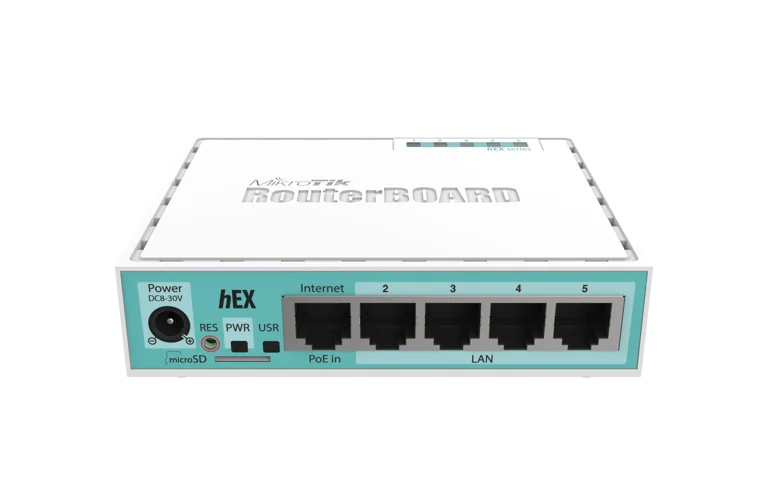
As checked on 1 September 2026, the website catalogue includes hEX PoE lite at KSh 8,500, hEX S at KSh 9,000, hEX PoE at KSh 13,000, PowerBox Pro at KSh 13,000, RB1100AHx4 at KSh 38,000, CCR2004-16G-2S+ at KSh 58,000 and CCR2004-1G-12S+2XS at KSh 65,000. These are point-in-time examples, not permanent price promises.
What changes a MikroTik price?
Exact model and generation
Closely named products can differ in CPU, memory, wireless generation, port speed, fibre interfaces and PoE. A quote for hEX PoE lite is not comparable to hEX S, and a CRS access switch is not interchangeable with a CCR router.
Currency and landed cost
Imported networking equipment is affected by exchange rates, freight, insurance, taxes and supplier replenishment cost. Existing stock and a new shipment can carry different prices even when the model code is identical.
Condition and warranty
New, refurbished and used units should be identified clearly. Written warranty, return handling and local support add value. An undocumented device may be cheaper but expose the buyer to replacement and downtime costs.
Accessories and licences
Confirm the power adapter, rack ears, PoE injector, SFP modules, cables and RouterOS or SwOS licence. Some products require optics or power components that materially change the complete price.
Price comparison checklist
- Match the complete product code.
- Confirm new, refurbished or used condition.
- Check VAT and currency.
- List included adapters, optics and mounting hardware.
- Compare written warranty and return policy.
- Add delivery, installation and configuration.
- Assess performance and growth headroom.
- Request a dated quote with validity period.
Choose by use case, not price alone
Home
A compact hAP can combine routing and Wi-Fi, while hEX suits wired routing with a separate access point. Check internet speed and wireless bands before choosing the lowest-cost unit.
Office
Small offices may need Gigabit routing, VPN, managed switching and several access points. Price the complete topology, including UPS protection, rather than forcing one inexpensive device to cover every role.
Hotels and schools
Guest density, content policy, roaming and PoE often make access-point placement and switching more important than a single router price. Budget for a site survey and documented configuration.
CCTV
Calculate camera bandwidth, PoE budget, recorder uplink and network separation. Cheap switching without adequate power or uplinks can cause intermittent recording and expensive troubleshooting.
Enterprise and ISP
CCR routing and high-speed CRS switching should be sized for actual packet mix, routing tables, queues, firewalling, optics and redundancy. Lab testing and spares belong in the price comparison.
Understanding total cost of ownership
Purchase price is only the first cost. Add cabling, optics, racks, power, surge protection, UPS capacity, configuration, monitoring, training and maintenance. Include downtime risk and the cost of an early upgrade if the device has little headroom.
A more expensive model can be better value when it replaces several devices, offers needed interfaces or stays useful longer. Equally, oversizing wastes capital and power. Use a written requirements list to find the economical middle.
Technical checks before buying
Routing performance
Official maximum test results are not guaranteed application throughput. Firewall rules, small packets, queues and VPN encryption consume CPU. Compare test conditions to the intended configuration.
Wireless performance
Wi-Fi signalling rates are not internet speeds. Bands, client capability, interference, walls and airtime determine usable performance. One low-cost access point may not cover a large or busy building.
Switching and hardware offload
CRS models can switch efficiently in hardware when configured correctly, but CPU routing is a different workload. CSS models run SwOS and focus on switching. Confirm the operating system and hardware-offload requirements.
Power over Ethernet
Verify passive or standards-based PoE, voltage, current and total budget. Include the correct power supply. A physically compatible port can still be electrically unsuitable.
Build a defensible budget
Separate hardware from services
Ask the seller to itemise the router or switch, required modules, cabling, installation, configuration, testing and ongoing support. This makes competing quotations easier to audit and prevents a low hardware price from hiding a higher project cost. It also lets an organisation approve capital equipment separately from professional services when its purchasing process requires that distinction.
Allow for growth
Record present internet speed, connected users, concurrent traffic, port use, wireless clients and VPN demand, then estimate the next two or three years. Reasonable headroom reduces disruptive replacements, but unlimited future-proofing is rarely economical. A sound budget explains the expected growth assumption and the point at which the proposed device would need to be upgraded.
Plan spares and recovery
For a business-critical site, compare the cost of a compatible spare with the financial impact of waiting for a replacement. A spare is useful only when its software, licence, power supply and saved configuration are ready. Include restoration testing, configuration backups and responsible ownership in the budget instead of treating resilience as a box delivered to a storeroom.
Account for power quality
Voltage instability, lightning and unplanned shutdowns can shorten equipment life. Price suitable surge protection, earthing and UPS capacity for the complete network stack. Check input voltage and PoE requirements carefully because a generic power supply can damage equipment or leave insufficient power for attached devices.
Questions to put on a formal quotation
- What is the exact MikroTik product code and hardware revision?
- Is the unit new, refurbished, open-box or used?
- Is the quoted amount inclusive of VAT?
- Which power supply, rack parts and cables are included?
- Are SFP, SFP+ or QSFP modules included or priced separately?
- How long is the quotation valid and is stock reserved?
- What is the expected dispatch or installation date?
- Who provides the warranty and where are returns handled?
- Does configuration include documentation and a secure handover?
- What support is available after installation and at what cost?
A seller should be able to answer these questions clearly. If a specification or commercial term is uncertain, place it in writing before payment. Screenshots and informal messages are less useful than a dated quotation and serialised invoice that identify the legal seller, customer, product and warranty.
Procurement guidance for Kenyan organisations
Small businesses
Prioritise a simple design that a local technician can support. Document the administrator account, internet settings, LAN ranges, Wi-Fi names and backup location. Buying a capable device without paying for a usable handover can create dependence on one installer and increase recovery time.
Schools, hotels and multi-tenant sites
These environments need clear separation between management, staff, guests, CCTV and other services. Request a bill of materials for the whole site and confirm whether captive portal, authentication, content controls or central wireless management require extra servers, licences or labour.
Enterprises and regulated teams
Ask for approved firmware policy, change records, role-based access, monitoring, logging, tested backups and escalation contacts. The hardware purchase may be a small part of the control environment. Evaluate the supplier's ability to provide traceable invoices, warranty handling and documented technical work.
ISPs and integrators
Validate throughput using a representative configuration rather than relying only on brochure figures. Include optics compatibility, rack power, cooling, route scale, queue design, redundancy and spares. A pilot or laboratory test can be far less expensive than discovering a bottleneck during migration.
After-purchase verification
Inspect the packaging and device label against the invoice before deployment. Record the serial number, product code and warranty date. Confirm that the ports, radios, storage, fans and power inputs operate normally, and investigate visible damage or unexpected configuration before connecting the unit to a trusted network.
Install an appropriate supported RouterOS or SwOS release, replace default or inherited credentials, restrict management access and disable services that are not required. Apply a minimal tested configuration first, then add VLANs, firewall rules, queues, VPNs and monitoring in controlled stages. Measure actual performance and keep the results with the handover documents.
Finally, store an encrypted backup and a readable configuration export away from the device. Note the software version and restoration procedure. Schedule review of firmware, logs, capacity and warranty information. These operational steps help turn a competitive purchase price into dependable long-term value.
How to avoid false bargains
- Reject listings that hide the complete product code.
- Ask why a price is materially below comparable offers.
- Check for missing power supplies or rack accessories.
- Confirm that the unit is not carrier-locked or custom branded.
- Test used ports, radios, storage and reset access.
- Do not pay for unsupported performance claims.
- Keep proof of payment, serial number and warranty.
Deployment and handover
Stage the device before production. Update supported software, secure credentials, configure WAN, LAN, VLANs, firewall, VPN and monitoring, then test speed and recovery. Save a configuration export and binary backup.
Handover should include topology, port schedule, IP plan, credentials through a secure channel, warranty records and support contacts. These items protect the investment and shorten future outages.
Internal buying resources
- MikroTik router price guide
- MikroTik switch price guide
- MikroTik hEX price guide
- RB4011 price guide
- CRS price guide
- Cheap MikroTik router guide
- Affordable MikroTik router guide
- Request a current quotation
Frequently asked questions
What is the current MikroTik Router Price in Kenya?
Prices change with model, stock, exchange rates, tax, delivery and warranty. Use the dated examples in this guide as orientation and request a formal current quotation before payment.
Why do MikroTik prices vary between Kenyan sellers?
Quotes may differ because of exact product code, new or used condition, source, currency timing, VAT, adapter, warranty, support and delivery. Compare like-for-like terms rather than the headline amount alone.
Does the price include configuration?
Not automatically. Ask whether basic setup, VLANs, VPNs, firewall policy, wireless tuning, documentation or onsite installation are included. Professional engineering is often quoted separately from hardware.
How can I confirm the device is genuine?
Buy from a traceable business, request a serialised invoice, inspect labels and packaging, and retain warranty documents. Avoid offers materially below normal market levels without a clear explanation of condition and source.
Should I buy the cheapest MikroTik model?
Only if it meets measured throughput, interfaces, wireless, PoE, VPN and growth needs. A cheaper device can cost more if it causes downtime or requires early replacement.
Are MikroTik prices negotiable for bulk orders?
Volume, project scope and payment terms may affect the quotation. Ask for itemised unit pricing and ensure a discount does not remove warranty, accessories or technical support.
Do prices include VAT and delivery?
They may or may not. A formal quote should clearly state VAT, delivery destination, courier insurance, dispatch timing and who handles damage discovered on arrival.
What warranty should I expect?
Warranty varies by seller and model. Request duration, exclusions, return process, repair or replacement terms and required proof in writing before payment.
Can I buy a used MikroTik router or switch?
Yes, but inspect hardware, verify licence and product code, reset previous credentials, test ports and radios, and compare the remaining useful life with a supported new model.
How often should I check prices?
Check immediately before budgeting or purchase. Fast-moving stock, currency and supplier costs can change, so a dated web article cannot replace a current quotation.
Conclusion
MikroTik Router Price in Kenya should be compared using exact models and complete project costs. Treat every published amount as date-sensitive, verify current stock and obtain a written quotation covering warranty, tax, delivery and support before purchasing.
MikroTik Router Price in Kenya: Current Buying Guide FAQs
What is the current MikroTik Router Price in Kenya?
Prices change with model, stock, exchange rates, tax, delivery and warranty. Use the dated examples in this guide as orientation and request a formal current quotation before payment.
Why do MikroTik prices vary between Kenyan sellers?
Quotes may differ because of exact product code, new or used condition, source, currency timing, VAT, adapter, warranty, support and delivery. Compare like-for-like terms rather than the headline amount alone.
Does the price include configuration?
Not automatically. Ask whether basic setup, VLANs, VPNs, firewall policy, wireless tuning, documentation or onsite installation are included. Professional engineering is often quoted separately from hardware.