
MikroTik RB951 Default Password and Login Guide
Find the correct MikroTik RB951 login approach, default IP, password guidance, reset steps and essential RouterOS security precautions for buyers across Kenya.
MikroTik RB951 Default Password and Login Guide
MikroTik RB951 default password — Specifications, Setup and Buying Advice
MikroTik RB951 Default Password and Login Guide
Updated 28 August 2026 | Reviewed against official MikroTik product and RouterOS documentation
MikroTik RB951 default password is the focus of this Kenya-oriented guide. It gives buyers and administrators a direct answer, separates similar RB951 model names and explains technical limits without treating theoretical specifications as guaranteed real-world performance.
MikroTik RB951 default password
Older MikroTik devices commonly use the username admin with a blank password after a true factory reset, but custom-branded, previously configured or later factory-password units may differ. Check the device, packaging and quick guide for a password label before assuming the password is empty. The usual default management address is 192.168.88.1.
If access is lost, resetting removes configuration and can interrupt the network. Back up first when possible. For a hardware reset, power off, hold the reset button, apply power and release when the relevant LED begins flashing, following the exact quick guide. After access is restored, immediately set a strong unique password, create a named admin and restrict management access.
RB951Ui-2HnD versus RB951G-2HnD
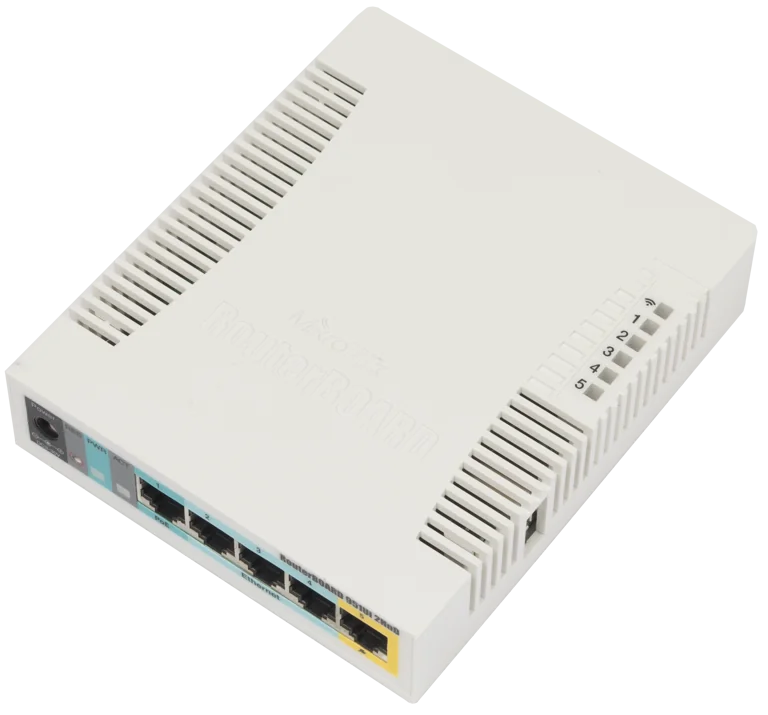
- RB951Ui-2HnD: five 10/100 ports, passive PoE-out on ether5, 2.4GHz Wi-Fi 4, 600MHz CPU and 128MB RAM.
- RB951G-2HnD: five Gigabit ports, 2.4GHz Wi-Fi 4, 600MHz CPU and 128MB RAM; MikroTik lists it as discontinued.
- Shared considerations: both are single-band legacy platforms and should be compared with current dual-band alternatives.
Best use cases
Home and small office
Suitable where internet speeds, user activity and wireless expectations are modest. Position the unit centrally and avoid congested 2.4GHz channels.
Training and RouterOS labs
The RB951 family remains useful for learning routing, firewalling, DHCP, queues and VLAN concepts when production-grade capacity is not required.
Legacy replacements
A like-for-like replacement can minimise redesign, but verify software support, condition and total cost before extending the life of an older platform.
Performance and capacity considerations
Published Ethernet test figures are laboratory maximums. Firewall rules, queues, VPN encryption, small packets and wireless retransmissions reduce throughput. Measure peak traffic and CPU load in the intended configuration. The 2.4GHz 300Mbit/s figure is a signalling rate, not expected application throughput.
Wi-Fi capacity depends on airtime. Many idle devices may cause little load while a handful of video calls can saturate the channel. Use wired connections for fixed high-demand equipment and additional access points where coverage or client density requires them.
Buying checklist for Kenya
- Confirm the exact model code and port speed.
- Ask whether the unit is new, refurbished or used.
- Request written warranty and return terms.
- Verify that the correct power adapter is included.
- Inspect serial labels and physical condition.
- Confirm current RouterOS support and configuration services.
- Compare with newer dual-band models before payment.
- Include delivery, VAT, installation and accessories in the quotation.
Security and maintenance
Change default credentials, restrict administration to trusted networks, disable unused services and retain the default WAN firewall unless a qualified engineer replaces it. Use a VPN rather than exposing management ports. Back up before upgrades, record the device serial and test recovery procedures during a maintenance window.
Check logs, interface errors, CPU, memory and wireless registration data when troubleshooting. Ageing power adapters, congested channels and damaged cables can resemble router faults. Document changes so the original working state can be restored.
Network planning before deployment
Measure the internet service
Record the contracted download and upload speeds, connection type and whether the provider uses DHCP, PPPoE or static addressing. Because RB951Ui-2HnD Ethernet ports are limited to 100Mbit/s, an internet plan above that rate cannot be delivered through one Fast Ethernet port at full speed. The RB951G variant has Gigabit interfaces, but CPU workload and configuration still affect routed throughput.
List users and applications
Count active devices at the busiest time rather than registered devices over an entire day. Separate light browsing and messaging from cloud backups, CCTV viewing, video meetings, streaming and VPN traffic. Record latency-sensitive applications and the minimum acceptable service during busy periods. These facts are more useful than a headline user-count estimate.
Survey 2.4GHz wireless conditions
The RB951 family uses 2.4GHz Wi-Fi 4. Nearby networks, Bluetooth devices, thick walls, metal shelving and poor placement can reduce performance. Use non-overlapping channels appropriate to the Kenya country profile, avoid excessive channel width in congested areas and position the access point away from obstacles. Add wired or modern dual-band access points where one radio cannot provide dependable coverage.
Practical RouterOS design
WAN and LAN separation
Place the provider-facing interface in the WAN list and trusted ports plus wireless in the LAN bridge as appropriate. Confirm NAT and firewall policy before allowing clients online. Never bridge an untrusted provider handoff directly into the internal network. Where an upstream modem already performs routing, decide deliberately whether the MikroTik will route, bridge or operate as an access point.
DHCP and addressing
Use a documented private subnet, DHCP pool, gateway and DNS configuration. Reserve addresses for printers, cameras or controllers through DHCP leases rather than configuring random static addresses on client devices. Avoid overlapping subnets when connecting VPNs or a second router. Save an export after the addressing plan is confirmed.
Bandwidth management
Queues can protect calls and interactive work, but an excessive or poorly designed queue structure consumes CPU. Measure traffic first, apply the simplest policy that meets the objective and observe CPU usage during peak load. Do not set queue limits above the actual provider speed because congestion will then occur upstream where RouterOS cannot manage it effectively.
Guest and device isolation
Separate untrusted guests, CCTV and operational devices from staff systems where the risk justifies it. VLAN and firewall design on legacy hardware requires careful testing and documentation. Confirm that management access remains available from an authorised network and that isolated clients can reach only the services they need.
Troubleshooting checklist
No login access
Check power, link LEDs, cable, computer addressing and whether the router appears in WinBox Neighbors. Try a known-good Ethernet cable and a LAN port. Do not reset immediately: a reset erases configuration and may remove the information needed to restore internet, Wi-Fi, VPN or business services.
Slow wired performance
Confirm negotiated port speed and duplex, replace suspect cables and test without unnecessary queues or VPN traffic. Remember that the Ui model has Fast Ethernet ports. Review CPU load and interface errors during the test. Compare local LAN transfer, direct internet speed and routed performance to locate the bottleneck.
Slow or unstable Wi-Fi
Test close to the router with one known-good device, inspect signal strength and channel occupancy, and compare against a wired test. Reposition the unit, select an appropriate channel and reduce interference. A stronger signal does not create more airtime; busy environments often need several coordinated access points or a move to 5GHz-capable hardware.
Random restarts or PoE problems
Inspect voltage, adapter condition, connector fit, temperature and total USB or PoE-out load. The RB951Ui ether5 output passes the input voltage and has a stated current limit, so compatibility must be checked electrically. Disconnect attached loads and test with a correct known-good power supply before concluding that RouterOS is faulty.
When to upgrade from an RB951
Consider an upgrade when the internet package exceeds port capability, 2.4GHz congestion causes recurring problems, CPU load stays high, required VPN performance is insufficient or business downtime has become expensive. Newer MikroTik models can provide dual-band Wi-Fi, faster processors, Gigabit or multi-Gigabit ports, WPA3-capable wireless and longer hardware availability.
An upgrade does not require discarding a working RB951 immediately. It can be reassigned to a lab, a low-demand wired role or a non-critical backup after sensitive configuration is removed. For production replacement, translate the old configuration into documented requirements rather than importing every historic rule without review.
Procurement and handover
A professional quotation should identify model code, serialised equipment, condition, adapter, warranty, RouterOS configuration, delivery and tax. For used equipment, request proof that the previous owner's configuration and credentials have been removed. Verify that the seller will assist if the unit arrives locked, damaged or materially different from the listing.
At handover, retain the invoice, serial number, topology, IP plan, administrator access, configuration export and binary backup in secure locations. Record the installed RouterOS version and upgrade date. A small amount of documentation can turn a future outage from a guessing exercise into a controlled recovery.
Official references
- Official RB951Ui-2HnD product page
- Official RB951G-2HnD product page
- Official MikroTik default-password guidance
- Official RouterOS security guidance
- MikroTik router guide for Kenya
- Buying MikroTik equipment in Kenya
Frequently asked questions
What is MikroTik RB951 default password?
MikroTik RB951 default password is a search term associated with the MikroTik RB951 family. This guide addresses the login and recovery intent while distinguishing RB951Ui-2HnD from RB951G-2HnD and from newer MikroTik alternatives.
Does RB951Ui-2HnD have Gigabit Ethernet?
No. The RB951Ui-2HnD has five 10/100 Ethernet ports. The discontinued RB951G-2HnD has five Gigabit Ethernet ports. Confirm the full product code before ordering because the names are similar but the wired interfaces differ.
Does the RB951Ui-2HnD support 5GHz Wi-Fi?
No. It is a single-band 2.4GHz Wi-Fi 4 device supporting 802.11b/g/n. Buyers who need 5GHz, less interference or higher wireless capacity should compare current dual-band MikroTik models.
What is the default IP address?
A normal factory default commonly uses 192.168.88.1 for management. Existing, branded or no-default configurations can differ. Connect by Ethernet and use WinBox Neighbors when the IP address is unknown.
What is the MikroTik RB951 default username?
Older factory-default RouterOS devices commonly use admin. Password behaviour varies by age and factory configuration: it may be blank or printed on the device or packaging. Change the credentials immediately after access.
Can ether5 power another device?
On the RB951Ui-2HnD, ether5 provides passive PoE-out using the same voltage supplied to the router, with a stated 500mA limit. Verify voltage, polarity and total power before connecting equipment. The RB951G-2HnD specification is different.
Is the RB951 still suitable for an office?
It can serve a small, light-use network, but Fast Ethernet, single-band Wi-Fi 4 and a 600MHz single-core CPU are important constraints. Modern offices should compare newer dual-band hardware, especially for fast internet, video calls or dense Wi-Fi.
Can RouterOS 7 run on the RB951?
MikroTik currently provides MIPSBE RouterOS packages for these products. Check the official download and product pages for the supported release, back up configuration and confirm available storage before upgrading.
How should I secure an RB951?
Use a strong unique password, create a named admin, disable or restrict unused services, keep WAN firewall protection, use a VPN for remote management, update supported software and retain offline backups.
Where can I buy MikroTik RB951 in Kenya?
Availability varies because some RB951 variants are legacy or discontinued. Request the exact product code, condition, warranty, included adapter and current quotation from a traceable Kenyan networking supplier.
Conclusion
MikroTik RB951 default password should be evaluated using the exact product code, real network workload and current support requirements. The RB951 family can still solve modest legacy needs, but its Fast Ethernet or single-band Wi-Fi limitations may justify a newer alternative. Contact MikroTik Kenya for current availability, a written quotation or model-selection help.
MikroTik RB951 Default Password and Login Guide FAQs
What is MikroTik RB951 default password?
MikroTik RB951 default password is a search term associated with the MikroTik RB951 family. This guide addresses the login and recovery intent while distinguishing RB951Ui-2HnD from RB951G-2HnD and from newer MikroTik alternatives.
Does RB951Ui-2HnD have Gigabit Ethernet?
No. The RB951Ui-2HnD has five 10/100 Ethernet ports. The discontinued RB951G-2HnD has five Gigabit Ethernet ports. Confirm the full product code before ordering because the names are similar but the wired interfaces differ.
Does the RB951Ui-2HnD support 5GHz Wi-Fi?
No. It is a single-band 2.4GHz Wi-Fi 4 device supporting 802.11b/g/n. Buyers who need 5GHz, less interference or higher wireless capacity should compare current dual-band MikroTik models.