
MikroTik RB4011 Factory Reset
Learn how to factory reset MikroTik RB4011 using the reset button, WinBox or Terminal, including default IP, login and what to configure after reset.
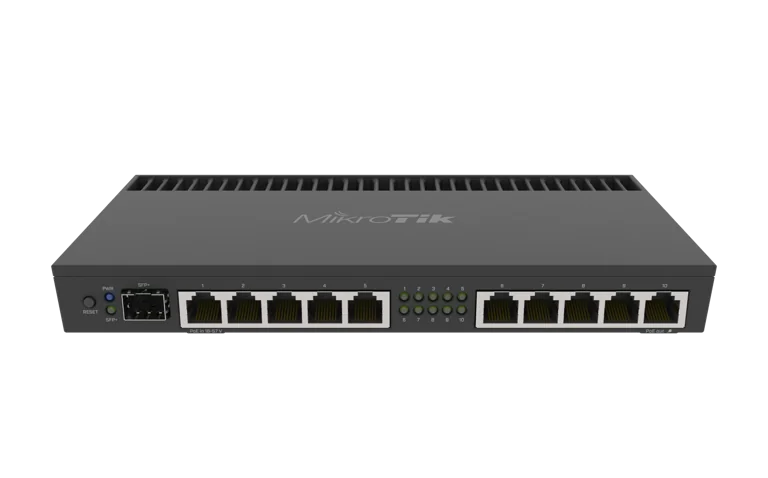
MikroTik RB4011 Factory Reset
How to Factory Reset MikroTik RB4011iGS+RM
MikroTik RB4011 Factory Reset | Reset Button & WinBox
If your MikroTik RB4011iGS+RM is no longer accessible, has a broken configuration, or you want to prepare it for a fresh setup, a factory reset can restore the router to its default configuration.
Resetting the RB4011 is useful when:
you forgot the administrator password
the router configuration is corrupted
VLAN or firewall changes locked you out
you are transferring the router to a new owner
you want to configure the device from scratch
the network topology has changed completely
However, a factory reset removes the existing RouterOS configuration, so it should be used carefully.
You can view the MikroTik RB4011iGS+RM or browse other MikroTik products in Kenya.
What Happens When You Factory Reset MikroTik RB4011?
A standard reset removes the current RouterOS configuration and restores the device to its default configuration behavior.
This can remove settings such as:
WAN configuration
LAN IP addresses
DHCP
NAT
firewall rules
VLANs
PPPoE
bandwidth queues
VPN
multi-WAN
routes
hotspot settings
administrator changes
If the router is being used by an ISP or business, a reset can cause complete network downtime until the configuration is restored.
Back Up the RB4011 Before Resetting
If you can still log in, create a backup first.
In WinBox:
Files → Backup
You should also create a text export:
/export file=rb4011-before-reset
The binary backup is useful for restoring the router, while the export file lets you review the configuration as text.
Store both files securely on another device.
Method 1: Factory Reset MikroTik RB4011 Using the Reset Button
The hardware reset button is useful when you cannot log in to RouterOS.
Step 1
Disconnect power from the RB4011.
Step 2
Press and hold the reset button.
Step 3
While continuing to hold the button, reconnect power.
Step 4
Continue holding the reset button until the appropriate LED indication appears.
Step 5
Release the button.
The router should reset and boot with its default RouterOS configuration.
Be careful not to hold the button for too long because MikroTik hardware reset buttons may support additional boot or recovery functions depending on the device.
Method 2: Reset RB4011 Through WinBox
If you can still log into the router, WinBox is one of the easiest reset methods.
Go to:
System → Reset Configuration
You will normally see options such as:
No Default Configuration
Keep Users
CAPs Mode
Run After Reset
For a normal factory-style reset, avoid selecting options you do not understand.
Then click:
Reset Configuration
The router will reboot.
Method 3: Reset RB4011 Using Terminal
RouterOS can also be reset from Terminal.
Use:
/system reset-configuration
RouterOS will ask for confirmation.
After confirmation, the router reboots and applies the reset.
This method is useful for network administrators who prefer command-line management.
Reset Without Default Configuration
Advanced users can reset the RB4011 without loading the standard MikroTik default setup.
The command is:
/system reset-configuration no-defaults=yes
This creates an almost blank RouterOS configuration.
Use this option only if you understand how to configure:
IP addresses
bridges
firewall
DHCP
NAT
management access
A no-defaults reset can leave you without normal IP connectivity.
WinBox MAC access may be required afterward.
MikroTik RB4011 Default IP After Reset
With the standard MikroTik default configuration, the router commonly uses:
192.168.88.1
Your computer should usually be connected to a LAN interface.
If DHCP is active, your computer may receive an address automatically.
You can then try:
192.168.88.1
through WinBox or WebFig.
MikroTik RB4011 Default Username After Reset
The default username is commonly:
admin
Password behavior can depend on the RouterOS/device configuration and manufacturing generation.
If the device has a factory password label, use the credentials supplied with the router.
If you previously changed the username and perform a full configuration reset, the normal factory login behavior should return.
Connecting With WinBox After a Reset
If you cannot connect using the IP address, open WinBox and go to:
Neighbors
The RB4011 may appear through MAC discovery.
Select the router and connect using its MAC address.
MAC WinBox is particularly useful when:
IP address is unknown
DHCP is not working
you used
no-defaults=yesthe bridge has not been configured
What to Configure After Factory Reset
After resetting the RB4011, do not immediately place it back into production.
Configure the following first.
Administrator Password
Set a strong password.
RouterOS Updates
Check for current RouterOS updates.
WAN
Configure:
DHCP
static IP
PPPoE
according to your upstream provider.
LAN
Configure:
bridge
IP address
DHCP
NAT
Add masquerade or the appropriate source NAT rules.
Firewall
Protect the router and management services.
VLANs
Recreate any VLAN configuration required by the network.
PPPoE
For ISP use, restore PPP profiles, users or RADIUS integration.
VPN
Recreate remote-access and site-to-site VPN settings.
Backup
Create a fresh backup after configuration is complete.
Factory Reset vs Reboot
A reboot and a factory reset are very different.
Reboot
A reboot simply restarts RouterOS.
Your configuration remains.
Factory Reset
A factory reset removes the configuration.
Use reboot for:
temporary software issue
after firmware changes
normal maintenance
Use factory reset only when you actually want to remove the configuration.
Factory Reset vs Netinstall
Netinstall is different from a normal factory reset.
A factory reset clears the RouterOS configuration.
Netinstall reinstalls RouterOS.
Netinstall may be useful when:
RouterOS is damaged
the router fails to boot properly
normal reset does not solve the issue
you need a clean RouterOS installation
It is a more advanced recovery method.
When Should You Use Netinstall?
Consider Netinstall if:
RB4011 cannot boot normally
configuration reset fails
RouterOS installation is corrupted
the device behaves abnormally after reset
For ordinary forgotten configurations, a normal reset is usually enough.
RB4011 Reset After Forgotten Password
If you forgot the administrator password and no other administrator account is available, a reset may be necessary.
Before doing this, remember that you may lose:
PPPoE customer profiles
VLANs
firewall rules
IP addressing
routes
VPN settings
For an ISP, this can be extremely disruptive.
Always keep secure configuration backups.
RB4011 Factory Reset for ISPs
An ISP should treat a factory reset as a last resort.
Before resetting, document:
WAN details
public IPs
PPPoE settings
RADIUS details
VLAN IDs
bandwidth profiles
firewall rules
routing
DNS
customer pools
ISPs can also use Tajira for billing and subscriber-management workflows, but the router configuration still needs to be backed up separately.
RB4011 Factory Reset for Businesses
For a business, resetting the RB4011 may affect:
internet access
CCTV
servers
staff VLANs
guest Wi-Fi
VPN
VoIP
Before resetting, record all important network settings.
If the RB4011 is the main gateway, the entire office may lose connectivity until setup is complete.
RB4011 Factory Reset for CCTV Networks
A reset can interrupt:
NVR connectivity
IP camera access
VLANs
remote viewing
VPN
Make sure the CCTV addressing and VLAN design are documented before resetting.
Common Problems After Factory Reset
Cannot Access 192.168.88.1
Try:
another LAN port
DHCP renew
WinBox Neighbors
MAC connection
No Internet
Check:
WAN configuration
default route
DNS
NAT
firewall
No DHCP Address
Confirm that the DHCP server is enabled and attached to the correct bridge.
VLANs No Longer Work
Factory reset removes your custom VLAN configuration.
Recreate:
bridge VLAN table
PVIDs
VLAN interfaces
DHCP
firewall rules
PPPoE Customers Cannot Connect
Recreate or restore:
PPPoE server
PPP profiles
IP pools
RADIUS settings
PPP secrets
Should You Restore a Backup After Reset?
Yes, if the backup is known to be good.
However, if you reset because of a bad configuration, restoring the same backup may restore the original problem.
In that case, use the exported configuration as a reference and rebuild the setup carefully.
Best Practice Before Major Router Changes
Before modifying:
VLANs
firewall
routing
PPPoE
multi-WAN
always create:
Binary backup
Text export
Screenshot or documentation of important settings
This can save significant recovery time.
MikroTik RB4011 Price in Kenya
If you are considering replacing or buying another router, check the current MikroTik RB4011iGS+RM price in Kenya.
You can also browse MikroTik products in Kenya.
For more options, compare MikroTik router prices in Kenya or browse MikroTik products from Orbitlink Solutions.
Frequently Asked Questions
How do I factory reset MikroTik RB4011?
You can reset it using the hardware reset button, WinBox under System → Reset Configuration, or RouterOS Terminal.
Does factory reset delete everything?
It removes the active RouterOS configuration. Backups stored elsewhere should be preserved separately.
What is the default IP after RB4011 reset?
The standard MikroTik default configuration commonly uses 192.168.88.1.
What is the default username after reset?
The standard username is commonly admin.
Can I reset RB4011 without WinBox?
Yes. Use the physical reset button.
Can I reset RB4011 from Terminal?
Yes. Use:
/system reset-configuration
What does no-defaults=yes do?
It resets the router without loading MikroTik's normal default configuration.
Will a factory reset remove VLANs?
Yes. Custom VLAN settings are part of the RouterOS configuration and must be recreated or restored.
Will factory reset remove PPPoE users?
Yes, custom PPPoE configuration and locally stored users can be removed.
What should I do if RB4011 still does not work after reset?
Consider troubleshooting hardware, cabling and power, or using MikroTik Netinstall for RouterOS recovery.
Final Thoughts on MikroTik RB4011 Factory Reset
Factory resetting a MikroTik RB4011iGS+RM can solve configuration-related problems and restore the router to a clean setup.
The three main reset methods are:
Hardware reset button
WinBox Reset Configuration
RouterOS Terminal
Before resetting a production router, always back up:
WAN
VLANs
firewall
PPPoE
bandwidth rules
routes
VPN
After resetting, secure the administrator account and rebuild the configuration carefully.
For ISPs and businesses, a factory reset should be treated as a recovery procedure rather than routine maintenance.
If you are replacing or upgrading your router, check the current MikroTik RB4011iGS+RM price in Kenya.