MikroTik Switch vs Router: What Does Your Business Need?
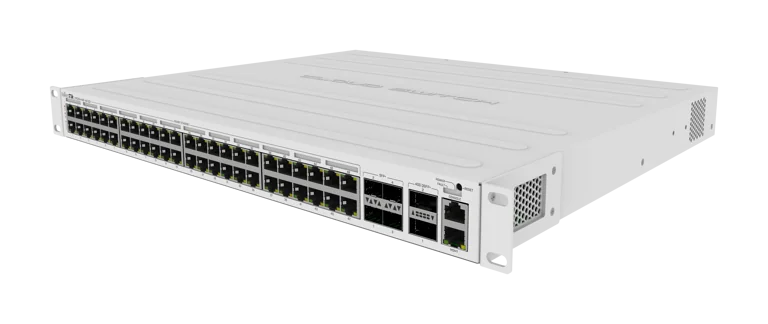
When planning a business network, it is easy to compare equipment mainly by price and port count. However, a switch and a router usually perform different roles, even when they have similar connectors or overlapping software features.
A switch primarily connects devices within a local network. A router forwards traffic between different IP networks, such as an office network and its internet provider.
Many businesses need both. Understanding their roles helps you select suitable equipment when comparing products at MikroTik Kenya.
What Does a Network Switch Do?
A switch provides connections for devices such as computers, printers, access points, servers and cameras.
It can allow devices within the same local network to exchange traffic without sending that traffic through the internet. A managed switch can also provide configuration options for organising connections and inspecting network operation.
For example, a computer accessing a printer on the same local network typically communicates through the switch. The router does not necessarily handle that exchange.
Switch selection therefore starts with endpoint connections, uplink requirements and any needed management or power-delivery features.
What Does a Router Do?
A router connects different IP networks and decides where their traffic should go.
In a typical office, it serves as the gateway towards the internet. Depending on the model and configuration, it may also handle firewall policies, address translation, VPN connections and multiple internet services.
The routing role becomes more demanding as traffic and processing requirements increase.
For a larger installation, the MikroTik CCR2116-12G-4S+ Cloud Core Router is one model to assess. MikroTik specifies a 16-core processor, 16 GB of RAM and four 10G SFP+ interfaces for this device. Suitability still depends on the intended workload. CCR2116-12G-4S+
Compare the Roles Before Comparing Models
| Requirement | Equipment role to assess |
|---|---|
| Connect more computers and printers | Switching |
| Link an office network to an internet provider | Routing |
| Connect several switches to shared infrastructure | Aggregation switching |
| Power compatible cameras or access points | PoE-capable equipment |
| Control traffic between IP networks | Routing and access-policy enforcement |
| Connect branch networks through a VPN | Suitable VPN gateway |
| Provide wireless coverage | Wireless access points |
Some products combine functions. The important question is whether the exact device can perform the required work at the necessary capacity.
Why MikroTik Product Names Can Be Confusing
MikroTik uses names such as Cloud Router Switch and Cloud Core Router. A device described as a switch may also support routing features, so the product name alone does not establish how it should be deployed.
For example, the CRS326-24S+2Q+RM offers RouterOS and SwOS options. MikroTik identifies RouterOS as the option for routing and other Layer 3 functions on that model. CRS326-24S+2Q+RM
That feature availability does not mean every configuration will perform like a dedicated router.
When assessing a MikroTik CRS326-24S+2Q+RM, distinguish its switching role from any additional processing you intend to configure.
Do Not Confuse Switching Capacity With Routing Performance
A large switching-capacity figure does not describe every task the device might perform.
Forwarding traffic through a switch chip differs from processing traffic through a CPU. Hardware acceleration may support particular functions, but its applicability depends on the model, software and configuration.
MikroTik publishes separate switching and CPU-based routing results for the CRS326-24S+2Q+RM. This is a useful reminder to compare performance for the intended operation rather than relying on one headline figure. CRS326-24S+2Q+RM
Ask your installer to assess the actual rules, traffic controls and services required. Test representative traffic before committing to a performance target.
When Adding a Switch Is the Appropriate Step
Adding a switch is worth considering when the existing router performs adequately but you need more local connections.
For example, an office may add desks, a printer and another access point. If its routing capacity remains sufficient, expanding the switching layer may address the requirement.
Check the new switch’s uplink capacity and compatibility with existing network segments.
For a compact expansion, review the MikroTik CRS310-8G+2S+IN. For a design involving several SFP+ connections, assess the MikroTik CRS309-1G-8S+IN.
Select the interface arrangement that matches the devices being connected.
When the Router Needs Attention
Investigate the routing layer when the problem involves traffic between networks, internet-gateway processing or services such as VPNs.
First establish whether the router is the limiting component. Slow internet could also originate from the provider, cabling, wireless equipment or a congested connection.
Record the affected traffic path and compare performance under repeatable conditions. Replacing a switch will not resolve a confirmed routing bottleneck, while replacing a router will not repair a faulty endpoint cable.
For equipment enquiries involving a substantial routing upgrade, you can consult the CCR2116 listing at Tawa.
Plan PoE and WiFi Separately
Neither “switch” nor “router” automatically means that the equipment provides PoE output or wireless coverage.
Check whether powered endpoints need a particular PoE standard and whether the chosen device can supply enough power.
For a larger powered-device installation, assess the MikroTik CRS354-48P-4S+2Q+RM PoE switch.
Wireless coverage requires suitable access points unless the selected equipment explicitly includes the required wireless capability. Their placement, power and wired connections all form part of the design.
A Practical Office Example
Consider a business with staff computers, a network printer, wireless access points and a separate server network.
The switch provides the physical connections. VLANs may organise the different groups, while the designated routing device controls permitted communication between their IP networks and the internet.
The access points provide WiFi. A compatible PoE switch may supply their power.
This arrangement separates responsibilities clearly. It also helps the business identify which component needs attention when it expands or develops a fault.
The final design should specify where each function operates rather than assuming every device will perform every task.
Compare the Complete Solution Cost
Ask suppliers to quote for the required roles and connections.
Include switches, the router where needed, access points, optical modules, cables, configuration and backup power. Request a diagram showing how the equipment will connect.
For switching options, browse the MikroTik switches category at Orbitlink Solutions, Jupitaz’s MikroTik switch range and Network Switch Kenya’s MikroTik listings.
For a proposed CCR2116 routing role, the Reisen SEO product listing provides another reference. Confirm current prices and support inclusions directly.
Frequently Asked Questions About MikroTik Switches and Routers
Can a MikroTik switch replace a router?
Some models support routing functions, but suitability depends on the required features and performance. Evaluate the exact configuration before replacing a gateway.
Can a router provide enough ports for a small office?
Possibly. Check available interfaces, switching behaviour, speed and expansion requirements. A separate switch becomes useful when the design needs more suitable connections.
Will a switch work without internet access?
Yes. Local devices can communicate through a suitably configured switch without an internet service, although applications requiring external services will remain unavailable.
Does buying both devices mean duplicating equipment?
Not necessarily. A router and switch can perform complementary roles in the same network.
Where can I compare MikroTik equipment in Kenya?
Visit MikroTik Kenya with your device list and required network functions. Ask for a proposal that identifies the switching, routing, wireless and power responsibilities clearly.
