MikroTik Switch Installation in Kenya: What a Complete Setup Should Include
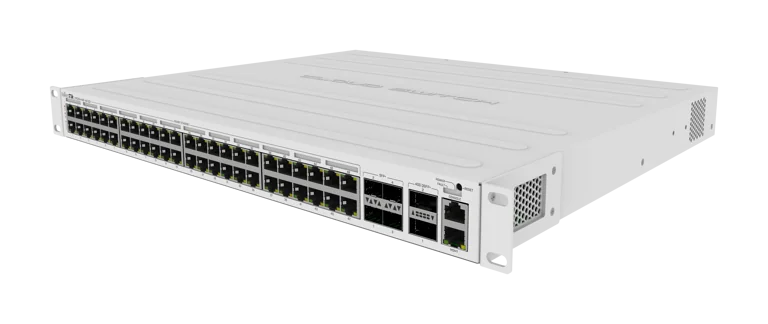
A network switch installation should leave your organisation with working connections, clear documentation and a practical way to resolve problems. Mounting the equipment and connecting cables are only part of the job.
Whether you are expanding an office, connecting a school laboratory or installing business WiFi, planning helps prevent missing accessories, unsuitable power arrangements and unexpected downtime.
This guide explains what to include when requesting MikroTik switch installation in Kenya. Use it to prepare your requirements before selecting equipment from MikroTik Kenya.
Begin With a Site Survey
A site survey establishes where equipment will operate and how devices will connect.
Show the installer the rooms, floors and buildings that need connectivity. Identify existing cabinets, cable routes, internet equipment and power outlets.
The survey should establish:
- Which cables and equipment can be reused.
- Where additional network points are needed.
- Approximate cable-route lengths.
- Suitable switch and cabinet locations.
- Power and backup-power requirements.
- Areas where installation work could interrupt operations.
Ask the installer to record assumptions. For example, a quotation that assumes existing cables are usable should explain whether testing is included.
Prepare a Device and Port Schedule
List each device that needs a connection, including computers, printers, access points, cameras and links to other switches.
Record the required interface and speed. For powered endpoints, include the exact model and power requirements.
A simple port schedule makes the installation easier to review:
| Connection | Details to record |
|---|---|
| Workstation | Location, outlet label and required speed |
| Wireless access point | Model, location, Ethernet speed and power requirement |
| Camera | Model, cable route and PoE requirement |
| Switch uplink | Equipment at both ends, medium and capacity |
| Management connection | Approved administrative access path |
| Spare connection | Intended future use |
Count uplinks as well as endpoints. A switch selected only around today’s occupied desk outlets may have insufficient connections for the final design.
Match the Switch to the Installation
Choose the model after establishing the connection requirements.
For a compact multi-gigabit network, assess the MikroTik CRS310-8G+2S+IN. For a design built around SFP+ connections, compare the interface arrangement of the MikroTik CRS309-1G-8S+IN.
A larger powered-device installation may call for evaluating the MikroTik CRS354-48P-4S+2Q+RM PoE switch.
These models serve different connection plans. Confirm the exact requirements rather than treating them as interchangeable alternatives.
You can discuss the equipment schedule through the MikroTik switches category at Orbitlink Solutions.
Specify Cabling and Accessories Clearly
Every planned connection should have a defined cable and interface arrangement.
For copper connections, specify the installed channel, patch leads and termination work. For fibre links, identify the fibre type, modules, connectors and route. Short connections between compatible equipment may use suitable direct-attach cables.
Ask for an itemised accessory list. Avoid descriptions such as “fibre accessories” without quantities or models.
Also agree on labelling. Both ends of each cable should identify the connection clearly, and outlet labels should match the handover records.
Where existing cabling will be reused, test it for the intended application before accepting it as part of the finished installation.
Agree on Configuration Requirements
A managed switch needs settings that reflect how the network will operate.
Explain which devices should share a network and which should remain separate. Identify the router or other device responsible for routing and access policies.
For example, your requirements might state that staff can reach shared printers, guests can access the internet, and only administrators can manage network equipment.
Ask the installer to translate those requirements into a documented configuration plan covering:
- Port roles and uplinks.
- VLANs where needed.
- Management addressing and access.
- Relevant loop-prevention or redundancy arrangements.
- Integration with existing equipment.
Keep the design proportionate to the task. Additional settings should serve a defined purpose.
Establish a Safe Changeover Plan
If the switch is joining a live network, agree on the order of work and the expected interruption.
Record the existing connections before disconnecting equipment. Prepare the new configuration in advance where practical, and retain a working recovery point.
The changeover plan should identify who will approve the result and what happens if critical services fail.
Avoid scheduling major changes immediately before an event or deadline that depends on the network. Allow enough time to test, investigate problems and restore the previous arrangement if necessary.
Include Power and Cabinet Work
Confirm that the installation location can accommodate the equipment and cables without obstructing airflow or maintenance access.
For PoE installations, assess the combined load of the switch and its powered endpoints when planning backup power. Essential routers, recorders and upstream equipment may also need support.
Label power cords as well as network cables. This reduces the chance of disconnecting the wrong device during later maintenance.
If requesting equipment through the CRS354 listing at Tawa, include your endpoint list and ask which power and mounting accessories are supplied.
Agree on Acceptance Tests Before Work Begins
Define what the completed installation must demonstrate.
| Test area | Expected evidence |
|---|---|
| Physical connections | Ports link at the intended speeds without unexplained interruptions |
| User access | Required applications and resources are reachable |
| Network separation | Restricted connections remain blocked |
| PoE operation | Approved endpoints operate together under representative demand |
| Uplinks | Traffic passes reliably between connected areas |
| Backup power | Essential services behave as agreed during a controlled test |
| Administration | Authorised staff can access and manage the equipment |
A single successful internet speed test does not establish that all these requirements are met.
Use representative devices and workloads. Where performance targets are included, agree on the test conditions so the results are meaningful.
Request a Complete Handover
The installation should be maintainable by someone other than the original technician.
Request an equipment inventory, port map, addressing information and protected configuration backups. Administrative credentials should be transferred securely to the authorised owner.
The handover should also identify:
- Outstanding issues and agreed follow-up work.
- Warranty contacts and purchase records.
- The scope of ongoing support.
- Recovery procedures.
- Any recurring maintenance responsibilities.
Confirm how future configuration changes will be recorded.
Compare Installation Quotations Fairly
Hardware-only and fully installed quotations cover different work.
Ask suppliers to separate equipment, accessories, cabling, configuration, testing and support. Confirm VAT treatment, delivery costs and any site-access assumptions.
You can compare product options through Jupitaz’s MikroTik switches page and Network Switch Kenya’s MikroTik listings.
For a compact installation, the CRS310 listing at Reisen SEO provides another product reference. Confirm installation services directly; a product listing alone does not establish what technical work is included.
Frequently Asked Questions About MikroTik Switch Installation
Can I reuse existing network cables?
Potentially. Inspect and test them for the intended speed and application before including them in the final design.
Does installation always require downtime?
Work affecting live connections may cause interruptions. Preparation and an agreed changeover window can reduce disruption.
Should configuration backups be included?
Request a backup of the accepted configuration and a clear recovery procedure as part of the handover.
Is hardware delivery the same as installation?
No. Confirm whether the quotation includes mounting, cabling, configuration, testing and documentation.
Where should I start when planning an installation?
Visit MikroTik Kenya and prepare a device list, premises layout and description of the services you need. These details help suppliers quote for a complete installation that can be tested and maintained.
