Is the MikroTik RB5009UG+S+IN a Good Router for a Home Lab in Kenya?
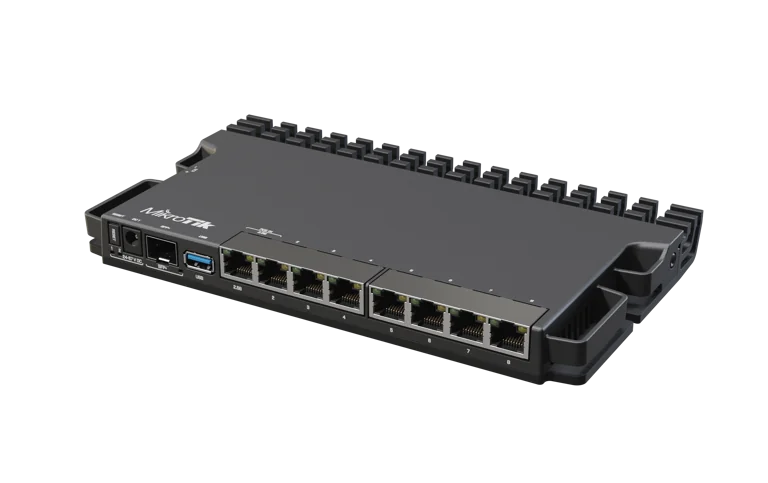
The MikroTik RB5009UG+S+IN is worth considering for a home lab when you want to learn network administration, connect different types of equipment and develop a more structured network. Its suitability depends on your learning goals, existing equipment and willingness to configure RouterOS.
A home lab provides somewhere to experiment with networking without relying entirely on a production environment. You might use it to practise network segmentation, connect a storage server, investigate performance problems or prepare configurations before installing equipment for a customer.
The MikroTik RB5009UG+S+IN can serve as the central router in that environment. However, choosing it should start with the projects you want to complete, rather than its specifications alone.
What Makes the MikroTik RB5009UG+S+IN Suitable for a Home Lab?
MikroTik positions this model for demanding home-lab use. Its hardware includes seven Gigabit Ethernet ports, one 2.5G Ethernet port, one 10G SFP+ cage, a quad-core ARM64 processor, 1 GB RAM and 1 GB NAND storage. It runs RouterOS v7 with a Level 5 licence and uses passive cooling.
For a learner, the practical attraction is having several connection options available in one device. You can begin with ordinary Ethernet equipment and plan faster connections as your projects develop.
You do not need to purchase every possible accessory immediately. A useful first lab can be much smaller than the final network you hope to build.
Who Should Consider This Router for a Home Lab?
The router is most relevant when your goals extend beyond connecting a few household devices to the internet.
Consider it if you want to:
- Practise configuring and documenting networks.
- Separate experimental devices from everyday household equipment.
- Build a test environment for future business installations.
- Connect a managed switch and explore different network layouts.
- Investigate the relationship between link speed and application performance.
- Learn how to troubleshoot configuration changes systematically.
If your only requirement is straightforward wireless internet with minimal administration, first decide whether you need a dedicated wired router and separate wireless equipment.
A home lab should match your available time as well as your budget.
What Equipment Do You Need to Get Started?
Start with equipment that supports one clearly defined project.
| Equipment | Purpose | Buying consideration |
|---|---|---|
| RB5009UG+S+IN | Central routing device | Confirm the exact model |
| Laptop or desktop | Configuration and testing | A wired connection is useful |
| Ethernet cables | Connect lab equipment | Label cables and check their condition |
| Managed switch | Additional ports and VLAN exercises | Choose features relevant to your projects |
| Wireless access point | Wi-Fi access where required | Check its power and management requirements |
| Test server or spare computer | Hosts services or virtual machines | Reuse suitable equipment where possible |
| Backup power | Reduces interruption during testing | Size it for the equipment you intend to protect |
A switch or server is not required for every initial exercise. Begin with a small setup, then add equipment when a project gives you a reason to do so.
How Should You Separate the Lab from Your Home Network?
One of the most useful design decisions is defining what belongs in the experimental environment.
Your household may depend on the internet for work, school, entertainment or security equipment. A lab configuration mistake should not unnecessarily disrupt those services.
A possible design separates devices into these groups:
| Network group | Example devices | Intended purpose |
|---|---|---|
| Household | Family laptops, phones and television | Everyday connectivity |
| Lab | Test computers and experimental services | Learning and configuration changes |
| Management | Authorised administration device | Managing network equipment |
| Guest | Visitors’ devices | Restricted visitor access |
RouterOS supports VLAN filtering, which can help implement logical separation on compatible equipment. The VLAN configuration must agree across the router, switch and access points, while routing and firewall policies determine permitted communication between networks.
For a beginner, a physically separate test setup may be easier to understand initially. Introduce a more complex shared design once you can explain how traffic should move through it.
Which Home-Lab Projects Should You Try First?
Document and Test a Basic Network
Start by recording the internet connection, router interfaces, connected devices and addressing plan.
Confirm that a test computer receives the expected settings and can reach its intended destinations. Save a working configuration before introducing more changes.
The deliverable is a small network you understand and can restore.
Create an Isolated Test Segment
Place a test device on a separate network and define what it should be allowed to access.
Write down the expected result before testing. For example, the device may need internet access while being prevented from reaching household devices.
Check both permitted and blocked connections. A successful internet test alone does not prove that isolation works.
Investigate a Slow File Transfer
Transfer a file between two suitable test devices and observe the result.
Check negotiated link speeds, the path between the devices, storage performance and other traffic using the same connection.
This exercise teaches a useful troubleshooting habit: measure the complete path before assuming the router is responsible.
Practise Configuration Recovery
Make a controlled change, record it and practise restoring the previous working setup.
Keep configuration backups somewhere other than the router. Label them with a date and a short description so you can identify the correct version later.
Recovery practice makes future experimentation less disruptive.
Do You Need 10G Equipment Immediately?
No. Purchase faster equipment when a defined workload justifies it.
For example, frequent transfers between lab computers and shared storage may create a reason to investigate faster networking. However, the storage system, computer interfaces and switching path must also support the intended performance.
If traffic remains within the same local network, it may pass through a switch without being routed. In that case, upgrading the relevant switch or endpoints may matter more than changing router settings.
Also distinguish interface speed from processing performance. MikroTik’s published tests show different results for different packet sizes and configurations, so a 10G interface should not be interpreted as a universal throughput guarantee.
Can You Use the Lab to Explore Hotspot Billing?
A lab can provide a controlled environment for evaluating a customer-access workflow before offering it commercially.
If hotspot services interest you, explore Hotspot Billing System Kenya and ask how to arrange a demonstration or supported test environment.
Prepare a test checklist covering:
- Customer registration or package selection.
- Access activation.
- Package expiry.
- Reconnection after a device restart.
- Failed or delayed payment handling.
- Operator access to useful troubleshooting information.
Confirm compatibility and costs with the provider. Avoid assuming that purchasing the router includes a complete billing platform.
How Should You Compare RB5009 Supplier Quotations in Kenya?
Request quotations using the full model name: RB5009UG+S+IN.
Compare the supplied equipment, accessories, warranty terms, delivery costs and any configuration service. Ask suppliers to distinguish included items from optional additions.
Alongside the RB5009UG+S+IN product page at MikroTik Kenya, you can consult these additional product links:
- Orbitlink Solutions RB5009UG+S+IN listing
- Tawa MikroTik RB5009 router listing
- Jupitaz MikroTik RB5009 listing
- Reisen SEO MikroTik RB5009 listing
Confirm the model and current offer directly before paying. A useful quotation should make the total cost of your intended setup clear.
What Mistakes Should You Avoid?
Buying accessories without a project. Define the connection you need before ordering modules, switches or additional interfaces.
Changing several settings at once. Make one manageable change, test it and record the result.
Using the household connection as an unrestricted experiment. Plan how other users will remain connected while you test.
Ignoring documentation. A simple diagram and addressing table can save considerable troubleshooting time.
Measuring only internet speed. Local transfers, latency and application behaviour may reveal problems that an internet speed test misses.
Frequently Asked Questions
Is the RB5009UG+S+IN suitable for someone learning networking?
It can be, provided you are prepared to learn its configuration tools and work through small projects methodically. Start with a basic working network before adding complexity.
Do I need a server to build a home lab?
No. A spare computer and a clear networking exercise can be enough to begin. Add a server when your projects require one.
Can one router serve both the household and the lab?
Yes, with an appropriate design. However, changes to shared equipment can affect everyone, so plan isolation, backups and recovery carefully.
Should I buy all the equipment at once?
Usually, a staged purchase is easier to evaluate. Complete one project, identify the next limitation and expand accordingly.
Is the RB5009UG+S+IN the Right Starting Point for Your Lab?
It is a practical candidate when you want a dedicated routing platform and have specific networking projects in mind. The value comes from what you learn and build with it, not simply from owning faster interfaces.
Start with an equipment list, a small network diagram and one achievable project. Then review the MikroTik RB5009UG+S+IN specifications and purchase information to decide how it fits your planned home lab.
