How Many Users Can the MikroTik RB5009UG+S+IN Support?
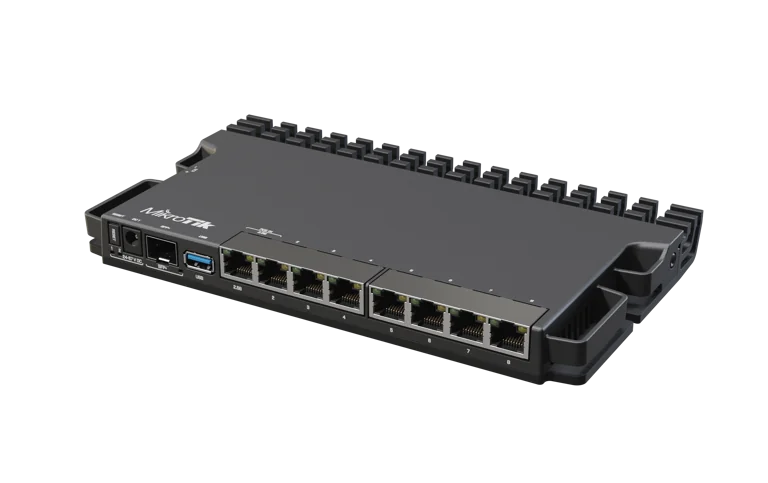
There is no single reliable user count that applies to every MikroTik RB5009UG+S+IN installation. Practical capacity depends on how many devices are actively using the network, their applications, available bandwidth and the router configuration.
A network with many connected phones checking occasional messages creates a different workload from a smaller network running video meetings, cloud backups and encrypted connections simultaneously.
When evaluating the MikroTik RB5009UG+S+IN, the useful question is therefore: can it handle your expected traffic while maintaining the experience your users need?
This guide explains how to assess that question for offices, hotspots, schools and other networks in Kenya.
What Determines How Many Users the MikroTik RB5009 Can Handle?
Five factors deserve attention when estimating network capacity:
| Factor | Why it matters |
|---|---|
| Simultaneously active devices | Connected but idle devices generate a different workload from active ones |
| Application usage | Messaging, streaming, backups and video meetings have different requirements |
| Internet capacity | Download and upload limits can become bottlenecks |
| Router configuration | Filtering, traffic limits and encryption affect processing requirements |
| Wireless and switching design | Poor coverage or congested uplinks can limit the experience independently of the router |
The weakest part of the complete network may become the practical limit.
Replacing the router will not necessarily solve congestion caused by an undersized internet connection or overloaded wireless access point.
What Is the Difference Between Users, Devices and Sessions?
These terms are often used interchangeably, but they describe different things.
A user is a person. A device is an endpoint such as a phone or laptop. A session is a connection or authenticated service session, depending on the feature being discussed.
An office with 40 employees might have considerably more than 40 connected devices once phones, laptops, printers and shared equipment are counted.
Similarly, a hotspot with 300 registered customer accounts may have only a portion of those customers online during its busiest period.
Before accepting a capacity claim, ask what is being counted:
- Registered accounts.
- Connected devices.
- Simultaneously authenticated users.
- Actively transferring devices.
- Sessions for a particular RouterOS service.
A meaningful quotation should explain the expected workload rather than promise an unexplained number of users.
Does the RouterOS Licence Define Practical User Capacity?
Licence limits and practical performance limits are different.
MikroTik documents licence-dependent limits for particular RouterOS features. These should be checked against the service you intend to deploy. A limit for one feature should not be treated as a universal maximum for every type of network traffic.
The RB5009UG+S+IN includes a RouterOS Level 5 licence. However, its licence level does not guarantee satisfactory performance for every possible workload within a permitted session count.
For a hotspot or subscriber network, ask your installer to check both the relevant licence limits and the performance of your intended configuration.
How Much Internet Bandwidth Will Your Users Need?
Begin with busy-hour demand rather than the total number of customer accounts or employees.
A simple planning calculation is:
Estimated aggregate demand = simultaneously active devices × assumed average bandwidth per active device
For example:
| Illustrative scenario | Active devices | Assumed average download demand | Calculated total |
|---|---|---|---|
| Light activity | 20 | 1 Mbps | 20 Mbps |
| Mixed activity | 40 | 3 Mbps | 120 Mbps |
| Heavier activity | 60 | 5 Mbps | 300 Mbps |
These are arithmetic examples, not RB5009 capacity ratings or recommended internet packages. Actual application demand varies, and your network needs room for bursts and growth.
Assess upload capacity separately. Online meetings, cloud storage and off-site backups can saturate an upload connection even when download capacity appears sufficient.
Use measurements from the existing network where possible. They provide a stronger basis for planning than assumptions alone.
How Does Router Configuration Affect Performance?
The work performed on traffic matters as much as its volume.
MikroTik publishes separate RB5009 results for different packet sizes and configurations, including routing with queues and firewall rules. The manufacturer also explains that other configurations may achieve lower performance than its published test results.
This means a result from a simple test configuration should not automatically be applied to a deployment with many customer limits, filtering requirements or encrypted connections.
Before purchasing, document the services that must run together. Then test that combination.
Do not remove necessary security or access controls simply to reproduce a higher benchmark figure. The relevant result is performance with the settings your network actually requires.
Can Wi-Fi Become the Limit Before the Router Does?
Yes. Users may experience a slow network even when the router and internet connection have spare capacity.
Possible wireless limitations include:
- Too many active devices sharing one access point.
- Weak signals caused by distance or walls.
- Interference from neighbouring wireless networks.
- Unsuitable access-point placement.
- A slow or unreliable connection between the access point and the wired network.
The RB5009UG+S+IN is a wired router, so wireless users connect through separate access points.
For a busy room, school or customer hotspot, evaluate access-point capacity and coverage independently. Test with ordinary customer devices in the locations where people will actually use the service.
A speed test beside an access point does not establish reliable coverage throughout the property.
How Should You Assess Capacity for a Paid Hotspot?
A hotspot needs a working customer-access process as well as sufficient traffic capacity.
If you plan to use an external platform, explore Hotspot Billing System Kenya and ask the provider to explain its integration requirements.
Your trial should check:
- Customer login and access activation.
- Several customers using the service simultaneously.
- Application of the intended package limits.
- Package expiry and reconnection behaviour.
- Recovery after an equipment restart.
- What happens if the billing connection is interrupted.
The size of the customer database alone does not show whether the network will perform well during peak demand.
Record the number of active customers and the traffic they generate during a pilot. Use those observations to guide expansion.
What Should You Measure During a Capacity Test?
Define an acceptable experience before testing.
For an office, this might mean clear video calls and dependable access to business applications while background transfers continue. For a hotspot, it might mean consistent package delivery and responsive browsing during the busiest period.
| Measurement | What it helps establish |
|---|---|
| Download and upload utilisation | Whether the internet connection is becoming saturated |
| Latency under load | Whether response times deteriorate during busy periods |
| Packet loss | Whether traffic is being dropped somewhere along the path |
| Router CPU load | Whether processing pressure rises with the workload |
| Memory use | Whether resource consumption remains stable |
| Access-point client load | Whether too much wireless demand is concentrated in one area |
| Link errors and negotiated speeds | Whether a connection needs investigation |
Test with the intended configuration and traffic passing through the router. Where possible, use separate test endpoints so the router is not also doing the work of generating the test traffic.
A single successful speed test is useful evidence, but it is not a complete capacity assessment.
When Should You Consider a Larger Router?
Consider an upgrade when measurements show that the router itself limits the required workload.
For example, a representative test may show sustained processing pressure and deteriorating performance while the internet connection, wireless network and switching path still have sufficient capacity.
Before replacing hardware, investigate configuration efficiency and rule out other bottlenecks.
Ask for a comparison based on your actual requirements, including expected growth. A larger router is useful only when it addresses a demonstrated limitation or a clearly planned expansion.
What Should You Ask Suppliers Before Buying in Kenya?
Give suppliers a short network brief that includes:
- The expected number of simultaneously active devices.
- Internet download and upload speeds.
- Important applications.
- Hotspot or subscriber-management requirements.
- Traffic limits and filtering needs.
- Existing switches and access points.
- Expected growth.
You can consult the Orbitlink Solutions RB5009UG+S+IN listing and Tawa RB5009 router listing when gathering product quotations.
Additional product references include the Jupitaz RB5009 listing and Reisen SEO RB5009 listing.
Confirm current availability, the exact model and included services directly. Treat any promised user count as a claim that needs a stated configuration and workload.
Frequently Asked Questions
Can the RB5009UG+S+IN support 100 users?
A count of 100 users alone is insufficient to give a reliable answer. Determine how many devices will be active, what they will do and which services the router must run, then test the proposed design.
Does a faster internet package let the router support more users?
It can help when the internet connection is the bottleneck. It will not resolve weak wireless coverage or a router-processing limitation.
Is the number of Ethernet ports the maximum number of devices?
No. Switches and access points allow additional devices to connect. Practical capacity still depends on the complete network and its workload.
Does a hotspot licence limit guarantee the same number of satisfied customers?
No. A permitted service-session count is different from a tested level of performance.
What is the most useful test before a large deployment?
Run a pilot using the intended configuration, applications and representative simultaneous demand. Measure performance and investigate any bottlenecks before expanding.
Choose the RB5009 Around Your Workload
A useful capacity assessment connects user demand, internet bandwidth, wireless design and router configuration. It should explain what the network can deliver under realistic conditions.
Review the MikroTik RB5009UG+S+IN specifications and purchase information, prepare your network requirements and ask for a design based on measured demand rather than an unsupported maximum user count.
