MikroTik RB5009UG+S+IN vs RB5009UPr+S+IN: Which Should You Buy in Kenya?
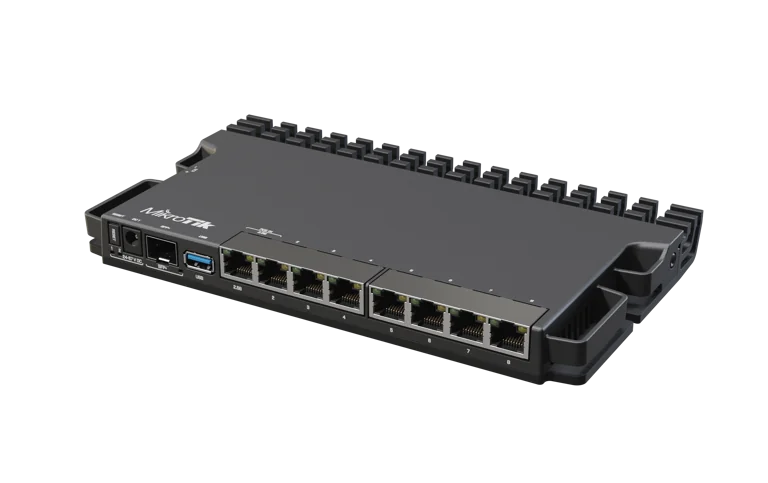
Choosing between the MikroTik RB5009UG+S+IN and RB5009UPr+S+IN starts with one practical question: do you need your router to supply power to connected Ethernet devices?
The two models have similar core networking specifications, but different power capabilities. The RB5009UG+S+IN suits installations where connected devices have their own power arrangements. The RB5009UPr+S+IN adds PoE output, allowing it to power compatible equipment through Ethernet cables.
For buyers comparing the MikroTik RB5009UG+S+IN in Kenya, understanding this distinction helps prevent ordering the wrong model or paying for features the installation does not require.
What Is the Main Difference Between These MikroTik RB5009 Routers?
The main difference is PoE output.
PoE means Power over Ethernet. It allows compatible equipment to carry electrical power and network data over the same Ethernet cable.
However, PoE input and PoE output perform different functions:
- PoE input: The router receives power through an Ethernet connection.
- PoE output: The router supplies power to another compatible device.
The RB5009UG+S+IN supports PoE input on its first Ethernet port but does not provide PoE output. The RB5009UPr+S+IN adds PoE output on all eight Ethernet ports. MikroTik also specifies different PoE-input capabilities across the UPr model’s ports.
This means you should never assume that a product described simply as a “PoE router” can power your access points. Check whether the specification refers to input, output or both.
How Do Their Main Specifications Compare?
| Feature | RB5009UG+S+IN | RB5009UPr+S+IN |
|---|---|---|
| Gigabit Ethernet ports | 7 | 7 |
| 2.5 Gigabit Ethernet ports | 1 | 1 |
| 10G SFP+ cage | 1 | 1 |
| CPU | Quad-core ARM64, up to 1.4 GHz | Quad-core ARM64, up to 1.4 GHz |
| RAM | 1 GB | 1 GB |
| NAND storage | 1 GB | 1 GB |
| Operating system | RouterOS v7 | RouterOS v7 |
| RouterOS licence | Level 5 | Level 5 |
| USB | USB 3.0 Type-A | USB 3.0 Type-A |
| PoE output | No | All eight Ethernet ports |
These manufacturer specifications show why the decision should focus on deployment requirements rather than assuming the UPr version automatically provides faster routing.
When Should You Choose the RB5009UG+S+IN?
The RB5009UG+S+IN is a practical option when power distribution is already handled elsewhere in the network.
Examples include installations where:
- A PoE switch powers wireless access points.
- Cameras connect to a separate PoE switch or suitable recorder.
- Connected devices use their own power adapters.
- The router connects mainly to switches, computers and provider equipment.
- You want to manage routing and device power through separate equipment.
Consider an office that already has a managed PoE switch. The switch supplies power to ceiling-mounted access points, while the router handles the internet connection and configured network policies.
In this arrangement, purchasing PoE output on the router may add little practical benefit.
Review the RB5009UG+S+IN specifications and purchase details alongside the equipment you already own before deciding whether you need the alternative version.
When Should You Consider the RB5009UPr+S+IN?
The UPr version deserves consideration when compatible powered devices will connect directly to the router.
For a compact installation, combining routing and PoE supply can reduce the number of separate injectors or power adapters required.
However, that benefit depends on the actual installation. Ask:
- Which devices will connect directly to the router?
- What PoE standards and voltages do they require?
- How much power does each device consume?
- What is the combined power requirement?
- Does the selected power source support the intended load?
MikroTik specifies up to 25 W per PoE-output port and a combined output limit of 130 W for the UPr model. Achievable power depends on the supply and applicable electrical limits; do not assume every port can deliver its maximum simultaneously.
Is a Separate PoE Switch Better Than a PoE Router?
Neither arrangement is automatically better. The decision depends on the number of devices, their location and how you expect the network to grow.
| Installation requirement | Arrangement to evaluate |
|---|---|
| Existing PoE switch with spare capacity | RB5009UG+S+IN with the existing switch |
| A few compatible devices near the router | UPr model with a verified power budget |
| Many access points or cameras | Router plus appropriately sized PoE switching |
| Devices distributed across several areas | Switching and power placed near each area |
| Frequent expansion | A design with spare switch ports and power capacity |
A separate switch can make expansion easier when the number of powered devices grows. A combined arrangement can simplify a small installation.
Also consider maintenance. If many services depend on one device, restarting or replacing it may interrupt several functions at once.
Which Model Should You Choose for a Hotspot Network?
Begin with the wireless layout and customer-access requirements.
A hotspot installation needs appropriate access points, dependable cabling, sufficient internet capacity and a tested authentication or billing workflow. Router PoE output is only one part of that design.
If a PoE switch already powers the access points, the UG model may fit the proposed layout. If a small number of suitable access points connect directly to the router, evaluate whether the UPr model’s power capabilities are useful.
For the commercial side of the service, explore Hotspot Billing System Kenya and request a demonstration covering account activation, package expiry and payment handling.
Confirm integration requirements separately. Choosing a router with PoE output does not automatically provide a complete billing system.
Will Either Model Automatically Make Your Internet Faster?
A router upgrade does not increase the bandwidth purchased from your internet provider.
Before replacing equipment, identify the current limitation. Slow service may result from wireless interference, congested internet capacity, damaged cabling, an overloaded device or an unsuitable configuration.
Likewise, a fast interface does not guarantee the same routing performance under every workload. MikroTik’s published performance tables show results varying with packet size and configuration.
For a meaningful evaluation, test the services you intend to run. An office with online meetings and cloud backups has different traffic patterns from a hotspot applying individual customer limits.
How Should You Compare Prices in Kenya?
Compare the total installation cost rather than the router price alone.
A quotation may need to include:
- The exact router model.
- Suitable power equipment.
- A PoE switch or injectors where required.
- Compatible SFP modules or cables.
- Configuration and installation.
- Delivery and warranty arrangements.
For additional supplier references, you can consult the Orbitlink Solutions RB5009UG+S+IN listing and the Tawa RB5009 router listing.
The Jupitaz RB5009 product link and Reisen SEO RB5009 product link are further references to check when gathering quotations.
Confirm the actual model, current availability and package contents with each seller. Similar product names are not enough to establish that two offers contain identical equipment.
What Should You Check Before Ordering?
Give your supplier the complete model code and explain how you intend to power the connected devices.
A useful purchase checklist is:
- Confirm whether you need PoE output.
- List connected devices and their power requirements.
- Identify any existing switches or injectors you can reuse.
- Confirm required Ethernet and fibre connections.
- Check what accessories the quotation includes.
- Agree on configuration and support requirements.
- Confirm warranty and delivery terms.
This reduces the risk of discovering missing equipment during installation.
Frequently Asked Questions
Are RB5009UG+S+IN and RB5009UPr+S+IN the same router?
They belong to the same product family and share core specifications, but their power capabilities differ. Treat them as separate models when requesting quotations.
Can the RB5009UG+S+IN power my access points?
It does not provide PoE output. Use compatible injectors, a PoE switch or the access points’ approved power adapters.
Should I choose the UPr version because it costs more?
Price alone does not establish suitability. Choose it when its power features solve a requirement in your network.
Do I need the UPr version if I already have a PoE switch?
Not necessarily. Check whether your existing switch provides enough ports, compatible power and capacity for the planned installation.
Which model should I choose for an office?
Choose according to the complete network design. An office with separate PoE switching has different needs from a compact installation that powers devices directly from the router.
Which RB5009 Model Fits Your Installation?
Choose the RB5009UG+S+IN when you need its routing and connectivity features while powering connected equipment separately. Consider the RB5009UPr+S+IN when compatible PoE output directly from the router provides a practical benefit.
For your next installation, review the MikroTik RB5009UG+S+IN product page, prepare a list of connected devices and compare the full equipment requirements before ordering.
